Some links on this page are affiliate links. If you buy through them, Dubspot may earn a commission at no extra cost to you. It never affects our scores or what we recommend — read our policy.
Sentient: A Neural Synth That Learns Your Sounds
Sentient by Valery Mironov is a neural-network synthesizer for iOS and macOS that listens to everyday sound and builds a personal wavetable. Features, specs, and price.
E
Elena Marsh
September 13, 2026 · 7 min read
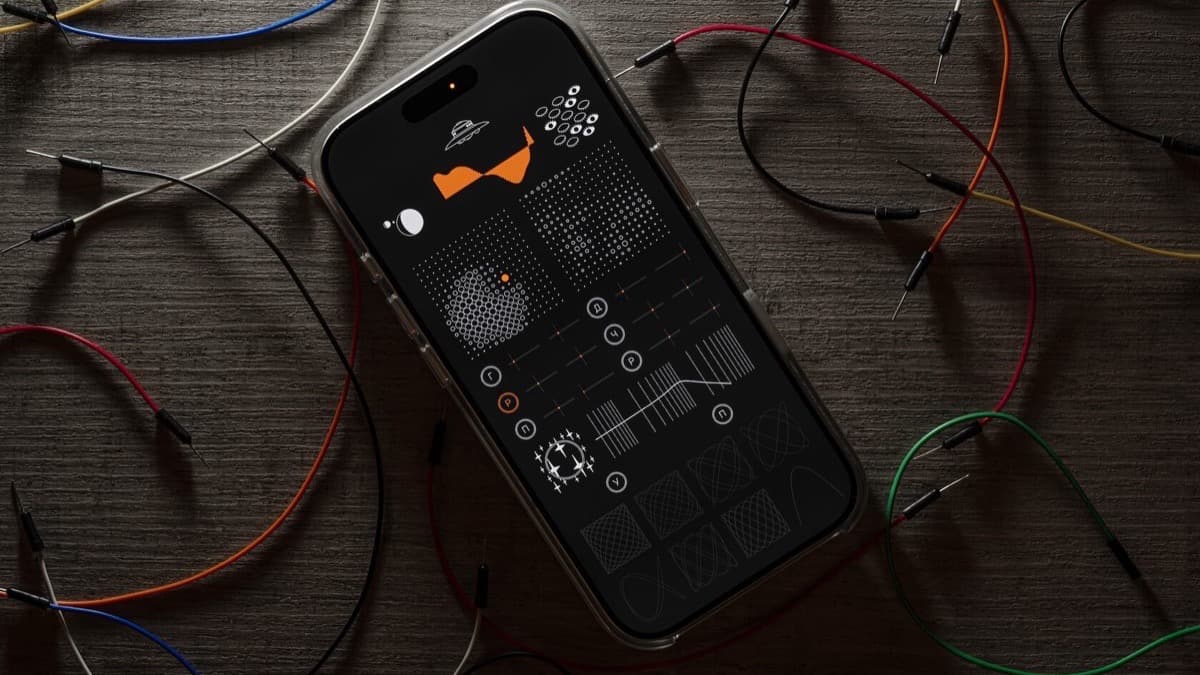
Valery Mironov released Sentient in September 2026. It's a synthesizer for iOS and macOS built around a small neural network that listens to everyday sound and slowly builds a wavetable that's unique to you. There's no factory wavetable library to scroll through. You feed the instrument sound, it learns, and the tones it makes are shaped by what it heard. This overview works from the official Sentient specifications.
At a glance: $5.99 on the App Store. Sentient runs as a standalone app and an AUv3 plugin on iPhone, iPad, and macOS (Apple Silicon). The neural network trains only in the standalone app, and the "memories" it builds stay playable inside the AUv3 plugin. Think of it as a small, deep, strange instrument rather than a big preset machine.
What is Sentient?
Sentient is the second instrument from Valery Mironov, who also made the Cellular synthesizer. Where a normal wavetable synth ships with hundreds of ready-made waveforms, Sentient starts closer to blank. Its sound comes from a neural network that studies the audio you give it, one sound at a time, and gradually forms a map of tones it can play back.
The idea sits at an interesting crossroads. AI music tools usually generate finished tracks or stems, and most of the debate around them is about songs, not sound. Sentient points the same technology at synthesis itself. It uses machine learning to build raw material, then hands you a normal synth voice to shape and play. That makes it one of the clearer examples of AI working as an instrument rather than a songwriter.
How the neural network works
The network is drawn as two grids Mironov calls hemispheres, and each cell is a neuron. When you feed Sentient a new sound, the neuron that best matches it updates its internal representation, and the neurons around it update a little too. Over time that creates smooth regions of related tones, so moving across the grid moves gradually from one learned sound to a neighbor rather than jumping randomly. This is a self-organizing map, a classic machine-learning structure, used here as a playable sound space.
You steer the learning with a Learning Controller. A pair of eyes shows whether the network is actively learning, dragging vertically sets how fast it learns, and dragging horizontally sets how strongly neighboring neurons are pulled along. Train it on a rainstorm, a kitchen, or a voice, and the character of the resulting tones follows. Because two people never feed it the same sounds in the same order, no two copies of Sentient end up alike.
What Sentient does, feature by feature
Memory Manager
Everything the network learns is stored as a state you can recall. Sentient presents these through a Memory Manager drawn as a planet you browse, with time represented visually. It's an unusual way to manage presets, and it fits an instrument whose presets are memories rather than factory patches. You can return to a sound space you trained days ago and keep playing it.
Synthesis and modulation
Once the network has learned, Sentient behaves like a compact synth. A Generator section sets the oscillator waveform, frequency, and volume, drawing on the learned wavetable as its source. Five modulation destinations are available: pitch, pan, drive, filter frequency, and resonance. That's enough movement to turn a static learned tone into something that breathes without burying you in routing.
Filter and keyboard
A filter section uses a slider with selectable types and its own drive control for grit. The onboard keyboard is eight keys drawn as Lissajous figures, with hold and tuning options, so playing Sentient looks as unusual as it sounds. On iPad the touch layout suits the visual, hands-on design.
Standalone training, AUv3 playback
One split matters before you buy. The neural network can only be trained in the standalone app, where Sentient can listen and learn. The AUv3 plugin plays back the memories you already built. So the workflow is to train and shape sounds in the app, then load the plugin in your DAW to use those sounds in a project.
Sentient specifications
| Spec | Detail |
|---|---|
| Product | Sentient |
| Developer | Valery Mironov |
| Type | Neural-network wavetable synthesizer |
| Sound source | Self-organizing map trained on user-supplied audio |
| Learning | Two neuron grids (hemispheres); learning rate and neighbor influence controls |
| Presets | Recallable learned states via the Memory Manager |
| Synthesis | Generator (waveform, frequency, volume) plus 5 modulation destinations |
| Modulation targets | Pitch, pan, drive, filter frequency, resonance |
| Filter | Multi-type filter with drive |
| Keyboard | 8 keys with Lissajous visuals, hold and tuning |
| Platforms | iPhone, iPad, macOS (Apple Silicon) |
| Formats | Standalone and AUv3 (training in standalone only) |
| Price | $5.99 (App Store) |
Sentient vs a conventional wavetable synth
The natural comparison is a mainstream wavetable synth such as Vital. They both make sound from wavetables, but they get those wavetables from opposite places.
| Sentient | Vital | |
|---|---|---|
| Developer | Valery Mironov | Matt Tytel |
| Wavetables | Learned by a neural network from your audio | Hand-built, imported, or drawn by you |
| Platform | iOS and macOS | macOS, Windows, Linux |
| Formats | Standalone, AUv3 | VST3, AU, standalone |
| Depth of control | Focused, few parameters | Deep modulation matrix and effects |
| Price | $5.99 | Free (paid tiers available) |
| Best for | Discovering unexpected tones from real sound | Precise, powerful everyday synthesis |
Which to reach for. Pick Vital if you want a full, controllable studio synth for finished productions, and you probably already should own it since the base version is free. Pick Sentient when you want to be surprised, to turn field recordings and household noise into a playable instrument, and to work somewhere no preset library can take you. They aren't really rivals. Sentient is an idea machine, and Vital is a workhorse.
Who Sentient is for
Consider it if you love experimental sound design, you record the world around you, or you are curious about what AI looks like when it is aimed at synthesis instead of songwriting. At $5.99 it is an easy thing to explore, especially for iPad producers who want a tactile, visual instrument.
Skip it if you need deep, precise control for conventional production, or you want a big preset library to play right away. Sentient is intentionally small and strange, and because training happens only in standalone, it takes a little planning to fit into a DAW session.
FAQ
How much does Sentient cost?
Sentient is $5.99 on the App Store. That single purchase covers the standalone app and the AUv3 plugin on iPhone, iPad, and macOS with Apple Silicon.
Can I use Sentient in my DAW?
Yes, as an AUv3 plugin, but with a catch. The neural network only learns in the standalone app, so you train and design sounds there first. The AUv3 plugin then plays back the memories you built inside your DAW project.
Is Sentient an AI music generator like Suno?
No. Tools like the ones in our best AI music generators guide create finished songs or stems from a prompt. Sentient uses a neural network only to build raw wavetables from sound you give it, then hands you a normal synth voice to play. It generates instrument material, not tracks.
The bottom line
Sentient is one of the more thought-provoking instruments of the year, and it costs less than a sandwich. Its neural network turns the sounds of your world into a playable wavetable, its Memory Manager treats presets as memories, and its Lissajous keyboard makes the whole thing feel like an experiment you get to keep. It's small, it's opinionated, and the standalone-only training won't suit everyone. But as a glimpse of AI working inside an instrument rather than replacing the musician, it's well worth the few dollars.