Ableton Live 13: Step Sequencer, ARA 2 and Drum Synth Arrive
Ableton Live 13 adds a Step Sequencer, ARA 2, Drum Synth, Capture Automation and 32-Macro Racks. Editions, prices, the free-upgrade offer and who should buy now.
Dubspot's best Black Friday dealsDubspot Tracker Pro: $15, was $24.99 ↗Drum Programming and Groove Production Course: $19, was $99 ↗
Black Friday 2026Ableton Black Friday 2026: dates and deals →
Ableton announced Live 13 on 10 November 2026, the first major version of its DAW since Live 12. It lands in early 2027 and is in public beta now. The headline additions fill gaps Live users have worked around for years: a native Step Sequencer clip, ARA 2 support for editors such as Melodyne, a Drum Synth instrument with over 20 engines, and a Capture button that now grabs knob moves as automation. The announcement comes with a timed offer that matters more than the feature list for anyone shopping this month: every Live 12 edition is 20% off until Live 13 ships, and the matching Live 13 edition comes free on release day.
At a glance: Live 13 Intro €99, Standard €279, Suite €599, available early 2027; public beta open to a limited number of Standard and Suite owners. New: Step Sequencer clips, ARA 2 in Arrangement View, Drum Synth, Capture Automation, Contextual Browsing, Racks with up to 32 Macros and mapping curves, Multiband and Mid-Side Racks, envelope clips on return tracks, Device Slots in the mixer, Link Arrangement Sync. Suite adds Melodyne essential, Looplet, Clipper, Transient Shaper and five Softube effects. Buy Live 12 now at 20% off and Live 13 is free.
What is Ableton Live 13?
Live 13 is the next full version of Ableton's DAW, following Live 12 and its point releases (our Live 12.3 update coverage covers the stem separation and Splice integration that arrived last year). Ableton's framing is "Mess. Obsess. Find focus.", and the features fall neatly into those three stages: tools for getting ideas down quickly, tools for following a sound further, and tools for finishing the mix.
The release keeps Live's identity intact. Session View, warping and the device chain work as before, and Ableton is explicit that everything you can do in Live 12 still works in Live 13. What changes is how much you need to leave Live to get common jobs done. Step-programming a beat, editing a vocal in Melodyne, shaping transients and splitting a bus into bands used to mean a Max for Live device, a third-party plug-in or a workaround. In Live 13 they are built in.
What's new in Live 13: feature by feature
Step Sequencer clips
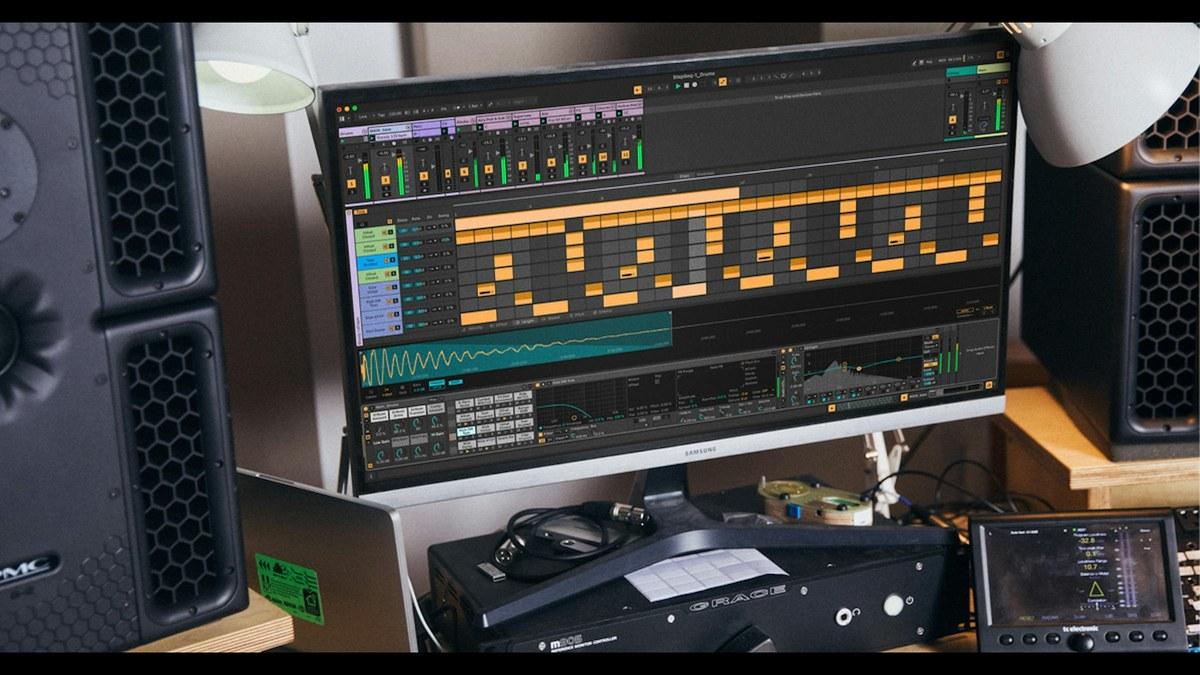
Live finally has a dedicated step-sequencer clip type alongside MIDI notes. Rows map to Drum Rack pads or to the pitches of a melodic instrument (one octave of the current scale by default), and a clip can be 8, 16, 32, 64 or 128 steps long. The important detail is that each row has its own length, step rate and play direction, so polyrhythms and phasing patterns are a few clicks rather than a careful copy-and-paste job. Per-step tabs cover velocity, offset, length, repeat, pitch and chance. A step clip converts to a normal MIDI clip and back, and MIDI recording into the sequencer works too. For anyone who came to Live from a groovebox or a tracker, this is the biggest workflow change in years.
ARA 2 support
ARA plug-ins load directly onto audio clips and take-lane clips in Arrangement View from a browser in the Clip View. Edit pitch and timing in Melodyne, then bounce the edits to audio or remove the plug-in. One ARA plug-in can be used at a time across multiple clips and tracks, ARA is Arrangement-only (not Session View), and VST3 plug-ins must be enabled. Suite includes Melodyne essential, so Suite owners get note-level vocal editing out of the box. In the current beta a few ARA plug-ins, including iZotope RX and Celemony Tonalic, are not yet usable.
Drum Synth
Drum Synth is a new instrument with nine sound types (Kick, Snare, Rimshot, Hihat, Clap, Tom, Percussion, Cymbal and FX), each with its own selection of synthesis models, for over 20 engines in total. Every model shares Tune or Transpose, Decay, Color and Volume, and Color can push some models into saturation. It responds to velocity, MPE slide and per-note pitch bend, and it can be played melodically as a monophonic instrument. It replaces the old Max for Live DS devices, which still load in existing Sets but no longer appear in the browser. The Core Library ships 115 Drum Synth presets.
Capture Automation
Live's Capture button, which already rescued MIDI you played without recording, now does the same for automation. Tweak a filter, a send or a macro while the track plays, press Capture (or N), and the movement becomes automation on that track. It works on audio and return tracks, captures several parameters on one track at once, and can grab MIDI and automation together. The Capture button has moved into the transport section next to Arrangement Record.
Contextual Browsing and Device Slots
Click the plus marker in a device chain, or double-click between devices, and a filtered browser opens in place: audio effects on an audio track, MIDI effects before an instrument, plus the last eight devices you used. Presets for the selected device can be browsed or stepped through with a keyboard shortcut. Device Slots is a new mixer section that shows every track's devices at a glance, where you can add, reorder, bypass and open plug-ins without switching to Device View.
Racks: 32 Macros, mapping curves and modulation
Racks can now hold up to 32 Macro Controls (in two banks of 16). Each Macro mapping gets its own breakpoint curve editor with macro and target ranges, macros can be reordered, and a Macro mapped to a button becomes a button. A new Mod mode lets a Macro offset its target instead of setting it directly, so a Macro behaves like a modulator over automation.
Multiband and Mid-Side Racks
Two new Rack types bring mastering splits to any device chain. The Multiband Rack splits audio into low, mid and high bands, with 24 dB minimum-phase, 6 dB minimum-phase or 24 dB linear-phase crossovers. The Mid-Side Rack processes the mid or side component separately and recombines them. Together they cover jobs that used to need a dedicated multiband or M/S plug-in.
Looplet, Transient Shaper, Clipper and Softube effects (Suite)
Looplet is a Max for Live device that loops different parts of one sample with four playheads, with tape-stop, reverse, granular and ping-pong behaviour for evolving textures. Transient Shaper has Attack, Sustain, a Clip toggle that keeps the output under 0 dBFS, Dry/Wet and a sidechain with low, mid or high emphasis. Clipper offers hard and soft curves, a Lift control for raising quieter material, a Delta toggle to hear only what is being clipped, and a readout of how many dB are being clipped. The Classic Dynamics & EQ Pack by Softube adds five Max for Live effects: FET Compressor, Opto Compressor, BCA Compressor, BCA Equaliser and BCA Drive.
Everything else
Envelope clips now work on return tracks, so return effects can be automated and modulated per scene. Ableton Link gains an Arrangement transport mode that syncs playback position between peers, plus a Follow Only button. Audio export can write a tempo-and-time-signature MIDI map. The mixer adds send sliders, a Configure Mixer menu and an Unsolo button on the Main track. Stem-separation models now download on first launch instead of bloating the installer. The Core Library has been rebuilt with 45+ Drum Racks, 180+ instrument presets, 260+ Audio Effect Racks and presets, 160+ MIDI clips and 270+ new samples.
What's new for Push 3 and Push 2
Push 3 gets Custom Layouts, which combine Session View clip launching, note areas, XYZ expression and mixer controls on one pad surface, saved per Set. The Step Sequencer arrives on the hardware with Expressive Step Editing, a Performance Mixer turns the mixer into something you play, and Device Mode gains jog-wheel navigation and access to all 32 Macros. Push 2 gets the Step Sequencer and most Device Mode upgrades, but not Custom Layouts, the Performance Mixer, jog-wheel navigation or Expressive Step Editing.
Live 13 editions compared
| Live 13 Intro | Live 13 Standard | Live 13 Suite | |
|---|---|---|---|
| Price (Ableton, EUR) | €99 | €279 | €599 |
| Audio and MIDI tracks | 16 | Unlimited | Unlimited |
| Software instruments | 8 | 13 | 20 |
| Audio effects | 20 | 35 | 58 |
| MIDI effects | 12 | 13 | 14 |
| MIDI Tools | 0 | 14 | 14 |
| Modulators | 2 | 6 | 6 |
| Packs | 4 | 16 | 33 |
| Max for Live | No | No | Yes |
| Melodyne essential, Looplet, Clipper, Transient Shaper, Softube pack | No | No | Yes |
| Availability | Early 2027 | Early 2027 | Early 2027 |
Suite is also available as rent-to-own at €24.96 a month for 24 months. Live runs on macOS and Windows and hosts VST2, VST3 and Audio Units (AU2 and AU3) plug-ins.
Ableton Live 13 vs Bitwig Studio 6 vs Logic Pro vs Cubase Pro 16
| Ableton Live 13 Suite | Bitwig Studio 6 | Logic Pro | Cubase Pro 16 | |
|---|---|---|---|---|
| Price | €599 (early 2027) | $399 | $199.99 | $599.99 |
| Platforms | macOS, Windows | macOS, Windows, Linux | macOS only | macOS, Windows |
| Best at | Clip launching, sound design, live sets | Modular modulation, The Grid | Value, recording, scoring on Mac | Linear production, editing, scoring |
| Hardware | Push 3, Move | Third-party controllers | Logic Remote on iPad | Third-party controllers |
| Pick it if | You perform, jam in loops or live in Max for Live | You want modulation everywhere and Linux support | You are on a Mac and want the most for the money | You record, edit and mix long linear projects |
Which to pick: Live 13 closes two of the gaps rivals used against it, step sequencing and ARA editing, so the choice is less about missing features and more about workflow. Bitwig Studio 6 is still the deeper modulation playground and the only one here on Linux. Logic Pro remains the value pick on a Mac. Cubase is the stronger linear editor (see our Cubase 16 coverage). If you already think in clips and scenes, Live 13 makes staying put easy.
Who Live 13 is for
Buy it if you program beats and want a real step sequencer without a plug-in; if you edit vocals and want Melodyne inside the arrangement (Suite includes Melodyne essential); if you mix and master in Live and have been bolting on transient, clipping and multiband tools; or if you own Push 3 and want Custom Layouts.
Skip it if you are happy on Live 12 and none of the headline features touches your workflow: the upgrade adds tools, not a new engine. Push 2 owners get only part of the hardware upgrade. And if ARA editing is the reason to upgrade, check your editor works first, since a few ARA plug-ins are still unsupported in the beta. Beginners should also look at our best DAWs for beginners guide before paying for Suite.
How much does Live 13 cost?
- Live 13 Intro: €99. Standard: €279. Suite: €599. All available early 2027.
- Live 12 now 20% off: Intro €63 (from €79), Standard €223 (from €279), Suite €479 (from €599), each with a free upgrade to the matching Live 13 edition on release day.
- Already own Live 12? Pre-order the Live 13 upgrade at 20% off from your Ableton account.
- Rent-to-own: Live 12 Suite at €24.96 a month for 24 months now, with every payment counting toward Live 13.
- Push 3, Move and the Push Upgrade Kit: 20% off until 30 November 2026.
Prices and upgrade paths are on Ableton's Live shop page. Our Ableton Live 12 page and the new Live 13 database entry track the editions.
Price-timing note: this is the cheapest Live 13 will be. Live 13 Intro lists at €99, but Live 12 Intro is €63 right now with Live 13 Intro included, a saving of €36 on the eventual price. Suite buyers save €120 against the €599 Live 13 price. The Live 12 discount runs until Live 13 is released; the Push and Move discount ends on 30 November.
FAQ
When is Ableton Live 13 released?
Ableton says early 2027. A public beta is running now, with limited places for Live Standard and Suite owners.
Is Live 13 a free upgrade?
Not for existing Live 12 owners, who can pre-order the upgrade at 20% off. Anyone who buys or upgrades to Live 12 between now and the release gets the matching Live 13 edition free.
Does Live 13 support ARA 2 and Melodyne?
Yes. ARA 2 plug-ins load onto audio clips in Arrangement View, one ARA plug-in at a time. Live 13 Suite includes Melodyne essential.
What's the difference between Live 13 Intro, Standard and Suite?
Intro is limited to 16 tracks and Scenes. Standard is unlimited and adds more instruments, effects and sounds. Suite adds Max for Live, the full instrument and effect collection and Core Library, plus Melodyne essential, Looplet, Clipper, Transient Shaper and the Softube pack.
Does Push 2 get the new features?
Push 2 gets the Step Sequencer and most Device Mode improvements. Custom Layouts, the Performance Mixer, jog-wheel navigation and Expressive Step Editing are Push 3 only.
Verdict
Live 13 is a mature, practical upgrade rather than a reinvention. The Step Sequencer with per-row length and direction is the feature most people will use every day, ARA 2 with Melodyne essential finally makes vocal editing a native job, and Drum Synth, Capture Automation and the new Racks reward the experimenting Live has always encouraged. Suite gets the best of it, Push 3 owners get a meaningful hardware refresh, and the Live 12 offer means anyone buying before release pays less than the Live 13 list price. If Live has been on your list, buy Live 12 now and collect Live 13 when it ships.