Bitwig Studio 6 Review: Clip Aliases, Project Key Signature, and a Major Automation Overhaul
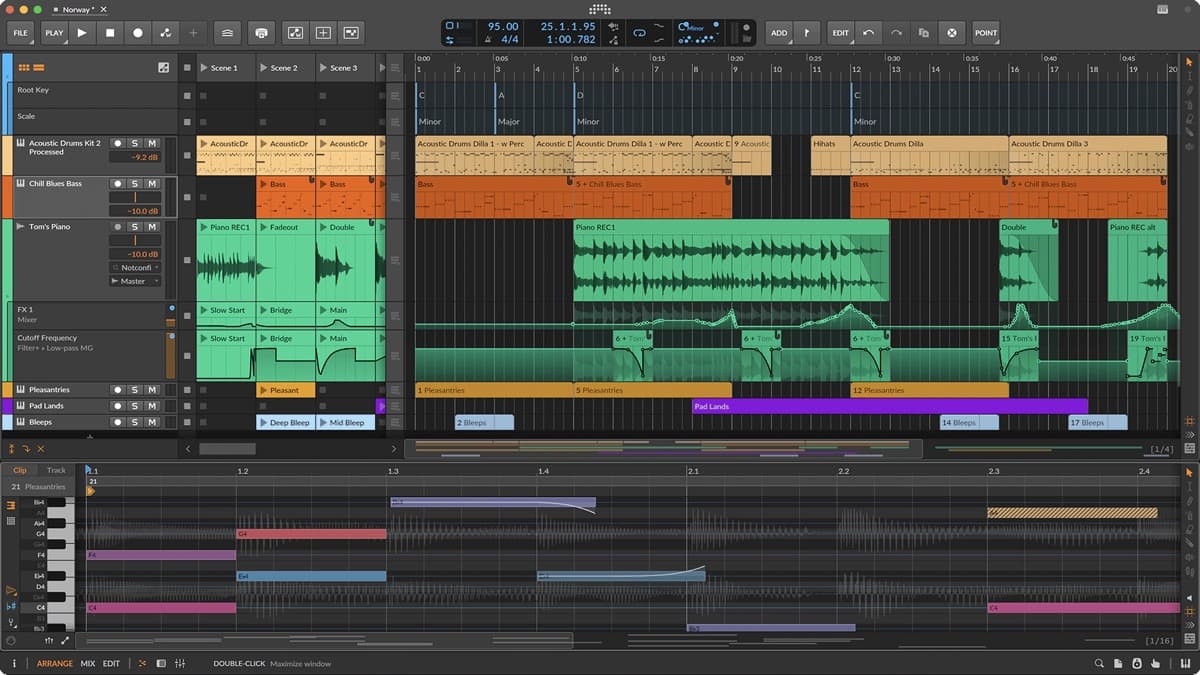
Bitwig Studio 6 brings clip aliases, automation clips, project-wide key signature, Spray Can, and layered editing to the modular DAW. Out April 2, 2026.
See full specs, price, and alternatives in the plugin database →
Bitwig GmbH released Bitwig Studio 6 on April 2, 2026. The Berlin-based company added clip aliases, automation clips, a project-wide key signature, and a redesigned editing palette to its modular DAW. Users with an active Upgrade Plan as of August 27, 2025 receive the update at no cost.
This release stands as the most significant core update in years. It focuses on daily fundamentals that producers use constantly. These include automation, repetition, scale-aware editing, and faster note entry.
What is Bitwig Studio?
Bitwig Studio serves as a cross-platform DAW. It centers on deep modulation, the modular Grid, and a hybrid Clip Launcher plus Arranger workflow. The software runs on macOS, Windows, and Linux. Many modular sound designers, electronic producers, and live performers choose it for creative routing options that feel more natural here than in other DAWs. You can see how it scores against other DAWs on its Bitwig Studio entry in our plugin database.
Version 6 preserves this core identity. At the same time, it improves everyday workflow elements that some users found lagged behind the strong modulation system.
What's new in Bitwig Studio 6
The main additions cover editing, sequencing, and project structure:
- Clip aliases for audio, note, and automation clips
- Automation clips with looping, stretching, and time-sliding
- Spread and hold automation behaviors plus per-segment curvature
- Project-wide key signature with Snap to Key and Quantize to Key
- Spray Can tool for grid-interval note and automation placement
- Audition tool for fast track and clip preview
- Step Input tool for multi-note step entry
- Layered editing across multiple clips at once
- Four new Grid modules: Quantize by Scale, Shift by Scale Steps, Global Root Key access, Pitch Class
- Modernized UI with tools palette, dynamic track headers, and Arranger Auto Zoom
- Automatic backup of previous-version project files when opening in v6
Clip aliases change how repetition works
Clip aliases create a shared pattern across linked clips. Change one alias and all connected clips update instantly. This works for audio, note, and automation clips in both the Clip Launcher and Arranger.
You keep full control. The Make Unique command breaks the link for a single instance. Merge Duplicate Patterns scans your project and connects identical clips automatically. The result supports non-destructive experimentation. You can build variations and decide later whether to commit or unlink them.
Automation finally lives inside clips
In Bitwig Studio 6, automation now works like audio and note clips. You can loop it, stretch it, slide it in time, and save it to your library. The detail editor shows every automation lane for a track in one panel.
New behaviors expand the options. Spread adds controlled random variation between points. Hold maintains a flat value until the next point. Per-segment curvature in the Inspector and an improved Pencil tool make freehand drawing cleaner. Most users will need fewer redraws to get precise results.
Here is the official walkthrough of Bitwig Studio 6:
Project-wide key signature
Bitwig Studio 6 adds a global key signature that applies across the entire project. Press K to snap notes to the active key. The Piano Roll displays the scale either as a standard piano layout or with lanes adjusted to the key. Six note-shifting devices, including the Arpeggiator, now offer a "Use Global Key" option.
This feature enables scale-aware MIDI editing directly in the DAW. It extends into the Grid through four new modules. Quantize by Scale, Shift by Scale Steps, Global Root Key, and Pitch Class help modular patches stay in harmonic context.
A faster editing palette
The right sidebar now contains a dedicated tool palette. It includes Spray Can, Audition, and Step Input alongside the pointer and pencil. Expression editing feels more direct. You edit micro-pitch, gain, and pressure curves straight on the notes.
Layered editing lets you view and change multiple clips together. This speeds up harmony and rhythm work across stems. The Arranger adds auto zoom, dynamic track headers, and visible beat grid lines inside clips. The Clip Launcher shows clearer position and loop indicators.
Where Bitwig Studio 6 fits
The update strengthens Bitwig's established strengths without overhauling its character:
- Sound design and modular work benefit from the Grid and new scale modules
- Electronic production gains from clip aliases and non-destructive variation
- Hybrid live performance improves through better Clip Launcher visuals, an area where it competes directly with Ableton — see our Ableton Live 12 vs Bitwig Studio comparison
- Scoring and arranging profit from the project key signature and snap-to-key tools
- Cross-platform studios continue to value native Linux support, which remains uncommon
The changes feel solid and focused. They address real workflow pain points while staying true to the DAW's modular roots.
Pricing and availability
- Studio: €399 — full version with The Grid, 188 instruments/effects, 43 modulators, Bitwig Circle membership
- Producer: €199 — 105 instruments/effects, 18 modulators, layered editing
- Essentials: €99 — 51 instruments/effects, starter modulation
- 8-Track: entry-level edition
- Free upgrade: users with active Upgrade Plan as of August 27, 2025
- System requirements: macOS 10.14+, Windows 10+, Ubuntu 24.04+; 4 GB RAM minimum (8 GB recommended); 12 GB disk
Each new license includes 12 months of free upgrades.
Get it
Download Bitwig Studio 6 from the official Bitwig website or read the full feature list on the What's New page. A demo version is available for those new to the platform.
Looking for more DAW coverage? See how the field stacks up in our ranked guide to the best DAWs, or weigh Bitwig against a very different workflow in our Bitwig Studio vs FL Studio comparison.