Some links on this page are affiliate links. If you buy through them, Dubspot may earn a commission at no extra cost to you. It never affects our scores or what we recommend — read our policy.
TAL-Bitcrusher Returns: Free Lo-Fi Crusher Rebuilt
TAL-Bitcrusher is back as a free, rebuilt lo-fi plugin with a new Companding control, resizable UI, and CLAP support. Full specs and how it beats stock crushers.
T
Theo Nakamura
September 1, 2026 · 7 min read
See full specs, price, and alternatives in the plugin database →
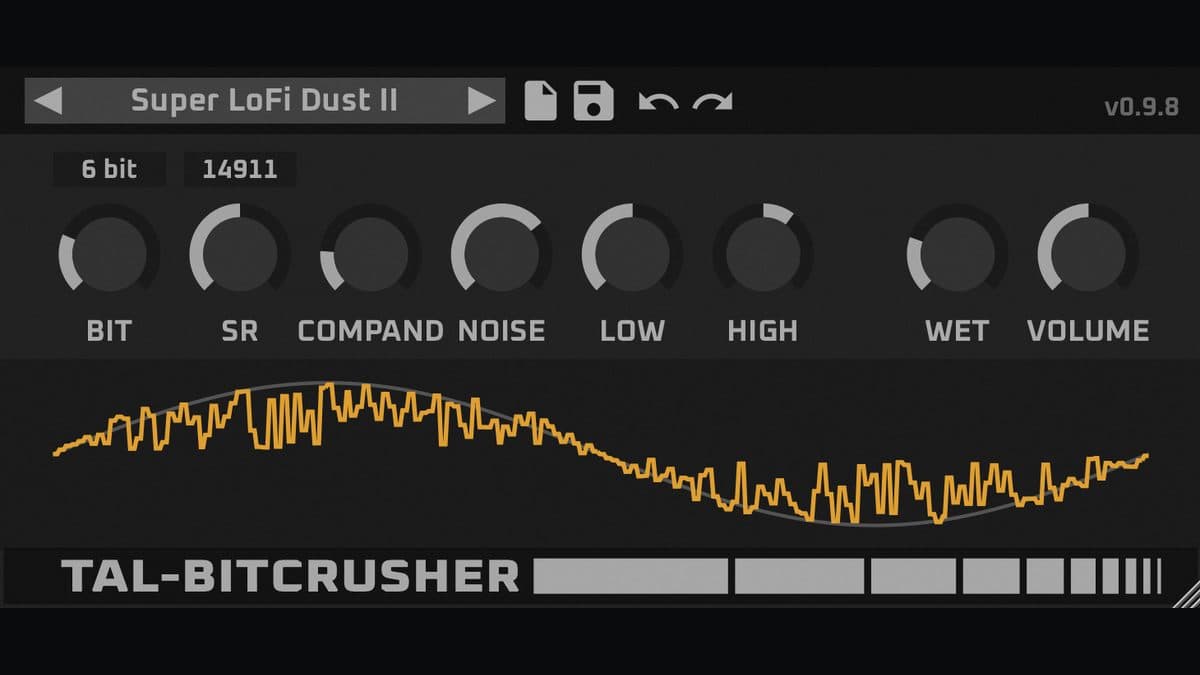
Togu Audio Line brought back one of its most-downloaded plugins. On August 31, 2026, the developer rereleased TAL-Bitcrusher as a ground-up rebuild of a plugin that first shipped more than a decade ago. It keeps the core algorithm that made the original a staple, then wraps it in a modern, resizable interface with a preset browser and adds a new Companding control. It's still free, and it still does one job with real character.
At a glance: Free. A lo-fi effect that reduces bit depth and sample rate, with a low and high shelf EQ, a noise section, and a new Companding parameter. Runs as VST, VST3, AU, AAX, and CLAP on Windows, macOS, and Linux.
What is TAL-Bitcrusher?
TAL-Bitcrusher is a digital degradation effect. It takes a clean signal and strips resolution from it in two ways: it lowers the bit depth, which adds quantization noise and grit, and it lowers the sample rate, which folds high frequencies into the aliased, metallic tones that define the lo-fi sound. Those two controls are the heart of every bitcrusher, and TAL has done them cleanly since the first version.
The effect suits drums, especially hi-hats and percussion, where a touch of sample-rate reduction adds bite. It works on synth leads that need an edge, on vocals that want a vintage sampler feel, and on full buses when you want a track to sound like it came off an old console game or a first-generation digital sampler. The original earned its place through simplicity and a sound that never felt cheap. For bitcrushing inside a full chain with noise, reverb and echo, see the Thenatan VYBZ 2 lofi multi-effect.
What is new in the 2026 TAL-Bitcrusher
The Companding control
The standout addition is a Companding parameter. Companding compresses a signal before the crushing stage and expands it after, which lifts quieter detail up into the effect and pushes more of the signal through the degradation. In practice you hear more noise, more sparkle, and more of the grit on softer material that a plain crusher would leave untouched. That single control is what makes this version feel fresh instead of a straight port of the old one.
A resizable interface and preset browser
The old TAL-Bitcrusher looked its age. The rebuild ships with a resizable interface that scales to any screen, plus a built-in preset browser so you can save and recall settings without leaving the plugin. These are basic expectations in 2026, and the plugin now meets them while keeping its footprint small on both your screen and your CPU.
Shelf EQ and a noise section
The plugin keeps its low and high shelf EQ, which lets you roll off the harsh top that heavy crushing can create, or push it forward when you want the effect to cut. A noise section adds character on top of the digital artifacts. Together they mean you can shape the crushed signal in the box rather than reaching for a separate EQ after it.
Wider format support
TAL rebuilt the plugin on its current framework, so it now covers VST, VST3, AU, AAX, and CLAP. CLAP support in particular marks this as a current build, and it means the plugin drops into newer hosts cleanly.
TAL-Bitcrusher specifications
| Spec | Detail |
|---|---|
| Type | Bit depth and sample-rate reduction (lo-fi) |
| New in 2026 | Companding control, resizable UI, preset browser |
| Tone shaping | Low and high shelf EQ, noise section |
| Formats | VST, VST3, AU, AAX, CLAP |
| Operating systems | Windows 10 or later, macOS 10.11 or later (Universal), Linux 64-bit |
| Architecture | 64-bit, Apple Silicon and Intel |
| Price | Free |
TAL-Bitcrusher vs D16 Decimort 2
Most producers weighing a free crusher against a paid one land on D16 Decimort 2, the best-known premium bitcrusher. The two aim at different jobs.
| TAL-Bitcrusher | D16 Decimort 2 | |
|---|---|---|
| Price | Free | Around 49 euros |
| Core | Bit and sample-rate reduction | Bit and sample-rate reduction with dual converter emulation |
| Filtering | Low and high shelf EQ | Resonant filter, quantization dithering |
| Character | Clean, direct grit | Program-dependent, high-end converter color |
| Formats | VST, VST3, AU, AAX, CLAP | VST3, AU, AAX |
| Best pick | Everyday crushing on any host at no cost | Designed, controlled lo-fi color with converter modeling |
Decimort 2 models the behavior of real analog-to-digital converters and adds resonant filtering and dithering, so it delivers a more refined, program-dependent degradation. It costs money for that depth, and you can check current pricing on Best Service. TAL-Bitcrusher gives you the direct, useful version of the same idea for free, and for a lot of sessions that's all you need.
Who TAL-Bitcrusher is for
The appeal here is broad, which is the point of a free tool this capable. Beginners get a dependable crusher without spending a cent. Working producers get a light, fast insert to keep on drums and synths across every project. Sound designers get a quick way to dirty up a source before further processing. If you already own a deeper lo-fi suite with tape and vinyl modeling, you may reach for that when you want those specific colors, but TAL-Bitcrusher still earns a slot for pure bit and sample-rate work.
How much does TAL-Bitcrusher cost?
TAL-Bitcrusher is free. You download it directly from the TAL website, with no account wall and no trial timer. That makes it one of the easiest wins in any starter chain, and it fits neatly alongside the other picks in our roundup of the best free VST plugins of 2026.
FAQ
Is TAL-Bitcrusher really free?
Yes. TAL-Bitcrusher is a free download from the developer, with no purchase and no time limit. It's been free throughout its history, and the 2026 rebuild keeps that model.
TAL-Bitcrusher vs Decimort 2, which should I use?
Use TAL-Bitcrusher for fast, free bit and sample-rate crushing that runs on any host and OS. Choose Decimort 2 when you want premium converter modeling, resonant filtering, and more program-dependent color, and you're willing to pay for it.
What does the Companding control do?
Companding compresses the signal into the crushing stage and expands it out again. It lifts quieter detail into the effect, so you hear more noise, grit, and sparkle on softer material than a plain bitcrusher would produce.
What are the TAL-Bitcrusher system requirements?
It runs on Windows 10 or later, macOS 10.11 or later as a Universal binary for Apple Silicon and Intel, and 64-bit Linux. It installs as VST, VST3, AU, AAX, and CLAP, so it fits nearly any current DAW.
Verdict
TAL-Bitcrusher proves a free plugin can earn a place as a first-call tool. The rebuild fixes the dated interface, adds a resizable window and a preset browser, and the new Companding control gives it a genuinely fresh voice. It won't replace a full lo-fi suite with tape and vinyl modeling, and it doesn't set out to. For clean, characterful bit and sample-rate crushing at no cost, it's one of the easiest downloads a producer can make. Pair it with more no-cost picks in our best free synth VSTs of 2026 and browse the wider plugin database for paid upgrades when a session calls for them.