SM-1 for $19, Analog Bundle for $39: Black Friday 2026
Dubspot SM-1, a semi-modular synth plug-in for Mac, is $19 through November 30, and the four-plug-in Analog Bundle is $39. Six patches to build in the trial.

Dubspot's best Black Friday dealsDubspot Tracker Pro: $15, was $24.99 ↗Drum Programming and Groove Production Course: $19, was $99 ↗
Nineteen dollars. That's the Black Friday price of SM-1 SemiModular, Dubspot's semi-modular synth plug-in for Mac, down from $99 USD through November 30, 2026. Its modules follow the Moog Grandmother and Matriarch, and you can mix both in one rack. For $39 USD you get it inside the Dubspot Analog Bundle with a vintage-style program EQ, a studio tape machine and an analog-modeled monosynth, four plug-ins that add up to $356 USD at regular prices.
SM-1 is our own instrument, so you won't find a score here. You'll find a workshop: six patches to build during the 14-day trial, the limits to know before you pay, and a plain answer on SM-1 alone versus the bundle.
Get SM-1 for $19 or start the 14-day trialThe Black Friday Prices at a Glance
| Black Friday | Regular | What you get | |
|---|---|---|---|
| SM-1 SemiModular | $19 USD | $99 USD | Semi-modular synth plug-in for Mac: AU, VST3 and AAX Native |
| Dubspot Analog Bundle | $39 USD | $356 USD | SM-1 SemiModular, EQP1, Tape M15 and VintageSub |
- Sale window: through November 30, 2026.
- Trial and refund: every plug-in has a fully functional 14-day trial, and direct purchases carry a 14-day full refund. The trial never starts a payment on its own.
- Licence: perpetual, with three computers per plug-in and released 1.x updates included. The Dubspot licence needs no iLok and works offline after activation.
- System: SM-1 runs on macOS 12 or later, on Apple Silicon and Intel. The complete bundle needs macOS 13, because Tape M15 does. Windows isn't available yet; the product page lists it as coming soon.
- iPhone and iPad: SM-1 is also a $9.99 USD App Store app with an AUv3 instrument and 31 factory presets. It's a separate purchase, and neither the Mac plug-in nor the bundle includes it.
Hear It Before You Read On
Every sound in this track comes from SM-1, including the kick and hats. The video shows each patch as it plays.
You'll build the next four sounds yourself in the workshop below. Each clip is one patch, recorded straight from the SM-1 engine with no outside effects or mastering.
Rubber Bass (mono). Square and saw oscillators, a short filter envelope and brief glide.
Clockwork (mono). A sixteenth-note pattern with slow filter modulation and dotted-eighth stereo echoes.
Four-note Brass (four-note paraphonic). Four pitches share the filter and amplifier envelopes, with a touch of spring reverb.
Singing Lead (mono). Two slightly detuned oscillators, legato glide and wheel vibrato, with delay and spring.
How SM-1 Thinks
Semi-modular means the synth is already wired. With no cables in sight, the oscillators feed the mixer, the mixer feeds the filter, and the filter feeds the output's VCA, while the envelope shapes both the filter and the volume. Those internal connections are called normals. A cable replaces the signal normalled to the socket it lands in, and pulling the cable out brings the internal route back.
Two things set SM-1 apart from a fixed panel.
Every module comes in two versions. The MK1 modules follow the Moog Grandmother: two oscillators, one ladder low-pass filter, one envelope and a mono output. The MK2 modules follow the Matriarch: four oscillators, two filters, separate filter and amplitude envelopes, a stereo output and two- or four-note paraphonic playing. Tap the strip above a module to swap it, even while a sequence runs, and mix both generations in one rack. Compatible cables stay connected.
The rack grows. Add up to four Modulation units, four Envelope units and four Delay or Grains effects next to the spring reverb, which is always there. A full rack exposes 216 patch points.

The MK2 rack: four oscillators, dual filters, separate filter and amplitude envelopes, and an added Stereo Delay.
Key Features
- MK1 and MK2 versions of all nine module sections
- Mono, or two- or four-note paraphonic playing
- Two or four oscillators with hard sync, pulse-width modulation and linear FM
- One ladder low-pass filter, or two filters in series, stereo or parallel
- A level and polarity setting on every cable
- Spring reverb, plus up to four Delay or Grains effects before it, after it or in parallel
- An arpeggiator and step sequencer that follow your host's tempo
- Saved patches recall the modules, cables, sequences and effects routing
Workshop: Six Semi-Modular Patches for the 14-Day Trial
All but the last patch start from one of the two init presets, which the Mac plug-in and the iPhone and iPad app both carry. The settings come from the patches behind the demo clips. Times and percentages hold on every version, while dial positions are starting points, because later versions refined how some knobs are scaled. If a position sounds off, trust the clip and your ears.
1. Rubber Bass: The Whole Voice, No Cables
You'll learn: the normalled signal path, and how the mixer drives the filter.
- Load Init MK1.
- In Oscillators, set oscillator 1's WAVEFORM to square and oscillator 2's to sawtooth. Put both OCTAVE knobs on 8' and leave FREQUENCY centred.
- In Mixer, turn OSCILLATOR 1 well up, to about three quarters. Bring OSCILLATOR 2 in underneath it at roughly half that level. Keep NOISE down.
- In Filter, switch KBD TRACK to OFF. Set CUTOFF a little below halfway and RESONANCE to about a quarter. Turn ENVELOPE AMT nearly all the way clockwise. It's bipolar, so the centre position means no sweep at all.
- In Envelope, set ATTACK as fast as it goes, DECAY to about 220 ms and RELEASE to about 55 ms. Bring the SUSTAIN fader about a quarter of the way up.
- Raise GLIDE to about a third. In the gear menu, turn on Legato glide so only overlapping notes slide.
- Still in the gear menu, open Tone and set VCA curvature to 25%.
Play a low riff at around 104 BPM, the tempo of the clip, and overlap a few notes. The envelope snaps the filter shut on every note, and the slides happen only where you tie notes together.
Now push OSCILLATOR 1 higher. The mixer's inputs share one saturating stage, so its level knobs change the tone as well as the volume. Pull VOLUME down in Output while you compare, so the louder setting doesn't win by default.
2. One Cable, Two Polarities
You'll learn: how a cable overrides a normal, and how to set how much it does.
- Keep the bass patch. Drag from Modulation's WAVE OUT to Filter's CUTOFF IN, or tap the two jacks in turn.
- Hold a note and turn Modulation's RATE. The filter now opens and closes at the LFO's speed.
- Tap the cable. In the Connection panel, pull Attenuation down to 25% for a gentler sweep.
- Choose the sawtooth wave with Modulation's WAVEFORM knob so the direction is easy to hear. Then switch the cable's polarity to Inverted. The sweep reverses.
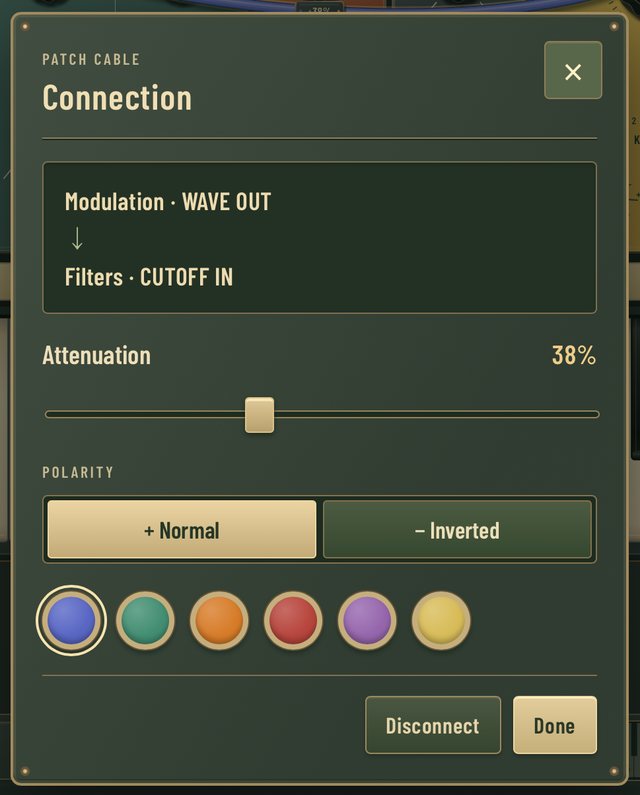
Tap any cable to set its level, polarity and colour.
That panel does the job of a separate attenuverter module, and every cable has one.
Power tip: a cable from WAVE OUT works with the mod wheel down. The three AMT knobs on the Modulation panel are different: they stay silent until you raise the wheel. And a cable at 0% still occupies its input and breaks the internal route. Drop the plug in empty space to remove it.
3. Clockwork: A Sequence That Moves
You'll learn: MK2 envelopes, slow modulation through a quiet cable, and the stereo delay.
- Load Init MK2 and set VOICE MODE in the Output panel to 1.
- Set oscillator 1 to sawtooth at 8' and oscillator 2 to square at 16', an octave below. In Mixer, turn OSCILLATOR 1 well up and bring OSCILLATOR 2 in at about a third of that level. Keep 3 and 4 down.
- In Filters, leave FILTER MODE on STEREO, where both filters are low-passes. Set CUTOFF and both RESONANCE knobs to about a third, and KBD TRACKING to about a quarter. Turn ENVELOPE AMT clockwise until each note opens with a sweep of about three and a half octaves.
- On the filter envelope, set ATTACK as fast as it goes, DECAY to about 110 ms and SUSTAIN almost down. On the amplitude envelope, set ATTACK as fast as it goes, DECAY to about 230 ms and SUSTAIN to about a third.
- Patch Modulation's WAVE OUT to CUTOFF 1 IN. Tap the cable and set Attenuation to 12%. Choose the sine wave and slow RATE nearly to its minimum. On MK2, CUTOFF 1 IN also moves the second filter until you patch CUTOFF 2 IN.
- If the rack doesn't already show a Stereo Delay, tap +FX and add Delay. Turn on PING PONG, set MIX to about 20% and FEEDBACK to about a third. With SYNC / TAP off, set TIME to about 400 ms. That's a dotted eighth at 112 BPM, the tempo of the clip. Turn SYNC / TAP on and the readout switches from milliseconds to note divisions.
- Feed it sixteenth notes from a MIDI clip in your DAW. You can also use SM-1's own recorder: set Arp / Seq MODE to REC, play the steps, switch to SEQ and press PLAY. With Host clock on, your DAW supplies the tempo.
Need a pattern? This original A-minor riff ships in the app's Seq MK1 - 01 preset:
A3 E4 C4 E4 | G4 E4 B3 E4 | A3 C4 D4 E4 | G4 D4 B3 A3
The LFO barely touches the cutoff, and that's the point. The line brightens and darkens slowly while your hands stay off the panel, and the ping-pong echoes fill the gaps.
Programming the drums under a line like this is its own skill, and it's one you can practice in the browser.
4. Four-Note Brass: Paraphony in Practice
You'll learn: how four notes share one filter and one pair of envelopes.
- Load Init MK2 and set VOICE MODE in the Output panel to 4.
- Set all four oscillators to sawtooth at 8'. Nudge the FREQUENCY knobs on oscillators 2, 3 and 4 a hair off centre, in different directions.
- Bring all four Mixer channels up to the same level, about two thirds.
- In Filters, set CUTOFF a little below halfway, KBD TRACKING to about a third and both resonances low. Turn ENVELOPE AMT clockwise for a sweep of about three octaves.
- On the filter envelope, set ATTACK to about 75 ms, DECAY to about 320 ms and SUSTAIN just under half. On the amplitude envelope, set ATTACK to about 25 ms, DECAY to about 500 ms and SUSTAIN high.
- Give both envelopes a RELEASE between 300 and 450 ms, and raise Spring Reverb's MIX to about 10%.
The filter envelope rises three times more slowly than the amplitude envelope, so each chord starts dark and swells open. That swell is the brass in the sound.
Now run the paraphony test. Hold C, E and G, then add B. The four notes share one filter and one pair of envelopes. With MULTI TRIG off, the envelopes carry on and the new note slips in. Turn MULTI TRIG on and the new note restarts them, so the whole chord gets a fresh attack. That shared articulation is the difference between paraphonic and polyphonic.
5. Singing Lead: An MK1 Filter in an MK2 Rack
You'll learn: module swapping, wheel vibrato and legato glide.
- Load Init MK2 again and set VOICE MODE to 1.
- Tap the strip above Filters and choose MK1. The dual filter becomes a single ladder low-pass.
- Set oscillator 1 to sawtooth and oscillator 2 to square, both at 8', with oscillator 2's FREQUENCY a hair above centre so the two beat slowly. In Mixer, turn OSCILLATOR 1 to about two thirds and bring OSCILLATOR 2 in a little below it.
- In Filter, switch KBD TRACK to 1 : 2. Set CUTOFF to about two thirds, RESONANCE low and ENVELOPE AMT slightly clockwise of centre.
- On the filter envelope, set ATTACK to about 12 ms, DECAY to about 450 ms and SUSTAIN to two thirds. On the amplitude envelope, set ATTACK to about 9 ms, DECAY to about 300 ms and SUSTAIN high. Give both a RELEASE of 200 to 240 ms.
- In Modulation, choose the sine wave, set RATE near halfway and PITCH AMT just above zero. Hold a note and push the mod wheel up to bring in vibrato.
- Raise GLIDE just past halfway. In the gear menu, set Glide mode to Linear time and turn on Legato glide.
- On the Stereo Delay (add one with +FX if the rack doesn't show it), turn PING PONG off and set TIME to about 220 ms, MIX to about 12% and FEEDBACK to about a quarter. Finish with Spring Reverb's MIX at about 7%.
Why swap the filter? The MK1 ladder gives a lead one cutoff and one resonance to ride. The MK2 pair earns its place when you want a high-pass into a low-pass, two low-passes in stereo, or the two in parallel.
6. Grains: Freeze a Chord Into a Texture
You'll learn: the granular effect, which is modeled on Mutable Instruments Beads.
- Load Grain Cloud, named Grains MK2 - 01 in the iPhone and iPad app. Hold a chord for a few seconds. Its Seed latch is already on, so the grains start by themselves.
- Let go and listen to the texture carry on. Press FREEZE to stop new audio replacing the recording while the grains keep playing it.
- Turn SIZE. The left part of its travel plays the grains backwards.
- Turn PITCH. It sits at unison in the centre and settles on musical intervals, up to two octaves either way.
- Turn Freeze off, then tap QUALITY to step through Bright digital, Cold digital, Sunny tape and Scorched cassette. The recording grows from 4 seconds to 16 as the fidelity drops.
- For a slow scan through the recording, patch Modulation's WAVE OUT to the TIME input on Grains and turn TIME AMT clockwise.

Stereo Delay and Grains sit between the envelopes and the output. The spring reverb stays in the rack.
Two things to remember. A new instance starts with an empty recording, because a preset saves the controls and cables and leaves the audio out. And Grains keeps a dry path, so set its MIX to 100% when you want only the processed sound. Open FX in the top bar to run the added effects before the spring, after it or in parallel.
Where the Analog Bundle Earns Its $39
SM-1 makes the sound. The other three plug-ins finish it.
- Tape M15 after a bass or lead. Push the input until the VU meters swing, then match the output so you compare at the same level. Blend in the dry signal to keep the note's attack while the tape adds weight underneath.
- EQP1 on the low end. Boost and cut the same low frequency together. The bass gets deeper and tighter, and the mud just above it clears.
- VintageSub when you don't want to patch. It's a fixed-panel monosynth with Multidrive, a four-slope ladder filter, a tempo-synced arpeggiator and 32 factory sounds.
The value math is short. Bought one at a time during the sale, the four plug-ins cost $76 USD, and any two of them cost $38 USD. So if you want SM-1 and one of the others, the bundle costs $1 more and adds the remaining two. Our Analog Bundle guide covers each plug-in and who should skip the set.
Get all four plug-ins for $39What SM-1 Doesn't Do
- It's Mac only on desktop. The plug-in runs as AU, VST3 and AAX Native. A Windows version is listed as coming soon, with no date.
- It's paraphonic, with four notes at most. Chords share one filter and one set of envelopes, as they do on the hardware its MK2 modules follow.
- The spring reverb has a MIX knob and nothing else. You can't set its decay time.
- Grains doesn't save its recording. Presets recall the controls and cables, and the buffer starts empty.
- The iPhone and iPad app is a separate purchase. Projects don't move between the mobile and desktop versions automatically.
- Big racks cost CPU. If a dense patch crackles, raise your host's buffer size or remove an effect.
SM-1, the Bundle, or Neither?
Buy SM-1 at $19 if you want to learn patching inside your DAW with full recall, or you want one synth that covers mono bass, sequenced lines and four-note chords with its own spring, delay and granular effects. For the architecture in depth, read our SM-1 launch guide.
Buy the bundle at $39 if you'd use even one of the other three plug-ins. Tape and EQ on a synth bus are the obvious next step after the patches above.
Skip both if you produce on Windows, need true polyphony, or want hundreds of presets to browse.
The trial settles it. Build the six patches, bounce them into a track and decide with your own ears before November 30.
Try or buy SM-1 for Mac: $19 through November 30Frequently Asked Questions
How long does the SM-1 Black Friday price last?
SM-1 for Mac costs $19 USD through November 30, 2026. Its regular price is $99 USD.
What is in the Dubspot Analog Bundle?
Four Mac plug-ins: SM-1 SemiModular, EQP1, Tape M15 and VintageSub. The bundle costs $39 USD during the sale, against $356 USD for the four at regular prices. Each plug-in keeps its own three-computer licence.
Is there a free trial?
Yes. Every plug-in has a fully functional 14-day trial, and it never starts a payment automatically. Direct purchases also carry a 14-day full refund.
Does the Mac plug-in include the iPhone and iPad app?
No. The App Store app costs $9.99 USD and is a separate purchase. It includes the standalone app and an AUv3 instrument.
Does SM-1 run on Windows?
Not yet. The plug-in needs macOS 12 or later and an AU, VST3 or AAX Native host.
Is SM-1 a Moog Grandmother or Matriarch emulation?
Both. Its MK1 modules follow the Grandmother and its MK2 modules follow the Matriarch, and one rack can mix the two. The SM-1 launch guide walks through the architecture.
Moog, Grandmother and Matriarch are trademarks of their respective owners, as are Mutable Instruments and Beads. Their names describe the hardware SM-1's modules follow. None of these companies is affiliated with Dubspot, and none has endorsed or sponsored SM-1.


