Some links on this page are affiliate links. If you buy through them, Dubspot may earn a commission at no extra cost to you. It never affects our scores or what we recommend — read our policy.
GCS Spectral: Draw or Resynthesize Any Sound
Gulf Coast Synthesis Spectral is an additive synth you paint by hand, resynthesize from audio, or drive from images. Full specs, price, and how it compares.
M
Marcus Feld
August 26, 2026 · 8 min read
See full specs, price, and alternatives in the plugin database →
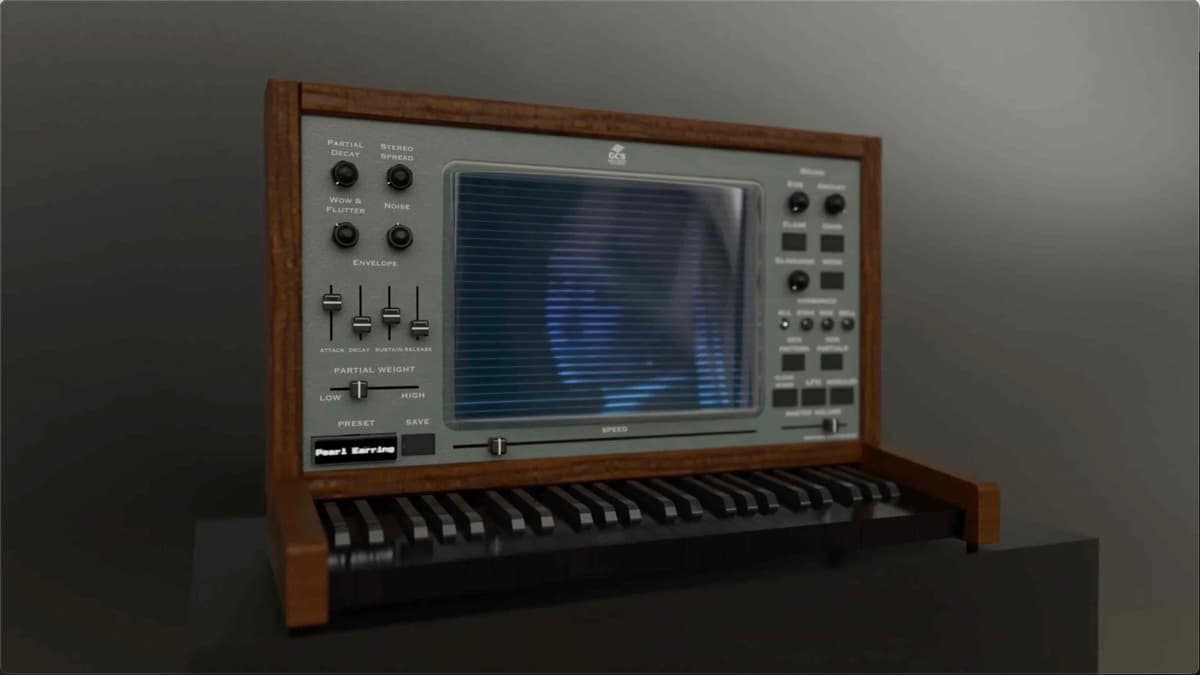
Gulf Coast Synthesis has released Spectral, an additive synthesizer you design by drawing. It shipped in August 2026 for macOS and Windows. The pitch is unusual. Paint the harmonics of a sound with a brush, drop in a sample to clone its spectrum, or drag an image onto the screen and hear its pixels. This is a first look at the shipping feature set.
At a glance: $69 full, $39.99 intro. Spectral pairs a 32-partial additive engine with band-limited analog waveforms and a subtractive stage. Its core is the Spectral Canvas for hand-drawn harmonics, plus audio and image resynthesis. It runs as VST3, AU and AAX on Mac and Windows. A free 10-day trial is available.
What is GCS Spectral?
Additive synthesis builds sound from stacked sine waves, one per harmonic. It is the most direct way to sculpt a timbre, because you set the level of each partial yourself. It is also, historically, the most tedious. Older additive synths buried those partials in spreadsheets of numbers. Spectral answers that problem by making the harmonics something you touch.
Spectral sits in the small family of "draw your sound" instruments alongside Image-Line Harmor and the spectral-editing world of Steinberg SpectraLayers. It is not trying to be a preset-driven workstation like Omnisphere or a wavetable powerhouse like Serum 2. It is a sound-design tool first, aimed at producers who want to author a timbre from raw material rather than dial through a menu. For resynthesis that runs live on granular material, see our Blinksonic HOLODRIFT first look.
What's new in Spectral
The Spectral Canvas
The centerpiece is the Spectral Canvas. Instead of typing partial amplitudes, you paint them. A brush tool draws the harmonic profile directly. A rising smear across the canvas becomes a brightening timbre, and a dense low cluster becomes a fat, narrow tone. You can also paint spectrally-shaped noise into the same view, which is how Spectral makes breath, air and grit sit inside a pitched patch rather than bolted on as an effect. Undo is built in, so the canvas behaves like a drawing app, not a fragile parameter grid.
Audio resynthesis
Drop a WAV, AIFF or FLAC file onto the screen and Spectral analyzes it, cloning both its harmonic content and its noise profile into a playable patch. That gives you an instant starting point drawn from real material: a vocal, a string note, a field recording. From there you can repaint the canvas, so resynthesis becomes a seed rather than a fixed sample. For a resynthesis instrument that rebuilds samples from up to 96 partials, see our AudioThing Materia first look.
Image resynthesis
The headline trick is image resynthesis. Drag an image file onto Spectral and it reads pixel brightness as harmonic amplitude, turning photographs, gradients and logos into evolving, playable textures. This is a real sound-design method, not just a novelty. A smooth gradient produces a slow tonal sweep, while a busy photo yields chaotic, inharmonic movement you would struggle to program by hand.
Hybrid and analog character
Spectral is not purely additive. It combines the 32-partial additive engine with classic band-limited analog waveforms (saw, square, triangle) and an integrated subtractive stage, so you can start from a familiar oscillator and add spectral detail, or work the other way around. To stop additive tones sounding clinical, it models analog behaviour: pitch drift, tape warble, saturation and simulated tape dropouts. Those touches keep a hand-drawn patch feeling like an instrument.
Harmonic modes and generative tools
Four harmonic modes reshape a timbre at its root: All, Even, Odd and Inharmonic. Switching to Odd hollows a tone toward a clarinet-like character; Inharmonic pushes it toward bells and metal. Pattern and Sacred Geometry generators create spectral shapes for you when the blank canvas is intimidating, and MIDI Learn maps hardware controls for hands-on performance.
Spectral specifications
| Spec | Detail |
|---|---|
| Synthesis | Additive (32 partials) + band-limited analog waveforms + subtractive stage |
| Resynthesis | Audio files (WAV, AIFF, FLAC) and image files to harmonic amplitudes |
| Editing | Spectral Canvas with brush + undo; paint harmonics and noise |
| Harmonic modes | All, Even, Odd, Inharmonic |
| Character | Pitch drift, tape warble, saturation, tape dropouts |
| Generators | Pattern generator, Sacred Geometry generator, MIDI Learn |
| Formats | VST3, AU, AAX |
| Systems | macOS and Windows (64-bit) |
| Price | $69 (intro $39.99); free 10-day trial |
Spectral vs Image-Line Harmor
Harmor is the long-standing reference for additive-plus-resynthesis, so it is the honest comparison.
| GCS Spectral | Image-Line Harmor | |
|---|---|---|
| Engine | 32-partial additive + analog + subtractive | Dual additive units, hundreds of partials |
| Resynthesis | Audio and image files | Audio and image (via included tools) |
| Editing style | Direct brush painting on a canvas | Deep parameter and image-map editing |
| Character controls | Drift, tape warble, saturation, dropouts | Extensive filters, unison, phaser |
| Formats | VST3, AU, AAX | VST, VST3, AU (in FL) |
| Price | $69 (intro $39.99) | Around $149 |
Which should you pick? Harmor is deeper and more powerful, with far more partials and a mature effects and filter section. It is also pricier, and its interface is dense. Spectral trades raw partial count for a friendlier, more tactile workflow and a much lower entry price. If you already own Harmor for surgical resynthesis, Spectral will not replace it. If you want to draw sounds and sonify images without a steep climb, Spectral is the easier, cheaper way in.
Who Spectral is for
Spectral is for sound designers, ambient and cinematic producers, and anyone who thinks in pictures rather than parameter lists. The image resynthesis alone makes it a strong texture and pad machine, and the analog character controls make those textures usable in a mix. Skip it if you need the surgical precision of a hundreds-of-partials additive engine, if you work only from finished presets, or if a CLAP build is a hard requirement, since Spectral ships VST3, AU and AAX only for now.
How much does Spectral cost?
Spectral is $69 at full price, with an introductory price of $39.99 at launch. That intro figure undercuts most additive and resynthesis instruments, and it includes free updates for the version you buy. A free 10-day trial is available too. Test the canvas and both resynthesis modes on your own material before paying. Confirm the current price and trial on the official Gulf Coast Synthesis product page. If you want a broader shortlist of no-cost options first, our roundup of the best free synth VSTs is a good next stop.
FAQ
Is GCS Spectral an additive synthesizer?
Yes, at its core. It uses a 32-partial additive engine, but it is a hybrid: it adds band-limited analog waveforms and a subtractive stage, so you can blend classic oscillator tones with hand-drawn harmonic content.
Can Spectral really turn images into sound?
It can. Drag an image file onto the plugin and it maps pixel brightness to harmonic amplitude, producing a playable patch. Gradients give smooth sweeps; detailed photos give chaotic, inharmonic textures.
What formats and systems does Spectral support?
Spectral runs as a VST3, AU and AAX plugin on macOS and Windows. There is no CLAP build at launch. It is compatible with the major DAWs, including Ableton Live, Logic, Pro Tools and FL Studio.
Spectral vs a wavetable synth like Serum 2?
Different jobs. Serum 2 is a wavetable synth built around visual wavetable editing and modulation. Spectral is an additive and resynthesis tool built around painting harmonics and sonifying audio or images. Producers who want evolving textures from real-world material will lean Spectral; those who want punchy, modulated wavetable patches will lean Serum.
Is there a free trial?
Yes. Gulf Coast Synthesis offers a free 10-day trial of the full plugin, so you can evaluate the Spectral Canvas and both resynthesis modes before buying.
Verdict
Spectral does something few synths attempt. It makes additive synthesis feel like drawing. Painting harmonics, cloning a sample's spectrum, and hearing an image are all genuinely useful, and the analog character controls stop the results sounding sterile. It is not the deepest additive engine on the market, and the preset library and format support are thin at launch. Even so, at an intro price of $39.99 it is one of the most creative sound-design buys of the year. Score 8.0.