ReSing Choir Turns One Vocal Into a Five-Singer AI Choir
IK Multimedia ReSing Choir turns one sung vocal into an editable choir of up to five AI singers with chord-aware harmonies. $149.99 intro until Dec 31.
Dubspot's best Black Friday dealsDubspot Tracker Pro: $15, was $24.99 ↗Drum Programming and Groove Production Course: $19, was $99 ↗
Black Friday 2026IK Multimedia Black Friday 2026: dates and deals →
IK Multimedia released ReSing Choir on 11 November 2026, a standalone application that takes one monophonic vocal and turns it into an editable choir of up to five modelled singers per song section. IK calls it the first ensemble vocal generation software. It runs entirely offline on your own machine, and the intro price is $149.99 (regular $199.99), the same at Plugin Boutique until 31 December.
At a glance: standalone AI choir builder for macOS and Windows; up to 5 singers per section and 10 sections per project; Source, Unison and six Harmony parts per singer; chord-aware auto-harmonization with a Harmonize slider; Auto-character, Timing, Variation and Detune humanization; 10 starter voice models, plus any ReSing models you own; mixdown or dry stem export; perpetual licence. $149.99 intro (from $199.99), $99.99 upgrade for eligible IK owners. It builds a stacked, multi-singer arrangement from one take, at the cost of a round trip outside your DAW.
What is ReSing Choir?
ReSing is IK's AI voice modelling plug-in: it re-sings a recorded vocal with a different modelled voice. ReSing Choir takes that same voice modelling technology and builds a separate application around it, aimed at one job: backing vocals, group parts and harmony stacks. You sing (or import) a single clean line, assign singers to parts, and the software renders each singer's performance from your original take.
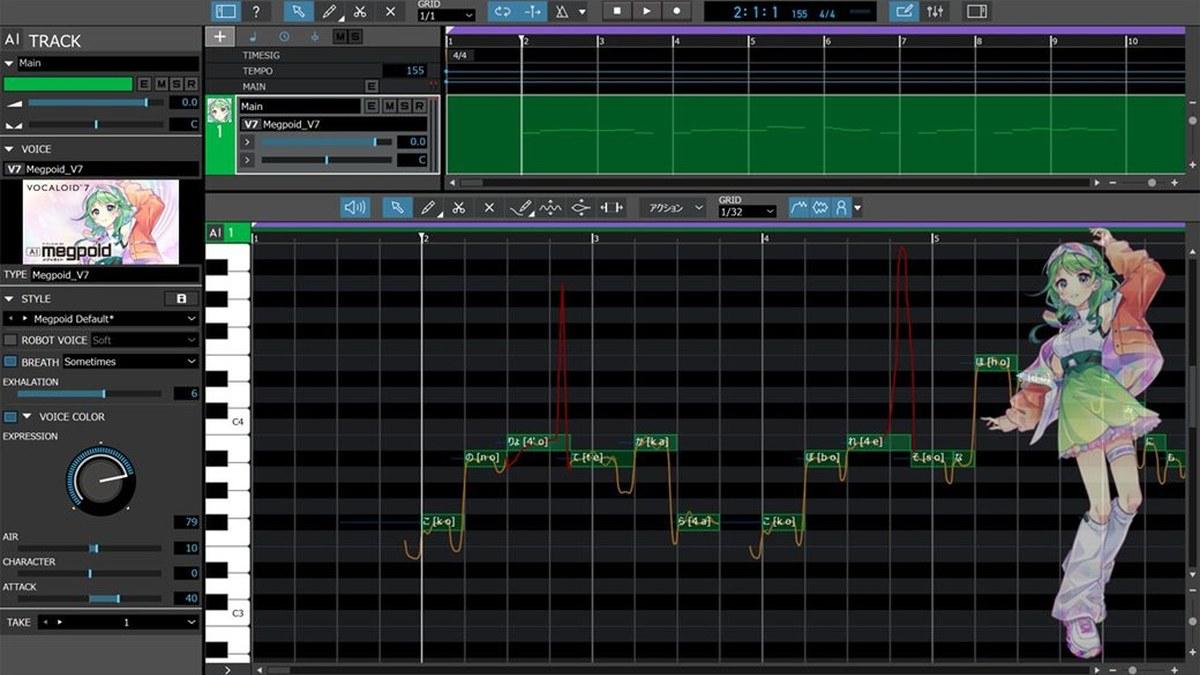
That is a different idea from a real-time harmonizer. Plug-ins such as Klevgrand Altitude Harmony or Karanyi's Voicemax pitch-shift your own voice into extra parts as the track plays. ReSing Choir replaces each part with a different modelled human singer, so the stack sounds like several people rather than several copies of you. It is also unlike a vocal synth such as Synthesizer V or Yamaha's new VOCALOID7, which sing from notes and lyrics you type in. Here the source is always your recording, with your phrasing, timing and words.
IK says the singer models are made with the full participation, consent and fair compensation of the original artists, which matters if you release commercially and care where an AI voice came from.
How ReSing Choir works
Singers as Voice Cards
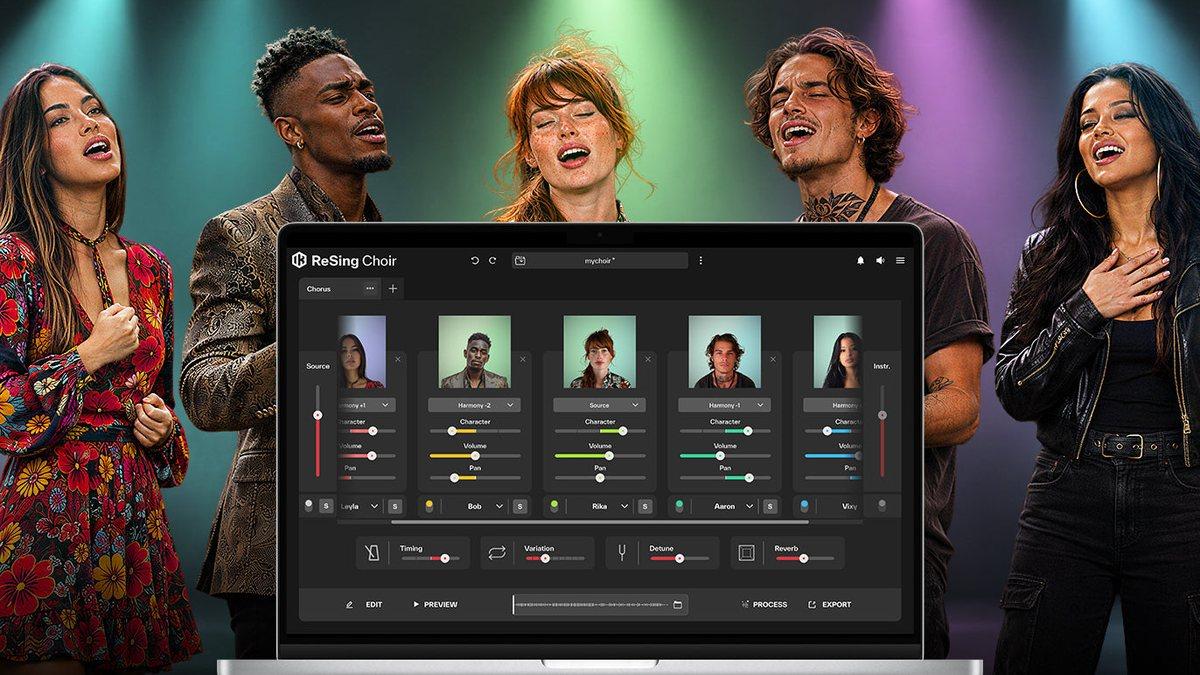
Each singer sits on a colour-coded Voice Card. You set every card to one of three roles:
- Source follows the original pitch curve exactly, so a singer doubles your lead with all its slides and inflections intact.
- Unison follows the lead melody with scale-quantized notes you can edit, which gives a tighter, more choral double.
- Harmony places the singer +1, +2 or +3 steps above the melody, or -1, -2 or -3 below it.
The useful detail is what happens when you change your mind. Swap one singer for another and the part assignment, mix settings and any manual note edits stay put. You can audition five different altos on the same harmony line without redoing the work.
Chord-aware auto-harmonization
Harmony parts follow the chords you give them. Draw chord regions in the Chords Lane and the Harmonize slider sets the balance between the source melody and the chord tones. Toward the melody, harmonies shadow the lead; toward the chords, they lock onto the progression, which is what you want under a chorus that moves through borrowed or non-diatonic chords. Notes you have edited by hand are locked, so reharmonizing a section never wipes out the line you fixed.
The editor
Every voice line appears in one colour-coded piano roll, laid over the original pitch curve (in white), with chord tones highlighted. Cut tools split note blocks, so you can carve a sustained harmony into a counter-melody or a call-and-response figure. Vibrato is set per note block by dragging vertically, and Transition adjusts the boundaries between blocks for smooth legato or more separated, articulated changes. For a producer, that means you shape the arrangement, not just the pitch.
Humanization
Stacks fall apart when every voice lands on the same grid at the same pitch. ReSing Choir has four controls against that:
- Auto-character is new technology that varies each singer's vocal character through the performance, so a long part doesn't sound like one frozen snapshot.
- Timing moves the whole choir's rhythmic feel across five positions: Ahead, Slightly Ahead, Balanced, Slightly Behind and Behind. Behind suits a laid-back R&B stack; Ahead pushes a gospel-style chorus.
- Variation adds micro-timing differences to word and phoneme onsets, so consonants don't hit as one.
- Detune spreads pitch between singers at Low, Medium or High.
Each singer also has its own Pan, and an integrated Reverb places the group in a shared space.
Sections and arrangement
A project holds up to 10 independent sections, such as verse, chorus and bridge. Each section has its own vocal source, singer combination, arrangement and instrumental reference track, so the verse can be two close unison voices and the chorus a full five-part stack. Duplicate a section to try a variation without losing the original. Source and Instrumental channels let you monitor the raw take or arrange against the backing track.
Processing and export
All rendering is 100% local: there are no cloud credits, usage quotas or uploads of your vocal. Each section exports as a full mixdown (with solos, mutes, volumes, panning and master reverb), as individual dry processed vocal stems without gain or pan, or both. Stems are the better choice if you mix in your DAW, since you keep control of each singer's level, EQ and space.
Which voices come with it?
ReSing Choir includes 10 starter voice models: Neil, Jenny, Leyla, Alex, Rika, Aaron, Vixy, Bob, Maya and Amber. That is enough for a five-singer choir with room to swap. It also reads any model already in your ReSing library, which means separately bought singers (over 66 voice models across the ReSing library and collections, in English, Spanish, Japanese and Portuguese) and custom models made with ReSing Modeler, including a model of your own voice. A choir of five versions of yourself, each with a different part, is a realistic use.
ReSing Choir specifications
| Spec | Detail |
|---|---|
| Type | Standalone AI ensemble vocal generator (64-bit application) |
| Input | One monophonic vocal recording per section |
| Singers | Up to 5 per section |
| Sections | Up to 10 per project, each with its own source, singers and reference track |
| Parts | Source, Unison, Harmony +1/+2/+3 and -1/-2/-3 |
| Harmonization | Chords Lane with Harmonize slider; manual edits locked |
| Editing | Unified piano roll, Cut tools, per-note Vibrato, Transition smoothing |
| Humanization | Auto-character, Timing (5 positions), Variation, Detune (Low/Medium/High) |
| Mix | Per-singer Pan, integrated Reverb, Source and Instrumental channels |
| Voices included | 10 starter models; uses installed ReSing and ReSing Modeler models |
| Processing | 100% local and offline |
| Export | Section mixdown, dry processed stems, or both |
| macOS | Apple M1 or Intel Core i5, 8 GB RAM, macOS 13.7 or newer, 9 GB disk, OpenGL 2 |
| Windows | Core i5 or equivalent, 8 GB RAM, Windows 10 (64-bit) or newer, 9 GB disk, ASIO sound card, OpenGL 2 |
| Licence | Perpetual, no subscription; internet needed for authorization |
| Price | $149.99 intro, $199.99 regular; $99.99 upgrade |
ReSing Choir vs Altitude Harmony vs VocalSynth 2 vs Synthesizer V
| ReSing Choir | Klevgrand Altitude Harmony | iZotope VocalSynth 2 | Synthesizer V Studio 2 Pro | |
|---|---|---|---|---|
| Price (Plugin Boutique, 13 Nov) | $149.99 (from $199.99) | $30 (from $50) | $199 | $99 |
| Starts from | Your recorded vocal | Your vocal, live | Your vocal, live | Typed notes and lyrics |
| Extra voices | Up to 5 modelled singers per section | Up to 3 shifted harmonies | Five processing modules incl. Polyvox | One complimentary voice (Liam, Mo Xu or Mai 2) |
| Sounds like | Different human singers | Copies of your voice | Robot, vocoder, talkbox textures | A synthetic singer |
| Note editing | Full piano roll | No | No | Full piano roll |
| Workflow | Offline rendering in a standalone app | Real-time plug-in with zero-latency mode | Real-time vocal processing | Vocal synthesis from typed notes and lyrics |
| Pick it if | You want a believable multi-singer stack | You want cheap, instant harmonies | You want electronic vocal effects | You have no singer at all |
Which to pick: these tools only overlap on paper. Altitude Harmony at $30 is the quick sketch pad: real-time, in your DAW, but every harmony is still your voice shifted, and three is the limit. VocalSynth 2 is a sound-design processor for vocoder and robot tones, not a way to build a natural choir. Synthesizer V Studio 2 Pro is about $50 cheaper and writes a vocal from nothing, but you type the performance in rather than sing it. ReSing Choir is the only one of the four that keeps your phrasing and hands each part to a different modelled singer, which is why it costs more and why it lives outside the DAW.
Who ReSing Choir is for
Buy it if you write pop, gospel, R&B, soul or film cues and need stacks that sound like a group; if you sing your own demos and want harmonies in voices other than yours; if you already own ReSing singers and want to put them to work together; or if you produce for vocalists and want to mock up backing vocal arrangements before booking a session.
Skip it if you need harmonies while tracking or on stage, because rendering is offline and there is no plug-in version. A real-time harmonizer such as Altitude Harmony is the better tool there. Skip it too if your source vocals are noisy, doubled or polyphonic, since it needs a clean monophonic take. And if you only want one modelled voice in place of yours, ReSing on its own does that for far less.
ReSing Choir's limits
The standalone design is the big one. You bounce the vocal out of your DAW, build the choir, then import the stems or mixdown back, which adds steps every time a lyric or melody changes. Five singers per section and ten sections per project cover most songs, but a dense, many-part arrangement may need a second project or a second pass. The install takes 9 GB. And while the 10 starter models are generous, the wider ReSing library costs extra.
How much does ReSing Choir cost?
- $149.99 intro (regular $199.99, excluding tax) direct from IK Multimedia, with euro pricing at €149.99 and €199.99.
- $149.99 at Plugin Boutique, 25% off until 31 December.
- Upgrade: $99.99 for eligible IK owners, from the ReSing Choir Upgrade at Plugin Boutique.
- Perpetual licence, no subscription. Internet is needed for authorization only; processing is offline.
The ReSing family is discounted at the same time. ReSing is $49.99 (from $129.99) and ReSing MAX is $99.99 (from $199.99) at Plugin Boutique until 30 November. ReSing Doubling is $39.99, and ReSing Voices Vol 2 Producer's Pack is $99.99 (from $129.99). Through November, IK adds Vol 1 Producer's Pack free when you buy Vol 2 Producer's Pack. Any singers you add this way also appear in ReSing Choir.
Our ReSing Choir plugin page tracks the price.
Price-timing note: the $149.99 intro price runs to 31 December, so there is no Black Friday deadline on ReSing Choir itself. The ReSing plug-in and ReSing MAX deals end sooner, on 30 November. If you want extra singers for your choir, or the ReSing plug-in for single-voice work, buy those first.
FAQ
How much does ReSing Choir cost?
$149.99 at its intro price, down from $199.99, from IK Multimedia and Plugin Boutique. Plugin Boutique's intro offer ends 31 December 2026. Eligible IK owners can buy the $99.99 upgrade. It is a perpetual licence with no subscription.
Is ReSing Choir a plug-in?
No. It is a 64-bit standalone application for macOS and Windows, separate from the ReSing plug-in. You export your vocal from the DAW, build the choir, and bring back a mixdown or individual stems.
Do I need ReSing to use ReSing Choir?
No. It comes with 10 starter voice models and works on its own. If you do own ReSing singers or custom models from ReSing Modeler, ReSing Choir can use them too.
How many singers can ReSing Choir create?
Up to five singers per song section, and up to 10 sections per project. Each section can use a different combination of singers, parts and source vocal.
Does ReSing Choir need an internet connection?
Only for authorization. All processing runs locally on your computer, with no cloud credits or usage quotas.
Verdict
ReSing Choir solves a real production problem: making one singer sound like a group without stacking five takes of the same voice. The Voice Card system, the chord-aware Harmonize slider and the humanization controls go well beyond a harmonizer, and fully offline processing with a perpetual licence is the right call for vocal work. The cost is workflow: it is standalone, offline-rendered and needs a clean monophonic source. For songwriters and producers who build backing vocals in the studio, $149.99 until 31 December is a fair price for an arranger that sings back.