Audiomodern Filterstep 2: Free Step-Sequenced Filter With 5 FX
Audiomodern Filterstep 2 is a free rhythmic motion filter: five sequencing modes, drawable filter shapes, Random, Remix and Infinity, and five FX engines.
Dubspot's best Black Friday dealsDubspot Tracker Pro: $15, was $24.99 ↗Drum Programming and Groove Production Course: $19, was $99 ↗
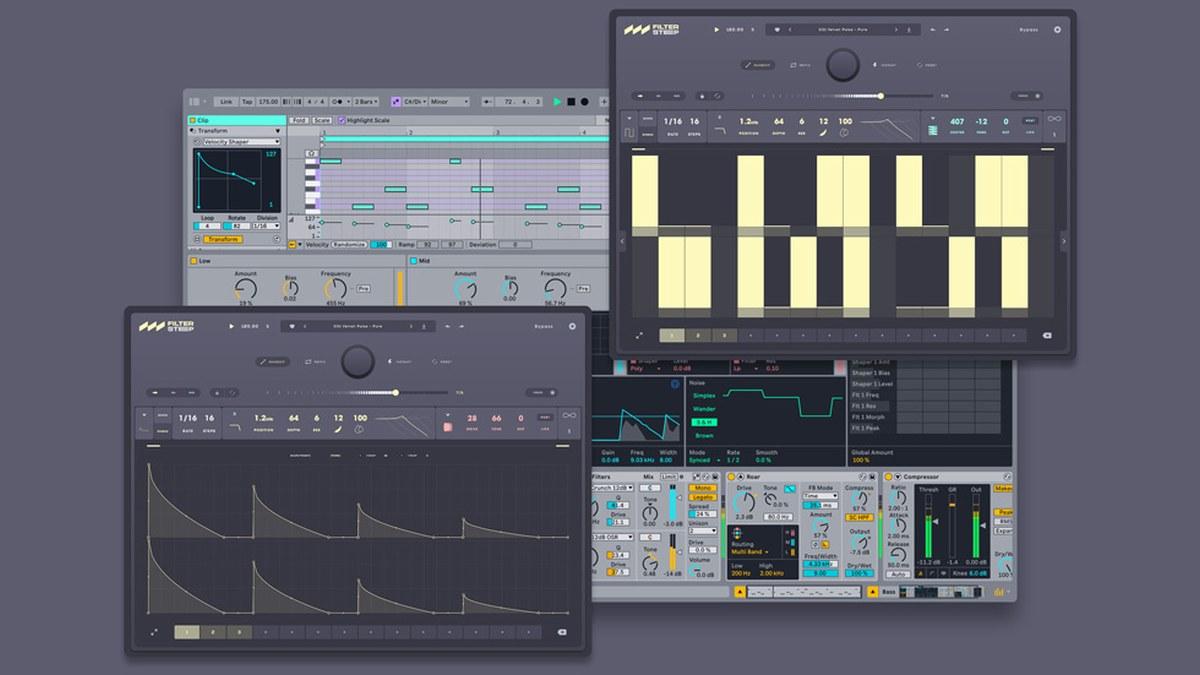
Filterstep 2 is Audiomodern's free rhythmic motion filter, released in November 2026 for Windows and macOS, with an iPad version on the way. It turns a filter into a step sequencer: pick one of five sequencing modes, draw your own filter shapes, and let Random, Remix and Infinity generate patterns you would not have programmed. Five effect engines, Density, Drive, Crush, Comb and Lo-Fi, then push those patterns from subtle movement into grit. It costs nothing, in VST3, AU, AAX and standalone formats.
At a glance: step-sequenced creative filter; five sequencing modes from sharp rhythmic pulses to smooth sweeps; custom drawn filter shapes; stereo movement; Random, Remix and Infinity pattern generators; five effect engines placed before or after the filter or linked to filtered steps. VST3, AU, AAX and standalone on macOS 10.14 or later and Windows 10 or newer; AUv3 and standalone for iPadOS coming soon. Free. One of the best free creative effects of the year.
What is Audiomodern Filterstep 2?
Rhythmic filtering is one of the fastest ways to make a static part move: a pad that pulses in sixteenths, a drum loop that opens and closes across the bar, a bass that chops into a groove. DAW automation can do it, but drawing it is slow and the result rarely surprises you. Filterstep 2 makes that movement a pattern you can play with, then adds generators that rewrite the pattern for you.
It succeeds the original Filterstep and sits in Audiomodern's line of pattern-driven tools next to the Riffer 4 MIDI generator. The same idea runs through both: controlled randomness that hands you ideas rather than replacing your decisions.
Filterstep 2 features, explained
Five sequencing modes
The five modes run from sharp, rhythmic pulses to smooth, evolving sweeps. Hard steps give trance-gate chops and stuttering filters; smoother modes glide between steps for slow, breathing movement. Because the sequencer runs in tempo with the host, every pattern locks to the track, and you can shape stereo movement so left and right channels open differently.
Custom filter shapes
Each step can carry a drawn filter shape rather than a fixed curve. That is what moves Filterstep 2 beyond a simple gate: a step can pluck open and decay, ramp up or hold, so a single pattern carries accents and articulation. Draw a fast decay into each step and a held pad turns into plucked, percussive chords.
Random, Remix and Infinity
Random generates a new pattern. Remix reworks the current one so it stays related to what you had. Infinity keeps the pattern evolving as the track plays, so a loop never repeats exactly. Together they are a quick way to find a groove, and the reason Filterstep 2 works as a writing tool as well as an effect.
Five creative effect engines
Density adds body, Drive adds bite, Crush adds digital grain, Comb adds metallic resonance and Lo-Fi roughens the texture. Each engine can sit before or after the filter, blend in parallel, or link to the filtered steps so the effect pulses with the pattern. Linking Comb to the steps, for example, makes the resonance appear only where the filter opens.
Filterstep 2 specifications
| Spec | Detail |
|---|---|
| Type | Rhythmic multi-effect: step-sequenced filter with effects |
| Sequencing | Five modes, custom filter shapes, stereo movement |
| Pattern tools | Random, Remix, Infinity |
| Effect engines | Density, Drive, Crush, Comb, Lo-Fi (pre or post filter, blend, step-linked) |
| Desktop formats | VST3, AU, AAX, standalone |
| iPad formats | AUv3 and standalone, coming soon |
| macOS | 10.14 or later, native Apple Silicon |
| Windows | Windows 10 or newer |
| DAWs | Ableton Live, Pro Tools, Logic Pro, FL Studio, Cubase, Studio One, Bitwig, Reaper, Reason and other major hosts |
| Price | Free |
Filterstep 2 vs FilterShaper XL, FilterFreak and LFO Tool
| Filterstep 2 | FilterShaper XL | FilterFreak | LFO Tool | |
|---|---|---|---|---|
| Price | Free | €79 regular, €49 in Cableguys' Black Friday deal | $149 regular, $39 in Soundtoys' current sale | $49.95 |
| Movement | Step sequencer with drawn shapes | Drawable LFOs on a dual filter | Analog-modelled filter with LFO, envelope and rhythm modes | Drawable LFO for volume and filter |
| Generators | Random, Remix, Infinity | No | No | No |
| Built-in effects | Five engines | Filter-focused | Saturation in the filter | No |
| Pick it if | You want instant rhythmic ideas for free | You want deep, precise modulation | You want analog filter character | You want sidechain-style pumping and simple filter LFOs |
Which to pick: start with Filterstep 2, because it costs nothing and its generators make it the fastest of the four for finding a pattern. FilterShaper XL is the upgrade for detailed, drawn modulation across two filters, and FilterFreak is the choice when analog filter tone matters more than sequencing. For sidechain pumping rather than filter rhythms, LFO Tool remains the simple answer. More free tools that earn a slot are in our best free VST plugins of 2026 guide.
Five Filterstep 2 jobs to try first
| Source | Setup | Result |
|---|---|---|
| Sustained pad | Hard-step mode, 1/16 pattern, Density after the filter | Trance-gate pulse with body |
| Drum loop | Smooth sweep mode, Infinity on | A loop that opens and closes differently every bar |
| Synth chord stabs | Drawn decaying shapes per step | Plucked, accented chords from a held part |
| Bass | Drive linked to the filtered steps | Grit only on the open steps |
| Vocal chop or texture | Comb engine step-linked, Remix for variations | Metallic, rhythmic resonance for transitions |
Who Filterstep 2 is for
Get it if you produce electronic music, hip-hop or soundtracks and want rhythmic movement on pads, loops and chords without drawing automation. Beginners get a free creative effect with musical results in seconds; experienced producers get a pattern generator that breaks habits.
Skip it if you need a transparent, static filter or precise corrective EQ. Filterstep 2 is built for movement and texture, and its generators reward experimentation more than exact recall.
How much does Filterstep 2 cost?
Filterstep 2 is free on Windows and macOS in VST3, AU, AAX and standalone formats. Download it from Audiomodern, or add it to your account at Plugin Boutique.
Download Filterstep 2 free at Plugin Boutique
Price-timing note: Audiomodern is running 40% off its paid catalogue (excluding Riffer) with code DROP40 alongside the launch, so it is a good week to pair Filterstep 2 with the company's other pattern tools.
Get Filterstep 2 free at Plugin BoutiqueFAQ
Is Audiomodern Filterstep 2 really free?
Yes. Filterstep 2 is a free download for Windows and macOS in VST3, AU, AAX and standalone formats.
What does Filterstep 2 do?
It is a step-sequenced creative filter with five sequencing modes, drawable filter shapes, Random, Remix and Infinity pattern tools, and five effect engines: Density, Drive, Crush, Comb and Lo-Fi.
Is Filterstep 2 available on iPad?
An AUv3 and standalone version for iPadOS is coming soon.
Does Filterstep 2 work in Pro Tools and FL Studio?
Yes. It ships as AAX for Pro Tools and VST3 for FL Studio, Ableton Live, Cubase, Studio One, Bitwig and Reaper, plus AU for Logic Pro.
What are the system requirements?
macOS 10.14 or later with native Apple Silicon support, or Windows 10 or newer.
Verdict
Filterstep 2 is the kind of free plugin that ends up on half your tracks. Five sequencing modes and drawable shapes cover everything from gates to slow sweeps, the effect engines add grit exactly where the filter opens, and Random, Remix and Infinity turn it into an idea generator rather than another automation chore. It will not replace a deep modulation suite like FilterShaper XL, but at no cost there is no reason not to install it today. Details and formats are on the Filterstep 2 plugin page.