Inside Tupos MPE FM: Three FM Engines Built for MPE
Tupos MPE FM is a new FM synth with 2, 4, and 6-operator engines, on-knob modulation assignment, and full MPE control over pitch, pressure, and slide.
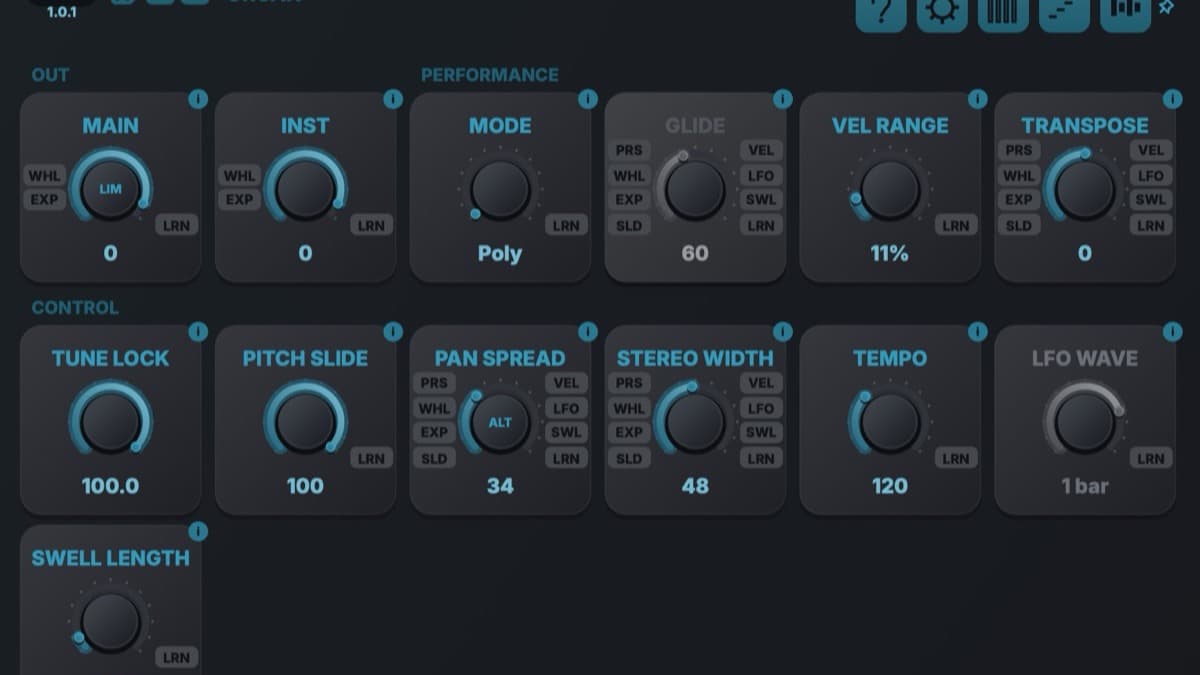
Tupos Audio, a small developer from Northern Finland, has released Tupos MPE FM, an FM synthesizer built to be played rather than programmed on paper. It ships with three engines at 2, 4, and 6 operators, modulation you assign straight from the main knobs, and full MPE control over every note. This is a first look based on the official product page and the developer's own materials, not a hands-on review.
At a glance: Tupos MPE FM is an expressive FM instrument. The desktop version costs €39.99, or €29.99 during launch with the code below, and there is a free 14-day trial. It runs on macOS and Windows as VST3, AUv2 on Mac, and standalone, and it also runs as a standalone app and AUv3 on iPhone, iPad, and Apple Silicon Mac. The pitch is speed. You shape algorithms from the front panel, assign pressure or velocity by touching a knob, and play each note with its own pitch, pressure, and slide.
What is Tupos MPE FM?
FM synthesis has a reputation for being powerful but fiddly. The classic workflow means staring at operator ratios and algorithm charts before you hear anything musical. Tupos MPE FM sets out to fix that. The whole instrument lives on one front panel where sound design stays on the surface, and the harder routing only appears when you go looking for it.
It sits in a busy category next to established names like Native Instruments FM8 and the free classic Dexed. What separates Tupos is the combination of two ideas. The first is direct, on-knob modulation, so you build expression without opening a matrix. The second is MPE built in from the start, so an expressive controller can move each note independently. Together they aim FM synthesis at players, not just patch programmers.
What Tupos MPE FM gives you
Three FM engines that share one panel. You choose 2, 4, or 6 operators, and the layout stays the same. Four operators give you eight algorithms, from a serial stack where each operator feeds the next, through three modulators into one carrier, dual stacks, a branched routing, four parallel sines, and a chain where operator one feeds back into itself. Two operators reduce that to a stack and a parallel pair. Six operators open 32 algorithms with their own feedback stage. Most sounds never leave the main controls.
On-knob modulation with source badges. This is the workflow idea that defines the instrument. Assignable controls carry small source badges, so you assign pressure, slide, velocity, or MIDI Learn directly on the control you want to move. Want aftertouch to open the tone, or velocity to add bite? You set it on that knob, and the badge shows the routing where it acts. There is no separate page to hunt through.
A routing matrix for when you need it. When a sound needs a path the eight or 32 algorithms do not cover, the matrix opens the full routing grid, including feedback connections. It is the same instrument, one layer deeper. Beginners can ignore it, and sound designers can dig in without switching tools.
MPE across every note. With an MPE controller or a keyboard that sends polyphonic aftertouch, each note gets its own pitch bend, pressure, and slide. Factory presets already demonstrate expressive routings, such as pressure into modulation depth or slide into timbre. None of it is fixed, so you can move a source onto any control. You still get plenty without MPE hardware. Velocity, mod wheel, channel aftertouch, and an expression pedal reach the same destinations and move the whole voice at once. A Standard MIDI profile in Settings sets that up in one tap.
An arpeggiator and a step sequencer. Held notes turn into rhythmic patterns through the arpeggiator, and the step sequencer writes note patterns with per-step velocity and length. Both keep the focus on playing an idea quickly rather than drawing it in a DAW.
An eight-slot effects chain. You build a chain of up to eight effects, and each one exposes its own focused controls plus the same direct-modulation badges used across the synth. Many factory presets arrive with a complete effects chain already in place, so a patch can go from raw tone to finished sound without leaving the plugin.
A preset browser and a built-in guide. The browser moves through factory and user sounds by category, and you can save, rate, and find your own variations. A virtual keyboard previews sounds without external hardware, though in plugin mode it plays the instrument directly and does not send MIDI to the host. A built-in guide covers the knobs, navigation, and effects, which lowers the barrier for anyone new to FM.
Tupos MPE FM specifications
| Spec | Detail |
|---|---|
| Type | FM synthesizer with direct on-knob modulation |
| Developer | Tupos Audio (Northern Finland) |
| Engines | 2, 4, and 6 operators sharing one panel |
| Algorithms | 8 at four operators, 32 plus feedback at six operators, custom routing matrix |
| Expression | Full MPE (per-note pitch, pressure, slide), plus Standard MIDI fallback |
| Sequencing | Arpeggiator and step sequencer with per-step velocity and length |
| Effects | Eight-slot chain, per-effect controls, modulation badges |
| Desktop formats | VST3, AUv2 (Mac), standalone (macOS and Windows) |
| Mobile formats | Standalone and AUv3 (iPhone, iPad, Apple Silicon Mac) |
| Version | 1.0.1 |
| Price | €39.99 full, €29.99 during launch, free 14-day trial |
Tupos MPE FM vs FM8
The obvious yardstick is Native Instruments FM8, the long-standing FM workhorse. FM8 is deep, with a large matrix, a drum engine, and decades of presets behind it. It is also a desktop plugin built around a classic editing model rather than live expression. Tupos MPE FM trades that legacy for speed and touch. It puts modulation on the knobs, builds MPE in from the start, and runs on iPad as well as desktop.
| Tupos MPE FM | Native Instruments FM8 | |
|---|---|---|
| Operators | 2, 4, or 6 | 6 (plus extra) |
| Modulation workflow | Assign on the knob, source badges | Central matrix editing |
| MPE | Built in, per-note | Limited |
| Platforms | macOS, Windows, iPad, iPhone | macOS, Windows |
| Price | €39.99 (€29.99 launch) | Around €139 |
| Reach for it when | You want to play FM expressively | You want a deep desktop classic |
Which to pick. If you already own FM8 or want the deepest desktop FM catalog, it remains a strong tool. If you want FM that responds to touch, edits fast, and travels to an iPad, Tupos MPE FM is the fresher fit. The free Dexed is also worth a look if you specifically want DX7-style FM at no cost, though it lacks the MPE and on-knob workflow here.
Who Tupos MPE FM is for
Buy it if you play with an MPE controller, a Seaboard, or a keyboard with polyphonic aftertouch, and you want each note to move on its own. The direct-assignment workflow also suits producers who find traditional FM editing slow and want results faster.
It is a strong pick if you work across desktop and iPad, since one instrument covers both with standalone and plugin versions on each. The built-in guide makes it approachable for anyone curious about FM but put off by the usual learning curve.
Skip it if you need Windows VST3 plus a decades-deep preset library today, or you rely on AAX in Pro Tools. There, an established option like FM8 covers more ground.
How much does Tupos MPE FM cost?
The desktop full license is €39.99, charged through Lemon Squeezy. During the launch you can take 25 percent off with the code TUPOSMPEFMLAUNCH25 at checkout, which brings it to €29.99, and that offer is valid through 10 October 2026. A full-featured 14-day trial costs nothing and needs no payment details, so you can run it in your own projects first. You can buy or try Tupos MPE FM on the official store.
If you want to compare it with a modern all-in-one synth on catalog, Arturia Pigments is a capable alternative, and our guide to the best free synth VSTs of 2026 covers the no-cost route. For expressive playing, our look at the Expressive E Osmose explains why MPE is worth the effort.
FAQ
Does Tupos MPE FM need an MPE controller?
No. MPE hardware adds per-note pitch, pressure, and slide, but the instrument works with any MIDI keyboard. A Standard MIDI profile routes velocity, mod wheel, channel aftertouch, and an expression pedal to the same destinations, moving the whole voice instead of one note.
What formats and platforms does Tupos MPE FM support?
On desktop it runs as VST3, AUv2 on Mac, and standalone across macOS and Windows. It also runs as a standalone app and AUv3 on iPhone, iPad, and Apple Silicon Mac. One license covers the desktop version.
Is Tupos MPE FM good for beginners to FM?
It is aimed squarely at that problem. The three engines share one panel, most sounds stay on the main controls, and a built-in guide walks through the knobs and effects. The routing matrix is there when you want depth, but you can make music without it.
How much does Tupos MPE FM cost?
The desktop full license is €39.99, or €29.99 during launch with the code TUPOSMPEFMLAUNCH25 through 10 October 2026. A free 14-day trial is available with no payment required.