Suno Studio 2.0 Adds MIDI, a Synth, and Unlimited Stem Export
Suno Studio 2.0 adds MIDI, a wavetable synth, chat-built plugins, and unlimited 32-bit/48kHz stem export on Premier. A first look at Suno's browser DAW.
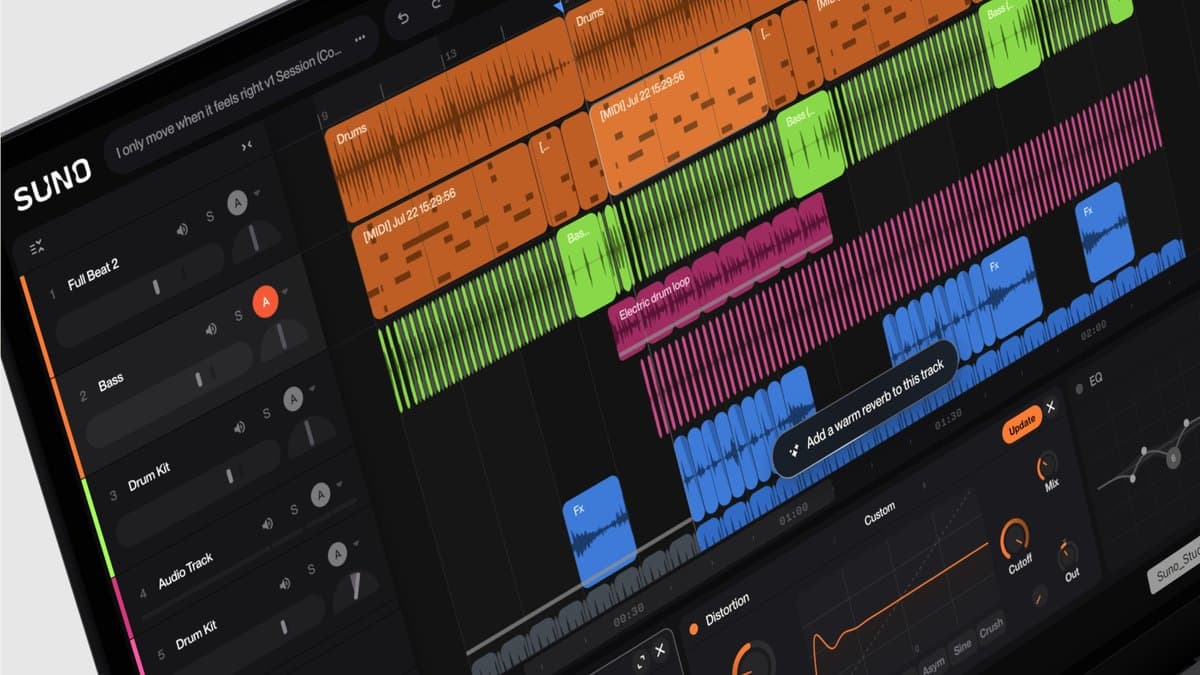
Suno shipped Studio 2.0 on August 13, 2026. The browser DAW now records MIDI, loads a built-in wavetable synth, and lets Premier subscribers export 32-bit/48kHz multitracks and stems with no cap. This is a first look at what the official pages shipped, not a session report.
Studio 2.0 at a glance
- Price / tier: Premier only. $24 per month on annual billing ($288/year), or $30 per month billed monthly. Pro and Free do not include Studio.
- Platforms: Web. Suno recommends Google Chrome. Web MIDI is not available in Safari. Phones are not supported. Minimum screen width is 768px.
- Headline extras: MIDI on the timeline, wavetable synth, chat bar (beta), factory effects, chat-built plugins, automation, advanced stem split, unlimited Studio exports.
- Verdict: The first Studio release that behaves like a small DAW. Still no VST or AU, and still locked to Premier.
Suno's own product walkthrough is on the official channel:
What Studio 2.0 is
Studio is Suno's in-browser generative workstation. You open a song from your library, drop in outside audio, or start a blank session, then generate and arrange parts on a timeline. Version 1 shipped to Premier users in 2025 as a stem-first editor with Cover, Remix, tempo, and export back to a regular DAW. Spoken narration with its own score is a separate beta, covered in our Suno Speech guide.
2.0 adds the parts producers kept asking for. MIDI sits on the timeline. A synth makes those notes audible. Effects and automation stay in the session. Chat can generate a clip, build a plugin, or tidy the project.
It still is not a replacement for Ableton, Logic, or FL Studio. There is no VST or Audio Units hosting, no direct DAW sync, and no desktop install. Suno frames it as a place to finish more of the song before you leave, or to export stems into a real DAW when you want one.
Studio 1.x stays open for a few weeks via Open in v1 in the project menu. Suno expects to retire 1.x in early September 2026. Old projects can open in 2.0. New 2.0 work (effects, automation, MIDI, synths) will not move back.
What 2.0 actually adds
MIDI on the timeline
MIDI was the most requested Studio feature, and it is the one that changes the job. You can import, record, and edit MIDI on the timeline. Notes live in clips. A synth on the track turns them into sound. You can draw a part, play it in, fix a bad note, and swap the instrument later.
Suno also does something a regular DAW does not. A MIDI clip can prompt a new audio generation. Drag an audio clip onto a MIDI track to transcribe it into notes. Generate an audio cover of your MIDI from chat. That loop (notes to audio, audio to notes) is the Studio-specific trick.
You do not need a controller. Musical typing maps the computer keyboard to a piano, with an arpeggiator and chord mode. Hardware controllers connect through Web MIDI. MIDI Learn maps a knob to a parameter. Transport buttons can drive play, stop, record, and loop. Safari does not support Web MIDI, so Chrome is the path if you care about a controller.
Wavetable synth
Every new MIDI track loads the factory wavetable synth so the track makes sound immediately. Official copy lists basses, leads, pads, chords, and other synth parts. You can shape a patch by hand (oscillators, filters, envelopes, LFOs, a mod matrix) or pick a factory preset. Chat can design new presets.
How many factory presets ship, and how the oscillators are voiced, is unpublished.
Chat bar (beta)
The old Cover/Remix context bar is now a chat bar, and it is explicitly in beta. You ask it to create instruments and vocals, design a plugin, generate a MIDI clip, arrange a section, or tidy the session. Suno says it understands music production language.
Chat is the only way to build custom plugins. At launch, creating those plugins does not cost credits. Suno says a credit charge may arrive later. How many credits a generation inside Studio still costs is not spelled out on the 2.0 pages.
Advanced stem separation
Studio now runs Suno's latest stem splitter on clips in the session. Right-click an audio clip, choose Split Stems, and pick a mode. Official 2.0 help lists Split from Mix and Advanced Split alongside the older automatic split. You can also bring audio in from outside Suno, split it, and rearrange the parts on the timeline.
Premier is the tier that unlocks Advanced Split on the rest of the site (Auto, Split from Mix, and Advanced). Pro gets Auto and Split from Mix only, and no Studio. If you already use Suno stems as the start of a mix, the export-to-DAW guide is still the handoff.
Audio effects and chat-built plugins
Factory devices at launch include compressor (with sidechain), EQ, reverb, convolution, delay, distortion, and gate. The announcement calls out sidechain compression and convolution reverb by name. Effects run in real time on audio and MIDI tracks. You can reorder, bypass, and save presets.
Custom plugins are chat objects, not third-party files. Describe an effect ("warm tape saturation with a wobble"), confirm the build, then drag it onto a track. Finished plugins save to your library, take presets, take automation, and take MIDI Learn. They are not VST, VST3, or AU, and Studio will not load those formats.
Automation
Automation is new. You draw curves for track volume, pan, and plugin parameters. Right-click a knob and choose Automate. Official help says automation is written into the exported mix and into downloaded stems. MIDI Learn can drive the same parameters from a controller.
Unlimited 32-bit/48kHz export
This is the practical reason to care about Studio in August 2026. On September 3, Suno caps regular song downloads: 7 lifetime on Free, 20 per month on Pro, 60 per month on Premier. Extra downloads will be for sale. Studio exports stay uncapped for Premier subscribers.
Official 2.0 copy: high-quality 32-bit/48kHz multitracks and stems, without limitations. Help adds the scopes: full song, selected range, or multitrack, as 32-bit WAV or MP3. Individual stems also download as WAV. That is the clean path out of Suno after the cap lands.
If the finished object you want is a record, not a session, Suno is also testing one-off vinyl. That is a separate product.
Specifications
| Spec | Official detail |
|---|---|
| Product | Suno Studio 2.0, browser generative DAW |
| Released | August 13, 2026 |
| Access | Premier subscribers only |
| Price | $24/mo annual ($288/year) or $30/mo monthly |
| Client | Web app. Chrome recommended |
| MIDI | Import, record, edit, musical typing, Web MIDI, MIDI Learn |
| Instruments | Built-in wavetable synth; chat-designed presets |
| Effects | Compressor (sidechain), EQ, reverb, convolution, delay, distortion, gate |
| Custom plugins | Chat-built, saved to your library; no VST/AU |
| Automation | Volume, pan, plugin parameters |
| Stem split | Auto, Split from Mix, Advanced Split (in Studio) |
| Upload | WAV, MP3, MIDI |
| Export | Full mix, range, or multitrack; 32-bit WAV or MP3; stem WAVs; 32-bit/48kHz |
| Studio export cap | None for Premier |
| Regular download cap (from Sept 3, 2026) | Premier 60/month outside Studio |
| Screen | 768px minimum width; phones not supported |
| Hardware (help) | CPU with SIMD (SSE4.1 or Neon); at least 4 GB RAM |
| 1.x overlap | Open in v1 for a few weeks; 1.x expected to retire early September 2026 |
Suno also lists a known timing bug: some new generations can sit slightly ahead of or behind the beat. The official workaround is the metronome (Shift-C) and soloing the part (Shift-S). How often it happens is unpublished.
Studio 2.0 vs Studio 1.x vs a real DAW
| Studio 1.x | Studio 2.0 | Export stems to a DAW | |
|---|---|---|---|
| Where it runs | Browser, Premier | Browser, Premier | Your Ableton, Logic, or FL project |
| MIDI tracks / piano roll | Not in 1.x | Import, record, edit, musical typing | Full MIDI and third-party instruments |
| Synth | Unpublished / none as a 2.0 headline | Factory wavetable | Any VST, AU, or stock device |
| Effects | Not a 2.0-style rack | Factory set plus chat plugins | Your full plugin folder |
| Automation | New in 2.0 | Volume, pan, plugins | Standard DAW automation |
| Stem split | Basic Studio split | Advanced split on clips, including outside audio | You import the files and mix there |
| Plugin formats | No VST/AU | Still no VST/AU | Whatever your DAW hosts |
| Export quality | Stems and MIDI out | 32-bit/48kHz, uncapped | Whatever you bounce |
| Best for | Quick stem edits in Suno | Staying in Suno longer | A mix you actually release |
2.0 is more of a DAW than 1.x. It is still not Ableton. If the endgame is a finished arrangement, generate and split here, then move the stems. For a wider map of generators, see the 2026 AI music guide.
Who it is for, and who should skip
Use it if you already pay for Premier and you want to play notes, automate a mix, or split outside audio without leaving the browser. The unlimited Studio export is the feature that matters once September 3 hits. Songwriters who want a vocal that sounds like them can pair this with Suno Voices on a paid plan, then open the song in Studio.
Skip it if you need VST or AU, you live in Safari, or you are on Free or Pro and will not upgrade. Skip it if you already have a DAW and only need a WAV dump: Pro can still split stems on the main site, and a real mixer will beat Studio's seven factory effects. Skip it if you want a local, offline generator; that is a different tool, covered in the best AI music generators roundup.
Pricing
Studio is not a separate SKU. It is a Premier feature.
From suno.com/pricing on August 19, 2026:
| Plan | Price | Studio | Credits | Song downloads from Sept 3, 2026 |
|---|---|---|---|---|
| Free | $0 | No | 50/day | 7 lifetime, personal use only |
| Pro | $10/mo, or $8/mo billed annually ($96/year) | No | 2,500/month | 20/month, commercial rights |
| Premier | $30/mo, or $24/mo billed annually ($288/year) | Yes | 10,000/month | 60/month on the main site; unlimited from Studio |
Premier also adds Advanced Split, early feature access, a priority queue (up to 10 at once), Voices, and Custom Models. Taxes are extra. Credits in the subscription do not roll over.
Start at the official site: suno.com.
Frequently asked questions
Do I need Premier for Studio 2.0?
Yes. Official blog, release notes, help, and pricing all say Studio is a Premier feature. Pro does not unlock it.
What can I export, and is it really unlimited?
Premier can export the full mix, a selected range, or the multitrack as 32-bit WAV or MP3, plus individual stem WAVs, at 32-bit/48kHz. Suno states there is no Studio export limit. That is separate from the 60-download monthly cap on regular song downloads that starts September 3, 2026.
Can I use my Serum, Vital, or hardware synth?
Not as a plugin. Studio does not host VST or Audio Units. A MIDI controller can play Studio's wavetable. A hardware synth can be recorded as audio if your interface works in the browser. To use your own software instruments, export MIDI or stems and finish in a DAW.
Will my Studio 1.x projects open?
Yes. Open them in 2.0 and you will be asked to create a new version. After that, 2.0-only work cannot go back to 1.x. Suno expects to drop 1.x in early September 2026.
Does it run on a phone?
No. Official help: desktop, laptop, or tablet, 768px minimum width. Mobile devices are not supported. Chrome is the recommended browser.
The bottom line
Studio 2.0 can take a MIDI part, a factory synth, a chat-built effect, and a stem split, then bounce a 32-bit/48kHz multitrack with no download counter. That matters once regular downloads are capped.
It is still a browser app on one paid tier, with no third-party plugins and a beta chat bar. Use it to get further inside Suno. Do not treat it as the DAW you already own.
Open Suno if you have Premier. If you do not, the upgrade is the $24/month annual Premier plan, and nothing cheaper includes Studio.