Bjango Reality Distortion Tracks Audio With 64 Oscillators
Bjango Reality Distortion is a $39 launch resynthesis plugin that rebuilds incoming audio with up to 64 oscillators. Specs, price, and who should buy 1.0.1.
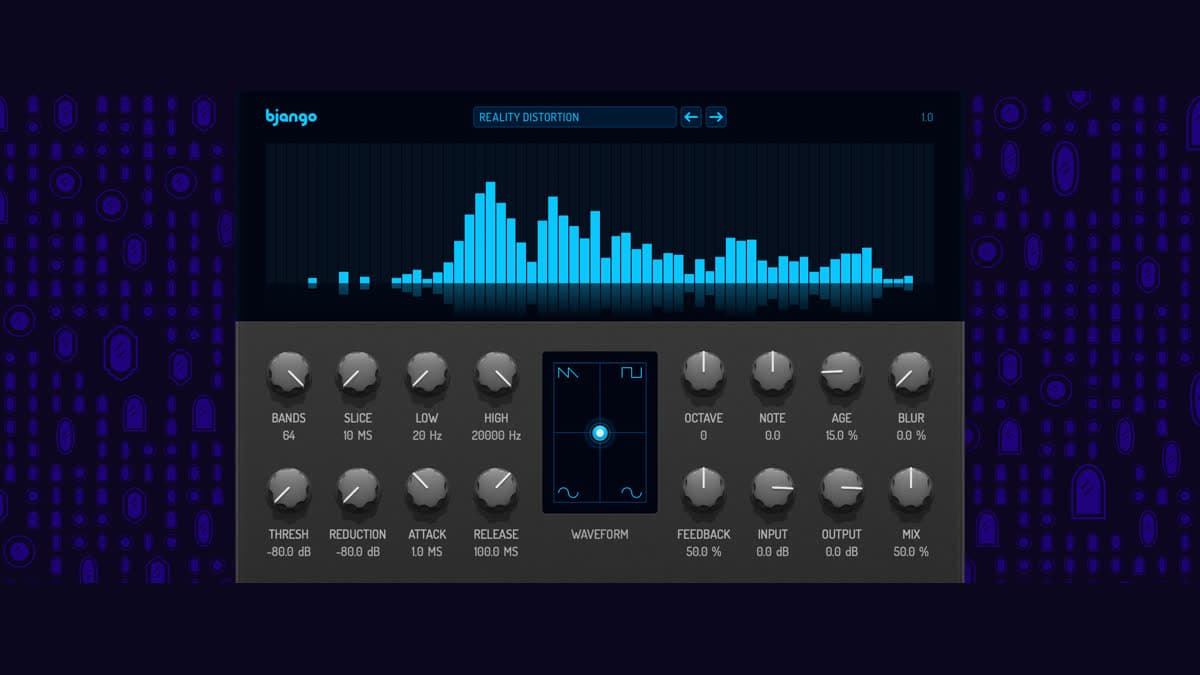
Bjango shipped Reality Distortion as Audio Unit 1.0.1 and VST 1.0.1.0. It listens to whatever you feed it, splits that signal into musically spaced bands, and rebuilds what it hears with up to 64 tracking oscillators. Launch price is $39 USD plus tax against a $49 regular price, the license is one-time, and all 1.x updates are included. Here's a first look at what's in the 1.0.1 release.
At a glance: $39 launch / $49 regular, plus tax. AUv3 and VST3. macOS 14+ for Audio Unit, macOS 13+ or Windows 10+ for VST. 30-day free trial. Sidechaining is required, so it won't run in GarageBand. Sold direct from Bjango.
What Reality Distortion is
Most creative effects smear, freeze, or granulate the recording you already have. Reality Distortion goes a different route. The analyzer measures the frequency response of the input, then a bank of oscillators plays that measurement back. Once the sound is a pile of oscillators you can pitch it, detune it, feed it back into itself, or thin it down to a single lonely tone that chases the track around.
Bjango is clear about the trade-off. Use all 64 oscillators and the result is altered but still recognizable. Drop the band count and the plugin leaves the source further behind. Mix a little under the dry signal for thickness and shimmer, or push Mix to 100% and let the oscillators take over completely.
It sits near other tools that turn live audio into something you can reshape, without doing quite the same job as any of them. Gulf Coast Synthesis Spectral is the draw-or-resynthesize cousin, while Portal and Graindad stay in the granular lane. Reality Distortion is a tracking oscillator bank with a gate, a morph pad, and a feedback loop.
Analyzer, slice, and the frequency window
The analyzer is the whole engine. Incoming audio gets split into musically spaced bands, and each band contributes one oscillator.
Bands sets how many of those bands are alive, from 1 to 64. Higher values track the input closer, lower values depart from it. One oscillator is a single tone following the track around; sixty-four is a dense reconstruction.
Slice sets how often that analysis runs, from a near-continuous 10 ms to a sluggish 1 second. Short slices keep the oscillators glued to the performance. Long slices freeze the bank between updates, so smooth material turns into stepped, sample-and-hold movement.
Low and High set the frequency range the analyzer listens to. Anything outside that window is ignored, which stops rumble and hiss from claiming oscillators you'd rather spend elsewhere. Set High below Low and the two simply swap roles.
That trio is the practical difference between a faithful double and a melting pad. Short slices, a high band count, and a wide window keep you close to the source. Long slices and a narrow window start inventing.
Waveform pad, pitch, age, and blur
The morph area in the middle sets the shape the oscillators play. Drag the dot to blend between sawtooth, square, and sine, and option-click to recenter it. It isn't a cosmetic XY pad. It's the waveform the entire bank uses once the analyzer has done its job.
Pitch and character sit around that pad.
- Octave transposes the whole bank up or down by 3 octaves.
- Note transposes by up to 600 cents. Small amounts add beating against the dry signal, and musical intervals behave like a harmonizer.
- Age detunes each oscillator by its own fixed random amount. A little reads as chorus; a lot puts the resynthesis out of tune with itself.
- Blur slews how quickly oscillators move to newly analyzed frequencies. At 0% they snap with each slice, and turning it up makes them glide.
Bjango's own tips are worth trying early. Long Slice times with some Blur turn almost anything into slow, drifting pads, and Feedback combined with a musical Note interval makes the plugin climb or fall in pitch on every slice.
Gate, feedback, and the mixer
The gate decides when the analyzer is allowed to hear the track.
Thresh is the level the input must exceed. At -80 dB the gate is effectively always open, so raise it until the oscillators stop sounding in the gaps. Reduction sets how far the analysis feed drops once the gate closes, and Attack and Release set how quickly that happens at either end. If the oscillators chatter on noisy input, the first move is Thresh, not Mix.
Feedback is the wild one. It sends the oscillator output back into the analyzer, so the plugin starts resynthesizing its own output, and tones sustain and wander long after the source has stopped. High band counts with lots of Feedback can get very loud, which is exactly what Output is there to rein in.
Input and Output trim the level going into and coming out of the oscillator bank. Mix blends dry audio against oscillators: at 0% you hear only the untouched input, at 100% only the resynthesis. Bjango suggests dragging the waveform pad to the bottom and setting Mix to 100% when you want to audition exactly what the analyzer is finding, then shaping from there.
Installing it, and the GarageBand catch
The Audio Unit build isn't a component file you drop into a plugin folder. Reality Distortion ships as an Audio Unit version 3, which means the plugin lives inside an app. Unzip it, move the app to your Applications folder, open it once, and it shows up in Logic Pro, Ableton Live, Reaper, and anything else that hosts AUv3. Updates run through that same app, and the plugin flags a waiting update in its top right corner.
The VST3 route is an ordinary installer on both macOS and Windows. Bjango also publishes manual downloads for anyone who'd rather place the bundle themselves.
One limit is worth reading twice. Sidechaining is required, so the plugin won't be usable in GarageBand. Official setup guides cover Ableton Live, Logic Pro, Reaper, Bitwig, Cubase, and FL Studio.
Reality Distortion specifications
| Spec | Detail |
|---|---|
| Type | Tracking-oscillator resynthesis effect |
| Version | Audio Unit 1.0.1 / VST 1.0.1.0 |
| Oscillators | Up to 64, one per analyzer band |
| Slice | 10 ms to 1 s |
| Waveforms | Morph pad between saw, square, and sine |
| Pitch | Octave (+/- 3), Note (+/- 600 cents), Age detune |
| Gate | Thresh, Reduction, Attack, Release |
| Mixer | Feedback, Input, Output, Mix |
| Formats | AUv3, VST3 |
| macOS | Audio Unit needs 14+; VST needs 13+ |
| Windows | Windows 10+, VST3 |
| Host notes | Sidechaining required; not usable in GarageBand |
| License | One-time; all 1.x updates included |
| Trial | 30-day free trial |
| Price | $39 USD + tax launch / $49 regular |
Reality Distortion vs Spectral and Portal
The nearest useful comparisons are a resynthesizer and a granular insert rather than another Bjango plugin. Robot Rocket is their vocoder and it also needs sidechaining, but that's a different job on a different kind of source.
| Reality Distortion | GCS Spectral | Output Portal | |
|---|---|---|---|
| Job | Rebuild audio as tracking oscillators | Draw or resynthesize a spectrum | Granular insert on live audio |
| Core control | Bands, Slice, Blur, Feedback, morph pad | Spectral canvas and resynthesis | Grain grid and gates |
| Formats | AUv3, VST3 | VST3, AU, AAX | VST, VST3, AU, AAX |
| GarageBand | No (sidechain required) | Host-dependent | Host-dependent |
| Price | $39 launch / $49 | $69 ($39.99 intro) | $149 |
Pick Reality Distortion when you want the incoming part turned into a playable oscillator cloud you can pitch, smear, and feed back on itself. Pick Spectral when the move is drawing the spectrum by hand. Pick Portal or Lucid when you want grains on a track you already recorded rather than a reconstructed oscillator bank. GRNi is the other current grain tool on this desk, and it's an instrument rather than an insert.
Who Reality Distortion is for
It suits producers who like thickening a vocal, a piano, or a synth with something that still follows the notes. Sound-design sessions that need pads grown from real performances are the obvious home, and the 30-day trial gives you long enough to learn Slice, Blur, and Feedback on your own material.
It's the wrong buy in a few clear cases. GarageBand users are out, because sidechaining is required and Bjango says so plainly. There's no AAX or VST2 build, and no Linux support. If you're shopping for a transparent enhancer, look elsewhere, because a resynthesizer changes the sound on purpose.
How much Reality Distortion costs
Reality Distortion is $39 USD plus tax during the launch sale, then $49, sold direct by Bjango. Local taxes may apply at the Paddle checkout. The purchase covers all 1.x updates rather than a subscription, and there's a 30-day free trial before you commit. Bjango also states its plugins carry no ads, no analytics, and no tracking. You won't find Reality Distortion on Plugin Boutique, Thomann, or Best Service.
FAQ
How much does Reality Distortion cost?
$39 USD plus tax during the launch sale, $49 afterwards, one-time from Bjango. All 1.x updates are included.
Does Reality Distortion work in GarageBand?
No. Sidechaining is required, and Bjango states the plugin won't be usable there. Ableton Live, Logic Pro, Reaper, Bitwig, Cubase, and FL Studio all have official setup guides.
What are the Reality Distortion system requirements?
The Audio Unit version 3 build needs macOS 14 or later. The VST3 build needs macOS 13 or later, or Windows 10 or later.
How many oscillators does Reality Distortion use?
Up to 64, one per analyzer band. The Bands control sets how many are active, and lowering it is how you push the result away from the source.
Is Reality Distortion a granular plugin?
No. It analyzes incoming audio and rebuilds it with oscillators. Granular tools like Portal and Graindad chop the recording into grains, while this one tracks frequency bands and resynthesizes them.
Does the launch price include updates?
Yes. The purchase covers all 1.x updates, and it isn't a subscription.
The bottom line
Reality Distortion is a small, specific tool: an analyzer, a morphable oscillator bank, and a feedback loop that can either sit under a part or replace it outright. Slice, Blur, and the gate are what separate a shimmering double from a pad that's forgotten where it came from. The limits are just as specific, since it's AUv3 and VST3 only, sold direct, and off-limits in GarageBand. At $39 with a 30-day trial attached, the way to decide is to put it on a vocal and a piano and listen to what 64 oscillators do with those notes. Browse our plugin database if you want it lined up next to Spectral, Portal, and the rest of the resynthesis and texture shelf.