Some links on this page are affiliate links. If you buy through them, Dubspot may earn a commission at no extra cost to you. It never affects our scores or what we recommend (read our policy).
Segment CPH Palora: A Synth Made for AI Presets
Segment CPH Palora is a virtual-analog synth with twin morphing oscillators, a per-voice transient engine, and presets you can write with any AI assistant.
T
Theo Nakamura
September 27, 2026 · 10 min read
Dubspot's best Black Friday dealsDubspot Tracker Pro: $15, was $24.99 ↗Drum Programming and Groove Production Course: $19, was $99 ↗
Copenhagen developer Segment CPH has released Palora, a virtual-analog synthesizer built around one unusual idea. Its presets are plain text, so you can ask any AI assistant to write them for you. Palora arrived in late September 2026 as the studio's first plugin. What follows is a first look drawn from the official product page and Segment CPH's own materials, not a hands-on review.
At a glance: Palora is a virtual-analog synth priced at €47.40 during launch, then €79 once the discount ends. It runs as VST3, AU, and standalone on macOS, and as VST3 and standalone on Windows. Activation is offline, with no iLok and no account. Twin morphing oscillators, a sub, a per-voice click generator, and a transient shaper feed a two-mode ladder filter and a five-stage effects chain. The headline is the preset format. Every patch is a readable JSON file, and Segment publishes an authoring brief so an AI assistant can generate patches on request.
What is Palora?
Palora sits in the crowded field of virtual-analog synths, the software instruments that chase the sound and workflow of classic subtractive hardware. That field already holds heavyweights like u-he Diva and a long tail of budget options. A debut synth needs a reason to exist, and Palora offers two. The first is a signature attack engine tuned for punchy plucks and stabs. The second is a preset system built for how many producers now work: describe a sound in words, then let a tool build it.
The design brief is a full-range synth that stays simple to drive. Rather than pile on engines, Segment CPH keeps the layout clear and subtractive: two oscillators, a sub, one filter, and a compact modulation section. An onboard effects chain then takes a raw patch to a finished, mix-ready state without leaving the plugin. It also runs standalone, so you can play it without opening a host at all.
What Palora gives you
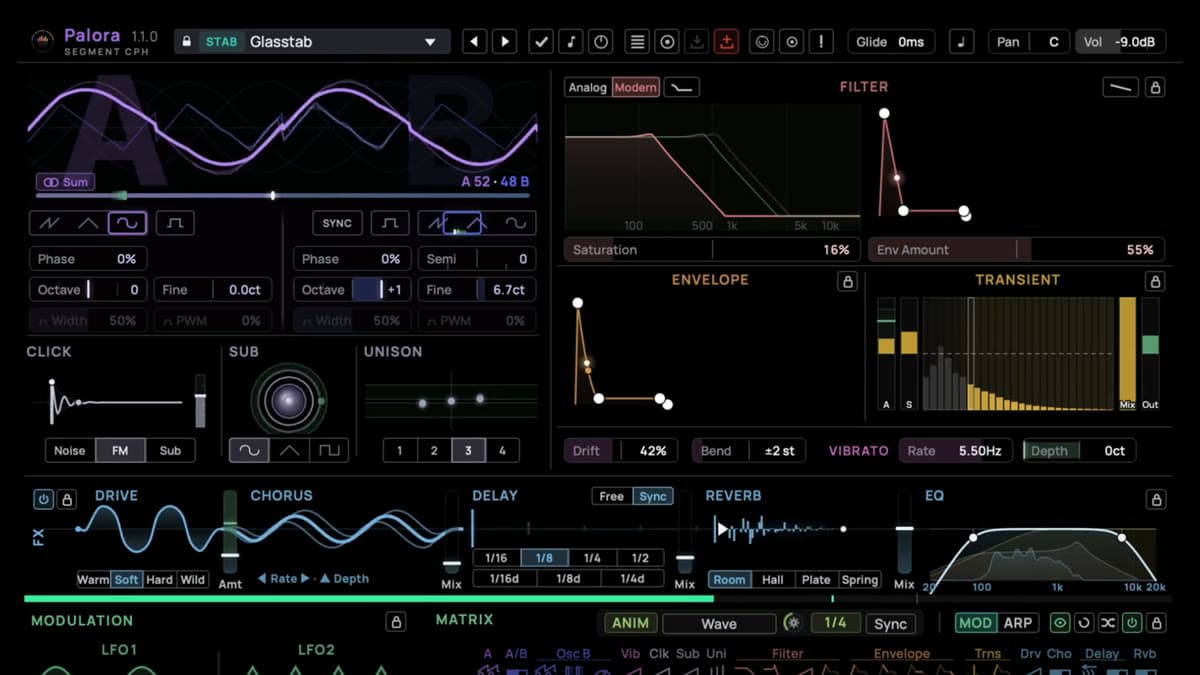
Twin morphing oscillators with a sub. Palora's two main oscillators move between saw, triangle, sine, and pulse shapes, with an A and B blend that lets you sum or crossfade between them. Detune, drift, and unison thicken a single note into an ensemble. A sub oscillator adds weight one octave below, which matters for bass patches that need to hold the low end on their own.
A click generator for transients. Every voice carries a dedicated click generator with noise, FM, and sub modes. It injects a short attack component at the start of a note, so plucks snap and kicks thump. This is Palora's signature feature, and it is what the developer means by an attack engine built for stabs and percussive sounds.
A per-voice transient shaper. Alongside the click, a transient shaper sculpts the first ten milliseconds of each note. You can make a pluck cut through a busy arrangement, or let a bass punch without wrecking its sustain. Paired with the click generator, it hands you real control over the part of a sound that ears notice first.
A ladder filter with two characters. The filter runs an Analog mode that adds warm saturation and a Modern mode that stays clean all the way to self-oscillation. A Bass Comp control compensates for the low-end loss that resonant filters usually cause, and a Saturation control pushes the drive. It is one filter, but the two voicings cover a wide tonal range.
A modulation matrix at the center. Movement comes from three LFOs, one envelope, three macros, and a per-note randomness source. Any of them can be wired to any of twenty-four selected parameters across a 24 by 11 grid, alongside velocity, mod wheel, key tracking, and aftertouch. Segment calls the matrix the heart of the instrument, and the layout backs that up. It is where a static patch becomes a living one.
A five-stage effects chain. Palora finishes sounds with Drive, Chorus, Delay, Reverb, and EQ in a built-in chain the developer nicknames the FX river. Each stage gets visual feedback, and the goal is to take a patch from raw to release-ready without reaching for separate plugins. For anyone building sounds across a whole track, that saves a lot of routing.
The preset format is the real story
Here is where Palora parts ways with the pack. Every preset is a readable JSON file with a clear structure of oscillator, filter, and modulation parameters. You can open a patch in any text editor, compare two versions, keep your sounds in version control, and share them as plain files.
Because the format is open and documented, Segment CPH publishes an AI authoring brief. It is a document you paste into any AI assistant to teach it how to write valid Palora presets. You describe a sound, or a whole pack, then load the result. There is even a dedicated skill for Claude that installs the brief directly. Segment is clear on one point: no AI runs inside the plugin, and no account or subscription is involved. The intelligence lives in whatever assistant you already use, and Palora simply reads the file it produces.
For sound designers, the format carries a commercial angle too. A preset pack can hold a read-only flag, which installs it as a locked commercial bank that cannot be exported back out as plain files. The same openness that lets you hand-edit your own patches also supports paid packs that stay protected.
The rest of the preset system is conventional but well built. A modern browser manages banks and categories. Preset markers show where a patch differs from the default and what you have changed since loading it. An audition system can play a representative phrase per category while you browse, so you can hunt for a sound without touching the keyboard.
Palora specifications
| Spec | Detail |
|---|---|
| Type | Virtual-analog (subtractive) synthesizer |
| Developer | Segment CPH (Copenhagen) |
| Oscillators | Two morphing oscillators (saw, triangle, sine, pulse), plus sub |
| Attack engine | Per-voice click generator (noise, FM, sub) and transient shaper |
| Filter | Ladder filter, Analog and Modern modes, Bass Comp |
| Modulation | 3 LFOs, 1 envelope, 3 macros, per-note randomness, 24 by 11 matrix |
| Effects | Drive, Chorus, Delay, Reverb, EQ (built-in chain) |
| Arpeggiator | Yes, with pattern, rate, swing, and gate |
| Presets | Open JSON format, AI authoring brief, commercial pack support |
| macOS formats | VST3, AU, standalone (Apple Silicon and Intel) |
| Windows formats | VST3, standalone |
| Activation | Offline, no iLok, no account |
| Price | €47.40 intro, then €79 |
Palora vs u-he Diva
The natural comparison is the virtual-analog benchmark, u-he Diva. Diva models classic circuits with heavy DSP for arguably the most convincing analog tone in software. It is also plugin only, costs far more, and asks a lot of your CPU. Palora aims lower on price and higher on convenience. It brings a built-in effects chain, a transient engine, standalone operation, and the AI preset workflow that Diva does not offer.
| Palora | u-he Diva | |
|---|---|---|
| Type | Virtual-analog synth with attack engine | Circuit-modeled analog synth |
| Price | €47.40 intro, €79 after | Around €179 |
| Standalone | Yes | No, plugin only |
| Built-in effects | Five-stage chain | Two effect slots |
| Signature strength | Transient design and AI presets | Authentic analog realism |
| CPU load | Light to moderate | High in top-quality mode |
| Reach for it when | You want an affordable all-in-one | You want the truest vintage tone |
Which to pick. If you need the most authentic analog character and have the CPU headroom, check the price on Diva and take it. If you want an affordable modern synth that finishes sounds on its own and fits an AI-assisted workflow, Palora makes a strong case. A free option like Vital covers wavetable ground if that is your priority instead.
Who Palora is for
Buy it if you want one versatile subtractive synth that can cover plucks, basses, leads, and pads across a whole track, with the effects to finish them built in. The click generator and transient shaper make it especially good for punchy, percussive sounds.
It is also a strong pick if you already lean on AI tools in your workflow and like the idea of describing a sound and getting a usable patch. The same goes if you value plain-text presets you can edit, diff, and version like code.
Skip it if you specifically want circuit-level analog modeling and vintage authenticity above all else. There, a specialist like Diva or Repro-5 remains the better spend.
How much does Palora cost?
Palora is €47.40 as an introductory price, a 40 percent discount off the €79 regular price, charged in your local currency at checkout through FastSpring. A single purchase covers both macOS and Windows. There is a free, fully featured 14-day trial, so you can run it in your own projects first, plus a 14-day refund policy as long as you have not downloaded your license file. Activation is offline, with no iLok and no account, so the plugin never phones home.
To see where Palora fits among free options, our guide to the best free synth VSTs of 2026 covers the no-cost route, and the best free VST plugins of 2026 rounds out a starter setup.
FAQ
Does Palora use AI inside the plugin?
No. Palora has no AI features of its own. Its presets are open JSON files, and Segment CPH provides a brief you paste into any AI assistant so it can write patches you then load. The assistant does the work outside the plugin, and no account or subscription is required.
What formats and systems does Palora support?
On macOS it runs as VST3, AU, and standalone, native on Apple Silicon and Intel. On Windows it runs as VST3 and standalone. One purchase covers both platforms, and activation is offline with no iLok.
What makes Palora's sound different?
Its attack engine. A per-voice click generator and a transient shaper let you design the first few milliseconds of every note, which is why the developer positions it for snappy plucks, stabs, and punchy bass. A two-mode ladder filter and a built-in five-stage effects chain shape the rest.
Is Palora worth it over a free synth?
If you want built-in effects, a dedicated transient engine, standalone operation, and the AI preset workflow, the intro price is easy to justify. If you only need basic subtractive sounds, a capable free synth like Vital can get you started at no cost.