Some links on this page are affiliate links. If you buy through them, Dubspot may earn a commission at no extra cost to you. It never affects our scores or what we recommend — read our policy.
Rapid Flow miniGRID Puts Hardware Shuffle in a MIDI FX
Rapid Flow miniGRID is a $29 four-lane MIDI FX sequencer with ±64 ms per-lane shift and Omniclock shuffle. 45-day trial; VST3, AU, and AAX on Mac and Windows.
P
Priya Raman
August 25, 2026 · 10 min read
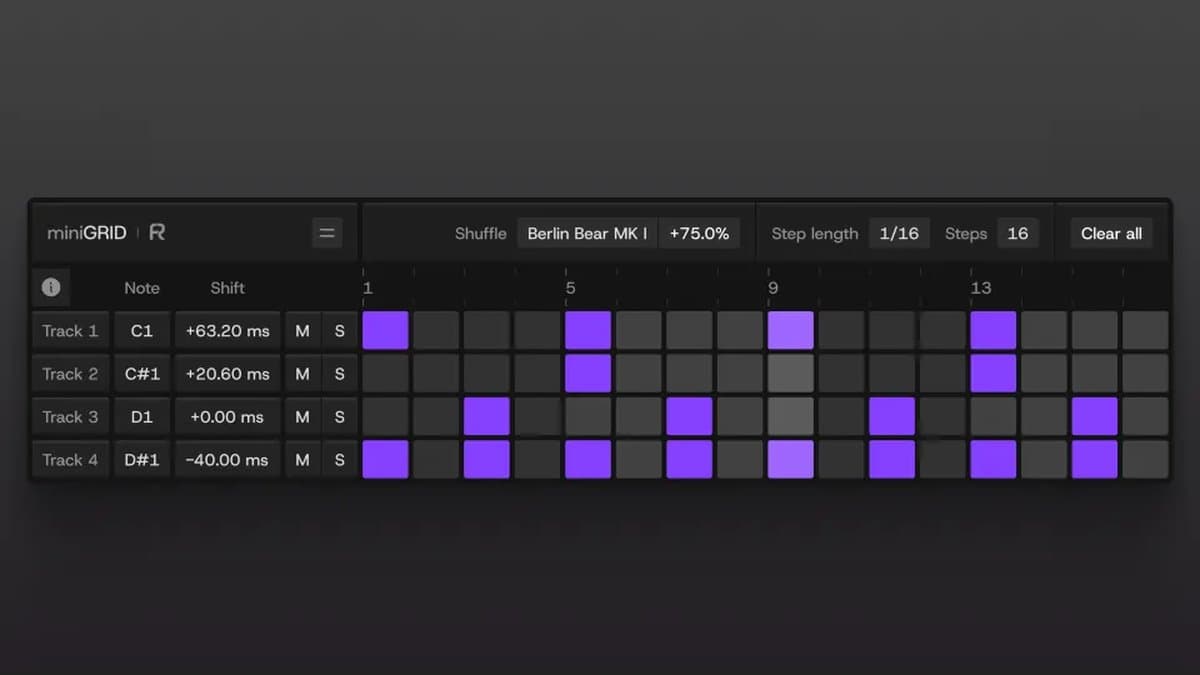
Rapid Flow's miniGRID is a four-lane MIDI step sequencer that lives in a MIDI FX slot. It does not make sound. It pushes notes into the instruments you already use, then lets you shove each lane around the beat and drop Omniclock shuffle on the grid. It costs $29. This is a first look ahead of hands-on time. We have not used it in a session.
At a glance: $29 one-time. Intro code MG35 takes 35% off at checkout. 45-day full trial. VST3, AU, and AAX. Windows 10+ and macOS 10.14+ on Intel and Apple Silicon. No iLok. Buy it from Rapid Flow.
What miniGRID is
Most DAW sequencers lock hits to a grid, then offer one global swing knob. Hardware chases a different feel: the TR-909 shuffle, the MPC60 swing, the slightly late snare that makes a loop sit down. Rapid Flow already builds Omniclock, a hardware clock box with those timing behaviors baked in. miniGRID is the in-the-box version of the same idea — per-lane shift and named shuffle, no clock on the desk.
The plugin is small on purpose. It gives you four MIDI lanes, up to 32 steps each, a shift control on every lane, and one global shuffle section with named profiles. You pick a MIDI note per lane, route the output into a drum plugin or a synth, and lock to the host transport. That is the whole machine.
It is not a chord assistant and it is not a groove audio effect. Scaler 3 writes progressions. Cthulhu memorizes chords and arps. ShaperBox 3 carves audio with LFOs. miniGRID only emits MIDI, and that has one hard consequence: if the instrument on the other end quantizes incoming notes, the shift and the shuffle both lose the fight. Rapid Flow flags that in its own documentation, and it is the first thing to check.
How the four lanes actually work
Steps, notes, mute, solo
Each lane is a row of steps with its own MIDI note. You can run up to 32 steps and change the step length, so a 16th-note hat lane can sit next to a longer phrase without cloning the plugin. Mute and solo are per lane, main parameters are automatable, and the UI scales to 400% with light and dark themes.
That is enough to sequence a four-piece kit, a percussion bed, or a bass-and-lead pair. It is not a 16-track drum machine, so if you need more rows you stack another instance.
Per-lane shift: ±64 ms
Shift is the headline. Each lane moves −64 ms to +64 ms against the DAW clock, which is the difference between pushing a snare early and pulling a hat late while the kick stays put. The lanes stay locked to transport, so you are nudging one voice rather than slipping the whole clip.
Resolution is finer than a typical swing knob. The default shift step is 0.2 ms, and holding the host Shift key while you drag drops it to 0.02 ms. That two-tier approach lets you chase pocket in hundredths of a millisecond without the control turning into a nervous mess under the mouse.
There is a transport catch worth planning around. A negative shift on step one would have to sound before you hit start, so on every restart or loop jump those early first steps get skipped. If your pattern depends on a pulled-back downbeat, move the feel later in the bar or accept the gap on each pass.
Omniclock shuffle profiles
Shuffle is global across all four lanes. You pick a profile, then set the amount. Profiles include 9×9, M60, and EM-12 BIT, among others. Rapid Flow describes them as timing behavior inspired by classic machines — TR-909, MPC60, SP-12, MPC 3000, Tanzbar, DMX, LM-1 — rather than licensed recreations, and the trademark note is explicit about it. The names describe a feel, and no manufacturer endorsed anything.
Reach for shuffle when a straight 16th grid feels stiff and one DAW swing setting makes every lane move identically. The profile sets the character and the amount sets how far you lean in. Shift still sits on top, so a lane can be late and shuffled.
MIDI only, any compatible instrument
miniGRID generates MIDI, not audio. Route it into a software drum rack, a bass plugin, a hardware synth through your interface, or anything else that takes notes. Rapid Flow documents setup for Ableton, Logic, Cubase, FL Studio, Pro Tools, Bitwig, and REAPER. In Logic it drops into the MIDI FX slot on the instrument strip. In Bitwig and REAPER it sits above the instrument in the same chain. In Ableton you pair a miniGRID track with an instrument track and set MIDI From.
Routing is the real install step, and it is where the first hour of a trial gets spent. Logic is one slot, Ableton and FL Studio take a few more clicks, and Pro Tools users are on the AAX build.
The AU version only appears in hosts that expose MIDI FX slots, so use VST3 everywhere else. You do not need the Omniclock hardware either — miniGRID runs on its own.
miniGRID specifications
| Spec | Official detail |
|---|---|
| Developer | Rapid Flow |
| Product | miniGRID |
| Type | MIDI FX step sequencer (no audio) |
| Lanes | 4, independent mute and solo |
| Steps | Up to 32, adjustable step length |
| Shift | ±64 ms per lane |
| Shift resolution | 0.2 ms default; 0.02 ms with Shift held |
| Shuffle | Omniclock profiles, global amount |
| MIDI | Assignable note per lane; output to any compatible plugin or hardware |
| Sync | Follows DAW transport |
| Automation | Main parameters |
| UI | Light and dark; scale up to 400% |
| Formats | VST3, AU, AAX (64-bit) |
| Windows | Windows 10+, VST3 64-bit |
| macOS | 10.14+, Intel and Apple Silicon, AU and VST3 64-bit |
| Linux | Windows build via Wine and yabridge (VST3) |
| iLok | Not required |
| Trial | 45 days, fully functional |
| Price | $29 one-time |
| Intro code | MG35 for 35% off at checkout |
| Buy | Rapid Flow |
miniGRID vs Scaler 3 vs Cthulhu
These three all speak MIDI. They do not do the same job.
| miniGRID | Scaler 3 | Cthulhu | |
|---|---|---|---|
| Job | Four-lane groove sequencer | Scale and chord writing | Chord memory and arpeggiator |
| Street / list | $29 at Rapid Flow | $99 on our Scaler 3 card | $39 on our Cthulhu card |
| Audio engine | None. MIDI out only | None. MIDI out only | None. MIDI out only |
| Timing | Per-lane ±64 ms + Omniclock shuffle | Not a micro-shift sequencer | Not a micro-shift sequencer |
| Formats | VST3, AU, AAX | VST3, AU, AAX | VST3, AU, AAX |
| Trial | 45 days, fully functional | Developer demo | Developer demo |
| Reach for it when | The kit is programmed and the pocket is wrong | You need progressions and scale lock | You want held chords turned into motion |
Which to pick. Choose miniGRID when the notes already exist in your head and the problem is feel. Choose Scaler 3 when the problem is harmony. Choose Cthulhu when one held chord should become movement. If you need a live orchestration host that spreads one performance across many instruments, that is Forma Labs Filament — a different class of MIDI tool entirely.
Be honest about the free option too. Your DAW's clip sequencer costs nothing, and nudging a few notes by hand covers plenty of tracks. miniGRID earns the $29 when you want named shuffle profiles and repeatable, automatable millisecond shift per lane, on every project, without dragging notes around again.
Who miniGRID is for
Consider it if you program drums or percussion in the box and you miss the way a 909 or an MPC leaned off the grid. Four lanes cover a kit, and shift plus shuffle are the reason to pay.
Consider it if you want that feel on a bass or a lead rather than only on drums, since any compatible instrument can take the MIDI.
Consider it if you will actually run the 45-day trial. Forty-five days is long enough to finish real tracks and decide whether the shift becomes a habit or a novelty.
Skip it if you want velocity lanes, probability, or a 16-row drum matrix. miniGRID is four lanes of steps, notes, shift, and shuffle.
Skip it if your instruments quantize incoming MIDI and you cannot turn that off, because the groove dies at the destination.
Skip it if you expected audio, since there is no sound engine here at all.
How much miniGRID costs
$29, one-time, lifetime access. Rapid Flow is running an intro deal: 35% off with code MG35 at checkout. Confirm the code in the cart before you pay, and do not assume it stacks with anything else.
The trial is 45 days and fully functional. Sales are final once you download, which is another argument for using the trial properly. Use the same email address for the trial and the purchase so the license flips over cleanly.
Buy it from rapidflow.shop/products/minigrid. The plugin card lives at /plugins/rapid-flow-minigrid.
FAQ
Does miniGRID make sound?
No. It sends MIDI notes, and the instrument you route into makes the sound.
Do I need Omniclock hardware?
No. The shuffle profiles come from that world, but the plugin runs on its own.
What are the system requirements?
Windows 10+ with VST3. macOS 10.14+ on Intel and Apple Silicon, with AU and VST3. AAX covers Pro Tools. No iLok. Linux is not a native build, though Rapid Flow points to the Windows VST3 running under Wine with yabridge.
Why is the AU missing in my DAW?
AU MIDI FX only shows up in hosts that have a MIDI FX slot. Use VST3 everywhere else.
Why does shift or shuffle disappear?
The destination is probably quantizing incoming MIDI, so turn that off first. Then check for negative shift on step one, which gets skipped after a restart or loop jump.
Is $29 the price I pay?
$29 is the price, and MG35 is the current intro code for 35% off at checkout. Run the cart and read the total before you pay.
The bottom line
miniGRID has a narrow brief and hits it: four MIDI lanes, millisecond shift per lane, and Omniclock shuffle driving the instruments you already own. It is $29 one-time with a 45-day trial, no iLok, no audio engine, and no velocity or probability lanes either.
This is a first look, not a scored review. We have not parked a snare 12 ms early on a real kit, and feel is the one thing a spec sheet cannot settle. Install the trial, route one drum plugin, and find out whether per-lane shift earns a permanent slot in your template. The live storefront is rapidflow.shop/products/minigrid.