Some links on this page are affiliate links. If you buy through them, Dubspot may earn a commission at no extra cost to you. It never affects our scores or what we recommend — read our policy.
Parish Audio Parametric Compressor Places Bands Like an EQ
Parish Audio Parametric Compressor is a $34.97 intro plugin that places up to 10 overlapping compressor bands like a parametric EQ. Specs and who it is for.
E
Elena Marsh
August 24, 2026 · 10 min read
Black Friday 2026Parish Audio Black Friday 2026: dates and deals →
Parish Audio shipped Parametric Compressor around 23 August 2026. The plugin treats compression the way a parametric EQ treats tone: you drop a band on a frequency, set its width, and leave the rest of the spectrum alone. Intro price at Parish Audio is $34.97, against a $69.95 regular price. This is a first look at the official product page and the v1.0.0 installers. We have not used it in a session.
At a glance: $34.97 intro / $69.95 regular at Parish Audio. Up to ten independent overlapping bands. Windows VST3. macOS VST3 and AU. No AAX. Version 1.0.0. Buy it from Parish Audio.
What Parametric Compressor is, and what it is not
A conventional multiband compressor splits the whole signal into adjacent slices with crossovers. You inherit every band even when you only wanted to sit on one problem. Parametric Compressor does not do that split. Each compressor lives on its own Frequency and Width, the same two coordinates you already use on a parametric EQ. A band can be a narrow surgical dip, a broad musical region, or full-spectrum broadband compression. Bands overlap on purpose. Nothing forces the rest of the mix into extra sections you did not ask for.
That is a different job from FabFilter Pro-MB, which is still the crossover multiband most mixers reach for when they want six adjacent bands, expansion, and gating. It is also a different job from FabFilter Pro-Q 4. Pro-Q 4 is an equalizer that can go dynamic. Parametric Compressor is a compressor that can go parametric. If you want one clean broadband compressor with eight styles and a gain-reduction graph, start with Pro-C 2.
Parish's own examples are mix jobs, not mastering slogans: tighten the low end of a drum bus, reduce buildup in the low mids, smooth an aggressive upper-mid range, or stack overlapping bands on a dense stem. Frequency and Width are not boost and cut. The processing stays compression. The selected region is simply the part of the signal that gets dynamically controlled.
How the bands actually work
Frequency, Width, and overlap
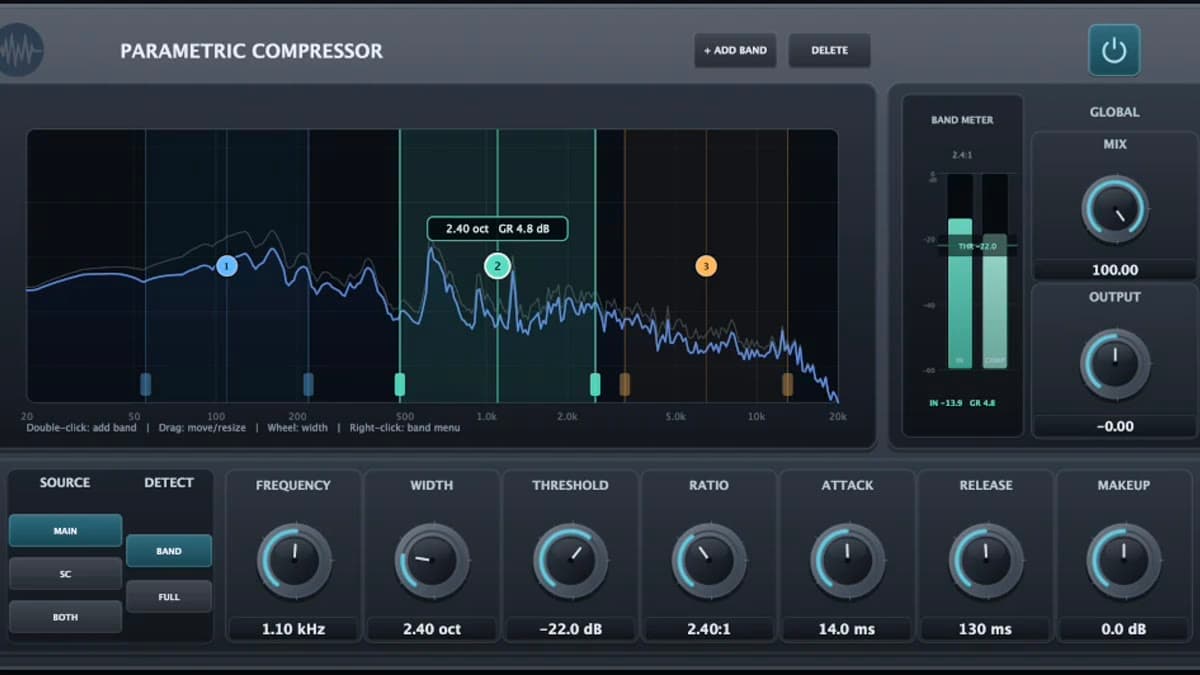
Add Band creates a compressor. You can run up to ten. Delete removes the selected one. Frequency sets the center. Width sets how much spectrum that compressor owns. Narrow settings stay around one frequency. Wider settings take a broader region. At maximum width the band becomes full-spectrum, which is how you get a traditional broadband compressor out of the same plugin.
Because each band is independent, two compressors can sit on top of each other with completely different Threshold, Ratio, Attack, Release, and Makeup. That is the headline difference from a crossover design. A crossover forbids overlap by construction. Here overlap is a feature.
The interactive spectrum is the editor. Parish's copy has you add bands on the graph, drag them, resize them, and watch how each region responds. Input and processed spectra sit together, with gain-reduction feedback for the selected band.
Per-band dynamics
Every band carries a full compressor, not a shared set of times.
- Threshold — the level where compression starts. Lower it to let more of the detector trigger the band.
- Ratio — how hard the band clamps once it is over the threshold. Low ratios stay gentle. High ratios get obvious.
- Attack — how fast the band moves after the detector crosses the threshold. Fast attack grabs transients. Slow attack lets the hit through.
- Release — how fast the band recovers once the detector falls back. Short release snaps back. Long release holds the gain reduction.
- Makeup — level for that frequency region after compression. Use it to replace what you took, or to rebalance that part of the spectrum on purpose.
Those five controls are why this is not a dynamic EQ with a compressor badge. You are choosing when and how hard a region moves, not just how much gain it loses at a frequency.
Detector source and detector mode
Parish splits "where compression happens" from "what causes it." That split is the second half of the design.
Source is per band:
- Main — the plugin input drives the detector.
- SC — an external sidechain drives the detector. The sidechain is not mixed into the audible output.
- Both — main and sidechain contribute to the detector together, without summing the two audio paths into the output.
Detect is also per band:
- Band — the detector is filtered to that band's Frequency and Width, so the compressor mostly hears the region it is processing.
- Full — the compressor still processes only the selected region, but it can respond to the whole detector signal.
That is the duck-the-pad-from-the-kick setup, or the "compress 200 Hz because the whole drum bus got loud" setup, without rebuilding the graph. One band can listen locally. The next can listen globally. Both can share a sidechain.
Mix, Output, and Power
Mix blends processed and dry. Pull it back for parallel compression, or leave it fully wet. Output is the final level after every band and the Mix control. Power bypasses processing and leaves the plugin in the chain.
Those three are global. Everything above them is per band.
Parametric Compressor specifications
| Spec | Official detail |
|---|---|
| Developer | Parish Audio |
| Type | Frequency-selective / parametric compressor |
| Version | 1.0.0 |
| Intro price | $34.97 |
| Regular price | $69.95 |
| Formats | Windows VST3; macOS VST3 and AU |
| AAX | No |
| Bands | Up to 10, independent and overlapping |
| Per-band controls | Frequency, Width, Threshold, Ratio, Attack, Release, Makeup |
| Detector source | Main, external sidechain, or both |
| Detector mode | Band-limited or full-spectrum |
| Global | Mix, Output, Power |
| Display | Interactive spectrum; input and processed traces; selected-band gain reduction |
| Windows install path | C:\Program Files\Common Files\VST3 |
| macOS VST3 path | /Library/Audio/Plug-Ins/VST3 |
| macOS AU path | /Library/Audio/Plug-Ins/Components |
| Buy | Parish Audio |
| Available | 23 August 2026 |
Parametric Compressor vs Pro-MB vs Pro-Q 4
Pro-MB is the crossover multiband in our catalog. Pro-Q 4 is the parametric EQ that also does dynamic and spectral work. Prices in the middle columns come from those plugin cards.
| Parametric Compressor | FabFilter Pro-MB | FabFilter Pro-Q 4 | |
|---|---|---|---|
| Job | Place compressor bands like an EQ | Crossover multiband dynamics | Parametric EQ with dynamic / spectral modes |
| Street / list | $34.97 intro / $69.95 at Parish | $199 on our Pro-MB card | $199 on our Pro-Q 4 card |
| Band model | Independent Frequency + Width; overlap allowed | Up to six adjacent bands with crossovers | Up to 24 EQ bands |
| Processing | Compression only | Compression, expansion, limiting, gating | EQ, dynamic EQ, spectral dynamics |
| Sidechain | Per-band main / SC / both | External sidechain, per-band mid/side | Sidechain and dynamic options |
| Formats | VST3, AU | VST, VST3, AU, CLAP, AAX | VST, VST3, AU, CLAP, AAX |
| Pro Tools | No AAX | AAX | AAX |
| Reach for it when | You want one region compressed and the neighbors left alone | You want a full multiband split with expansion | You want to sculpt tone, then add dynamics on the same EQ |
Which to pick. Choose Parametric Compressor when the picture in your head is "compress 3 kHz, leave 1 kHz and 8 kHz alone," or when two overlapping regions need different attack times. Choose Pro-MB when you want the whole mix divided into bands, plus expansion and a limiter in the same plugin. Choose Pro-Q 4 when the first move is EQ and dynamics are a second gesture on the same band.
If the job is one broadband clamp with a clear meter, Pro-C 2 is still the simpler tool. If you want the vocabulary behind compressors, crossovers, and why a detector is not the same thing as the audio path, start with our audio effects overview.
Who Parametric Compressor is for
Consider it if you already think in parametric EQ and you keep wishing the compressor would do the same. Drum buses, vocals with a harsh spot, and low-mid buildup on a mix bus are the published use cases.
Consider it if you want parallel compression on a chosen region. Mix is global, Makeup is per band, and a full-width band still behaves like a regular compressor.
Consider it if you need the detector and the processing region to disagree. Band detect for local control, Full detect for program-driven movement, and an external sidechain when another track should drive the duck.
Skip it if you work in Pro Tools and need AAX. This release is VST3 and AU only.
Skip it if you want a vintage bus compressor with a character circuit. Parish's own C11 is the tube-voiced compressor in that lineup. Parametric Compressor is a placement tool.
Skip it if you need expansion, gating, or a dedicated de-esser mode. Pro-MB covers those extra dynamics types.
How much Parametric Compressor costs
$34.97 intro, $69.95 regular at Parish Audio. Windows and Mac installers are version 1.0.0.
Buy it from Parish Audio. The plugin card lives at /plugins/parish-audio-parametric-compressor.
FAQ
Is this a multiband compressor?
It is a dynamics plugin with up to ten bands, but it is not a crossover multiband. Each band is placed with Frequency and Width. Bands can overlap. The rest of the spectrum does not get carved into extra bands you did not create.
Parametric Compressor vs Pro-MB, which one?
Pro-MB splits the signal with crossovers and can compress, expand, limit, and gate. Parametric Compressor only compresses, and it lets you park those compressors anywhere, including on top of each other. Buy Pro-MB for a full multiband split. Buy this for targeted, overlapping dynamics. Detail is in the Pro-MB card.
Parametric Compressor vs a dynamic EQ?
A dynamic EQ changes gain at a frequency when the detector fires. This plugin compresses a chosen region with Threshold, Ratio, Attack, Release, and Makeup. The coordinates look like an EQ. The processor is still a compressor.
Does it run in Pro Tools?
No AAX build. Windows is VST3. macOS is VST3 and AU.
What version is shipping?
1.0.0. Parish hosts a Windows installer and a Mac installer on the product page.
The bottom line
Parametric Compressor is Parish Audio's first-look answer to a specific complaint: crossover multibands make you own the whole split when you only wanted one region. $34.97 is the intro. $69.95 is the regular price. Ten overlapping bands, a per-band detector that can ignore its own frequency, and no AAX.
This is a first look, not a scored review. We have not parked a band on a drum bus or a vocal. Install v1.0.0, drop one narrow band on the problem, and find out whether Frequency and Width replace the crossover dance. The live storefront is parishaudio.com/products/parametric-compressor.