Some links on this page are affiliate links. If you buy through them, Dubspot may earn a commission at no extra cost to you. It never affects our scores or what we recommend — read our policy.
Gearmulator MD/MM: Free Machinedrum and Monomachine Plugins
Gearmulator MD/MM is a free, open-source plugin that runs the real Elektron Machinedrum and Monomachine firmware inside your DAW. Full breakdown of features, formats and how it works.
T
Theo Nakamura
September 20, 2026 · 8 min read
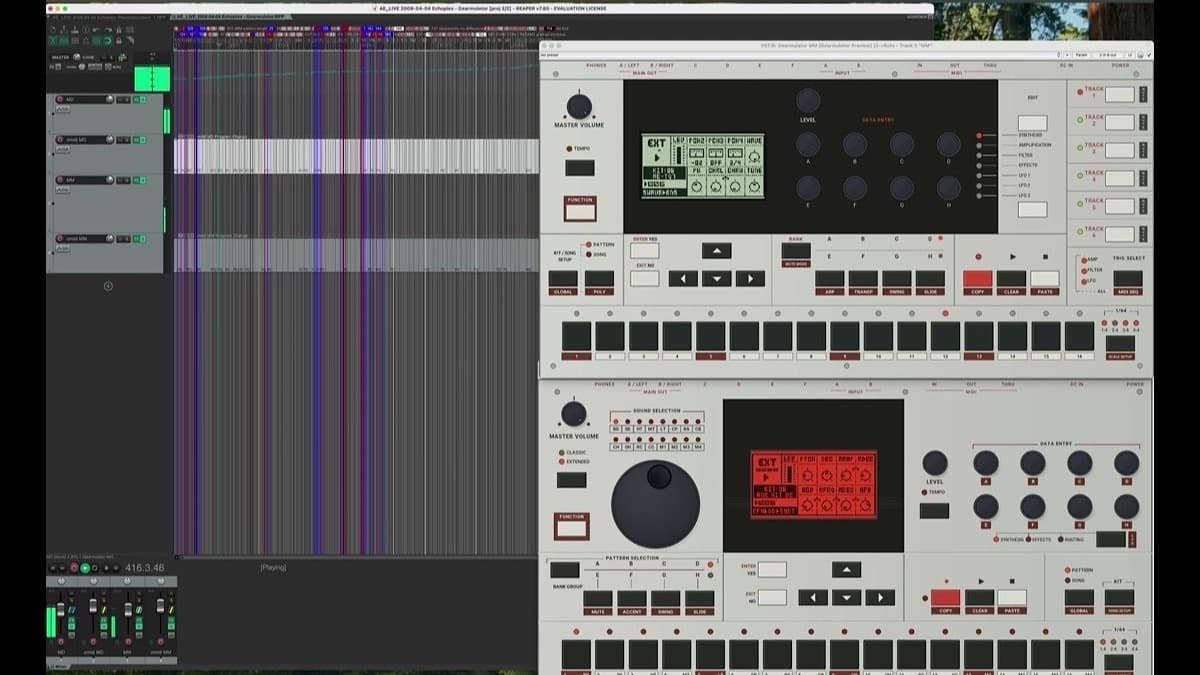
On 17 September 2026, developer Joe Landers released Gearmulator MD/MM, a free and open-source plugin that puts two discontinued Elektron classics, the Machinedrum and the Monomachine, back inside your DAW. It does not sample or approximate them. It runs the machines' actual firmware, recreating their front panels and operating systems in software. For anyone who has watched used Elektron prices climb for years, this is a big deal.
At a glance: free and open-source, VST3, AU and standalone on macOS (Intel and Apple Silicon) and Windows. It emulates both the Machinedrum drum synthesizer and the Monomachine multi-engine synth, exposing 416 and 348 automatable parameters respectively. There is one catch: you supply your own firmware image, because the code cannot legally ship Elektron's ROM.
What is Gearmulator MD/MM?
The Machinedrum and Monomachine are two of Elektron's most loved instruments. The Machinedrum is a fully synthesized drum machine, building every sound from scratch rather than playing samples, with a sequencer that turned it into a fixture on countless electronic records. The Monomachine is its melodic sibling, a five-track synth that stacks several synthesis methods behind the same immediate, hands-on workflow. Both were discontinued years ago, and clean units now sell for serious money on the used market.
Gearmulator MD/MM is a fork of the open-source Gearmulator project, extended by Joe Landers to cover these two machines. Landers is clear that the project is not affiliated with Elektron, and asks users not to contact Elektron or the original Gearmulator team for support. Instead of modeling the sound by ear, the plugin runs the same operating system the hardware runs. What you see on screen is the real front panel, the real menus and the real behavior, wrapped in a plugin window.
What Gearmulator MD/MM does, feature by feature
The project bundles two instruments that share one philosophy. Here is what each part gives you.
- The real firmware, not a model. Both emulations run Elektron's own operating system, so parameter ranges, menu structure and sound match the hardware rather than a developer's interpretation of it. This is the difference between a tribute and the actual instrument.
- Two instruments in one project. Machinedrum handles synthesized percussion, sequencing, effects and its sampling machines. Monomachine covers multi-engine melodic and textural synthesis. Load either as a plugin or run it standalone.
- Deep DAW automation. Gearmulator exposes 416 Machinedrum parameters and 348 Monomachine parameters to the host, so you can automate almost anything from your arrangement instead of only from the front panel.
- Parameter locks preserved. Elektron's signature parameter locks, where individual sequencer steps hold their own parameter values, carry over into the plugin. That is the feature that gives these machines their evolving, never-quite-repeating movement.
- SysEx transfer. You can send and receive SysEx, so patches, kits and pattern data move between the plugin and a real unit, or load classic sysex sets shared by other users.
- Multi-output routing. Individual voices can be routed to separate outputs, which matters on the Machinedrum when you want to process each drum with its own chain in the mix.
- Adjustable UI sensitivity. Encoder and control sensitivity can be tuned to taste, which softens the jump from hardware knobs to a mouse or MIDI controller.
The current build is an early alpha (version 0.1.0, alpha 12 at launch), and development is active, with a community forming on Discord. Treat it as a fast-moving work in progress rather than a finished commercial product.
Gearmulator MD/MM specifications
| Spec | Detail |
|---|---|
| Type | Firmware-accurate emulation of the Elektron Machinedrum and Monomachine |
| Formats | VST3, AU, standalone (macOS); VST3, standalone (Windows 64-bit) |
| Operating systems | macOS (Intel and Apple Silicon, separate builds), Windows 64-bit |
| License | Free and open-source (GPL-3.0) |
| Sound source | Runs the original Elektron firmware, user supplied |
| Automatable parameters | 416 (Machinedrum), 348 (Monomachine) |
| Sequencing | Elektron sequencer with parameter locks |
| Data transfer | SysEx send and receive; multi-output routing |
| Version at launch | 0.1.0 alpha 12 (17 September 2026) |
| Price | Free |
The firmware requirement
There is one requirement you cannot skip. Gearmulator MD/MM does not include the Machinedrum or Monomachine firmware, because that code is Elektron's copyrighted property. Before either machine will make a sound, you have to supply a complete, supported firmware image yourself. The project's documentation is blunt about it: do not ask the developer for the firmware files, and do not discuss firmware or ROM sourcing in the community Discord.
In practice this means the plugin is aimed at people who own or have owned the hardware and can dump their own firmware, rather than at anyone wanting a one-click free instrument. It is the same legal line other firmware-based emulators walk. Worth knowing before you download, so you are not surprised by a silent plugin.
How it compares
The obvious comparison is the hardware itself, and a legal, ready-to-run commercial plugin like D16's Drumazon 2, which recreates the Roland TR-909 without any firmware hunting.
| Gearmulator MD/MM | Elektron hardware | Drumazon 2 (D16) | |
|---|---|---|---|
| Price | Free | Used market, often four figures for a pair | 119 dollars |
| Availability | Download now | Discontinued, secondhand only | On sale now |
| Sound source | Real Elektron firmware (you supply it) | The original units | D16's own 909 synthesis |
| Setup | Requires your own firmware image | Plug and play | Install and go |
| Best for | Owners who want their MD/MM in the box | Players who want the physical instrument | Anyone who wants a legal 909 today |
If you already own a Machinedrum or Monomachine, Gearmulator MD/MM is an easy recommendation. It lets you sequence and automate the machine inside your project, recall it instantly and keep working when the hardware is packed away. If you have never owned one and want a plug-and-play classic drum machine instead, a commercial emulation such as Drumazon 2 is the simpler path. For more free options, our roundups of the best free synth VSTs and the best free VST plugins are good next stops, and the best drum machines guide covers the paid field.
Who Gearmulator MD/MM is for
This is for current and former Elektron owners who want the Machinedrum or Monomachine in software, for producers chasing that specific parameter-locked movement, and for the tinkerers who enjoy an open-source project in active development. It is also for anyone preserving these instruments now that the hardware is out of production. Unofficial firmware is now reaching Elektron's hardware too, and our long read on the custom firmware boom covers what that means for owners.
Who should skip it: anyone who wants a finished, supported product with a factory sound set and no setup. The firmware requirement rules out a large chunk of curious listeners, and the alpha status means bugs and changes are part of the deal. If that friction is not for you, a commercial plugin will feel calmer.
How much does Gearmulator MD/MM cost?
Nothing. Gearmulator MD/MM is free and open-source under the GPL-3.0 license, distributed through the project's public repository, with builds for macOS and Windows. There is no paid tier, no account and no license key. The only thing you have to bring is a supported firmware image, which the project cannot provide.
FAQ
Is Gearmulator MD/MM really free?
Yes. The plugin is free and open-source under GPL-3.0. You do have to supply your own Elektron firmware image, which is not distributed with it.
Do I need to own the hardware?
Practically, yes. The plugin will not produce sound without a complete, supported firmware image, and that code is Elektron's copyright. It is built for people who can legally source their own firmware, typically because they own or owned the machine.
What formats and systems does it support?
It runs as a VST3, AU and standalone application on macOS (with separate Intel and Apple Silicon builds) and as a VST3 and standalone on 64-bit Windows.
How is this different from a normal soft synth?
Most emulations model the sound in new code. Gearmulator MD/MM runs Elektron's actual operating system, so the interface, parameter behavior and sequencer, including parameter locks, match the hardware rather than approximate it.
Is it stable enough to use in a project?
It launched as an early alpha (version 0.1.0) and is under active development, so expect rough edges and frequent updates. Back up your work and treat it as a promising work in progress rather than a finished tool.


