Dirtywave M8 Tracker Lands on iOS for $29.99
The full Dirtywave M8 tracker engine is now an iPhone and iPad app for $29.99, with AUv3, Ableton Link, and hardware project compatibility. Specs and comparisons.
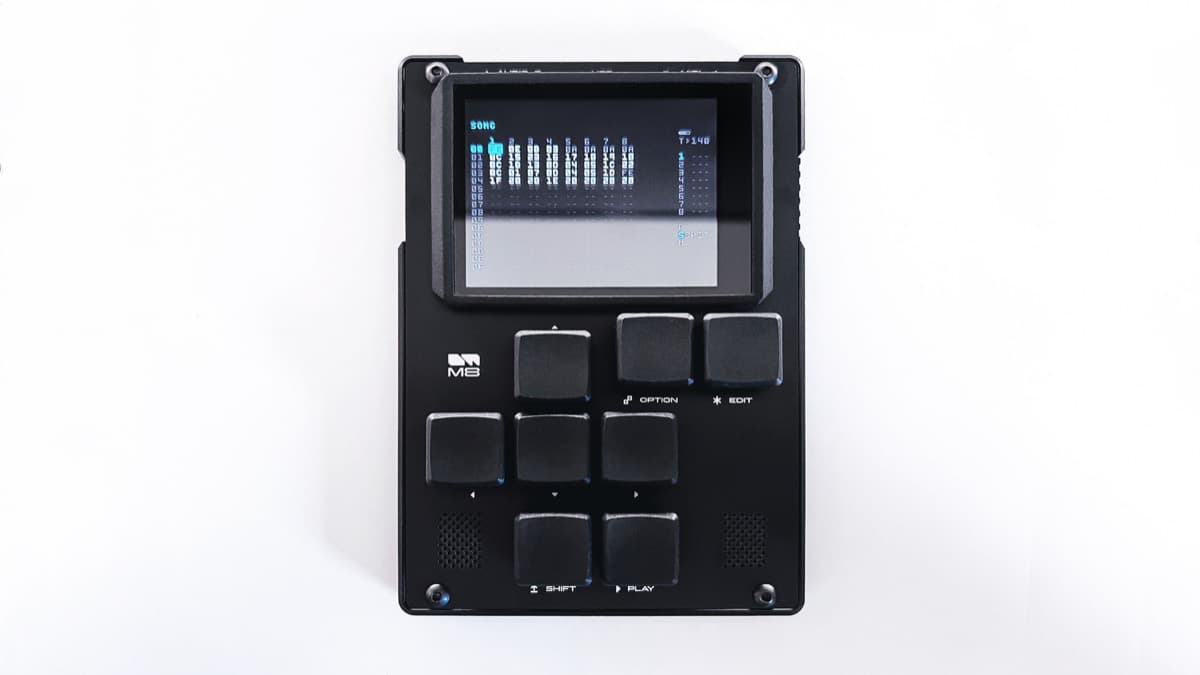
Dirtywave has put the entire M8 tracker engine on iPhone and iPad. The M8 Music Tracker app arrived on the App Store in September 2026 for $29.99, and a follow-up update added AUv3 plugin support so it runs inside a host as well as on its own. This is the same sequencer, synthesizer, and sampler that lives in the cult M8 hardware, not a cut-down mobile spin-off.
At a glance: $29.99 one-time on the App Store. iPhone, iPad, and iPod touch, iOS 15 or later. Eight tracks, five synthesis engines, up to 128 instruments per song. AUv3 plugin with multi-instance support, Ableton Link, CoreMIDI in and out, and full project compatibility with M8 hardware. This is a first look at the official App Store listing and Dirtywave product pages. We have not run it through a full production yet.
What is the Dirtywave M8?
The M8 is a portable tracker sequencer and synthesizer built by Timothy Lamb, better known as Trash80. It takes its layout from Little Sound Dj, the Game Boy tracker, and rebuilds that idea as a modern instrument. Notes, effects, and automation are entered as values in a vertical grid rather than drawn on a timeline, and the whole machine is designed to be played fast with two thumbs.
Until now the M8 was hardware only. The current M8 Tracker Model:02 sells for $699 and pairs a 3.5 inch screen with a 12 hour battery. Demand has always outstripped supply, and units sell out in minutes. The iOS app removes that wall. If you own an iPhone, you can run the M8 workflow today for less than $30.
Trackers reward muscle memory, and the M8 has one of the most loved layouts in the format. Putting that engine on a device most producers already carry is the headline. The app is not an emulation of the hardware either. It is the same engine compiled for iOS, so songs move between the app and a physical M8 in both directions.
What is new in the M8 iOS app?
The point of the app is completeness. Dirtywave did not trim the feature set to fit a phone. Here is what you actually get, and what each part does for you.
- The full eight-track engine. Eight monophonic tracks, each freely assignable to any instrument, with the M8 arranger, chains, phrases, and live mode intact. This is the same song structure M8 players already know, so existing skills transfer directly.
- Five synthesis engines. Wavsynth, Macrosynth, FMSynth, and Hypersynth cover wavetable, waveshaping, FM, and dense multi-voice sounds, and the Sampler plays and mangles your own audio. You can hold up to 128 instruments in a single song, which is plenty for a full arrangement rather than a sketch.
- AUv3 plugin with multi-instance support. The update that landed alongside the launch turns the M8 into a plugin inside AUv3 hosts such as AUM, Cubasis, Logic Pro for iPad, and Drambo. Multi-channel and multi-instance support means you can run more than one M8 in a project and route tracks out separately.
- Ableton Link. The app locks to tempo across Wi-Fi with other Link-enabled apps and devices, so the M8 can drive or follow a wider jam without MIDI clock cabling.
- CoreMIDI in and out. The M8 sends and receives MIDI, so it works as a sequencer for external synths or as a sound source played from a controller. That two-way MIDI is what lets it sit at the center of a hybrid setup.
- External keyboards and game controllers. You can drive the app from a connected keyboard or a game controller, which matters because the M8 is built around fast directional input. A controller brings some of the hardware feel to a touchscreen.
- Launchpad Pro MKIII support. Novation's grid is supported directly, giving you pads for input and performance instead of relying only on the glass.
- Files app and hardware compatibility. Projects, instruments, samples, themes, and rendered audio are reachable through the iOS Files app, and songs and bundles are compatible with M8 hardware. Start a track on the train, finish it on the desktop, then load it onto a physical M8 for a show.
The workflow above is the M8 tracker engine that the iOS app now runs. If you have never used a tracker, expect a learning curve. The reward is speed. Once the grid makes sense, entering a bassline or a drum pattern is faster than mouse clicking clips, and the M8 keeps everything on one screen.
Dirtywave M8 Music Tracker specifications
| Spec | Detail |
|---|---|
| Developer | Dirtywave |
| Type | Tracker sequencer, synthesizer, sampler, and MIDI controller |
| Platform | iPhone, iPad, iPod touch |
| Operating system | iOS 15.0 or later |
| Price | $29.99, one-time |
| Tracks | 8 monophonic, freely assignable |
| Instruments | Up to 128 per song |
| Synthesis engines | Wavsynth, Macrosynth, FMSynth, Hypersynth, Sampler |
| Plugin | AUv3, multi-channel and multi-instance |
| Sync | Ableton Link |
| MIDI | CoreMIDI input and output, Inter-App Audio |
| Controllers | External keyboards, game controllers, Launchpad Pro MKIII |
| File access | Files app for projects, samples, themes, and renders |
| Hardware transfer | Compatible with M8 song and bundle files |
| Size | 243.4 MB |
| Store | App Store |
M8 iOS vs M8 hardware vs Korg Gadget 3
The obvious comparison is the M8 app against the M8 hardware, because they run the same engine at very different prices. The second reference point is Korg Gadget 3, the best known full production app on iOS, which takes the opposite design approach. A third option is Tracker Pro for iPad, which pairs a tracker sequencer with a sampler and built-in synths. Its Tracker Pro 1.1 update added Beads-based granular devices and web sampling.
| M8 iOS | M8 Tracker Model:02 | Korg Gadget 3 | |
|---|---|---|---|
| Price | $29.99 | $699 | Around $14.99, varies |
| Form | iPhone and iPad app | Dedicated hardware | iPhone and iPad app |
| Interface | Tracker grid on glass | Tracker grid on buttons | Instrument gadgets and clips |
| Engine | Full M8 engine | Full M8 engine | Multiple Korg synth and drum gadgets |
| Tracks | 8 | 8 | Scales with device |
| Plugin | AUv3 host support | Standalone device | AUv3 export and Ableton Live sync |
| Portability | Runs on your phone | Pocket device, 12 hour battery | Runs on your phone |
| Best at | The M8 workflow, cheap | The M8 workflow, tactile | Fast, colorful pop and electronic |
Which to pick. Choose the M8 iOS app if you want the M8 workflow and you already carry an iPhone. It is the cheapest way into the format by a wide margin. Choose the Model:02 hardware if the tactile buttons, the standalone battery life, and having a dedicated instrument matter more than the price, or if you want to play live without your phone. Choose Korg Gadget when you would rather build tracks from a rack of ready-made synths and drums than learn a tracker grid. For a hands-on drum and sampling box in the same portable spirit, the Akai MPC One G2 and the 1010music Blackbox 2 sit in the hardware lane.
Who the M8 iOS app is for
Consider it if you have wanted an M8 but never caught a hardware drop, or never wanted to spend $699 to find out whether trackers suit you.
Consider it if you already play the M8 and want a second unit that lives in your pocket and swaps songs with your hardware.
Consider it if you build hybrid setups. The two-way MIDI, Ableton Link, and AUv3 make the app a capable brain for external gear or a track inside a larger iOS session.
Skip it if you dislike trackers. The M8 will not convert you, and a clip-based app like Korg Gadget or a linear DAW will feel friendlier.
Skip it if you want the physical instrument. A touchscreen is not the same as the M8's directional buttons, and live performers may still want the hardware.
How much does the M8 iOS app cost?
The M8 Music Tracker is $29.99 as a one-time purchase on the App Store. There is no subscription and no in-app unlock. That single price is the whole app, including the AUv3 plugin.
The hardware is a separate purchase. The M8 Tracker Model:02 is $699 direct from Dirtywave and includes a case, a USB-C cable, a MIDI adapter, and a 64GB card. Buying the app does not discount the hardware, and the reverse is also true, but projects move freely between them.
If you are weighing portable grooveboxes more broadly, our best drum machines guide and the Akai MPC buyer's guide cover the hardware alternatives in detail.
FAQ
Is the M8 iOS app the full tracker or a lite version?
It is the full engine. The App Store listing describes an eight-track tracker, sequencer, and synthesizer with the same feature set as the hardware, including all five synthesis engines and up to 128 instruments per song.
Does the M8 app work as a plugin?
Yes. An update added AUv3 support with multi-channel and multi-instance capability, so the M8 runs inside hosts like AUM, Drambo, Cubasis, and Logic Pro for iPad, not only as a standalone app. Toybox's Buzz Zone wavetable synth also runs on iPad, and version 3.0 added six sequencers.
Can I move songs between the app and M8 hardware?
Yes. Songs and bundles are compatible with M8 hardware, and files are reachable through the iOS Files app, so projects transfer in both directions between the app and a physical M8.
What do I need to run it?
An iPhone, iPad, or iPod touch on iOS 15.0 or later. The app is 243.4 MB. It supports CoreMIDI, Ableton Link, external keyboards, game controllers, and the Launchpad Pro MKIII.
Is it worth buying if I already own an M8?
If you want a second, pocketable M8 that swaps songs with your hardware, yes. At $29.99 it is a cheap way to keep writing when the hardware is not with you.
Verdict
The M8 iOS app is the most significant thing to happen to the tracker in years. Dirtywave shipped the whole engine, not a demo, for $29.99, then added AUv3 with multi-instance support so it plugs into a host. The barrier to trying one of the most loved trackers in music software just dropped from a $699 hardware lottery to a one-tap download.
It will not turn a tracker skeptic into a fan, and it is not a substitute for the tactile hardware if performing is your priority. For everyone who has watched M8 units sell out and wondered what the fuss is about, this is the answer. Load it up, learn the grid, and move your first song onto real hardware later if the format sticks. The app is on the App Store.