Some links on this page are affiliate links. If you buy through them, Dubspot may earn a commission at no extra cost to you. It never affects our scores or what we recommend — read our policy.
Baby Audio HyperWarp Sequences Time in Grains
Baby Audio HyperWarp is a time-bending granular effect at $49 intro, from $99. A graph sequencer and seven profiles cover stutters, scratches, and warps.
P
Priya Raman
October 7, 2026 · 13 min read
Black Friday 2026Baby Audio Black Friday 2026: dates and deals →
Baby Audio released HyperWarp on 6 October 2026. It is a granular multi-effect that sequences time on a graph, then colors the result with one of seven profiles. The regular price is $99. The intro price is $49. This is a first look from the product page, the official manual, and the retailer listings, not a scored session review.
At a glance: HyperWarp slices incoming audio into grains and plays those grains back along a shape you draw. Steps, slopes, and curves set stutters, half-time, scratches, tape-stops, and reverse. Pitch runs ±2 octaves with optional semitone snap. Resolution, Scatter, feedback, and a ping-pong switch sit beside the graph. Each of the seven profiles exposes four macros. Wet/dry and a high-pass/low-pass band on the wet signal keep the effect from taking the whole track. VST, VST3, AU, and AAX on macOS 10.13+ and Windows 10+. More than 190 presets. Plugin Boutique has it at $49 from $99, 50% off until 30 November 2026. Best Service lists $49 from $99 and €49 from €109, excluding VAT, through 5 December 2026.
What HyperWarp is
HyperWarp is an insert. It is built for loops, stems, vocals, drums, and synths that already exist, and for turning those recordings into something with a different clock. Baby Audio describes it as a time-twisting multi-effect powered by the company's granular engine. The graph builds the rhythm. The profile decides what kind of grain you hear while that rhythm plays.
The manual is explicit about the lineage of the stranger profiles. They are inspired by the granular engine in Grainferno. HyperWarp is not a second copy of that synth. It is an effect that borrows the grain idea and puts a time score in front of it. On iPad, the Mutable Instruments Beads granular effect in Tracker Pro is another route to freezing and scattering grains.
If you already use a stutter editor or a tape-stop plugin, the new part is that pitch and time can come apart. Clean Warp can slow a phrase without the dive in pitch a tape would give you. Flange Warp can put that link back when you want the old behavior. The same drawing produces both results, depending on the profile and one macro. If a classic pitch-and-speed drop is all you need, Cableguys TimeStop is a dedicated tape-stop plugin.
How the graph sequences time
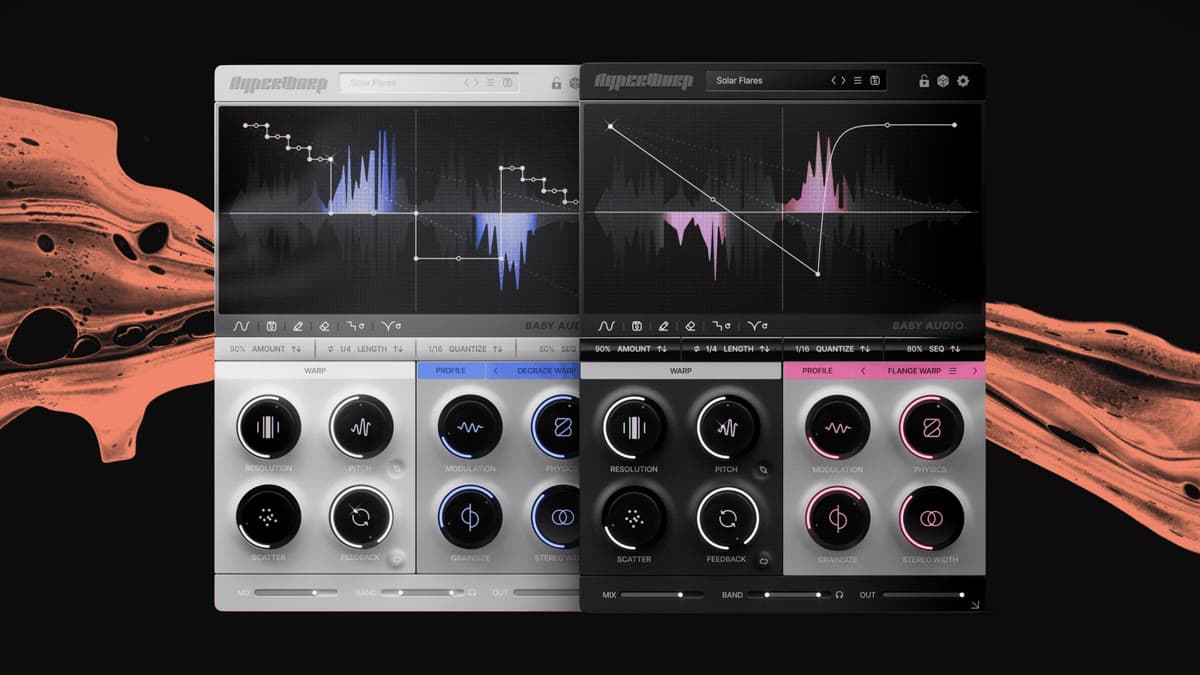
The graph is an X/Y score. The X axis is the length of the window, set in beats by the Length control, from a half note to four bars. The Y axis is how far the playhead is pulled backward in time. HyperWarp can only warp backward. The granular engine has to load audio into its window before it can rearrange it, so the graph does not reach into the future of the clip.
Reading the drawing is the whole skill, and Baby Audio's manual spells it out. A horizontal line is normal speed, even after a jump backward, which is how a stutter stays in time. A stairstep is a jump backward, the classic glitch. A slope equal to the upper dotted guide is half speed. Steeper slopes slow the audio further, until the 45-degree dotted line, where playback rate is zero and the window holds a single grain. Steeper than that, the stored audio plays in reverse, faster as the angle gets more severe. A line that rises plays the buffer faster than the original. Dragging the midpoint of a segment bends it into a curve, so speed changes across the segment instead of in one step. Curves are the scratch and the tape-stop.
Under the graph, the toolbar loads and saves graph presets, turns on step drawing, clears the shape, and randomizes it. Random (steps) is the Steppy randomizer. Random (curves) is the Curvy one. Quantize sets the grid from 0, which is free, up to 64. Hold Shift while drawing if you want a step without leaving freehand mode. Amount scales the whole pattern toward the neutral top line, so a violent shape can be backed off without redrawing it. Skew slides the midpoint of the time axis left or right. Length is the window, in beats.
A stopped graph, sitting on that 45-degree line, is its own technique. The window contains only the audio that was loaded at the left edge of each pass, and HyperWarp turns that sliver into a tone or a repeating, delay-like grain. That is the single-grain mode the manual describes, and it is the point where the effect starts to behave like an oscillator.
The top bar has a separate randomize dice for the whole preset, and a lock overlay so you can keep the graph, the Amount, or the profile out of the roll. By default, Amount and the profile stay locked. That is the practical way to audition textures without losing a rhythm you already like.
Warp controls and the seven profiles
The warp panel is the grain editor that every profile shares.
Resolution sets the length of the microsamples. Maximum is the cleanest time warp. Lower values use larger slices and the motion gets coarser. Pitch shifts the processed audio by up to two octaves either way, and semitone snap locks that shift to scale steps across the same range. Scatter randomizes where each slice is read inside the window. At the top of the knob, the read position can land anywhere in the buffer. Feedback feeds the previous slice into the next. The ping-pong switch throws alternating repeats across the stereo field.
Each profile is a different configuration of that engine, with four macros of its own. The same graph can sound unrelated once you change profile. These are the seven, with the macros the manual assigns:
Clean Warp is the transparent one. Pitch and time stay independent, which is the mode for tonal chops that should still sound like the source. Macros: vibrato amount, vibrato speed, feedback time in tempo divisions, and Circuit-bend, which degrades the correlation and adds artifacts on purpose.
Flange Warp uses tight grains and a squeakier modulation as speed changes. Physics, fully clockwise, links pitch to playback speed for a traditional warp. The other macros are Modulation, Grain Size, and Stereo Width.
Degrade Warp downsamples inside the grains. Degrade is the sample reduction. Filter cutoff is a per-grain low-pass. Grain size and Chaos, which is pitch randomness, finish the set.
Filter Spam puts a low-pass on each grain and then destabilizes it. Cutoff, filter randomness, resonance, and octave randomness, which raises the chance a grain jumps up an octave.
Harmo-Nicer stacks grains at octaves and fifths above the source. Harmonize sets the level and feedback of that shift. Detune blurs the new pitches. Speed sets the octave-and-fifth arpeggiation. Reverse flips grain direction for a swirl.
Fauxcoder is a resonant grain mode that lands near a vocoder without being one. Amount is the resonance intensity. Squelch is fast modulation. Cutoff picks the band. Magic randomizes the Squelch movement. For robot voices built from typed text instead, see 23audio TELEPRINTER.
Lo-Fizzly is the downsampled, radio-ish end of the set. Degrade sets the intensity. Dirt adds per-grain mess that interacts with Rate. Radio is a resonant filter that pulls the top off and boxes the sound in. Rate moves Degrade from a slow filter motion toward something closer to FM.
The output stage is the safety valve. Mix is wet/dry. Band is a dual slider, high-pass and low-pass, on the processed signal only, so HyperWarp can own a frequency range and leave the rest of the source alone. Output level sits beside them. An arrow in the corner resizes the interface.
The preset browser holds more than 190 presets, both full presets and graph-only presets. Baby Audio credits Solidtrax, mleuc, Joe Gilling, Databroth, Alessandro Mastroianni, Marius Rabin, Noe Barcza, Galen Tipton, Riley Thornton, and Sobi. Presets are a way in. The graph is still the part you end up drawing yourself.
HyperWarp specifications
| Spec | Detail |
|---|---|
| Type | Granular time-warp multi-effect |
| Developer | Baby Audio |
| Released | 6 October 2026 |
| Graph | Backward time only. Length from 1/2 note to 4 bars. Quantize 0–64. Steppy and Curvy randomizers |
| Warp | Resolution, pitch ±2 octaves with semitone snap, Scatter, feedback, ping-pong |
| Profiles | Clean Warp, Flange Warp, Degrade Warp, Filter Spam, Harmo-Nicer, Fauxcoder, Lo-Fizzly. Four macros each |
| Output | Wet/dry, high-pass and low-pass on the wet signal, output level |
| Presets | 190+ |
| Formats | VST, VST3, AU, AAX, all 64-bit |
| macOS | 10.13 or later, native Apple Silicon |
| Windows | 10 or later |
| Trial | 5 seconds of silence every 60 seconds |
| Intro price | $49 from $99 at Plugin Boutique through 30 November 2026. $49 / €49 at Best Service through 5 December 2026 |
| Regular price | $99. Best Service also shows €109 excluding VAT as the struck euro price |
HyperWarp vs Portal and Effectrix 2
Two plugins already in the database sit near this job, and they do not do the same job. Output Portal is a granular effect built around a playable macro and a large preset library, listed at $149. It is the tool for clouds, transitions, and texture when you want a finished grain without drawing a score. Sugar Bytes Effectrix 2 is a step sequencer for effects. The current Effectrix page lists it at $99, with 14 effects you place on a grid. It is the tool for rhythmic chops, filters, and loops when the timeline should be steps, not a freehand curve.
Parish Audio Warpfield is the closer cousin on time itself. Warpfield's intro is $34.97 against $69.95, and it is VST3 only, with six modes that capture a window and play it back as a new melody or rhythm. The Warpfield first look covers that instrument. HyperWarp is the one with the drawable graph and the seven grain profiles.
| HyperWarp | Portal | Effectrix 2 | |
|---|---|---|---|
| Price | $49 intro, $99 regular | $149 | $99 |
| Engine | Granular time graph | Granular effect, playable macro | 14 effects on a step grid |
| How you write | Draw steps, slopes, and curves | Play an XY and load presets | Program up to 32 steps |
| Time direction | Backward only, including reverse and stop | Grain time and pitch inside the effect | Looper and grain as sequenced effects |
| Color | 7 profiles, 4 macros each | Preset-led textures | Filter, grain, crush, delay, reverb, and the rest of the 14 |
| Formats | VST, VST3, AU, AAX | VST, VST3, AU, AAX | VST2, VST3, AU, AAX, standalone |
| Pick it when | The rhythm of the warp is the part | You want a grain cloud fast | You want a step-sequenced effect chain |
HyperWarp wins when the drawing is the composition: a half-time slope, a scratch curve, a stutter that resets on the bar. Portal wins when you want a texture and you do not want to author a timeline. Effectrix 2 wins when the effect itself should change every step, and time-warp is only one of several tricks.
Who HyperWarp is for
HyperWarp is for electronic producers, editors, and sound designers who already have loops and want those loops to stop sounding like the pack they came from. It suits glitch edits, transition throws, pitched chops that stay in key, and lo-fi grain that still follows a grid. The band filters make it usable on a full mix bus in small doses, because the dry signal can keep the lows while the warp owns the top.
Skip it if you need to push audio forward of the playhead. The engine does not do that. Skip it if you want a granular synthesizer you play from a keyboard. This is an effect on existing audio. Skip it if a five-second mute every minute in the trial will wreck a client session. Buy it, or bounce the trial takes, before you rely on it.
How much HyperWarp costs
The regular price is $99. The intro is $49.
Plugin Boutique shows $49.00 from $99.00, 50% off, until 30 November 2026. Best Service shows $49 from $99 and €49 from €109, excluding VAT, with the HyperWarp campaign running through 5 December 2026. Baby Audio's own page sells the license directly and notes a loyalty price for existing customers once you are logged in.
Formats are VST, VST3, AU, and AAX, 64-bit. macOS 10.13 or later, including Apple Silicon. Windows 10 or later. Baby Audio lists Ableton Live, Pro Tools, Logic Pro, FL Studio, Cubase, Studio One, Bitwig, Reaper, and Reason among supported hosts. The trial plays, then inserts 5 seconds of silence every 60 seconds. Plugin Collection Plan subscribers get HyperWarp through the Baby Audio Manager app.
FAQ
How much is Baby Audio HyperWarp, and when does the intro end?
The regular price is $99. Plugin Boutique has the intro at $49 from $99 through 30 November 2026. Best Service has $49 from $99, and €49 from €109 excluding VAT, through 5 December 2026.
Can HyperWarp warp audio forward in time?
No. The graph only pulls audio backward from the playhead, because the granular window has to load the sound before it can rearrange it. Reverse, stop, and faster-than-normal playback of that buffer are all available. A look-ahead warp is not.
HyperWarp vs Output Portal?
Portal is a granular texture effect at $149, built around a playable macro and presets. HyperWarp is a time-warp score at $49 intro, or $99 later, with seven grain profiles on top of a drawing. Use Portal for a cloud. Use HyperWarp when the timing of the warp is the musical idea.
What formats and systems does it support?
VST, VST3, AU, and AAX, 64-bit. macOS 10.13 or later with native Apple Silicon. Windows 10 or later. There is no standalone instrument in the spec Baby Audio publishes.
What does the trial do?
The trial inserts 5 seconds of silence every 60 seconds. Full use needs a license key from the Baby Audio account, or an active Plugin Collection Plan.
HyperWarp is a drawing tool for time, with a grain engine behind the pencil. The intro at $49 is half the regular $99, and the graph is the part worth learning before the price changes. The spec sheet lives on the HyperWarp plugin card, and the manual on Baby Audio's docs is the page to keep open while you learn which slope means half speed.


