Cableguys TimeStop: Tape-Stops You Draw as Automation
Cableguys TimeStop is a tape-stop plugin that draws slowdowns as DAW automation, with Classic, Modern and Loop modes. From 16 EUR in VST3, AU and AAX.
Black Friday 2026Cableguys Black Friday 2026: dates and deals →
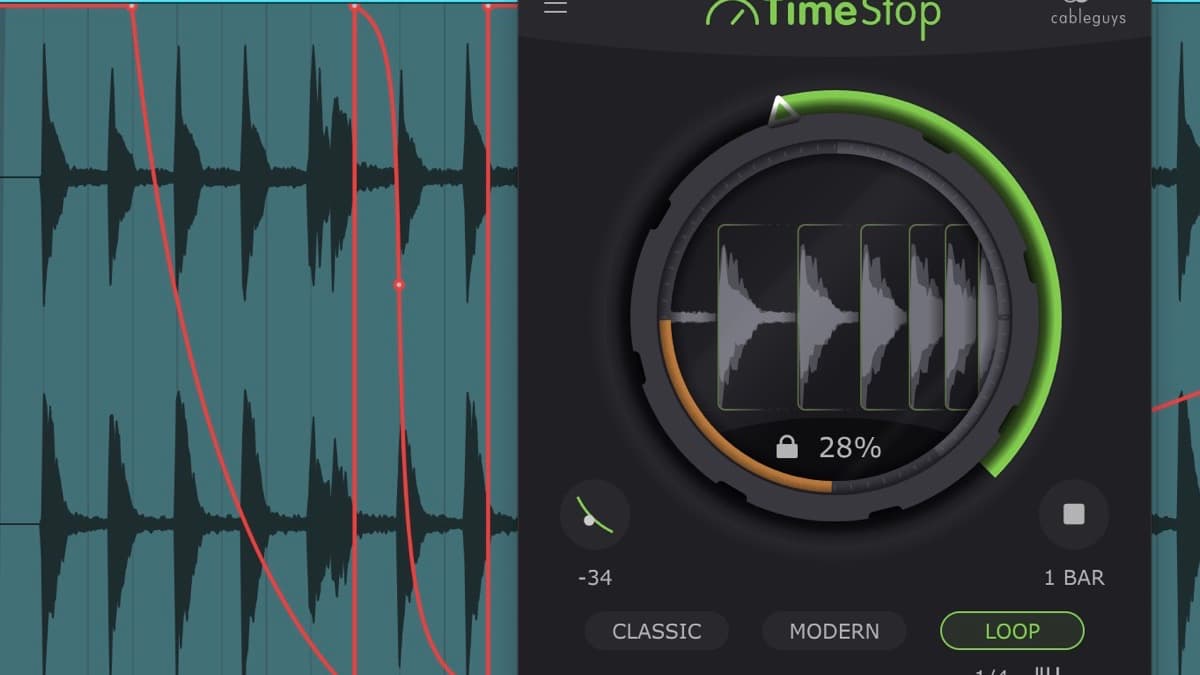
Cableguys has released TimeStop, a dedicated tape-stop plugin that treats the slowdown as something you draw rather than something you trigger. It shipped on October 13, 2026 from the team behind ShaperBox, HalfTime and Kickstart, and it goes after one specific sound: the pitch-and-speed drop that ends a phrase or throws a track into the next section. This is a first look based on the official Cableguys product page, not a hands-on review.
At a glance: TimeStop is a single-purpose tape-stop and slowdown effect. You automate one big Pitch knob with any curve you like, so the slowdown can be a short lurch or a long, drawn-out collapse. It runs as VST3, AU and AAX on macOS 10.15 or later and Windows 7 through 11, both 64-bit, and works on any sound including the master bus. The price is 16 EUR (around $16) direct from Cableguys, with a reduced price for Cableguys Bundle owners and a fully functional free trial.
What is Cableguys TimeStop?
A tape-stop is the sound of a tape machine or turntable losing power: pitch and speed sag together until everything grinds to a halt. Producers reach for it constantly, usually by riding a pitch or varispeed control, drawing fiddly automation, or printing the effect to audio and editing it by hand. TimeStop exists to make that one move fast and repeatable.
Cableguys calls it the first tape-stop plugin where you draw your slowdowns as DAW automation. In practice that means the plugin leans on a tool you already have. Instead of hiding the timing behind sliders or a single button, TimeStop maps the slowdown to one large, fully automatable Pitch control. You write an automation lane in your DAW, and the shape of that lane is the shape of your tape-stop. Want a two-beat dip into the chorus, or an eight-bar slow death at the end of the track? You draw it, and you can redraw it until it sits right.
It slots in next to the rest of the Cableguys catalog without overlapping much. HalfTime drops a part to half speed for that downpitched, slow-motion feel, and ShaperBox 3 bundles rhythmic modulation across eleven effects. TimeStop does one thing those tools only touch in passing, and it keeps the control surface small on purpose.
How TimeStop works
The plugin ships with three modes, and the differences matter more than they first appear.
Classic drops pitch and time together, the way a real tape machine or vinyl record slows down. Pitch falls, the groove drags, and everything smears toward a stop. This is the familiar, dramatic version, and it's the right call on a full mix or a synth riff where you want the whole thing to sag as one.
Modern is the clever one. It drops the pitch without slowing the beat, so your drums and vocals stay locked to the grid while the pitch bends underneath them. That keeps a vocal phrase or a drum loop in time while still bending it, which is the trick producers usually fake with pitch envelopes and careful editing. It's the mode that makes a tape-stop usable mid-phrase rather than only at a hard cut.
Loop combines the tape-stop with stutter-style repeats, so you get DJ-style fills and glitchy transitions out of the same window. This is the mode for build-ups and turnarounds, where a plain slowdown isn't busy enough.
Because the Pitch knob is just an automatable parameter, every mode inherits the same freedom: any curve length, any shape, as gentle or as violent as you draw it. TimeStop works on vocals, drums, synths and the master bus alike, so the same plugin covers a subtle end-of-verse dip and a full end-of-track collapse.
TimeStop specifications
| Spec | Detail |
|---|---|
| Type | Tape-stop and slowdown effect |
| Modes | Classic (pitch and time drop together), Modern (pitch drops, beat stays in time), Loop (tape-stop plus stutter fills) |
| Core control | One large, fully automatable Pitch knob; slowdowns drawn as DAW automation |
| Curve | Any length and shape |
| Works on | Any source, including vocals, drums, synths and the master bus |
| Mac formats | VST3, AU, AAX |
| Windows formats | VST3, AAX |
| macOS | OS X 10.15 or later, Intel or Apple Silicon |
| Windows | Windows 7, 8, 10 or 11, 64-bit |
| Hosts | Ableton Live, Logic Pro, Pro Tools, Cubase, Bitwig Studio, FL Studio, REAPER, Studio One and other VST3, AU or AAX hosts |
| Trial | Fully functional free trial |
How TimeStop compares
The nearest thing in Cableguys' own lineup is the TimeShaper module inside ShaperBox 3, which also does tape-stops along with reverse, scratch and stutter. The question for most buyers is whether they want the focused, cheap tool or the big suite.
| Cableguys TimeStop | Cableguys ShaperBox 3 | |
|---|---|---|
| Price | 16 EUR (around $16) | 99 EUR |
| Scope | Tape-stop and slowdown only | 11 effects, including a tape-stop in TimeShaper |
| Workflow | Draw the slowdown as DAW automation | Draw tempo-synced LFO shapes per effect |
| Multiband | No | Yes, 3 bands per effect |
| Best at | One repeatable tape-stop move, fast | A whole rhythmic-effects toolkit in one window |
| Learning curve | Minimal | Real, once you add bands and LFOs |
If a tape-stop is the only thing you're after, TimeStop is the direct hit and costs a fraction of the suite. If you already lean on drawable, tempo-synced movement across many effects, ShaperBox 3 gives you the tape-stop plus ten other Shapers and the band-splitting that TimeStop doesn't have. Outside Cableguys, BLEASS Slow Machine is the other well-known budget slowdown effect, so it's worth a look if you want a second option before you buy.
Who TimeStop is for
It's aimed at producers who use tape-stops as a regular transition tool and are tired of drawing varispeed automation or printing the effect to audio. Electronic, pop, hip-hop and bass producers will get the most out of it, especially the Loop mode for build-ups and the Modern mode for bending vocals that need to stay on the grid. Anyone who already owns ShaperBox may not need it, since TimeShaper covers the same ground. And if you only reach for a tape-stop once in a blue moon, the stock pitch automation in your DAW might be enough.
How much does TimeStop cost?
TimeStop is 16 EUR (around $16) direct from Cableguys, with a reduced price for owners of the Cableguys Bundle, and it's also part of that bundle if you'd rather buy everything at once. A fully functional free trial lets you test it in your own projects first. You can check the current price on Plugin Boutique, which also carries the rest of the Cableguys range.
FAQ
What is a tape-stop effect?
It's the sound of a tape machine or turntable slowing to a halt: pitch and speed fall together until the audio stops. Producers use it as a transition between sections or as a dramatic ending. TimeStop recreates that move and lets you shape it with automation.
How is TimeStop different from a pitch bend?
A pitch bend only changes pitch. A tape-stop in Classic mode drops pitch and tempo together, which is why it drags as it falls. TimeStop's Modern mode separates the two, dropping pitch while keeping the beat in time, which a simple pitch bend can't do.
Does TimeStop need ShaperBox?
No. TimeStop is a standalone plugin and runs on its own. The TimeShaper module inside ShaperBox 3 covers similar ground, so ShaperBox owners may not need the separate plugin, but TimeStop does not require it.
What formats and systems does TimeStop support?
It runs as VST3 and AAX on Windows 7 through 11, and as VST3, AU and AAX on macOS 10.15 or later, both Intel and Apple Silicon. There is no VST2 version. It loads in Ableton Live, Logic Pro, Pro Tools, Cubase, Bitwig Studio, FL Studio, REAPER, Studio One and other compatible hosts.
The verdict
TimeStop is a small, sharp tool that does one popular job well. By mapping the slowdown to an automatable Pitch knob, it turns a fussy edit into a curve you can draw and redraw in seconds, and the Modern mode solves the real problem of bending a part without knocking it off the grid. It won't replace a full creative-effects suite, and ShaperBox owners already have most of it. At 16 EUR with a free trial, though, it's an easy addition for anyone who uses tape-stops often. For more creative movement, see ShaperBox 3, HalfTime and the rest of the plugin database, or browse our picks for the best free VST plugins.