Some links on this page are affiliate links. If you buy through them, Dubspot may earn a commission at no extra cost to you. It never affects our scores or what we recommend (read our policy).
RIPPLES Pulse: A Free Volume Shaper You Can Draw
RIPPLES Pulse is a free sidechain, gate, and LFO volume shaper for VST3 and AU. Five drawable shapes, Sync or Trig, 16 presets. Specs and who it's for.
M
Marcus Feld
September 7, 2026 · 8 min read
Dubspot's best Black Friday dealsDubspot Tracker Pro: $15, was $24.99 ↗Drum Programming and Groove Production Course: $19, was $99 ↗
RIPPLES shipped Pulse as a free sidechain, gate, and LFO volume shaper. You pick one of five shapes, flip it if you want, drag the nodes until the dip lands on the kick, then lock it to the host or fire it from the track's own hits. The license is free. Install it through RIPPLES Tap.
At a glance: Free. VST3 and AU. macOS and Windows. Five shapes with Flip. Sync or Trig. 16 presets. Depth, Curve, Smooth, Mix. Official walkthrough on the RIPPLES YouTube channel.
This is a first look at the shipping plugin and the specs RIPPLES publishes. We have not mixed a record through it yet.
What Pulse is
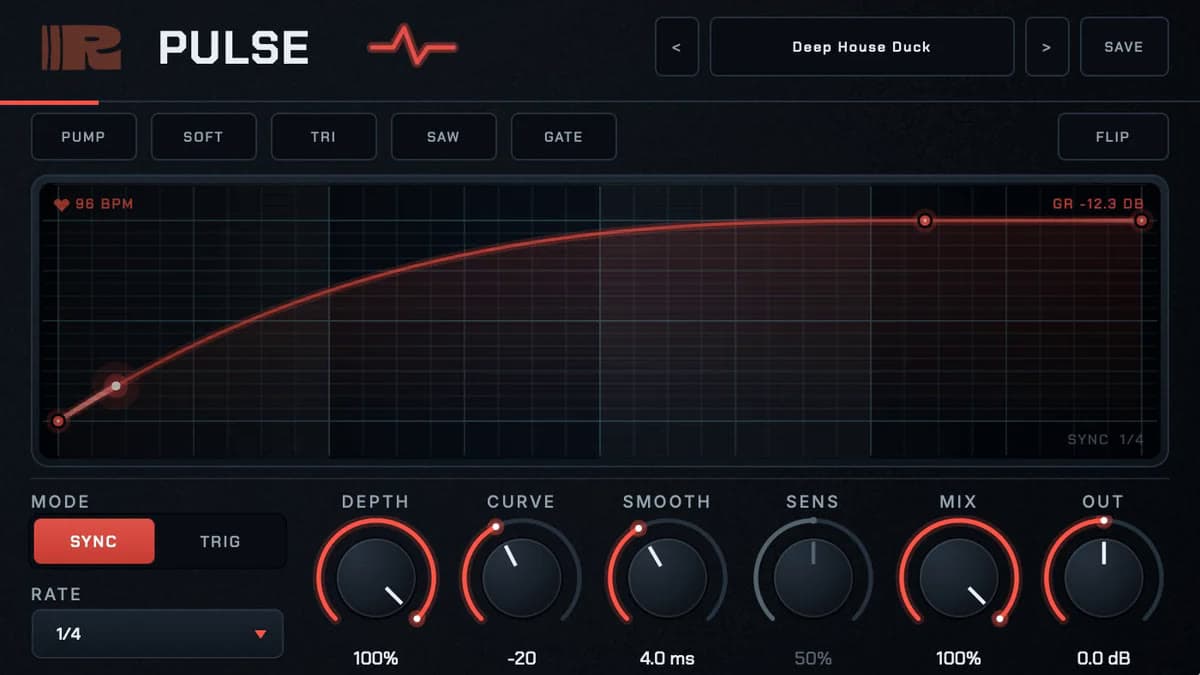
Pulse is a volume curve you can see. That is the whole product, and it is enough. A compressor sidechain asks you to route a kick, set threshold and release, and hope the envelope matches the drop you hear in your head. Pulse draws the drop. Depth sets how far it goes. Curve bends the return. Smooth rounds the corners. A meter shows gain reduction next to the host tempo.
RIPPLES already sells Kick Designer, Cascade, and Cartridge through the same Tap installer. Pulse is the free movement plugin on that shelf. It does not try to be a filter, a panner, and a volume shaper at once. It shapes volume.
That puts it next to Kickstart 2 and Duck as a one-job ducker, and next to LFO Tool as a drawable curve with less extra. LFO Tool also filters and pans. Pulse stays on level. HoRNet SpectraDuck takes the opposite approach and ducks only the frequencies the sidechain occupies.
Five shapes, then Flip
The shape row is Pump, Soft, Tri, Saw, and Gate. Pump is the classic sidechain dip. Soft is a gentler breath. Tri and Saw cover tremolo and falls. Gate is hard rhythmic chops. Flip turns any of those upside down, so a duck becomes a push and a gate becomes a window that opens the other way.
Then you drag the nodes. The official GUI for the Deep House Duck preset shows a red curve on a grid, with the tempo in the corner and live gain reduction on the right. You are not locked to the factory contour. The shape is a starting point.
That is the honest limit as well as the appeal. There is no multiband duck, no mid/side trigger, and no filter graph. If the kick needs the bass to duck only below 120 Hz, you still want a sidechain compressor or ShaperBox 3. Pulse is the visible volume lane.
Sync it or trigger it
Sync locks to the host. Nine rates run from 1/16 through dotted divisions up to 4 bars. The GUI on the product page shows Sync at 1/4 with the project tempo printed on the curve. This is the house and techno default: the duck lands on the grid whether or not you routed a kick.
Trig fires the shape from the track's own transients. No sidechain routing. Sens sets how hard a hit has to be to arm it. Use it when the groove is not a four-on-the-floor grid, or when you want the vocal to punch holes in a pad from the vocal's own consonants.
Mix blends the shaped signal back against the dry one. Out is a makeup gain. Sens greys out in Sync, which is the correct UI move: you are not triggering anything in that mode.
Sixteen presets that name the job
Factory presets are named for the work, not for adjectives. RIPPLES lists Classic Pump, Deep House Duck, Tight Sub Duck, Trance Gate, Stutter Chop, Riser Bar, Kick Carver, and nine more. Load one, blend it with Mix, and save your own.
That is a better on-ramp than a folder of "Warm" and "Wide." You know which preset to try on a sub, a pad, or a riser.
Install is RIPPLES Tap, a free manager for macOS 11 or newer (Apple Silicon and Intel) and Windows 10 or newer (64-bit). Sign in, grab Pulse from the free shelf, and the plugin lands in the usual VST3 and AU folders. Paid RIPPLES plugins run a 7-day trial from the same app. Pulse never asks for a key.
Pulse specifications
| Spec | Detail |
|---|---|
| Type | Volume shaper: sidechain, gate, LFO |
| Price | Free |
| Shapes | Pump, Soft, Tri, Saw, Gate, each with Flip |
| Timing | Sync (9 rates, 1/16 to 4 bars, dotted divisions) or Trig from transients |
| Controls | Depth, Curve, Smooth, Sens, Mix, Out |
| Presets | 16 factory; user save |
| Formats | VST3, AU |
| Platforms | macOS, Windows |
| Installer | RIPPLES Tap (macOS 11+; Windows 10+ 64-bit) |
| License | Free; no key |
Pulse vs Kickstart 2 and LFO Tool
| Pulse | Kickstart 2 | Xfer LFO Tool | |
|---|---|---|---|
| Job | Drawable volume curve | Kick-locked volume duck | Volume, filter, and pan LFOs |
| Trigger | Sync or input transients | Tempo sync + audio trigger | Host sync + MIDI |
| Extra | Flip, five shapes, 16 presets | Kick View | Filter, pan, MIDI CC out |
| Formats | VST3, AU | VST 2.4, VST3, AU, AAX | VST, AU, AAX |
| Price | Free | $16 | $49.95 |
Pick Pulse when you want a visible duck or gate and you do not want to pay. Pick Kickstart 2 when you want the simplest kick-locked pump and you need AAX. Pick LFO Tool when the same curve should also move a filter or send MIDI CC. Duck ($49) is the other no-route pump, with more of a dedicated electronic-music workflow than a free five-shape panel.
Pulse has no AAX and no CLAP. Pro Tools sessions stay on Kickstart or LFO Tool. Linux is not on the spec sheet.
Who Pulse is for
Pulse suits bedroom producers, students, and anyone who is tired of routing a kick into a compressor for a four-on-the-floor dip. It is a strong free companion to a paid kick designer: RIPPLES sells Kick Designer at $39 and points at Pulse as the plugin that makes everything else get out of the way. Trance gates, stutter chops, and bar-long risers are already named in the preset list.
Skip it if you need AAX, multiband ducking, or filter and pan in the same window. Skip it if Kickstart 2 already lives on every bass bus and you do not care about the price difference. And skip it if you want a full rhythmic multi-effect; that is Cascade at $59, not Pulse.
How much does Pulse cost?
Pulse is free. Download RIPPLES Tap, sign in, and install Pulse from the free shelf. Formats are VST3 and AU on macOS and Windows. There is no Plugin Boutique, Thomann, or Best Service listing.
FAQ
Is RIPPLES Pulse free?
Yes. Pulse is a free VST3 and AU plugin. You install it with RIPPLES Tap, which is also free.
Does Pulse need a sidechain input?
Not in Sync mode. Sync locks the curve to the host tempo. Trig mode fires from the track's own transients, so you still do not route a kick into a sidechain input.
Pulse vs Kickstart 2?
Both draw a volume duck. Kickstart 2 is the $16 kick-locked specialist with AAX. Pulse is free, adds Flip and a Trig mode, and stays on VST3 and AU.
What are the Pulse system requirements?
macOS or Windows, with VST3 or AU. The Tap installer wants macOS 11 or newer, or Windows 10 or newer (64-bit).
Does Pulse work in Pro Tools?
AAX is not on the official spec sheet. Use VST3 or AU hosts, or pick Kickstart 2 / LFO Tool for Pro Tools.
Verdict
Pulse is a free, visible volume shaper with five shapes, a Flip button, and a choice between host sync and transient trigger. That is the whole pitch, and it is a good one if your actual need is a duck, a gate, or a tremolo you can see. It will not replace LFO Tool's filter and pan graphs, and it will not open in Pro Tools. For everyone else, Tap installs it in a minute and the official walkthrough shows the curve in motion. Browse our sidechain coverage to see where a free drawable duck sits next to Kickstart, Duck, and LFO Tool.