Some links on this page are affiliate links. If you buy through them, Dubspot may earn a commission at no extra cost to you. It never affects our scores or what we recommend — read our policy.
HoRNet SpectraDuck: Spectral Sidechain Ducking for €29.99
HoRNet SpectraDuck ducks only the frequencies your sidechain occupies, with no bands or crossovers. €29.99 as VST3, AU, AAX. Specs, rivals and who it suits.
P
Priya Raman
October 22, 2026 · 8 min read
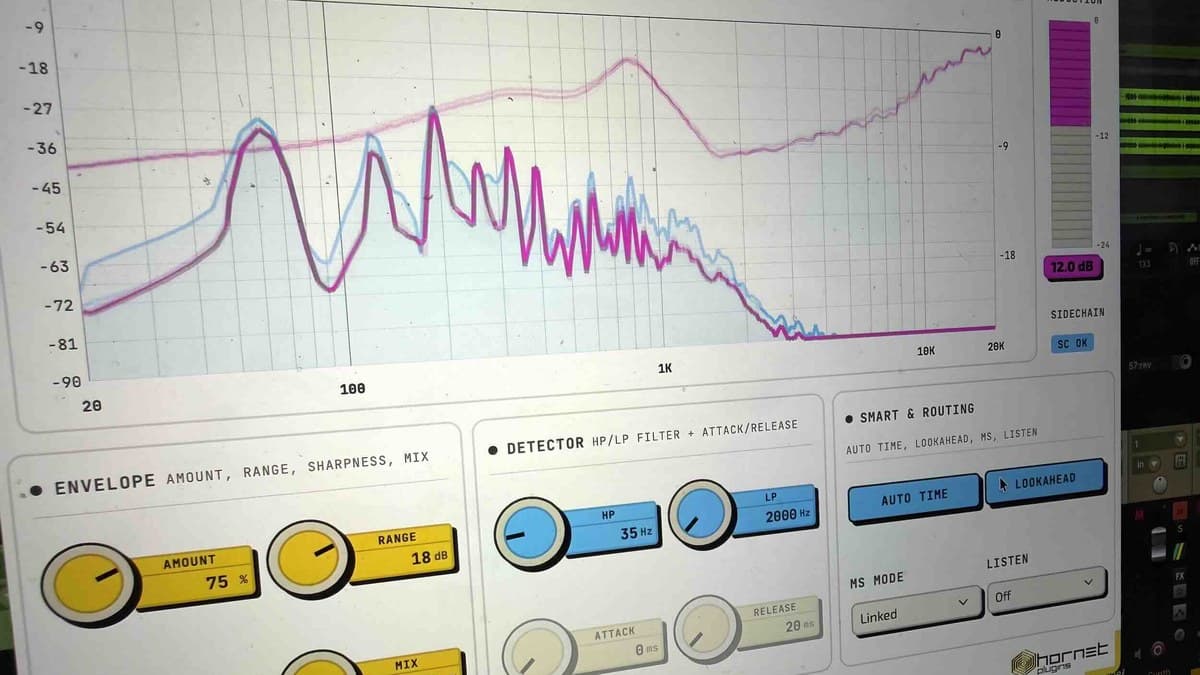
HoRNet has released SpectraDuck, a sidechain ducker that reads the spectrum of the trigger instead of its level. When a kick hits at 60 Hz, it pulls the bass down around 60 Hz and leaves the rest of the bass alone. There are no bands to set and no crossovers to place. It costs €29.99, and version 1.0.1 is already out with fixes for Pro Tools, Logic, Cubase 15 and Ableton Live 12.
At a glance: SpectraDuck is a €29.99 one-time purchase from HoRNet with lifetime free updates. It runs as VST3, AU and AAX (64-bit) on macOS 10.15 or later, native on Apple Silicon, and on 64-bit Windows 10 or later. Latency is about 5 ms with host compensation. The demo is fully functional with no time limit, and HoRNet offers a 15-day refund window.
What is SpectraDuck?
Classic sidechain ducking is a level trick. A compressor on the bass listens to the kick and turns the whole bass down every time the kick is loud. That clears space, but it also thins the low end and drains energy from the parts of the bass that were never fighting the kick. Multiband sidechain setups fix some of that, at the price of crossovers, per-band settings and phase shifts between bands.
SpectraDuck takes a different route. It runs an FFT analysis of the sidechain in real time and cuts the ducked track only in the frequencies the trigger occupies, by as much as the overlap calls for. Where the two sounds clash, it cuts. Where they do not, the signal passes untouched. HoRNet calls it ducking that follows the natural masking of the signal, and that is a fair description of the idea.
It is not the first plugin to work this way. Wavesfactory's Trackspacer made the approach popular. SpectraDuck's pitch is a lower price, a clearer display and a few extra modes.
The controls
Three knobs do most of the work:
- Amount sets how hard the ducker pushes, from 0 to 100 percent. The default is 100.
- Range caps how many decibels it can cut at any moment. The default is 24 dB.
- Sharpness decides how surgical the cut is. High values follow the sidechain spectrum exactly. Low values spread the cut over neighbouring frequencies for a softer, more musical result. The default is 30 percent.
The rest refines it:
- HP/LP detector filter tells SpectraDuck which part of the sidechain to listen to. HoRNet suggests 35 Hz to 220 Hz for a kick and 180 Hz to 5.5 kHz for a voice.
- Auto Time estimates attack and release from the sidechain material. A dry kick gets short times and a sustained voice longer ones. It is on by default.
- Lookahead buffers the signal so the duck anticipates transients, for click-free results on drums. It is off by default.
- MS mode ducks both channels (Linked), only the centre (Mid Only) or only the sides (Side Only). Side Only is handy for clearing wide pads around a centred lead.
- Listen mode lets you hear the sidechain detector, or Delta, which plays only what is being removed.
The display draws the input spectrum, the post-ducking spectrum and the gain-reduction curve live, so you can see exactly where it is cutting.
Where it fits in a mix
HoRNet's own examples cover the usual jobs. Kick against bass: put SpectraDuck on the bass bus, feed it the kick, set the detector to the kick's range. Vocal against a music bed: put it on the music bus and key it from the vocal, so the bed dips only where the voice lives. Drum bus: key it from the kick so only the low-mids that clash get pulled, while snare and hats stay put. Podcast and voiceover: music under speech that ducks around the voice instead of dropping as a whole.
Without a sidechain signal, SpectraDuck runs in passthrough. That is by design, and a small SC indicator shows when the trigger is active.
SpectraDuck specifications
| Spec | SpectraDuck |
|---|---|
| Type | Spectral sidechain ducker |
| Detection | FFT-based, no bands, no crossovers |
| Main controls | Amount, Range (default 24 dB), Sharpness |
| Detector | HP/LP filter, Auto Time, attack and release |
| Extras | Lookahead, MS mode (Linked, Mid, Side), Listen (Sidechain, Delta) |
| Metering | Input and output spectra, gain-reduction curve, L/R and GR meters |
| Latency | About 5 ms, host-compensated |
| Formats | VST3, AU, AAX, 64-bit only |
| macOS | 10.15 or later, Intel and Apple Silicon native |
| Windows | 10 or later, 64-bit |
| Current version | 1.0.1 |
| Demo | Fully functional, no time limit |
| Price | €29.99 |
SpectraDuck vs Trackspacer vs On Tap vs Kickstart 2
| HoRNet SpectraDuck | Wavesfactory Trackspacer | Carbonated Audio On Tap | Cableguys Kickstart 2 | |
|---|---|---|---|---|
| Price | €29.99 direct | $59 at Plugin Boutique | $20 direct | $16 direct |
| How it ducks | Spectral, follows the sidechain spectrum | 32-band EQ driven by the sidechain | Drawn gain curve with band-split crossover | Drawn gain curve |
| Needs sidechain routing | Yes | Yes | No (sync, MIDI or audio trigger) | No (sync or trigger) |
| Best at | Transparent kick/bass and vocal/bed clearing | Proven, widely used carving tool | Pumping without routing | Fast, simple pump |
Trackspacer is the direct rival and the established name. It splits the sidechain into 32 bands and applies an inverted 32-band EQ to the other track. SpectraDuck claims finer, band-free detection, adds MS ducking and a Delta listen mode, and costs about half as much. Trackspacer has years of use behind it.
The other two solve a different problem. Carbonated Audio On Tap and Kickstart 2 create the rhythmic pump of dance music with a drawn volume curve. They are cheaper and need no routing, but they duck the level, not the spectrum. If you want the pump as an effect, buy one of those. If you want the clash gone without hearing a pump, SpectraDuck is the tool.
Who it's for
SpectraDuck suits mixers who fight masking on kick and bass, vocals over dense beds, and drum buses, and who want a fix that sounds transparent rather than pumping. It also suits podcast and post-production editors who duck music under speech every day.
Skip it if you want audible sidechain pumping as a groove element. A curve ducker does that better. Skip it if you already own Trackspacer and are happy with it, since the core idea is the same. And if you need fixed-band dynamic control with set curve shapes, a multiband compressor or a dynamic EQ such as FabFilter Pro-Q 4 is still the right call.
Price and availability
SpectraDuck costs €29.99 from the official HoRNet store, with lifetime free updates and a 15-day money-back guarantee. HoRNet's cart discount applies too: two paid plugins take 40 percent off, rising to 70 percent once a basket reaches €300 of paid plugins. The full demo has no time limit and needs no card.
FAQ
What does SpectraDuck do differently from a sidechain compressor?
A sidechain compressor turns the whole track down when the trigger is loud. SpectraDuck cuts only the frequencies the trigger occupies, so the rest of the ducked track keeps its level.
Does SpectraDuck add latency?
About 5 ms, which your DAW compensates automatically. With Lookahead off it suits live tracking.
SpectraDuck vs Trackspacer?
Both duck by frequency from a sidechain. Trackspacer uses a 32-band EQ and costs $59 at Plugin Boutique. SpectraDuck uses band-free FFT detection, adds MS and Delta modes, and costs €29.99.
Can I try it first?
Yes. The demo is fully functional with no time limit, and there is a 15-day refund window after purchase.
What happens without a sidechain?
The plugin passes the signal through untouched until a sidechain is connected.
Verdict
SpectraDuck brings spectral ducking down to €29.99 and makes it easy to see what it is doing. The three-knob setup, Auto Time and the detector filter should get most sessions sorted in minutes, and MS and Delta modes are useful extras over the best-known rival. It will not replace a pump plugin or a multiband compressor, and HoRNet says so itself. This is a first look based on HoRNet's official materials, not a hands-on test.