CodWaves Quance: Resonance Suppression, Live to Studio
CodWaves Quance is a resonance suppressor with six material modes and five quality grades, from a zero-sample live mode to studio quality. $49.99 intro, $79.99 full.
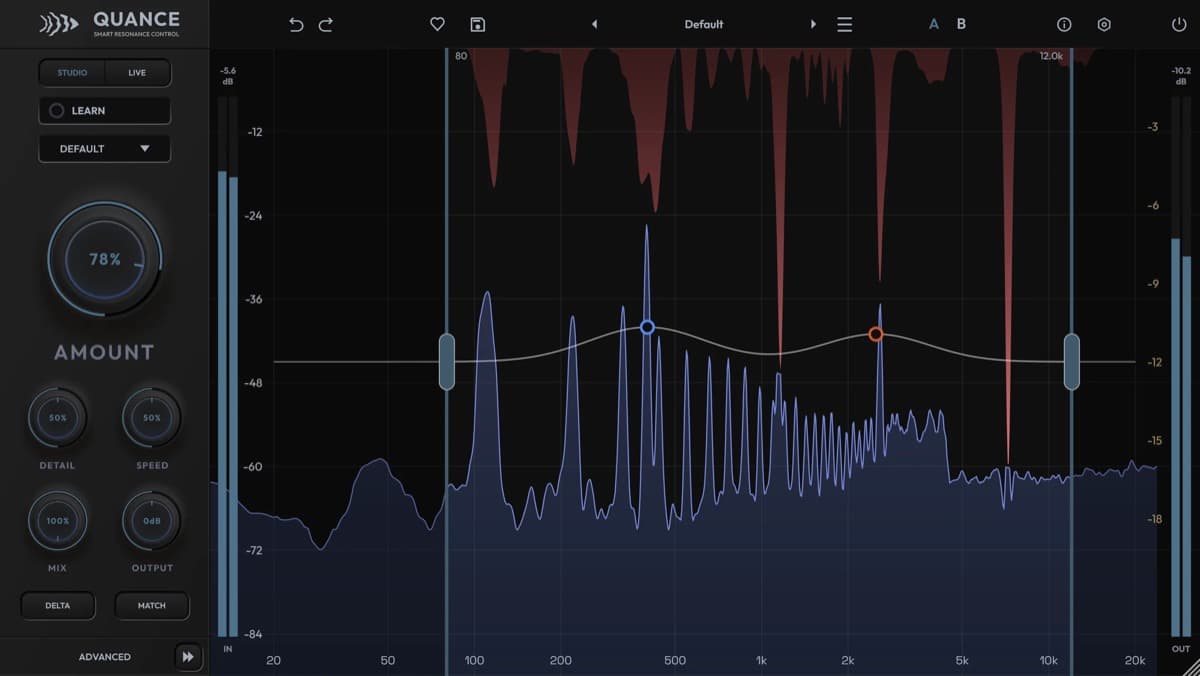
CodWaves released Quance in late October 2026, a dynamic resonance suppressor built to tame the harsh peaks that make a mix tiring. It lands in a category that oeksound's soothe has owned for years, and it makes its case on two fronts: a lower price, and a quality system that runs from a true zero-latency live mode up to heavy studio processing. This is a paid plugin, not a free utility, and it's the most ambitious thing CodWaves has shipped.
At a glance: Quance is a resonance suppressor in VST3, AU and AAX for macOS 10.15 or later and Windows 10 or later. It offers six material modes, five quality grades from a 0-sample Live Zero engine to a 171 ms Studio Ultra engine, up to eight focus points, and a Learn function that finds resonances for you. It costs $49.99 at launch ($79.99 full), with the CodWaves store showing the same figures in euros.
What is a resonance suppressor?
A resonance suppressor solves a specific, nagging problem. Almost every recording carries narrow frequency peaks that ring, hiss or jump out: sibilance on a vocal, a boxy note on an acoustic guitar, a ringing cymbal, a harsh build-up on a full mix. The old fix was to hunt those peaks by hand with a dynamic EQ and notch each one. That eats time, and it still misses peaks that move around.
A resonance suppressor does that work for you. It scans the signal in real time and ducks a problem frequency only when and where it spikes, then lets go. Done well, the processing is close to invisible, and that's why the category became a mixing staple. Quance is CodWaves' entry, and it competes head on with soothe2, the newer soothe3, and broadband balancers like Gullfoss.
What Quance does, feature by feature
Six material modes. Quance opens with modes for Default, Vocal, Instrument, Drums, Mix and Hard. Each one retunes the detector and the protection systems for a type of source, so a vocal gets different handling from a drum bus. It's a sensible starting point, and it saves you from dialling in the engine from scratch every time.
Up to eight focus points. You shape the detection curve by hand with focus points on the graph. Each one is either a Tame point, which raises sensitivity at a frequency, or a Protect point, which shields an area from any reduction. Every point has its own width and a solo button, so you can audition exactly what it's catching. Four detection ranges can run at once, with seven presets from Sibilance to Snare Ring.
A Learn function that does the hunting. Click once and Quance listens until you stop it. Double-click and it runs a fixed eight-second pass. Either way, it drops focus points on the most stable resonances it finds and narrows the detection around them. It doesn't touch the Amount control, so you still decide how hard it cuts, and the whole pass counts as one undo step.
Protection that keeps the music intact. Tone Protect guards fundamentals, overtones and vocal formants, while Transient Protect eases off during attacks so drums keep their snap. Max Cut sets an optional ceiling on how much it'll remove at any frequency. There's also sidechain unmasking, which reduces resonances on one track based on another signal, a Delta mode to monitor only what's being removed, and Loudness Match to keep input and output level for a fair comparison.
Five quality grades, the real headline. This is where Quance separates itself. It offers five engines at different latencies, so one plugin covers both tracking and mastering.
CodWaves Quance specifications
| Spec | Detail |
|---|---|
| Developer | CodWaves |
| Type | Dynamic resonance suppressor |
| Material modes | Default, Vocal, Instrument, Drums, Mix, Hard |
| Stereo modes | Linked, Dual, Mid-Side, M-S Link |
| Filter phase | Linear or minimum phase |
| Quality grades | Live Zero (0 samples), Live Light (~21 ms), Live Normal (~43 ms), Studio Pro (~85 ms), Studio Ultra (~171 ms) |
| Focus points | Up to 8, each Tame or Protect, with solo |
| Detection ranges | Up to 4 active, 7 presets from Sibilance to Snare Ring |
| Presets | 53 factory presets plus user presets |
| Formats | VST3, AU, AAX (Windows: VST3, AAX) |
| System | macOS 10.15 or later (Intel and Apple Silicon); Windows 10 or later (64-bit) |
| Channels | Mono and stereo |
| Price | $49.99 / EUR 49.99 intro, $79.99 / EUR 79.99 full |
The grades run from Live Zero, a 48-band minimum-phase filter bank at zero reported latency, up to Studio Ultra, a three-band multi-resolution engine at around 171 ms. You can switch grades mid-session with crossfading, so a track can sit on a light engine while you record and move to a heavier one for the final bounce.
CodWaves Quance vs oeksound soothe3
The reference point is soothe, now in its third version. soothe3 is the established standard, and it holds advantages Quance doesn't match yet. The clearest is channel support: Quance is mono and stereo only, while soothe3 handles surround, which matters for post-production. On price and on the live mode, though, Quance pushes back hard.
| CodWaves Quance | oeksound soothe3 | |
|---|---|---|
| Price | $49.99 intro, $79.99 full | $259 / EUR 229 / GBP 199 |
| Modes | Six material modes | Soft and Hard, adaptive Soft |
| Lowest latency | Live Zero, 0 samples | Low-latency mode |
| Channels | Mono and stereo | Mono, stereo and surround |
| Detection help | Learn, up to 8 focus points | Delta solo, manual nodes |
| Formats | VST3, AU, AAX | VST3, AU, AAX |
| Best for | Affordable live and studio mixing | High-end mixing and post |
If you already lean on soothe3 across a surround post workflow, Quance won't replace it. If you mix music in stereo and want a transparent resonance tool at a fraction of the price, with a true zero-latency mode for tracking, Quance is a strong pick. A dynamic EQ such as FabFilter Pro-Q 4 or the free TDR Nova can notch resonances too, but neither hunts them automatically the way Quance does.
Who Quance is for
Quance suits mixing engineers and self-mixing producers who want resonance control without paying for the category leaders. The six modes make it approachable for newcomers, and the zero-sample Live Zero grade is a real draw for anyone who tracks vocals or guitars and wants to monitor through the processing with no latency. The protection systems mean you can push it on a full mix and still keep the low end and transients intact.
It's a weaker fit for post-production. With no surround support, dedicated sound editors who work in 5.1 or Atmos are better served by soothe3. This is also a first release, so the preset library is young and the long-term track record isn't there yet. Anyone who already owns a resonance suppressor they trust has less reason to switch, though the trial makes it easy to compare.
How much does Quance cost?
Quance launches at $49.99, with the CodWaves store showing the same figure as EUR 49.99, during a sale that runs to 30 November 2026. After that it returns to its full price of $79.99, shown as EUR 79.99 on the store. A rent-to-own plan runs EUR 6.99 a month over twelve payments, but rent-to-own always bills at the regular price, so the sale doesn't apply to it. A seven-day trial and a fourteen-day money-back guarantee round it out, and it installs as VST3, AU and AAX on Mac, or VST3 and AAX on Windows.
You can read the full feature list on the official Quance product page. For the wider mastering toolkit, see our best mastering plugins of 2026.
FAQ
What is CodWaves Quance?
It's a dynamic resonance suppressor. It scans a signal for narrow peaks and harsh build-ups and reduces them in real time, while protection systems keep fundamentals, transients and tone in place.
How much does Quance cost?
It's $49.99 during the launch sale, which runs to 30 November 2026, and $79.99 afterwards. The CodWaves store shows the same figures in euros, and a rent-to-own plan runs EUR 6.99 a month for twelve payments.
What formats and systems does Quance support?
It runs as VST3, AU and AAX on macOS 10.15 or later (Intel and Apple Silicon), and as VST3 and AAX on Windows 10 or later. It processes mono and stereo only.
What is the point of the five quality grades?
They trade latency for depth. Live Zero adds no latency, so you can track and monitor through it, while Studio Ultra uses a heavier engine for the most detailed cuts on a final bounce. You can switch grades inside one session.
Quance or oeksound soothe3?
Choose Quance for affordable, transparent resonance control in stereo, with a zero-latency live mode. Choose soothe3 for high-end mixing and post-production, where surround support and a longer track record still count.
Verdict
Quance is a confident first swing at a category that badly needed competition. It covers the fundamentals well, with six material modes, up to eight focus points and a Learn pass that does the tedious hunting, and the protection systems keep the music breathing while it works. The five quality grades are the standout. Putting a zero-sample live mode and a heavy studio engine in one plugin pays off across a whole project. The one real limit is channel support, because stereo only keeps it out of serious surround post for now. For music mixing, though, Quance delivers most of what the category leaders do at a fraction of the cost, and the trial means you can hear it on your own tracks before you commit. For the alternatives, start with our best mastering plugins of 2026.