Some links on this page are affiliate links. If you buy through them, Dubspot may earn a commission at no extra cost to you. It never affects our scores or what we recommend (read our policy).
Carbonated Audio On Tap: Ducking Without the Routing
Carbonated Audio On Tap is a $20 sidechain ducking plugin with 16 curves, three trigger modes and a band-split crossover, for macOS and Windows.
M
Marcus Feld
October 17, 2026 · 8 min read
Dubspot's best Black Friday dealsDubspot Tracker Pro: $15, was $24.99 ↗Drum Programming and Groove Production Course: $19, was $99 ↗
Carbonated Audio's On Tap is a sidechain ducking plugin built on one idea: get the pump, skip the routing. You drop it on a track and get a clean ducking shape without sending a kick to a compressor, building a bus, or wiring a sidechain input. It now runs on macOS and Windows at $20, and it joins a small, focused catalog from the same developer that already includes the ducking reverb FOAM. This is a first look based on the official product page, not a hands-on review.
At a glance: On Tap costs $20, one time, with three machine activations and free updates. It offers 16 hand-crafted ducking curves, three trigger modes, and a band-split crossover so you can duck only the lows or only the highs. Formats are VST3, AU and AAX on macOS, and VST3 on Windows. Latency is zero, with no lookahead. A free demo runs the full plugin, playing 60 seconds then muting 10 on a loop.
What is On Tap?
On Tap is a volume-shaping ducker. Instead of a compressor reacting to a trigger, it draws a repeating gain curve and pulls the track down on each beat, the way classic sidechain pumping works, but without the signal routing that usually comes with it. That matters because sidechain setup is the part beginners get stuck on and the part everyone finds tedious: route the kick, insert a compressor, dial the ratio, hope the release lands in time. On Tap replaces all of that with an insert and a shape.
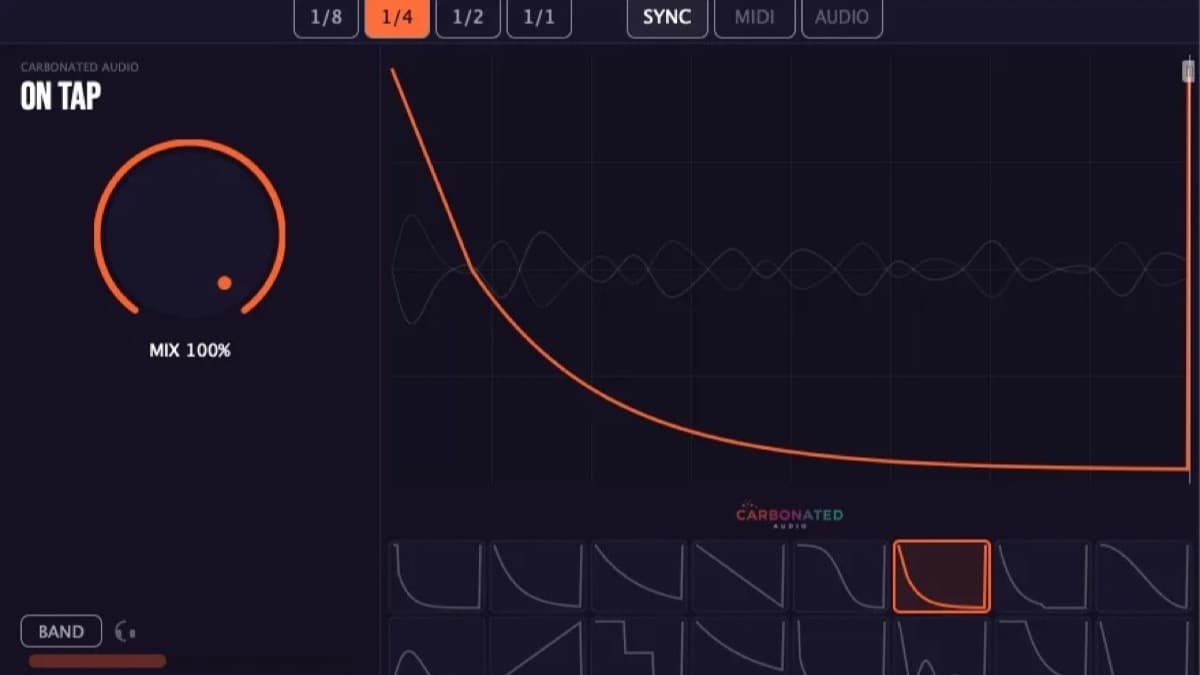
In practice, you load it on the track you want to duck, pick a curve, and set the trigger. The pump is locked to the beat from the first play, and you tweak depth and timing from there rather than chasing a compressor's attack and release. That workflow is the whole pitch, and it is why the plugin stays deliberately narrow.
It sits in the same lane as Kickstart 2, Cableguys VolumeShaper 6 and the wider ShaperBox 3 bundle, and it undercuts all of them on price. For the same developer's take on ducking applied to reverb tails, our FOAM first look is the companion read.
What On Tap actually does
The core is a library of 16 ducking curves. These are not generic triangles. The set includes a standard sidechain pump, a dedicated sub-bass ducking shape, and a reverse chain, so the common jobs are one click away rather than something you draw by hand each time. You can still shape the result. A slope offset tilts the curve, a shift amount moves it in time, and a draggable end marker sets where the duck recovers.
Three trigger modes decide what drives the pump:
- Sync locks the curve to your DAW tempo, the usual four-on-the-floor pump with no trigger track needed.
- MIDI fires the duck from any note, so you can pump in a rhythm that is not straight quarters.
- Audio responds to an incoming signal, which is the closest mode to a traditional sidechain when you want the real kick to drive it.
Those three modes cover most real sessions. Sync handles the standard dance pump, MIDI lets you program syncopated ducking, and Audio keeps the door open for a genuine kick trigger when you want it.
The band-split crossover is the feature that lifts On Tap above a one-trick pumper. A crossover from 20 Hz up to 5.12 kHz lets you duck only above or only below a chosen frequency, so you can pump the sub out of the way of a kick while leaving the top of the same track untouched. Anti-click smoothing cleans up the gain transitions, and the developer reports zero latency with no lookahead delay and low CPU use, which keeps it usable on a live or latency-sensitive session. For ducking that follows the kick's actual spectrum instead of a fixed crossover, see HoRNet SpectraDuck.
On Tap specifications
| Spec | Detail |
|---|---|
| Type | Sidechain ducking and volume-shaping plugin |
| Curves | 16 hand-crafted shapes, including sidechain pump, sub-bass duck and reverse chain |
| Trigger modes | Sync (DAW tempo), MIDI (any note), Audio (incoming signal) |
| Band split | Crossover from 20 Hz to 5.12 kHz, duck above or below |
| Controls | Mix, slope offset, shift amount, draggable end marker |
| Latency | Zero, no lookahead |
| Formats (Mac) | VST3, AU, AAX (Intel and Apple Silicon native) |
| Formats (Windows) | VST3, 64-bit |
| System | macOS 10.13 or later, Windows 10 or later |
| License | $20 one time, 3 activations, free updates |
How On Tap compares to Kickstart 2 and VolumeShaper 6
All three get you a pump without a compressor. The differences come down to scope and price.
| On Tap | Kickstart 2 | VolumeShaper 6 | |
|---|---|---|---|
| Core job | Preset curves, fast ducking | Preset curve ducking | Draw any volume LFO |
| Curves | 16 shapes plus editing | Curve library | Fully drawable, multiband |
| Band split | Yes, 20 Hz to 5.12 kHz | No | Yes, in ShaperBox |
| Trigger | Sync, MIDI, Audio | Sync, MIDI | Sync, MIDI, audio trigger |
| Latency | Zero, no lookahead | Low | Low |
| Price | $20 | Around $29 | Around $39 |
| Pick it if | You want ready curves and a band split cheap | You want the simplest pump | You want to draw everything |
On Tap lands between Kickstart's one-job simplicity and VolumeShaper's draw-anything depth, and it is the cheapest of the three with a band split built in. If you only ever want the classic pump, Kickstart 2 is the simplest. If you want to draw arbitrary volume, pan and filter motion, VolumeShaper 6 and the ShaperBox 3 bundle go further. On Tap is the value pick for producers who want good curves, a band split and zero fuss.
Who On Tap is for
It suits producers who duck the same way on most tracks and are tired of the routing, plus beginners who want the pump without learning sidechain setup first. The band split makes it genuinely useful for dance and bass-heavy music, where ducking only the sub is a real mixing move. Skip it if you already own a drawable shaper like VolumeShaper or ShaperBox and lean on its deeper modulation, since On Tap covers a narrower job. One format caveat: there is no AAX on Windows, so Pro Tools on a PC is not supported. The studio's newer SPRITZ multi-effect goes further, with tape stops, stutters and half-time flips drawn as curves.
How much does On Tap cost?
On Tap is $20, a one-time purchase sold direct by Carbonated Audio, with three machine activations and free updates. Klarna and Afterpay split it into four interest-free payments of $5. The nine-plugin Carbonated Audio bundle, which includes On Tap, is $99. A free demo runs the full plugin, playing 60 seconds then muting for 10 on a loop, so you can test every feature before buying. You can get On Tap and the demo from Carbonated Audio.
FAQ
Is On Tap worth it over a free sidechain compressor?
If your DAW's stock compressor and a kick send already give you the pump you want, you do not need it. On Tap is worth $20 when you value the speed: ready curves, no routing, a band split, and three trigger modes in one insert. It turns a five-step setup into one.
On Tap vs Kickstart 2?
Both are curve-based duckers with no compressor. On Tap adds a band-split crossover and a reverse-chain curve, and it is cheaper. Kickstart 2 is the more established name and keeps the workflow as simple as possible. If price and the band split matter, On Tap wins. If you want the simplest possible pump, Kickstart is fine.
What formats and systems does On Tap support?
VST3, AU and AAX on macOS 10.13 or later, native on Intel and Apple Silicon, and VST3 on Windows 10 or later, 64-bit. There is no AAX on Windows, so Pro Tools on a PC is not covered.
Verdict
On Tap does one thing and does it cleanly: it gives you a sidechain pump without the sidechain. The 16 curves cover the common jobs, the three trigger modes handle the awkward cases, and the band-split crossover is the detail that makes it a real mixing tool rather than a toy pumper. At $20 with zero latency and a full-feature demo, it is an easy recommendation for anyone who ducks often and hates the routing. It will not replace a drawable shaper if you already live in VolumeShaper 6, and that marks the edge of its scope. For the same studio's other ducking tools, see FOAM and TALLBOY, or browse the full plugin database.