Some links on this page are affiliate links. If you buy through them, Dubspot may earn a commission at no extra cost to you. It never affects our scores or what we recommend — read our policy.
Rast Sound Splitz: Split Effects Rack for Your Own Plugins
Splitz splits audio into mid/side, three bands, loud/soft or hits/tails and runs each part through its own effects, even your VST3 plugins in Pro Tools. €59 intro.
M
Marcus Feld
October 21, 2026 · 8 min read
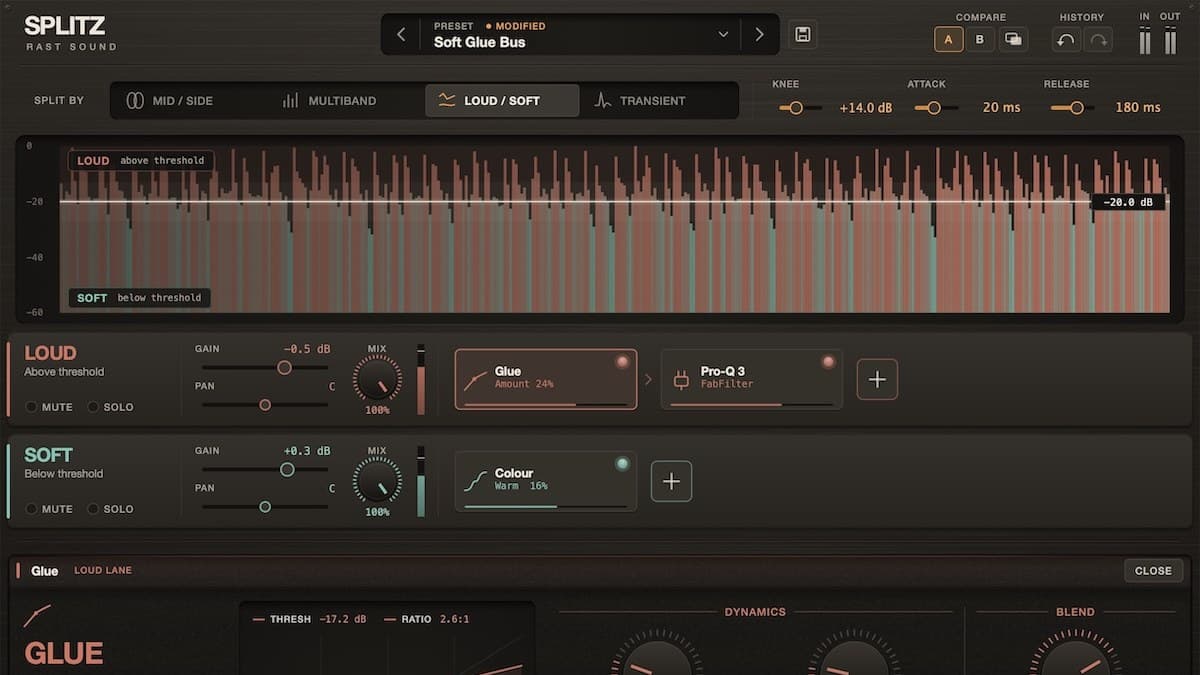
Rast Sound has released Splitz, an effects rack that divides a sound into parts and lets you process each part on its own. Reverb only on the tails. Drive only on the quiet notes. Echo only on the sides. Each part gets up to four effect slots, filled with Splitz's seven built-in effects or your own plugins, and then everything comes back together in time. The introductory price is €59, down from €99.
At a glance: Splitz is €59 at launch (regular €99) direct from Rast Sound. It has four split modes (centre and sides, lows/mids/highs, loud and quiet, hits and tails), up to four effect slots per part, seven included effects, and 47 factory presets. It hosts third-party VST3 plugins on Mac and Windows and Audio Units on Mac, including inside Pro Tools. Splitz runs as AU, VST3 and AAX on macOS 10.13 or later (Apple Silicon and Intel native) and as VST3 and AAX on Windows 10 or later.
What is Splitz?
Split processing is an old mixing trick. Engineers have long duplicated a track, gated or filtered one copy, and treated the two differently. Multiband compressors, mid/side EQs and transient shapers each automate one version of that idea. Splitz puts four of those splits into one plugin and, crucially, lets you put any effect on each part rather than a fixed processor.
It comes from Rast Sound, the developer behind the Redwood analog color rack. Redwood stacks three processors in series. Splitz runs them in parallel, one chain per part of the sound.
The four ways to split
- Centre and sides (Mid/Side). Keep the centre focused and let the sides do something else, such as wide echoes on a stereo synth while the middle stays dry.
- Lows, mids and highs (Multiband). Three bands, each with its own chain. Glue on the lows, colour on the mids and space on the highs is one of the factory examples.
- Loud and quiet parts (Loud/Soft). A threshold with knee, attack and release decides what counts as loud. Saturate only the phrases where a singer pushes, or lift only the ghost notes on a drum loop.
- Hits and tails (Transient). Separate the strike from the sustain. Compress the body of a drum without dulling the snap, or send only the ring of a piano note into reverb.
The loud/soft and transient modes are the interesting ones. Frequency and mid/side splits are common. Splitting by level or by attack, then running any effect you like on each part, is much rarer in one plugin.
Effects: built-in or your own
Each part gets up to four slots. The seven included effects are Colour (saturation), Tone (a macro EQ with tilt, focus, filter and band shapes), Glue (compression), Space (reverb), Echo (delay), Mod (modulation) and Duck (ducking).
You can mix these with third-party plugins: VST3 on Mac and Windows, and Audio Units on Mac. That works even when Splitz itself runs as AAX in Pro Tools, which is a real advantage for Pro Tools users who cannot normally put a VST3 inside an AAX session. Rast Sound says almost all the third-party effects it tested worked in Splitz. The hero image shows the idea: Glue and FabFilter's Pro-Q 3 on the loud lane, Colour on the soft lane.
Mixing tools that keep it safe
With no effects loaded, the parts recombine flat, so Splitz does not color the sound by itself. Each part stays time-aligned even when its plugins add latency. You can solo or mute a part, balance it with gain, pan and mix controls, A/B two setups, undo and redo, and blend the whole result with the dry signal.
Automation covers the split controls, each part's gain, pan, mix, mute and solo, and the overall dry/wet and output. Parameters inside the effects are not exposed to your DAW yet, so you cannot automate a reverb's decay inside Splitz from the host.
The 47 factory presets cover drums, vocals, bass, guitar and keys, the mix bus, mastering and creative effects. Examples include Ghost Note Lift, Snap & Bloom, Tame the Belt, Growl Split, Dig-In Drive, Master Density and Hit Stutter.
Splitz specifications
| Spec | Splitz |
|---|---|
| Type | Split effects rack |
| Split modes | Mid/Side, Multiband (3 bands), Loud/Soft, Transient |
| Slots | Up to 4 effects per part |
| Included effects | Colour, Tone, Glue, Space, Echo, Mod, Duck |
| Third-party hosting | VST3 (Mac and Windows), AU (Mac), also inside Pro Tools |
| Per-part controls | Gain, pan, mix, mute, solo |
| Global | Dry/wet, output, A/B, undo/redo, user presets |
| Latency | Parts stay time-aligned when plugins add latency |
| Presets | 47 factory |
| macOS | 10.13 or later, Apple Silicon and Intel native: AU, VST3, AAX |
| Windows | 10 or later: VST3, AAX |
| Activation | Online once, then offline |
| Price | €59 intro, €99 regular |
Splitz vs Multipass vs SplitEQ
| Splitz | Kilohearts Multipass | Eventide SplitEQ | |
|---|---|---|---|
| Price | €59 intro, €99 regular | $99 at Plugin Boutique | $149 at Plugin Boutique |
| Split types | Mid/side, 3 bands, loud/soft, transient | Up to 5 frequency bands | Transient and tonal |
| What runs on each part | 7 built-in effects or your VST3/AU plugins | Kilohearts Snapins | EQ only |
| Pro Tools | Yes (AAX) | Yes (AAX) | Yes (AAX) |
Kilohearts Multipass is the stronger sound-design tool. Five bands and per-band modulation go deeper than Splitz's three-band mode, but it only hosts Kilohearts Snapins, and it has no loud/soft or transient split. If you already own Snapins, read our Multipass page first.
Eventide SplitEQ is the specialist. Its transient and tonal separation drives a full EQ on each part, which is excellent for surgical work on drums and vocals. Splitz trades that EQ depth for the freedom to run any effect on the hits or the tails.
Who it's for
Splitz is for mixing engineers and producers who already think in parallel chains. If you regularly duplicate tracks to compress only the body of a drum, add drive only to loud phrases, or keep low end mono while the top goes wide, Splitz does that in one insert with latency handled. Pro Tools users get extra value from VST3 and AU hosting inside AAX.
Skip it if you mainly need multiband dynamics: a dedicated multiband compressor will be quicker. Skip it, too, if you want to automate effect parameters from your DAW, since that is not supported inside Splitz yet. And if your idea of transient work is just more attack, a simple transient shaper is cheaper. Our guide to mixing with transient shapers covers that route.
Pricing and availability
Splitz is available now from the official Rast Sound store for €59 at launch, saving €40 on the regular €99. A free 15-day demo is listed as coming soon, and a user manual is available as a PDF. Activation needs an internet connection once, then Splitz works offline.
FAQ
Can Splitz load my own plugins?
Yes. It hosts VST3 effects on Mac and Windows and Audio Units on Mac, and that works even when Splitz is running in Pro Tools.
How many effects can each part have?
Up to four, from the seven built-in effects, your own plugins, or a mix of both.
Does Splitz change the sound with no effects loaded?
No. With empty slots, the parts recombine flat, and every part stays time-aligned even when plugins add latency.
Can I automate Splitz?
You can automate the split controls, each part's gain, pan, mix, mute and solo, and the global dry/wet and output. Effect parameters inside Splitz are not exposed to the host yet.
Splitz vs Multipass?
Multipass has five bands and per-band modulation but only hosts Kilohearts Snapins. Splitz has fewer bands but adds loud/soft and transient splits and hosts your own plugins.
Verdict
Splitz turns a handful of classic parallel-processing tricks into one tidy rack, and the loud/soft and transient modes with third-party hosting are what set it apart. At €59 during the intro it is easy to justify for anyone who builds duplicate-track chains by hand. The missing effect automation and a three-band limit are the trade-offs. This is a first look based on Rast Sound's official materials, not a hands-on test.