Some links on this page are affiliate links. If you buy through them, Dubspot may earn a commission at no extra cost to you. It never affects our scores or what we recommend — read our policy.
Novation FLpad Puts FL Studio's Grid on the Desk
Novation FLpad and FLpad Mini are FL Studio grid controllers at $229.99 and $139.99, with sequencer, channel rack, and graph editor views across 64 pads.
M
Marcus Feld
October 5, 2026 · 10 min read
Black Friday 2026FL Studio Black Friday 2026: dates and deals →
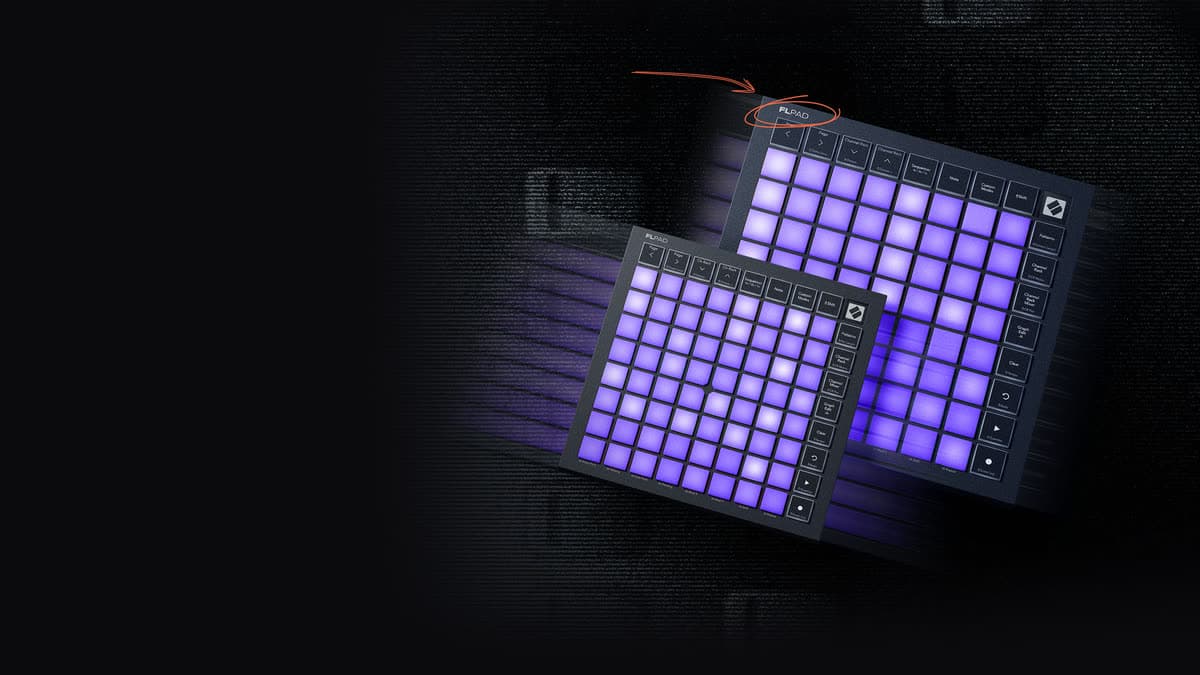
Novation and Image-Line launched FLpad on 1 October 2026, and it is not another keyboard with FL stickers. If you already play FL Studio from the FLkey range, this is the grid that sits beside it. FLpad is $229.99. FLpad Mini is $139.99. Both are USB-C, bus-powered, and they need FL Studio 26.1.6 or later.
At a glance: an 8x8 grid of 64 RGB pads. The full FLpad uses velocity-sensitive full-size pads. The Mini uses fixed-velocity mini pads. Views cover Sequencer, Note, Patterns, Channel Rack, Channel Rack Mixer, Graph Edit, and up to four Custom Modes. A six-month FL Studio Producer Edition licence is in the bundle.
What the pads are doing inside FL Studio
Sixteen buttons sit around the grid. Four of them navigate. The rest jump to Sequencer, Note, Custom Modes, Shift, Patterns, Channel Rack, Channel Mixer, and Graph Edit, plus Clear, Undo, Play/Pause, and Record. Shift reaches Clone Loop, octave up and down, Pattern Length, Channel Rack mutes, Channel Rack pan, Tempo, Redo, Quantise, and Score Log. That is the whole performance surface. There is no screen on the hardware, so the view you are in has to be obvious from the pads and the DAW.
Sequencer is the step grid. You can sequence up to four instruments at once, which is the feature that separates this from a generic clip launcher. Note plays the focused channel in scale or chromatic layout. Patterns creates, selects, clears, and duplicates patterns without a mouse trip to the picker. Channel Rack and Channel Rack Mixer put mutes, levels, and pan under the pads, with the Shift layer for mutes and pan called out on the panel. Graph Edit opens the graph editor for the step you are shaping.
Finger-drum layouts cover FPC, Slicex, and Fruity Slicer. If your drums already live in one of those, the grid is a pad instrument, not only a step sequencer. Custom Modes, up to four of them, are the escape hatch when a stock view does not match the session.
Transport is the part producers usually bolt on with a separate controller. Record, Play, Undo, and Redo are dedicated. Clear wipes the thing you are editing. Tempo, Quantise, and Score Log sit on Shift, so timing fixes and a look at the score log do not need the mouse. Pattern Length and Clone Loop are the arrangement moves: set how long the pattern is, then duplicate a loop you want to keep while you change the next one.
None of this helps on an old install. Novation requires FL Studio 26.1.6 or newer, so the views are talking to the current FL Studio pattern and channel-rack model. A 20.x or 21.x session will not grow these pages on its own.
Full size or Mini
The views, the buttons, the Shift map, the DAW requirement, and the software bundle are the same on both units. The difference is the pads and the chassis.
FLpad's 64 pads are full size and velocity-sensitive, using Novation's force-sensing resistors. The chassis is 240 x 240 x 17.6 mm and 820 g. That is a laptop-sized square, heavy enough to stay put when you play dynamics. FLpad Mini is 180 x 180 x 14.2 mm and 380 g, with fixed-velocity mini pads. Hits do not send velocity. You get the same views, and you lose the dynamics.
Both are USB-C and bus-powered, with a Kensington slot and a 1.5 m USB-C to USB-A cable. No power supply is in the box. You do not need one for a normal computer port.
If you play drums from FPC or you ride velocity into a sampler, the full FLpad is the one that hears it. If the grid is a pattern launcher and a mute box, the Mini does that job at $90 less and about half the weight.
FLpad specifications
| Spec | FLpad | FLpad Mini |
|---|---|---|
| US price | $229.99 | $139.99 |
| UK street (Thomann) | £165 | £85 |
| Pads | 64 RGB, full size, velocity-sensitive | 64 RGB, mini, fixed velocity |
| Grid | 8x8 | 8x8 |
| Views | Sequencer, Note, Patterns, Channel Rack, Channel Rack Mixer, Graph Edit, up to 4 Custom Modes | Same |
| Shift | Clone Loop, octave, Pattern Length, mutes, pan, Tempo, Redo, Quantise, Score Log | Same |
| Transport | Record, Play/Pause, Undo, Clear, plus Shift Redo | Same |
| Step sequencing | Up to four instruments at once | Same |
| Drum layouts | FPC, Slicex, Fruity Slicer | Same |
| Connection | USB-C, bus-powered, 1.5 m USB-C to USB-A cable | Same |
| Size | 240 x 240 x 17.6 mm, 820 g | 180 x 180 x 14.2 mm, 380 g |
| DAW | FL Studio 26.1.6 or later | Same |
| SKU | NOVFLPD01 | NOVFLPD02 |
FLpad, Launchpad, FLkey, and Fire
Novation already sells grids. Launchpad X is $229.99, the same US price as FLpad. Its 64 pads are velocity-sensitive and pressure-sensitive, with polyphonic aftertouch. It is built for Ableton Live and Logic Pro, with Note and Scale modes, Capture MIDI, four Custom Modes in Components, and Ableton Live Lite in the box. The chassis is 241 x 241 x 17.5 mm, so it occupies the same desk space as FLpad and speaks a different DAW.
Launchpad Mini is $129.99. It is a 64-pad RGB grid at 180 x 180 x 14.2 mm, the same footprint as FLpad Mini, with three Custom Modes, 16 buttons, and Live Lite for Ableton sessions.
On the keyboard side, FLkey Mini 25 MK2 is $139.99 and FLkey 49 MK2 is $289.99. Those are keys with FL transport, not an 8x8 sequencer. Our MIDI keyboard roundup is the right place if the missing piece is a keybed. FLpad does not replace one.
Akai Fire is the earlier dedicated FL Studio pad controller: velocity-sensitive pads, an OLED, a one-to-one step sequencer, and FL Studio Fruity Fire Edition included when you register it. It is a different generation of the same idea, aimed at FL Studio 20.5-era sessions rather than the 26.1.6 views FLpad is built around.
| FLpad | FLpad Mini | Launchpad X | Launchpad Mini | FLkey 49 MK2 | |
|---|---|---|---|---|---|
| US price | $229.99 | $139.99 | $229.99 | $129.99 | $289.99 |
| Playing surface | 64 velocity pads | 64 fixed-velocity pads | 64 pads, velocity, pressure, aftertouch | 64 RGB pads | 49 keys |
| Made for | FL Studio 26.1.6+ | FL Studio 26.1.6+ | Ableton Live and Logic | Ableton Live | FL Studio, as a keyboard |
| Step sequencing | Up to four instruments, graph edit | Same views | Session and note modes for Live | Session launching | Not a grid sequencer |
| Size | 240 mm square, 820 g | 180 mm square, 380 g | 241 mm square | 180 mm square | Keyboard |
Which one to pick
Pick FLpad if FL Studio is the DAW and you want velocity on a full-size pad. Pick FLpad Mini if you want those same FL views in a bag and you can live without velocity. Pick Launchpad X if the same $229.99 should buy aftertouch and a Live or Logic workflow. Pick Launchpad Mini if you want the small grid for Live and the extra $10 matters. Pick an FLkey if you need keys. Add Fire to the list only if you specifically want the OLED and the older one-to-one Fire sequencer.
Who FLpad is for
Consider the full FLpad if you sequence patterns and you play drums with dynamics. Consider the Mini if mutes, pattern select, and note entry are the job and the desk is small. Skip both for Live or Logic, where Launchpad X and Launchpad Mini already speak the session view. Skip the Mini if velocity is how you perform, and skip both if you really wanted keys: FLkey Mini 25 MK2 is the same $139.99 and plays a keyboard. Stay on an older FL Studio only if you do not plan to reach 26.1.6, because these views will not appear on their own.
Price, bundle, and when you can get one
Novation's store lists FLpad at $229.99 and FLpad Mini at $139.99. Both show as preorder there. Thomann has FLpad at £165 and the Mini at £85, with delivery quoted at 9 to 12 weeks. Those Thomann links are our affiliate route.
The bundle is the same for both sizes. You get six months of FL Studio Producer Edition, which Novation describes as 27 instruments and 59 effects, plus audio recording and stem separation. Instruments and effects from UVI (Prime 8+), Klevgrand (Slammer and LUXE), and a trio of synths from GForce are included, along with Melodics lessons. The six months are a licence window. Budget for a full FL Studio licence if this controller becomes the way you write.
FAQ
Which FL Studio version does FLpad need?
FL Studio 26.1.6 or later. The Sequencer, Channel Rack, and Graph Edit views depend on that generation. Older installs are not the target.
Are the Mini pads velocity-sensitive?
No. FLpad Mini's pads are fixed velocity. The full FLpad's pads are velocity-sensitive. Views, buttons, and the bundle match. Dynamics do not.
Will it work as an Ableton controller?
It is built as an FL Studio grid, with views that map to FL's sequencer, channel rack, and graph editor. For Live, Launchpad X at the same $229.99 is the Novation grid with session modes and aftertouch.
What is in the software bundle?
Six months of FL Studio Producer Edition, UVI Prime 8+, Klevgrand Slammer and LUXE, three GForce synths, and Melodics lessons. The FL Studio portion is 27 instruments and 59 effects for those six months.
How soon can I get one in the UK?
Thomann lists both models with a lead time of 9 to 12 weeks, at £165 and £85. Novation's own store has them as preorder at $229.99 and $139.99.
Verdict
FLpad is a grid that knows FL Studio's pattern, channel rack, and graph editor, which is a more specific job than lighting up 64 pads. The full-size model earns the $229.99 when you play with velocity. The Mini earns $139.99 when you want the same views and you do not. Neither one replaces a keyboard, and neither one is the right grid if Live is home. Update to FL Studio 26.1.6 first, then pick the pad size your hands actually need.