Some links on this page are affiliate links. If you buy through them, Dubspot may earn a commission at no extra cost to you. It never affects our scores or what we recommend — read our policy.
Chopgrid Review: Sampling Built Around Chance
Chopgrid is a chance-based sampler that fills a 16-cell grid from random files, with 14 synthesis engines, a drum machine, and glitch FX. Specs and price.
M
Marcus Feld
July 12, 2026 · 7 min read
See full specs, price, and alternatives in the plugin database →
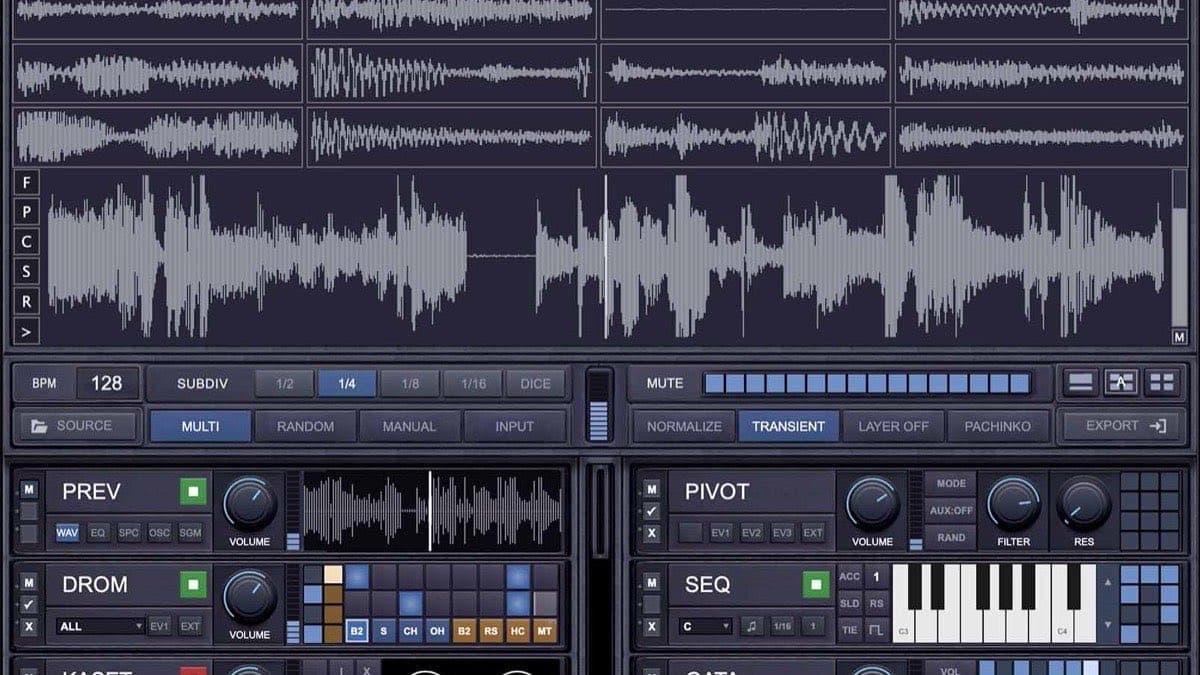
Chopgrid is a sampler built around chance. Developed by Broekn Labs and released in July 2026, it reads a folder of audio, grabs files at random, and fills a 16-cell grid with one-shots you can play, mangle, and export. The idea is speed through happy accidents: hit one button and you have a kit you would never have assembled on purpose.
What is Chopgrid?
At its core, Chopgrid is a grid sampler with a randomizer bolted to everything. The signature move is CHOP ALL. Press it and the plugin reads from your selected audio folder, grabs 16 different files, picks 16 different start points, and drops one-shot slices across the grid. No two sessions sound the same.
Each of the 16 cells holds its own waveform, envelope, and playback position. You can mute, reverse, lock, or swap individual cells on the fly, and shape the attack and decay of every cell independently. Two live banks, A and B, let you switch instantly and chop up to 128 files in a session, which is handy for filling a sampler bank or a drum rack.
That chance-first approach runs through the whole plugin. Every module uses 12-bit randomizers, and hitting the roll scrambles each available parameter into one of 4,096 combinations. Find something you like, lock it, and it stays put while you keep rolling elsewhere.
What Chopgrid includes
Chopgrid is not just a slicer. It bundles sound generators, drum tools, effects, and recording into one window.
Sound modules
Four modules let you build sound from scratch rather than only from samples:
- SB301 is an analog-style monosynth with a four-pole ladder filter, aimed at thick, aggressive low end.
- PIVOT packs 14 synthesis engines, spanning FM, granular, physical modelling, and more. It is the deep end of the plugin for tone generation.
- CHIP is a lo-fi digital oscillator module modelled on game-console hardware, with hard edges and heavy aliasing.
- SEQ provides six sequencer types and eleven scales, and it can play live, run on its own, or read a dropped-in MIDI file.
Drum machines
- DROM is an 8-part drum machine with a random pattern generator, eight custom kits, and over 4,500 recorded one-shots included.
- MASH is built for one-shot creation. Load two audio sources, blend between them, layer drums from different kits, and shape each hit with an amplitude envelope.
- UTIL combines EQ, filter, compression, and a VCA in one module for quick problem-solving and shaping.
Effects processing
Seven effects handle the destruction and movement: CRUSH (bit crusher), DIRT (six distortion models with noise and radio interference), FUXT (skips, stutters, and signal collapse), DLYA (multi-head tape delay), WERB (dark, bit-reduced reverb), FILT (a sequenced filter bank with filter delay), and GATA (an animated gating sequencer).
Recording and playback
Three modules capture and generate: KASET records live input straight to tape and can feed CHOP ALL as a source; LOOP records loops on the fly, with a Magazine mode that batch-records up to eight variations back to back; and STEM runs full stems alongside the session as a backing track or a chop source.
Chopgrid specifications
| Spec | Detail |
|---|---|
| Type | Chance-based grid sampler and sound-design workstation |
| Grid | 16 independent cells, two live banks (A/B), up to 128 files per session |
| Sound modules | SB301 monosynth, PIVOT (14 synthesis engines), CHIP, SEQ |
| Drum modules | DROM (8-part, 4,500+ one-shots, 8 kits), MASH, UTIL |
| Effects | CRUSH, DIRT, FUXT, DLYA, WERB, FILT, GATA |
| Recording | KASET (to tape), LOOP (+ 8-variation Magazine mode), STEM |
| Randomization | 12-bit randomizers, 4,096 combinations per module |
| Formats | Mac standalone app, Mac VST3/AU, Windows VST3 |
| macOS | macOS 13 Ventura or higher (Intel or Apple Silicon) |
| Windows | Windows 10 or higher |
| RAM / display | 8 GB RAM, 1280 x 800 minimum |
| Disk | ~350–500 MB |
| Authorization | Internet connection required |
| Price | $29 intro / $49 full (one-time, no subscription) |
Chopgrid vs XLN Audio XO
The closest well-known comparison is XLN Audio's XO. Both turn a pile of samples into playable kits, but they solve the problem from opposite directions.
| Chopgrid | XLN Audio XO | |
|---|---|---|
| Core idea | Random chops and rolls from a folder | Visual map that organizes samples by character |
| Sound generation | 4 synth modules + 3 drum modules | Sample playback only |
| Effects | 7 built-in glitch and texture FX | Per-slot FX |
| Pattern tools | SEQ, DROM, Magazine batch record | Step sequencer with beat presets |
| Formats | Mac app, Mac VST3/AU, Win VST3 | VST, VST3, AU, AAX, standalone |
| Price | $29 intro / $49 | Around €149 |
XO, available at Best Service, is the more polished, curated tool. Its Genius Space visualizer is the fastest way to find complementary drum sounds, and it ships as a broad format set including AAX. Chopgrid is rougher and cheaper, and it leans into chaos rather than organization. It also does far more than sample playback, with real synthesis and glitch effects on board. If your workflow is about controlled curation, XO wins; if it is about surprise and speed, Chopgrid is the more exciting box. Producers chasing granular motion instead should look at Output Portal, also available at Best Service.
Who Chopgrid is for
Chopgrid suits producers who sample from folders and enjoy building from accidents: beat-makers, lo-fi and experimental artists, and sound designers who want a fast source of one-shots, textures, and glitches. If you fill drum racks and sampler banks constantly, the CHOP ALL and Magazine workflows are a genuine time-saver.
It is a weaker fit if you need precise, repeatable programming. The chance-first design is the whole personality, so it fights you when you want exact, hand-placed control. Pro Tools users are also out of luck for now, since there is no AAX build. And with this many modules, expect a learning curve before it clicks.
How much does Chopgrid cost?
Chopgrid launched at an intro price of $29, down from a full price of $49. It is a one-time payment with no subscription. The plugin runs as a Mac standalone app, a Mac VST3/AU plugin, and a Windows VST3 plugin; there is no AAX version. A demo is available on the official site, and authorization needs an internet connection.
Chopgrid is sold directly through the official Chopgrid site. You can also browse other samplers and sound-design tools at Plugin Boutique.
FAQ
What does CHOP ALL do in Chopgrid?
CHOP ALL reads your selected audio folder, grabs 16 different files, picks 16 random start points, and fills the grid with one-shots. It is the fastest way to generate a fresh kit, and no two rolls sound the same.
What formats does Chopgrid support?
Chopgrid runs as a Mac standalone app, a Mac VST3/AU plugin, and a Windows VST3 plugin. There is no AAX version, so it does not load in Pro Tools.
What are the system requirements for Chopgrid?
Chopgrid needs macOS 13 Ventura or higher, or Windows 10 or higher, on Intel or Apple Silicon, with 8 GB of RAM, a 1280 x 800 display, and roughly 350–500 MB of disk space. An internet connection is required to authorize it.
Chopgrid vs XO — which should I buy?
XO is the polished, curated choice with a visual sample map and AAX support. Chopgrid is cheaper, adds synthesis and glitch effects, and is built around random chops. Pick XO for organization, Chopgrid for chance and speed.