Some links on this page are affiliate links. If you buy through them, Dubspot may earn a commission at no extra cost to you. It never affects our scores or what we recommend — read our policy.
WaveMachine ReStem 2: Seven Drum Stems, No Cloud
WaveMachine Labs ReStem 2 splits one drum recording into seven stems on your machine, no cloud. Core $99, Pro $199. Formats, per-stem tools, and who it's for.
T
Theo Nakamura
August 24, 2026 · 7 min read
See full specs, price, and alternatives in the plugin database →
WaveMachine Labs has released ReStem 2, a stem separator built specifically for drums. It turns a single drum recording into seven individual tracks, and it does the whole job on your machine. Nothing goes to a server. The plugin ships in a $99 Core edition and a $199 Pro edition. This is a first look at the published specification.
At a glance: $99 Core or $199 Pro, direct from WaveMachine Labs. One stereo drum recording becomes seven stems: kick, snare, hi-hat, toms, ride, crash, and an "other" catch-all. Pro adds live separation, ARA2, every plugin format, and per-stem drum replacement. Mac and Windows. Everything runs locally.
What ReStem 2 is
ReStem 2 is a drum-focused de-mixer. Feed it a stereo drum bus, a room mic, or an old live take. It separates the kit into its component pieces, so you can rebalance, clean, or resample each drum on its own. It is the sequel to the original ReStem, and it sits alongside WaveMachine's ReBeat in the company's drum-repair line.
The positioning matters here. ReStem 2 is not a general song separator. Tools like Steinberg SpectraLayers and the music-rebalance module in iZotope RX 11 split a full mix into vocals, bass, drums, and other. ReStem 2 does the opposite. It takes something that is already drums and splits it deeper, into individual pieces of the kit. That specialization is the whole pitch.
What is new in ReStem 2
Seven stems from one recording
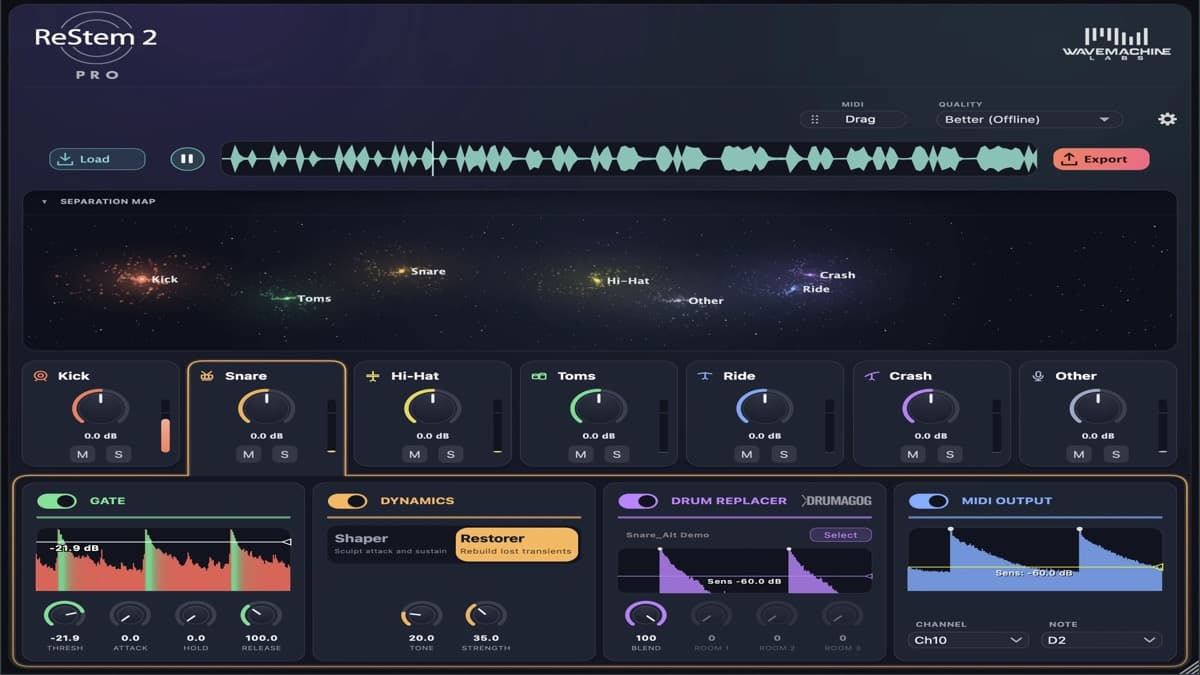
ReStem 2 extracts seven stems: kick, snare, hi-hat, toms, ride, crash, and a dedicated "other" stem for anything that is not a drum. That last stem catches bleed, percussion, and room tone. It keeps the six drum stems clean. Once the kit is separated, you can mute, solo, and rebalance each element as if the session had been tracked with close mics from the start.
Everything stays on your machine
Unlike cloud separators, ReStem 2 does all of its processing locally. Nothing is uploaded. It works with the network cable unplugged, and client material never leaves the studio. For anyone handling unreleased or confidential recordings, that is a meaningful difference from browser-based tools. If you are exporting AI-generated or online stems instead, our guide on exporting AI stems to your DAW covers that side of the workflow.
Per-stem repair tools
Separation is only half the job. Each stem gets its own processing channel. A gate removes the bleed that sits between hits, and dynamics controls push or soften each drum. On the kick and snare, you also get a Transient Shaper and a Transient Restorer to rebuild attack on problem tracks. In the Pro edition, kick and snare add a Drum Replacer powered by the Drumagog engine, plus MIDI output via a trigger engine. That lets you drive samplers straight from the separated hits.
Three quality modes and ARA2
ReStem 2 offers three processing modes. Good runs in real time for live separation on an insert. Better renders offline at roughly twice the speed of ReStem 1. Best is the slowest, highest-quality pass, aimed at messy recordings. The Pro edition also supports ARA2, so it can analyze and process directly on the timeline without bouncing audio first.
ReStem 2 specifications
| Spec | Detail |
|---|---|
| Product | WaveMachine Labs ReStem 2 |
| Type | Drum stem separation plugin and standalone app |
| Core price | $99 |
| Pro price | $199 |
| Stems | 7: kick, snare, hi-hat, toms, ride, crash, other |
| Processing | 100% local, no cloud upload |
| Quality modes | Good (real time), Better (offline), Best (offline) |
| Per-stem tools | Gate, dynamics, transient shaper/restorer |
| Drum replacement | Pro only, Drumagog engine on kick and snare |
| MIDI output | Pro only, trigger engine per stem |
| Formats (Pro) | VST, VST3, AU, AAX, ARA2, standalone |
| Formats (Core) | Standalone app only |
| Platforms | macOS and Windows |
| Trial | 7-day free trial |
ReStem 2 vs iZotope RX 11 vs SpectraLayers
Treat ReStem 2 as a drum specialist, not a general separator.
| ReStem 2 | iZotope RX 11 | Steinberg SpectraLayers 13 | |
|---|---|---|---|
| Focus | Splits a drum mix into 7 drum stems | Full-mix repair + music rebalance | Full-mix spectral editing + unmixing |
| Stems | Kick, snare, hi-hat, toms, ride, crash, other | Vocals, bass, drums, other | Vocals, bass, drums, piano, other, and layers |
| Per-drum control | Yes, gate/dynamics/replace per drum | No per-drum split | Manual, via spectral selection |
| Processing | Local only | Local | Local |
| Price | $99 / $199 | Standard tier, higher list | Pro tier, higher list |
| Best for | Remixing and repairing drum kits | Restoration and broad stem splits | Deep spectral surgery |
Which to pick. Choose ReStem 2 when the source is drums and you want each piece of the kit on its own fader. Choose RX 11 when you need broad restoration and a general four-stem split across a whole song. Choose SpectraLayers when you want to paint on a spectrogram and unmix by hand. For the wider picture on working with separated parts, our piece on mixing AI-generated stems is a useful companion.
Who ReStem 2 is for
Consider it if you remix, sample, or repair drums and keep hitting the limits of a stereo drum bus. Splitting the kit into seven tracks gives you close-mic control after the fact.
Consider it if you handle sensitive material. Local-only processing means the audio never leaves your machine.
Consider Pro if you want live separation on an insert, ARA2 on the timeline, drum replacement, and MIDI triggers. The Core edition is standalone-only and aimed at quick offline jobs.
Skip it if you need to split a full song into vocals and instruments. That is not what ReStem 2 does, and a general separator is the right tool there.
How much ReStem 2 costs
ReStem 2 comes in two tiers, direct from WaveMachine Labs. Core is $99. It is standalone-only, with both offline quality modes, rebalancing, and export. Pro is $199. It unlocks every plugin format, live separation, ARA2, the full effects set, drum replacement, and MIDI output on every stem. A 7-day free trial is available from inside the app, so you can test it on your own drum tracks before buying.
FAQ
Does ReStem 2 upload my audio to the cloud?
No. All processing happens locally on your computer. It works with no internet connection, which is why it suits confidential or unreleased material.
What is the difference between Core and Pro?
Core ($99) is the standalone app with offline separation, rebalancing, and export. Pro ($199) adds all plugin formats, ARA2, live separation, the full built-in effects, drum replacement on kick and snare, and per-stem MIDI output.
Can ReStem 2 separate a full song?
No. It is built for drums. It splits a drum recording into individual drums, rather than splitting a full mix into vocals, bass, and instruments.
What formats does it support?
Pro runs as VST, VST3, AU, AAX, ARA2, and standalone on macOS and Windows. Core is standalone only.
Is there a trial?
Yes. A 7-day free trial starts from inside the app.
The bottom line
ReStem 2 is a drum specialist. It splits one recording into seven stems and hands each drum its own gate, dynamics, and repair tools, all without touching the cloud. The Pro tier's live separation and ARA2 workflow are the meaningful step up from the original, and the offline engine is now twice as fast. It will not unmix a whole song, and it does not try to.
This is a first look at the published specification, not a scored test through our own sessions. If your problem is a stereo drum bus you wish had been close-miked, ReStem 2 is built for exactly that.