Stride Engine First Look (2026): Modulate Any VST3 Plugin
Stride hosts the synths and effects you own and writes a fresh, tempo-locked curve on every mapped knob per click. Price, specs, rivals and who it suits.
Black Friday 2026Ableton Black Friday 2026: dates and deals →
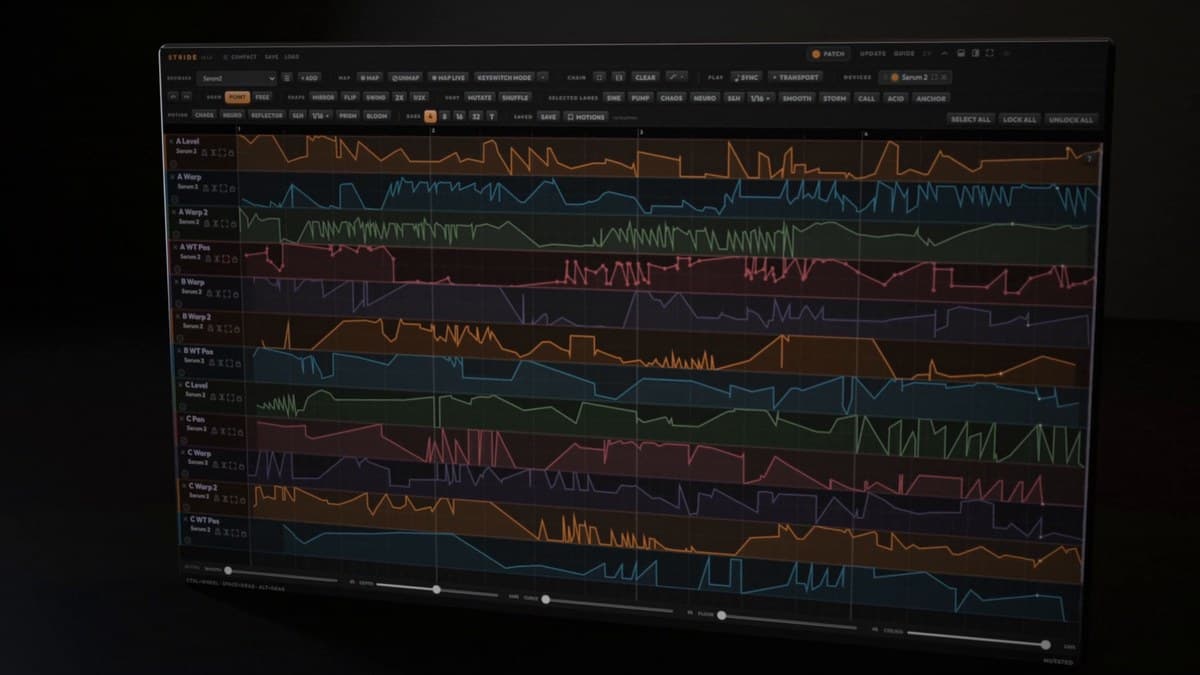
Stride is a sound design engine that does one job very well: it makes the plugins you already own move. You load your synths and effects inside it, touch the knobs you want animated, and every one of them becomes its own lane on a shared canvas. One click writes a different, tempo-locked curve on every lane at once. Click again and you get a completely new take. It landed at Plugin Boutique in mid-October 2026, and it is $79 there until October 28.
At a glance: Stride costs $99 direct from the developer and $79 at Plugin Boutique (20% off $99) until October 28, 2026. One license covers two plugins, Stride for instrument tracks and Stride FX for audio tracks, buses and the master, on up to two computers. It hosts VST3 instruments and effects on Windows and macOS, plus AU on macOS. Curves run in loops of 2 to 32 bars, locked to your DAW's tempo and transport. StrideBridge, a Max for Live device for Ableton Live 11 or later, is included. There is no AAX and no VST2, so Pro Tools users are out.
What is Stride?
Most modulation tools give you an LFO or an envelope and ask you to wire it to one parameter at a time. That is fine for a filter sweep. It falls apart when you want twelve parameters across three plugins to move together in ways that feel related but not identical. Stride flips the workflow. You decide which knobs matter, and it generates the motion for all of them in one pass.
It makes no sound of its own. Think of it as a host with a modulation brain: a chain of your own VST3 (and, on a Mac, AU) instruments and effects, with a lane for every control you mapped. The result is closer to having a second pair of hands on your plugin UIs than to a traditional LFO plugin.
If you have been following the rise of generative MIDI tools like Melody Sauce 3, Stride is the same idea applied to sound design rather than notes. It doesn't write your parts. It writes the movement inside them.
Features, and what they do for you
Map by touch
Arm Map, then click any knob on any hosted device. That control drops onto the canvas as a lane. There is no modulation matrix to fill in and no parameter list to scroll. For a producer who already knows which three knobs make a patch come alive, this is the fastest route from idea to motion.
A fresh take on every click
The core of Stride is its six Motion tools. Each fills every unlocked lane in one click, in loops of 2 to 32 bars:
- Chaos writes layered, organic wave motion for dense textures and pads.
- Neuro writes dotted ramps, hard chops, stutters and syncopated drops on the grid, aimed squarely at neuro, drum and bass and wobble design.
- Reflector pairs lanes into a base and a mirrored twin, so a filter opens as resonance drops, or drive climbs as volume falls.
- Sample & Hold writes stepped random motion, either polyrhythmic with its own rate per lane or locked to a grid from 1/8 to 1/32, straight or triplet.
- Prism lets you draw on one lane while every other lane answers live through the same anchor points along a different path.
- Bloom spreads the curve on your active lane across the others as complementary variations, with a Morph amount for how far they stray.
Mutate and Shuffle rework what you already have. Mutate reshapes the active lane into a variation of itself. Shuffle trades curves between lanes. For individual lanes there are four more moves (Storm, Call, Acid and Anchor) plus Sine, Square, Triangle, Saw, Pump and Glitch shapes. Acid writes 303-style 16th-note slides, and Pump is a sidechain-style duck and swell.
Lock what hits, reroll the rest
This is the feature that makes the random side usable. Locked lanes keep their curves while the next click refills everything else. In practice you keep the filter motion you love, reroll the wavetable position until it sits right, then lock that too. It turns "generate and hope" into a quick, controlled search.
Draw and edit by hand
Nothing Stride writes is final. Point and freehand drawing, grid snap with a triplet lock, Mirror, Flip and Swing, 2x and 1/2x time stretch, and copy and paste across lanes are all there. Smooth, Depth, Curve, Floor and Ceiling work on one lane or all of them at once, which is handy for taming a take that moves too far.
Play the motion
Keyswitch Mode puts eight of the tools on one octave of your MIDI keyboard. The notes stay silent and the tools fire, live or recorded into a clip. Note-triggered motion runs the canvas from the notes you play instead of the transport, so a curve can restart with every phrase. That makes Stride useful on stage, not only in sound design sessions.
Audio In, for more than synths
Route a guitar, a vocal, a drum machine or any recording into Stride FX, build an effects chain around it, and every mapped knob keeps moving while you play. A chain of a delay, a filter and a reverb with Reflector running across them is an instant, evolving texture for a vocal throw.
StrideBridge for Ableton Live
In Ableton Live, the included StrideBridge device brings your set's own devices onto the same canvas, from Operator and Wavetable to Roar and Auto Filter, MIDI effects included. INJECT writes the motion into a clip as real, editable automation. If you want the motion out of Stride and into your arrangement, that is the cleanest way to commit it. Our Ableton Live 12.4 update guide covers the Live features that sit alongside it.
Chains you can keep
A StrideChain file saves a whole chain, its devices, patches and curves, so you can load it into any project. Everything also saves with your DAW session.
Stride specifications
| Spec | Stride |
|---|---|
| Type | Plugin host and generative modulation engine |
| Plugins in the license | Stride (instrument), Stride FX (audio effect), StrideBridge (Max for Live) |
| Hosted formats | VST3 instruments and effects (Windows, macOS), AU (macOS). No VST2 |
| Plugin formats | VST3 (Windows, macOS), AU (macOS). No AAX, no VST2 |
| Loop length | 2 to 32 bars, locked to host tempo and transport |
| Motion tools | Chaos, Neuro, Reflector, Sample & Hold, Prism, Bloom, plus Mutate and Shuffle |
| Lane moves and shapes | Storm, Call, Acid, Anchor; Sine, Square, Triangle, Saw, Pump, Glitch |
| Performance | Keyswitch Mode (eight tools on one octave), note-triggered motion |
| Audio In | Yes, through Stride FX |
| macOS | 11 Big Sur or later, Apple Silicon or Intel (universal) |
| Windows | 10 or 11, 64-bit, Microsoft Edge WebView2 Runtime |
| Compatible hosts | Ableton Live 10.1 or later, Bitwig Studio, Cubase, Nuendo, Studio One, FL Studio, Reaper, Cakewalk, Waveform, Logic Pro, GarageBand |
| StrideBridge | Ableton Live 11 or later with Max for Live (not Lite or Intro) |
| Activation | Online, one serial on up to two computers |
How Stride compares
There isn't a long list of tools that host third-party plugins and generate modulation for them. The two closest are a general-purpose host with parameter mapping and a modular multi-effect with deep modulation inside its own ecosystem.
| Stride | Blue Cat's PatchWork | Kilohearts Multipass | |
|---|---|---|---|
| Price | $99 ($79 at Plugin Boutique to Oct 28) | $99 | $99 list |
| Hosts third-party plugins | Yes, VST3 and AU | Yes, up to 64 VST, VST3 or AU | No, Kilohearts Snapins only |
| Generates motion for you | Yes, one click fills every lane | No, map parameters to automation, macros or a controller | No, you build it from LFOs, envelopes and modulators |
| Built-in effects | None, it uses your plugins | 30 built-in effects | Kilohearts Essentials included |
| Pro Tools | No AAX | Yes, AAX | Yes, AAX |
| Best for | Fast, varied motion across plugins you own | Routing, chaining and bridging formats | Multiband sound design inside the Kilohearts world |
Blue Cat's PatchWork is the safe, flexible host. It chains up to 64 plugins in series or parallel, maps their parameters for automation and control surfaces, and even bridges VST into hosts that don't support it. What it won't do is invent motion for you. If your problem is routing, PatchWork is the better buy, and unlike Stride it runs in Pro Tools.
Kilohearts Multipass splits audio into up to five bands and gives you a modular modulation system that can get wild. The catch is that it only hosts Kilohearts Snapins, not your Serum patch or your favorite delay. If you already live in the Kilohearts ecosystem, including Snap Heap and Phase Plant, Multipass is excellent. If you want to animate third-party plugins, it is the wrong shape.
Stride is the only one built around generating varied, related motion across many controls at once. The honest weakness is the format list. No AAX and no VST2 hosting will rule it out for some studios.
Who it's for
Stride makes the most sense for sound designers and producers in bass music, IDM, experimental electronica and cinematic work, where a patch needs to keep evolving and drawing a dozen automation lanes by hand is the bottleneck. It's also a strong fit for Ableton Live users, since StrideBridge pulls native devices onto the canvas and INJECT writes the result into clips you can edit. Guitarists and vocalists who want an evolving effects chain will get real use from Stride FX and Audio In.
Skip it if you work in Pro Tools, rely on VST2-only plugins, or mostly need one sweep on one parameter. A synth's own modulation matrix, or a drawable shaper like ShaperBox 3, covers that for less effort. And if you dislike randomness on principle, remember that Stride's value comes from rerolling. You can draw everything by hand, but that's not why you'd buy it.
How much does Stride cost?
- Plugin Boutique: $79 from $99, 20% off until October 28, 2026.
- Direct from the developer: $99 for Stride with StrideBridge included, with a free 24-hour trial. An optional Experimental Collection (250+ sounds, 15 Ableton Racks and 4 StrideChains) adds $24.99 at checkout.
- One serial covers both Stride and Stride FX on up to two computers.
FAQ
Does Stride make any sound on its own?
No. It moves the instruments and effects you already own. Third-party plugins are sold separately, so you need at least one synth or effect to host.
Does Stride work in Pro Tools?
No. There is no AAX version. It runs as VST3 on Windows and macOS and as AU on macOS, so Logic Pro and GarageBand are supported.
Can Stride host my VST2 plugins?
No. It hosts VST3 instruments and effects, plus AU on macOS. VST2 plugins can't be loaded.
Do I need Ableton Live Suite for StrideBridge?
StrideBridge needs Ableton Live 11 or later with Max for Live. Max for Live is built into Live Suite; Live Standard needs the Max for Live add-on, and Lite and Intro aren't supported. Stride itself works in any VST3 host without it.
Stride vs Blue Cat's PatchWork?
PatchWork is the better general-purpose host and supports Pro Tools. Stride is the better pick if you want the plugin to generate tempo-locked motion across many mapped controls with one click.
Verdict
Stride solves a real, specific problem: getting many knobs on many plugins to move together, quickly, without drawing every lane yourself. Lock and reroll keep the randomness under your control, StrideBridge makes it a natural fit for Live, and Audio In stretches it beyond synths. The missing AAX and VST2 support is the main limit. At $79 through October 28 it is easy to recommend to sound designers who already own the plugins they want to animate. This is a first look based on the developer's official materials, not a hands-on test.