Acon Digital Restoration Suite 3 Adds One-Click Analyze
Acon Digital Restoration Suite 3 puts DeNoise, DeHum, DeClick and DeClip in one plug-in with ML modes and one-click Analyze. $68 at Plugin Boutique to 17 Nov.
Dubspot's best Black Friday dealsDubspot Tracker Pro: $15, was $24.99 ↗Drum Programming and Groove Production Course: $19, was $99 ↗
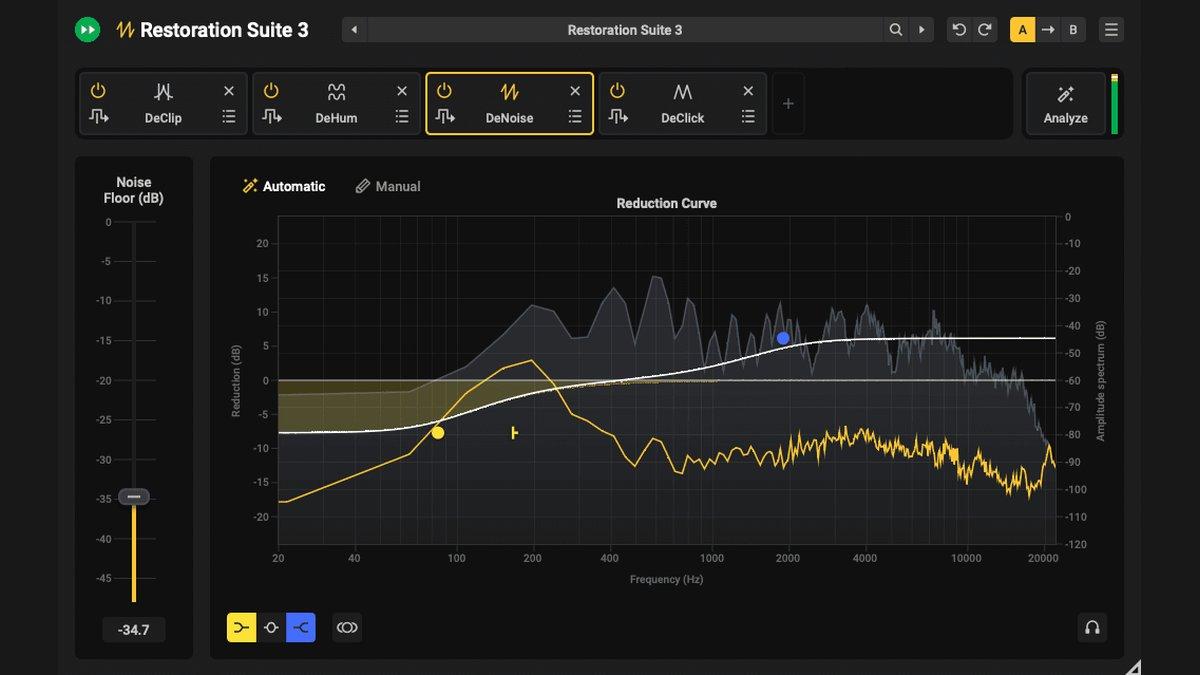
Acon Digital released Restoration Suite 3 on 5 November 2026, and the headline is a new all-in-one plug-in. DeNoise 3, DeHum 3, DeClick 3 and DeClip 3 now live in a single interface with an Analyze button that listens to your audio and builds the repair chain for you. Machine-learning Automatic modes in DeNoise and DeHum remove the noise-profile step, and the intro price is $68 at Plugin Boutique until 17 November (from $99).
At a glance: four repair modules (noise, hum, clicks and clipping) in one plug-in, plus each module on its own; one-click analysis that adds and configures only the modules your audio needs; VST, VST3, AU and AAX on macOS (Apple silicon and Intel) and Windows; up to 7.1.6 channels. $68 at Plugin Boutique until 17 November, $33 upgrade from Restoration Suite 2, free trial, one-time purchase. A fast, affordable repair chain for your DAW, not a spectral editor.
What is Acon Digital Restoration Suite 3?
Restoration Suite is Acon Digital's set of real-time repair plug-ins, the same processors that sit inside its Acoustica audio editor. Version 3 keeps the four separate modules but adds a combined Restoration Suite 3 plug-in on top. You insert it on a track in any compatible host (or inside Acoustica), click Analyze and press play. After a few seconds of listening it identifies broadband noise, hum, clicks or clipping, then adds the modules the material needs and sets them up. What you get is a ready-made repair chain that you can fine-tune at any point.
That changes how quickly you get from a problem to a fix. Instead of stacking four plug-ins, guessing their order and dialling each from zero, you start from a chain that has already heard the audio. It suits the jobs Acon lists: hiss, hum and buzz on instruments, vocals and dialogue; vinyl, cassette and archival tape transfers; clipped recordings; and noise floors that change from take to take.
The plug-in also arrives in Acon's editor. Restoration Suite 3 is now part of Acoustica 8 Premium and Ultimate, covered in our Acoustica 8 first look.
What's new, module by module
DeNoise 3
DeNoise 3 gets a machine-learning Automatic mode that removes hiss, broadband noise, wind, buzz and camera noise without a noise profile. The old routine of finding a clean gap, capturing a fingerprint and hoping it matches the rest of the file is gone for most material, which matters on short clips and on recordings with no silent section at all. Manual mode stays for unusual or complex noise where you want to set the reduction yourself. The stereo image is preserved, and you can listen to only what is being removed, the quickest way to check you are not eating into the vocal or the cymbals.
DeHum 3
DeHum 3 also gains an ML Automatic mode that finds and removes hum and buzz from poor grounding or electrical motors. Precision mode tracks hum that drifts in pitch, the case that defeats fixed notch filters on long location recordings and old tape. Notch mode is the low-CPU, zero-latency option, which makes it the one to leave running while you track or mix a large session.
DeClick 3
DeClick 3 removes clicks, pops, surface crackle, data drop-outs and plosive thumps on P and B sounds. It rebuilds the damaged section from the clean audio around it, which is what you want on vinyl and 78 RPM transfers, and the interface has been streamlined. The plosive handling makes it useful on vocal and voiceover tracks too, not just on records.
DeClip 3
DeClip 3 reconstructs peaks flattened by analogue or digital clipping while keeping the tone and frequency balance of the source. One click detects the clipping level, and a level histogram shows what will be restored before you commit. It can add headroom so the rebuilt peaks have somewhere to go, and you can trade processing load against quality. The interface has been refreshed to match the rest of the suite.
How the Analyze workflow fits a session
For producers, the useful part is that Analyze is a starting point rather than a black box. These are real-time plug-ins, so the chain it builds stays open: you can bypass a module it added, push DeNoise harder on a noisy guitar DI, or swap DeHum to Notch mode on a session that is already heavy on CPU. On a podcast or vocal comp with mismatched takes, one instance per track gives each its own analysis, which helps with the uneven noise floors Acon calls out.
Acon lists Logic Pro, Pro Tools, Ableton Live, Cubase, Nuendo, Studio Pro, REAPER, FL Studio, LUNA, Audition, Premiere, DaVinci Resolve, Reason and Media Composer among the supported hosts, so the same chain works in music and video editing alike.
Acon Digital Restoration Suite 3 specifications
| Spec | Detail |
|---|---|
| Type | Audio repair plug-in suite: all-in-one Restoration Suite 3 plus DeNoise 3, DeHum 3, DeClick 3, DeClip 3 |
| Analysis | One-click Analyze adds and configures the modules the audio needs |
| ML modes | Automatic mode in DeNoise 3 and DeHum 3 (no noise profile) |
| Formats (Mac) | VST, VST3, AU, AAX |
| Formats (Windows) | VST, VST3, AAX |
| Pro Tools | Pro Tools 12 / 12.8.3 or higher |
| macOS | macOS 10.13 or later, native on Apple silicon (ARM64) and Intel |
| Windows | Windows 10 or 11; Intel Core i5 or AMD multi-core (Core i7 recommended) |
| RAM / disk | 1 GB RAM (4 GB recommended); 1 GB disk |
| Sample rates | Up to 192 kHz |
| Channels | Surround and immersive up to 7.1.6 |
| Licence | One-time purchase, no subscription; free trial with no credit card |
Restoration Suite 3 vs RX 12, Photon and SpectraLayers
| Restoration Suite 3 | iZotope RX 12 Elements | iZotope RX 12 Standard | iZotope Photon | SpectraLayers Pro 13 | |
|---|---|---|---|---|---|
| Plugin Boutique price (9 Nov) | $68 until 17 Nov ($99 list) | $99 | $399 | $259 until 7 Dec | $359.99 |
| What it is | Four real-time repair modules with auto-analysis | iZotope's entry RX tier | iZotope's detailed repair suite | AI stem separation plus 6 denoise models | Spectral editor with AI unmixing |
| Pick it if | You want noise, hum, click and clip repair on the track, fast and cheap | You want to stay in the iZotope ecosystem at entry level | You need surgical repair on difficult recordings | You need stems or dialogue splits as well as cleanup | You want to paint, cut and rebuild audio on a spectrogram |
Which to pick: on price, the like-for-like rival is RX 12 Elements at $99, and Restoration Suite 3 undercuts it by $31 during the intro offer while covering the same basic de-noise, de-click and de-hum work plus DeClip for clipped peaks. Once a repair needs an editor, the picture changes. RX 12 Standard and SpectraLayers Pro 13 let you see the problem on a spectrogram and fix a single cough or squeak, which no real-time plug-in chain can do. iZotope Photon is a different kind of tool: it splits stems and cleans dialogue on your GPU, but it is ARA2 or standalone only and needs Apple silicon on a Mac, whereas Restoration Suite 3 is a standard insert that still runs on Intel Macs.
Who Restoration Suite 3 is for
Buy it if you record vocals, guitars or dialogue in less than perfect rooms and want hiss, hum and buzz gone without leaving the mix; if you digitise vinyl, cassette or tape; or if you inherit clipped takes you cannot re-record. It is also a sensible buy for podcasters and video editors working in Premiere, DaVinci Resolve or Audition, and for anyone on an Intel Mac who is shut out of newer GPU-only tools.
Skip it if your problems need a spectral editor: one-off noises, overlapping sounds and surgical fixes call for Acoustica, RX Standard or SpectraLayers. Skip it too if you need de-reverb, de-essing or dialogue isolation, none of which are in this suite (Acon sells Extract:Dialogue separately). And treat Analyze as the first move, not the last; on difficult material you will still be tuning the modules by ear.
How much does Restoration Suite 3 cost?
All intro prices run until 17 November 2026.
| Option | Price | Retailer |
|---|---|---|
| Restoration Suite 3 | $68 (from $99) | Plugin Boutique |
| Upgrade from Restoration Suite 2 | $33 (from $49) | Plugin Boutique |
| Restoration Suite 3 | $69 intro (30% off $99) | Acon Digital store |
| Restoration Suite 3 | €69 | Best Service |
| Restoration Suite 3 | €64 | Thomann |
| Restoration Suite 2 registered on or after 1 August 2026 | Free | Already in your Acon account |
- $68 at Plugin Boutique, 31% off until 17 November.
- $33 upgrade from Restoration Suite 2 at Plugin Boutique, from $49, until 17 November.
- €69 at Best Service.
- €64 at Thomann.
- Free trial from Acon Digital, no credit card needed.
If you registered a Restoration Suite 2 licence on or after 1 August 2026, you do not need to buy anything: Restoration Suite 3 is already in your Acon account. Acoustica 8 Premium and Ultimate owners also get the new plug-in. Our Restoration Suite 3 database entry tracks the price after the intro offer ends.
FAQ
What is included in Restoration Suite 3?
Four modules, DeNoise 3, DeHum 3, DeClick 3 and DeClip 3, plus a new all-in-one Restoration Suite 3 plug-in that combines them in one interface. Click Analyze and it adds and configures the modules your audio needs.
Do I need a noise profile with DeNoise 3?
Not in Automatic mode. The machine-learning model removes hiss, broadband noise, wind, buzz and camera noise without a captured profile. Manual mode is still there for unusual or complex noise.
How much is the upgrade from Restoration Suite 2?
$33 at Plugin Boutique until 17 November 2026, from $49. If you registered a Restoration Suite 2 licence on or after 1 August 2026, Restoration Suite 3 is free and already added to your Acon account.
Does Restoration Suite 3 work on Intel Macs?
Yes. It runs on macOS 10.13 or later, natively on both Apple silicon and Intel, and on Windows 10 or 11. Formats are VST, VST3, AU and AAX on Mac and VST, VST3 and AAX on Windows.
Is Restoration Suite 3 a replacement for iZotope RX?
For everyday noise, hum, click and clipping repair inside a DAW, it competes directly with RX 12 Elements at a lower intro price. It has no spectral editor, so for surgical fixes you still need an editor such as Acoustica, RX 12 Standard or SpectraLayers.
Verdict
Restoration Suite 3 makes audio repair faster without making it shallower. The Analyze button turns four plug-ins into one chain that already knows what it is listening to, the ML Automatic modes in DeNoise and DeHum drop the noise-profile chore, and Precision and Notch modes cover drifting hum and low-CPU sessions. At $68 until 17 November, or $33 as an upgrade, it undercuts RX 12 Elements and still supports Intel Macs. The limits are clear: no spectral editor, no de-reverb, de-ess or dialogue isolation, and an Analyze result you will still tune by ear on hard material. If your repairs happen on the track rather than on a spectrogram, run the free trial and buy before the intro price ends.