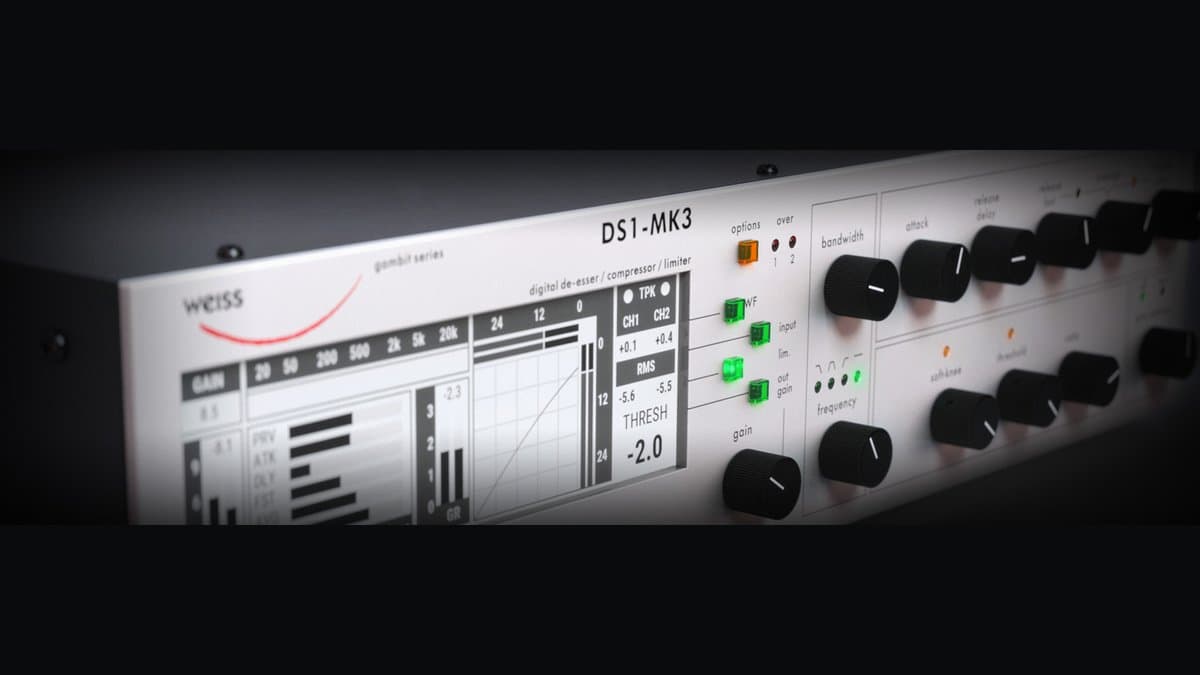
Softube Weiss DS1-MK3 is the DAW version of one of digital mastering’s foundational processors: the Weiss Engineering DS1-MK3 compressor, limiter, and de-esser. Softube did not “approx-model” a vibe. In collaboration with Weiss Engineering, the plugin is a line-by-line code port of the hardware’s digital algorithms—officially licensed and positioned as the software path to the same crystalline dynamics control that has lived in mastering rooms for decades.
If you want thick transformer saturation or SSL bus crack, this is the wrong product page. If you want dynamics that disappear while still solving real peak, density, and sibilance problems, DS1-MK3 is why the Weiss name still dominates pro shortlists.
What the DS1 actually is
On paper it is a two-channel digital dynamics processor that can operate as:
- A full-band compressor
- A band-selective compressor / limiter using linear-phase crossovers across the audio band
- A de-esser (high-frequency band dynamics done properly)
- A limiter / maximizer stage for peak control and loudness
- An M/S dynamics tool
- A parallel compression engine for upward density without destroying transients
That combination—especially band-selective dynamics with mastering-grade transparency—is the DS1’s identity. Hardware units have been described for years as studio staples on major releases; Softube’s plugin goal is to put that processing on any major DAW without buying multi-thousand-dollar outboard.
Softube package: more than one plugin
Buying DS1-MK3 is not only the hardware-faithful flagship UI. Softube’s current product framing includes companion plugins that re-skin the same algorithmic world for modern workflows:
| Plugin | Role |
|---|---|
| DS1-MK3 | Full flagship surface: compressor + limiter + de-ess + deep controls |
| MM-1 Mastering Maximizer | Streamlined loudness / maximizer path from DS1 DNA |
| Compressor/Limiter | Cleaner modern faceplate for body compression + updated limiter choices |
| Deess | Focused de-essing workflow without the full mothership |
Engineers often use companions day-to-day for speed and CPU focus, then open the full DS1-MK3 when they need the complete control surface or hardware-style preset thinking.
Controls and design ideas that matter
Band-selective dynamics (not a gimmick)
Linear-phase crossovers let you compress or limit a frequency region without the phase smear associated with cheap multiband toys. Practical examples:
- Control low-mid buildup on a dense chorus without dulling the top
- Soften harsh upper mids on a vocal-heavy master
- De-ess by compressing the sibilant band rather than notching blindly
Release architecture
DS1-class release design is a big reason people call it “least digital-sounding” among digital dynamics. Instead of one release time fighting every genre, you shape:
- Fast release after short peaks
- Slow release for average-level changes
- RMS window size for how the detector “hears” loudness
- Release delay (hold) before release begins
Used carefully, this keeps gain reduction from chattering on transients or hanging forever after a chorus.
M/S mode
Ungang mid and side, and decide whether sidechain linking should follow stereo or independent behavior. Typical mastering moves:
- Compress mid more than side to stabilize vocal/center without collapsing width
- Calm wide, splashy sides while leaving mid punch alone
- Fix stereo imbalance problems that broadband L/R linking would smear
Parallel compression
Parallel (wet/dry) dynamics is a first-class workflow, not an afterthought. Low ratios and parallel blend are how many engineers get “upward” density—raising low-level detail—without crushing crest factor. That transparent parallel mode is repeatedly cited as a reason people keep DS1 in permanent templates.
Limiter section
Beyond classic compression, the Softube ecosystem includes the original DS1-style safety/limiting approach plus newer brick-wall limiter modes (including true-peak oriented options in companion Compressor/Limiter workflows). Use the compressor for program density and the limiter for ceiling control—do not ask one stage to do both jobs badly.
How to use Weiss DS1-MK3 (workflows)
Mastering: gentle full-band glue
- Insert DS1-MK3 early-to-mid in the mastering chain (after corrective EQ or as dynamics before final maximizer—order is taste and material dependent).
- Start with low ratio and slow-ish attack so transients survive.
- Aim for ~1–2 dB GR on peaks, not constant pumping.
- Shape release so GR returns musically between phrases.
- Match output loudness and A/B for 20–30 seconds of the loudest chorus.
- If the mix only needs peak safety, bias toward limiter/MM-1 rather than heavy compression.
Mastering: band-selective fix
- Identify the problem band (mud, harshness, sibilance, boom).
- Engage band-selective / crossover tools and compress only that region.
- Keep thresholds conservative—band compression is easy to overdo.
- Check mono compatibility and translation on small speakers.
Mix bus finishing polish
Some mixers put a light DS1 instance on the mix bus as a “final lacquer” before print. Keep it subtle. If you need console color, add a different processor; if you need glue, DS1 can stabilize without changing the mix’s identity.
De-essing vocals or masters
- Prefer band dynamics over wide EQ cuts when sibilance is dynamic.
- Solo the band while setting threshold so only esses trigger.
- Or use the dedicated Deess companion for a faster UI.
- Verify on multiple playback systems—over-de-essing kills air.
Parallel density for soft sources
- Set a low ratio and threshold that lifts quieter material.
- Blend with parallel mix so peaks stay open.
- Great on acoustic programs, classical-adjacent material, and dynamic vocal productions where fader automation alone is exhausting.
Settings starting points (not laws)
| Job | Ratio feel | Attack | Release approach | GR target | Notes |
|---|---|---|---|---|---|
| Transparent master compress | Low (gentle) | Medium-slow | Fast+slow release balance | 0.5–2 dB | Loudness-match A/B |
| Peak safety | Limiter mode | Fast enough to catch overs | Program-dependent | brief GR | Prefer true-peak awareness before streaming encode |
| De-ess | Band HF | Fast | Fast-medium | only on esses | Don’t dull constant air |
| Parallel density | Low | Medium | Musical hold/release delay | deeper on wet only | Blend wet low |
| M/S center control | Mid higher than side | Medium | Independent if needed | subtle mid GR | Protect width |
Always confirm with meters and ears. Constant GR usually means you are mixing with the compressor, not mastering with it.
DS1-MK3 vs alternatives
Weiss MM-1 — Same family, maximizer-first workflow. Choose MM-1 when loudness polish is the job and you want fewer decisions. Choose DS1-MK3 when you need compression + de-ess + band tools in one instrument (and you usually get MM-1 in the package anyway).
FabFilter Pro-C 2 / Pro-L 2 — Modern Swiss-army dynamics with superb metering. Many rooms use Pro-L 2 as final limiter even when compression is Weiss. Pro-C 2 is more flexible stylistically; DS1 is more “reference transparent digital.”
iZotope Ozone 12 Advanced — Full mastering suite with AI assist and many modules. Ozone wins on breadth and Assistant speed. DS1 wins when you want a single legendary dynamics core without suite complexity.
Tone Projects Unisum — Another high-end mastering compressor with more “personality” options for some ears. Unisum vs DS1 is often taste: colored flexibility versus Weiss neutrality.
Hardware DS1-MK3 — Still the physical reference, with converters and studio integration. Plugin is the accessible code path; hardware is the capital-equipment path.
Who should buy it
Buy DS1-MK3 if you:
- Master or finish mixes where transparency is non-negotiable
- Need band-selective dynamics and serious de-essing without stacking random plugins
- Want M/S dynamics done properly
- Prefer paying once for a reference tool over chasing monthly flavor-of-the-month maximizers
Skip or delay if you:
- Only need light mix-bus glue color (try The Glue / SSL bus instead)
- Are budget-locked—start with MM-1 or Pro-L 2 and upgrade later
- Want one-knob AI mastering more than manual control
Honest limitations
Price is real. The UI density is real. The “no color” design is a feature and a limitation—some masters want harmonic excitement from somewhere else in the chain. One compressor stage will not fix a broken mix. And because the name is legendary, people over-buy it for problems that need arrangement or mix revision, not a $549 plugin.
Verdict
Softube Weiss DS1-MK3 remains a top-shelf digital dynamics package: code-ported Weiss algorithms, band-selective and M/S mastery, de-essing that does not trash air, and a companion plugin set (MM-1, Compressor/Limiter, Deess) that makes the investment more than a single GUI. Score 9.1 for engineers who value precision over personality.
Confirm current price, OS/format matrix, trial terms, and bundle contents on the official Softube DS1-MK3 page and Weiss Engineering’s hardware documentation for the original design context. Use the trial on a real master bus—transparency claims only matter on your material.