Some links on this page are affiliate links. If you buy through them, Dubspot may earn a commission at no extra cost to you. It never affects our scores or what we recommend — read our policy.
Orra Pump Pro Draws Four Curves in One Window
Orra Pump Pro is a four-layer drawable modulator with 14 targets, ALL or SEQ modes, and mid/side per layer. Intro price is $19, list is $29, with a 14-day demo.
E
Elena Marsh
September 24, 2026 · 12 min read
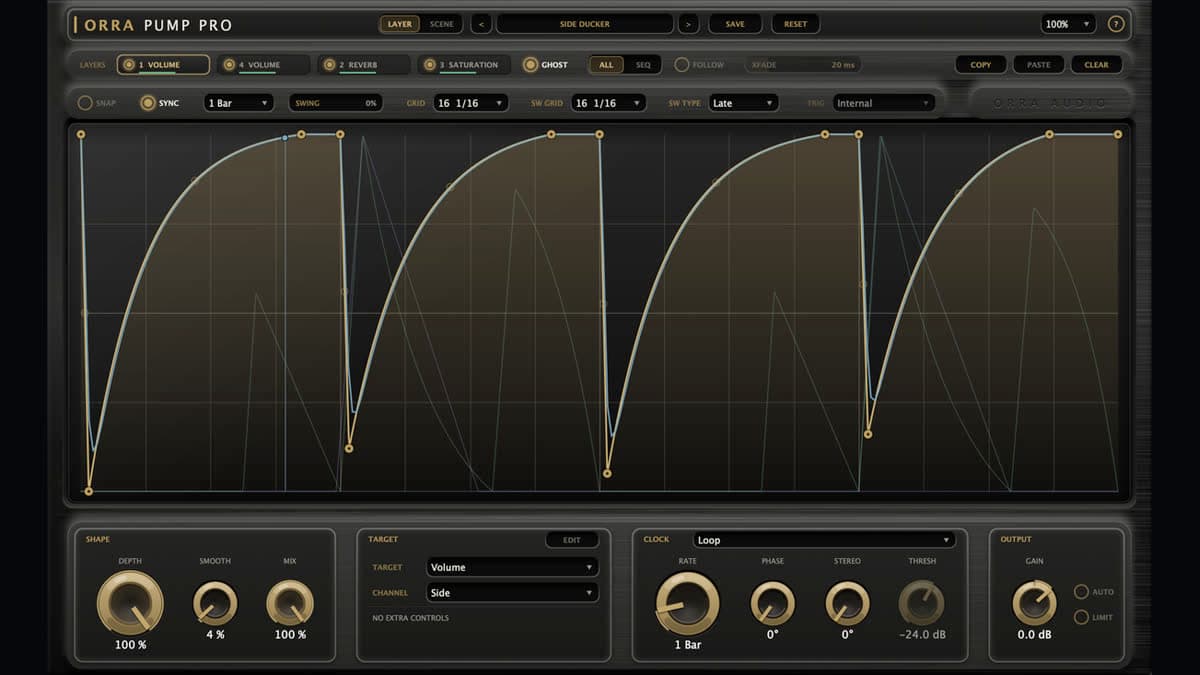
Orra Audio has shipped Pump Pro, a four-layer drawable modulation plugin. The intro price is $19. List is $29. Checkout is direct, through Lemon Squeezy, on the product page. Each layer is its own curve, clock, and target, so a filter can feed a volume duck that feeds a reverb throw. This is a first look from the product page, the Pump Pro manual, and Orra's official demo.
At a glance: $19 intro / $29 list. VST3, AU, and AAX. macOS 10.13 or later (macOS 11 or later on Apple Silicon), Universal 2. Windows 10 or later, 64-bit, VST3 and AAX. Zero latency. A 14-day demo starts inside the plugin, with no key. 105 factory layer presets and 91 scenes.
What Pump Pro is
Pump Pro is a separate plugin from free Orra Pump. It has its own licence, its own preset folder, and its own sessions. Free Pump is one drawn curve pointed at one of eight destinations. Pro is four of those modulators in one window, plus six extra targets, a series mode, and a one-at-a-time mode with a crossfade.
The job is rhythmic motion you draw, not a compressor you tune. A sidechain compressor ducks when the kick is loud and lets go when it is quiet. Pump Pro plays the shape you drew, on the clock you set, whether the source is hot or quiet. That is the same idea as Kickstart 2 and LFO Tool, taken further: the curve can drive filters and built-in effects, and four of those curves can run together. When the duck should react to the kick's spectrum rather than a drawn shape, a spectral sidechain ducker like SpectraDuck is the other route.
Orra lists it under Modulation. It will do the obvious pump. It will also do a tremolo, an auto-pan, a rhythmic filter, or a reverb and delay whose wet amount follows the drawing.
Four layers, and what each one can drive
The window has four tabs. Each tab is a complete modulator: curve, clock, trigger, target, channel, and the settings for that target. Drag a tab sideways and the chain reorders. Mute a layer with its LED and the curve stays put. Copy, paste, or clear moves a whole layer between tabs.
ALL runs the layers in series, in tab order. A filter layer can feed a volume layer, and that volume layer can feed a reverb throw. SEQ plays one layer at a time. The tabs become the Active Layer control, and that switch records as automation in touch or latch mode. XFADE sets the crossfade between them, from 0 to 2,000 ms. A reverb or delay tail keeps ringing after the switch instead of being cut. FOLLOW keeps the layer you are editing on the one that is playing. GHOST draws the other curves faintly behind the one in front.
Fourteen destinations sit on each layer. Four of them are resonant filters: low-pass, high-pass, band-pass, and notch. Volume covers tremolo and rhythmic gating. Pan moves the signal across the stereo field, and the channel selector greys out there because a pan always moves the whole image. The other eight are effects whose amount the curve drives: saturation, distortion, width, bitcrush, chorus, phaser, reverb, and delay.
Free Pump already had the filters, volume, pan, reverb, and delay. Pro adds saturation, distortion, width, bitcrush, chorus, and phaser, and it gives you four layers of any of them. Reverb and delay each have a mode switch, a low cut, and send or insert behaviour. The manual's saturation notes one clean type with a slight asymmetry, anti-aliased by construction, so it stays clean on bright material without adding latency. Distortion runs from hard clip to foldback. Bitcrush goes from 2 to 16 bit, with a sample-rate reduction from 1× to 64×.
Mid/Side is per layer. One layer can work the sides while another works the centre. On the product comparison, free Pump offers mid/side on 5 of its 8 targets. Pro offers it on 8 of 14 targets, on each of the four layers.
The curve itself is drawn as a played phrase. Velocity, envelope, and timing change from hit to hit, rather than one cell repeated. Snap, a grid from 4 to 64 lines, a separate swing grid, and Late, Early, or Gallop swing are on the clock. Sync locks the loop to the host at a note division. Sync off is a free-running rate in Hz.
Trigger has three positions. Loop runs continuously, locked to the transport when sync is on. The other two wait for a sidechain hit: play once (one-shot), or restart the loop on every hit. The sidechain bus can be mono or stereo. Input and output stay matched, mono or stereo.
Level, presets, and what the scene does not touch
AUTO is a measured, held makeup gain. It brings the pumped signal back to the level of the dry one, taken over whole cycles of the slowest layer, and it re-measures when a preset or scene loads. It holds one value. It does not ride the pump. Output gain after that is −24 to +12 dB, a deliberate offset on top of the match. LIMIT is a zero-latency safety limiter at −0.1 dBFS, out of circuit while it is off.
The output card is a mix position. A scene or a layer preset never moves it, so loading a sound does not jump your output level.
A layer preset is one layer: curve, shape, target, clock, grid, swing, and that target's controls. A scene is all four layers, plus the mode, the tab order, and the crossfade. The factory set is 105 layer presets and 91 scenes across 22 styles. Favourites, search, rename, and delete are in the browser. Your own files land in Layers and Scenes folders under the Orra Audio support directory. Factory layer presets are also host programs, so a DAW preset menu walks the same list into the selected layer.
UI scale runs from 75% to 200%, and the window reopens as you left it: layer, scope, snap, and edit view are saved with the session. Every layer parameter automates under its own name, so the host sees L1 Depth, L2 Target, and so on.
Pump Pro specifications
| Spec | Detail |
|---|---|
| Price | $19 intro / $29 list. Direct, Lemon Squeezy checkout on the product page |
| Trial | 14-day demo from inside the plugin, no key |
| Type | Four-layer drawable modulation. Listed under Modulation |
| Layers | 4, reorderable. ALL (series) or SEQ (one at a time) |
| Crossfade | 0 to 2,000 ms in SEQ. Reverb and delay tails ring out |
| Destinations | 14 per layer: 4 filters, volume, pan, saturation, distortion, width, bitcrush, chorus, phaser, reverb, delay |
| Routing | Mid/side per layer on 8 of 14 targets. Optional mono or stereo sidechain |
| Level | AUTO held match, gain −24 to +12 dB, optional limiter at −0.1 dBFS |
| Presets | 105 factory layer presets, 91 scenes, 22 styles. User folders for both |
| Latency | Zero. None reported to the host. Reverb and delay report a tail so offline bounces keep the decay |
| macOS | 10.13 or later. Apple Silicon needs macOS 11 or later. Universal 2. VST3, AU, AAX |
| Windows | 10 or later, 64-bit. VST3 and AAX. No AU |
| Audio | Mono or stereo, input and output matched |
| Not included | Linux, standalone |
| Buy | Pump Pro at Orra Audio |
Offline bounces always render, including during the demo path the manual describes. Activating one instance unlocks the other open instances within about a second. The manual says one key covers the machines the purchase allows.
Pump Pro vs free Pump vs Kickstart 2
Free Pump is the same drawing idea with one layer. Kickstart 2 is the cheap, famous volume duck. LFO Tool and ShaperBox 3 are the wider modulation desks if four layers is not enough.
| Orra Pump Pro | Orra Pump | Kickstart 2 | |
|---|---|---|---|
| Price | $19 intro / $29 list | Free | $16 on the Kickstart 2 card |
| Layers | 4, series or one at a time | 1 | 1 volume curve |
| Destinations | 14, including saturation, distortion, width, bitcrush, chorus, phaser | 8: filters, volume, pan, reverb, delay | Volume only |
| Clock | Loop, one-shot, or loop restarted from a sidechain. Grid, swing, sync or Hz | Same drawing tools on the single layer. 77 factory shapes in 7 categories | 16 curves. MIDI trigger or audio trigger |
| Level match | AUTO held makeup, plus a −0.1 dBFS limiter | Not on the free plugin | Mix knob sets ducking strength |
| Formats | VST3, AU, AAX. macOS and Windows | macOS and Windows installers on the same Orra download page | VST 2.4, VST3, AU, AAX. macOS 10.15+, Windows 7+ |
| Reach for it when | The pump has to move a filter or an effect, or several of those at once | You want the drawing board and nothing else | The only job is a repeatable volume duck on the kick |
Which to pick. Stay on free Pump if one curve into a filter, a tremolo, a pan, a reverb, or a delay is the whole part. The drawing tools, the swing grid, and the reverb and delay targets are already there, and the price is zero. Buy Pump Pro when the part needs two or more of those at once, or when you want to crossfade between four finished grooves without loading a new preset. Buy Kickstart 2 when the only target is volume and you want the duck in a few seconds. Kickstart will not filter, widen, crush, or throw a reverb.
LFO Tool, at $49.95 on its card, is the closer peer if you want drawable volume, filter, and pan with MIDI CC out. It does not include Pro's built-in saturation, delay, or four-layer scenes. ShaperBox 3 is the large version of this idea: 11 shapers, each splittable into three bands, listed at €99 on the ShaperBox 3 card. Pump Pro is the small, finished version at an intro of $19.
Who Pump Pro is for
Consider it if you write house, techno, pop, or electronic music and the sidechain has to be a shape, not a threshold.
Consider it if one instance should filter, duck, and throw a delay, in an order you can drag.
Consider it if you track and monitor through effects. The plugin reports no latency. Reverb and delay still have a tail, and offline bounces keep it.
Consider it if you work in Pro Tools. AAX is a real build, on Mac and Windows.
Skip it if a single volume duck is the whole request. Free Pump or Kickstart 2 already does that for less, including zero dollars.
Skip it if you want program-dependent compression: threshold, ratio, and a release that follows the kick's decay. This plugin plays the drawing. It does not listen to level, except as a trigger to restart that drawing.
Skip it if you need Linux, or a standalone app outside the DAW. Neither is on the spec list.
Skip it if you are on Windows and your only plugin format is AU. AU is macOS only. Windows gets VST3 and AAX.
How much does Pump Pro cost?
$19 at the intro price, $29 list, one time, from Orra Audio. Checkout is Lemon Squeezy on that page. Plugin Boutique, Thomann, and Best Service do not carry it.
The 14-day demo starts from the plugin with no key and no card. Orra's FAQ describes that demo as the full plugin. Pump Pro's own manual confirms the 14-day start and that offline bounces still render. The licence is separate from free Pump. Updates for the current version are the usual Orra pattern: bug fixes and features for existing holders, with major version jumps possibly paid.
The short finder entry is the Pump Pro card.
FAQ
What is the difference between Pump and Pump Pro?
Pump is free and has one layer, eight destinations, and 77 factory shapes. Pump Pro has four layers, fourteen destinations, ALL and SEQ modes, a crossfade up to two seconds, AUTO level match, a safety limiter, and 105 layer presets plus 91 scenes. They do not share a licence or a preset folder.
Does Pump Pro add latency?
No. The manual says it adds no latency and reports none to the host, so it is safe to track through. Reverb and delay targets report a tail length so an offline bounce keeps the decay. The limiter, when it is on, is also zero-latency.
Will it load in Pro Tools and on Windows?
Yes. AAX is listed for macOS and Windows. Windows 10 or later, 64-bit, gets VST3 and AAX. macOS 10.13 or later gets VST3, AU, and AAX. Apple Silicon needs macOS 11 or later, and the build is Universal 2. There is no Linux build.
Pump Pro vs Kickstart 2?
Kickstart 2 is a volume duck with 16 curves, MIDI or audio trigger, at $16 on our card. Pump Pro draws curves into filters and eight effects as well as volume, and it can run four of those at once. Buy Kickstart for a fast pump. Buy Pump Pro when the groove has to change the tone, not only the level.
Is there a trial?
Yes. A 14-day demo starts inside the plugin, with no licence key. Orra's store FAQ says the demo is the full plugin and that no card is required to start it.