Some links on this page are affiliate links. If you buy through them, Dubspot may earn a commission at no extra cost to you. It never affects our scores or what we recommend — read our policy.
CARBON Q Sets EQ and Level Across the Session
Mastering The Mix CARBON Q sets EQ and level for vocals, drums, bass, and music from one window. The launch price is $55 from $78, or £41.30 from £59.
M
Marcus Feld
October 2, 2026 · 9 min read
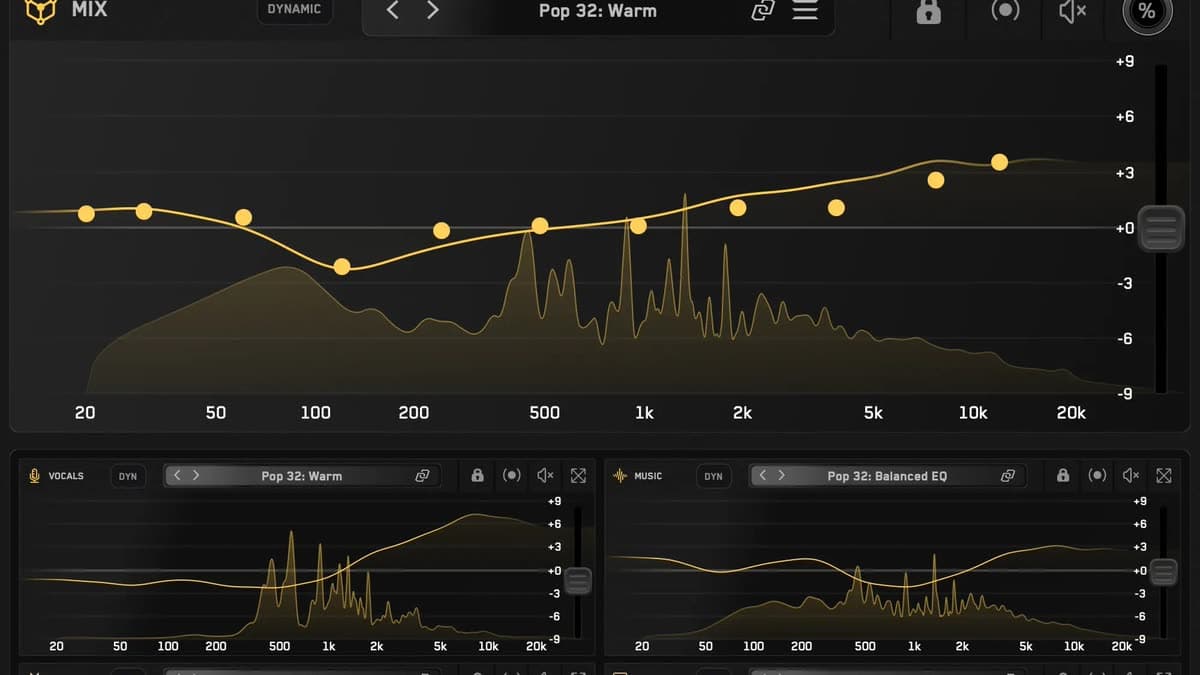
Mastering The Mix has released CARBON Q, an eleven-band EQ that sits on the mix and on the vocals, drums, bass, and music at the same time. The shop price is $55, down from $78, and £41.30, down from £59. That is the Save 30% launch price. This is a first look from the official product page and the official overview, not a hands-on review.
At a glance: One MIX instance on the output, plus agents for vocals, music, drums, and bass. Eleven fixed bands, ±9 dB each, and ±9 dB of output gain per instance. Smart Presets from your audio, or from any reference track, with stem separation on your machine. Linear phase, 41 ms latency, level-matched moves, mid/side, and a dynamic mode. VST3, AU, and AAX. macOS 10.15 or later, Apple silicon native. Windows 10 or later. Two license seats. Sold direct, with a 30-day money-back guarantee.
What CARBON Q is
Most EQs are one plugin on one channel. You balance the vocal, then the drums, then the bass, and the vocal decision is already stale by the time you get back to it. CARBON Q is built around that problem. A MIX instance goes on the output. Agent instances go on vocals, music, drums, and bass. They connect as soon as they load. From any window you can see every channel's EQ, its level, and its preset.
The bands are fixed, not a free parametric canvas. They sit at 20, 30, 60, 120, 240, 480, and 960 Hz, then 1.92, 3.84, 7.68, and 12 kHz. Each band moves ±9 dB. That is a tonal-balance EQ, the kind of spacing you use when you are matching a record, not a surgical notch for one resonance.
Mastering The Mix frames the whole plugin as two jobs done together: how loud each part is, and how the EQ of each part fits the rest. Output gain on each instance is ±9 dB. Those gains live in the plugin. CARBON Q does not move your DAW faders, so existing rides and automation stay where you left them.
How a session is supposed to run
Insert CARBON Q on the output and set the role to MIX. Insert it on vocals, music, drums, and bass, and pick the matching role on each. You do not need an instance on every track in the song. Unused roles can stay out. The MIX instance stays, because it calculates the Smart Presets from the whole session and shares them with the agents.
Loop the busiest section, usually the final chorus or the drop. Press ANALYZE, choose which instances to include, and press GO. CARBON Q compares the song with its reference mixes and puts the ten closest Smart Presets at the top of the browser. Each preset sets tonal balance and volume balance for every connected channel at once.
A reference you already love works the same way. Drop it in the reference tab. CARBON Q separates it into vocals, music, drums, and bass, measures the tone of each part and how loud each one sits, and turns that into a preset. If you already have stems, you can upload those instead. You can unlink an agent and take the vocal balance from one record and the drums from another.
Analysis and stem separation run on the computer. Audio is not uploaded.
What the EQ itself is doing
Every move is level matched in real time. A brighter curve is not allowed to win the comparison just because it got louder. That is the usual trap with EQ, and it is the reason a lot of "better" settings fall apart when you bypass them at the same level.
The filters are max-quality linear phase. Mastering The Mix measures them against a leading linear phase EQ at its maximum resolution: the response matches within 0.13 dB, at 41 ms of latency instead of 1,509 ms. The plugin reports that latency to the host. For recording, use the DAW's low-latency mode. 41 ms is a mixing and mastering number, not a tracking number.
Dynamic mode holds each channel to its tonal target by pulling peaks back when they cross it. The amount can be one control or three bands, with adjustable crossovers, attack, and release. Mid/side is a second curve on the same screen. Yellow is mid, blue is side. Click the other line to edit it.
The browser holds Smart Presets, starred favourites, reference tracks, and twelve factory genres. Preset names carry tags for tonal character and stereo width. Each instance has lock, link, bypass, and a mix percentage. The MIX instance can bypass the session. A/B, undo, and redo are there, and the window resizes.
CARBON Q specifications
| Spec | Detail |
|---|---|
| Type | Session-wide 11-band EQ and volume balance |
| Developer | Mastering The Mix |
| Instances | MIX on the output, plus vocals, music, drums, and bass agents |
| Bands | 20, 30, 60, 120, 240, 480, 960 Hz, 1.92, 3.84, 7.68, 12 kHz |
| Range | ±9 dB per band, ±9 dB output gain per instance |
| Phase | Linear phase, 41 ms latency, reported to the host |
| Level match | Real time on EQ moves and preset changes |
| Dynamic mode | One amount or three bands, with crossovers, attack, and release |
| Stereo | Stereo, mid, and side, both curves on screen |
| References | Stem separation on your machine, nothing uploaded |
| Presets | 10 Smart Presets per analysis, 12 factory genres, reference tracks |
| Formats | VST3, AU, AAX, 64-bit |
| macOS | 10.15 or later, Apple silicon native, AU, VST3, or AAX host |
| Windows | 10 or later, VST3 or AAX host |
| License | 2 seats |
| Price | $55 from $78, or £41.30 from £59 (Save 30%) |
| Guarantee | 30 days |
CARBON Q vs Pro-Q 4 and Gullfoss
FabFilter Pro-Q 4 is the surgical EQ most mixers already trust: up to 24 bands, dynamic EQ, spectral dynamics, and a choice of zero, natural, or linear phase, at $199. Gullfoss is a perceptual auto-EQ. You push two sliders and it clears a mix from a hearing model. The official Gullfoss price is €178. CARBON Q is neither of those. The bands are fixed, the instances are linked, and the level of each stem is part of the preset.
| CARBON Q | FabFilter Pro-Q 4 | Gullfoss | |
|---|---|---|---|
| Price | $55 launch, $78 regular | $199 | €178 |
| Job | Tone and level across mix, vocal, drums, bass, music | Per-channel surgical and dynamic EQ | Perceptual clarity on a bus or master |
| Bands | 11 fixed, ±9 dB | Up to 24, free frequency | No traditional bands |
| Latency | 41 ms linear phase | Zero, natural, or linear phase | About 20 ms (about 2 ms in Live) |
| Session link | Agents share one window | One instance, one channel | One instance, one channel |
| Faders | Plugin output gain only | Does not ride the mix | Does not ride the mix |
Use Pro-Q 4 when a snare ring or a vocal resonance needs a narrow, dynamic cut. Use Gullfoss when a bus needs clarity and you do not want to draw curves. Use CARBON Q when the mix is already built and the remaining problem is how the vocal, drums, bass, and music sit against each other, in tone and in level. Scaler EQ Pro is a different neighbour again: note-aware EQ at $99, not a session balance tool.
CARBON Q is also inside the All Plugins bundle on the same shop, listed at $468 from $935 in US dollars. That bundle is twelve Mastering The Mix plugins. Buy the single plugin unless you already want the rest of the line.
Who CARBON Q is for
It fits mixers who finish records by matching references, and who are willing to print vocals, music, drums, and bass to buses so the agents have something to hold. The Smart Preset step is fast if the session is already organised that way.
Skip it if you mix with a free-form EQ on every channel and you do not group stems. Eleven fixed bands will feel coarse next to Pro-Q. Skip it for tracking. 41 ms of linear phase is the wrong tool on a live vocal. Skip it if you wanted the plugin to move the DAW faders. It will not.
How much CARBON Q costs
CARBON Q is sold direct on the Mastering The Mix shop. The CARBON Q plugin page repeats the spec sheet. The launch price is $55 from $78, and £41.30 from £59, badged Save 30%. Two seats are included. If you do not keep it, the guarantee is 30 days. The manual video is on the Mastering The Mix channel if you want the click-path after the overview.
FAQ
Does CARBON Q move my DAW faders?
No. Each instance sets its own output gain, up to ±9 dB, on the channel it sits on. Faders and automation stay put.
Can it match a reference track?
Yes. Drop a song into the reference tab. CARBON Q separates vocals, music, drums, and bass on your machine, measures tone and level, and saves that as a preset for the session. Unlink an agent if you only want one part of that reference.
Do I need it on every channel?
No. Keep a MIX instance on the output. Add agents only for the roles you use: vocals, music, drums, bass. The MIX instance is the one that builds Smart Presets for the others.
How much latency does it add?
41 ms of linear phase, reported to the host. Mastering The Mix puts that next to 1,509 ms for a leading linear phase EQ at maximum resolution, with the curves within 0.13 dB. Use a low-latency monitoring path if you are recording.
What does it cost, and where do you buy it?
$55 from $78, or £41.30 from £59, Save 30%, direct from Mastering The Mix. Two license seats. 30-day money-back guarantee. macOS 10.15 or later and Windows 10 or later, as VST3, AU, and AAX.