Iftah Sting: Acid Lines, Counterpoint, Any DAW
Iftah Sting is a 35€ VST3, AU, and CLAP acid sequencer with four engines, Launchpad and monome support, plus a seven-download daily free tier. Specs inside.
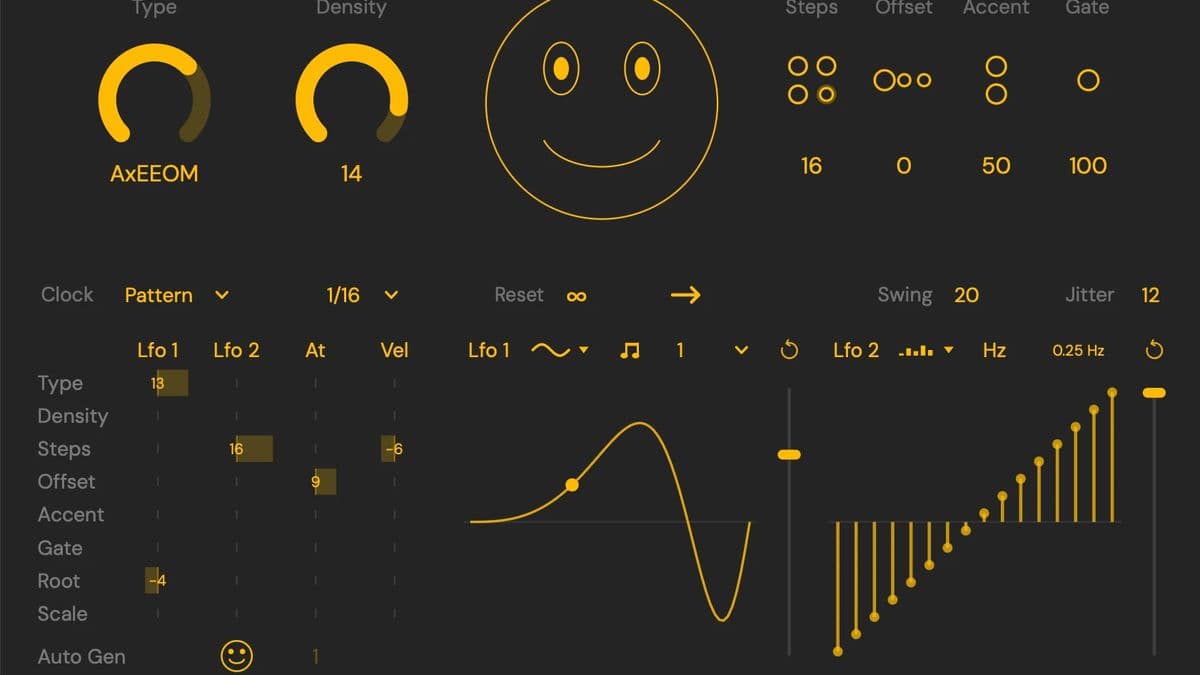
Iftah shipped Sting as a VST3, AU, and CLAP plugin for macOS, Windows, and Linux. It is the acid-line generator that started as a 2013 experiment and later lived as a Max for Live device, now opened to any host. The paid build is 35€ plus VAT. A free build stays available, capped at seven downloads per day.
At a glance: 35€ + VAT paid, or a daily free download. MIDI out, not audio. Four engines: Algo, Arp, Bass, and Counterpoint. Optional Novation Launchpad or monome control. Fifteen color themes plus custom themes, with VoiceOver, NVDA, Narrator, and OSARA support. Sold direct from if-tah.com.
This is a first look at the shipping plugin and the official manual. We have not run Sting in a session yet.
What Sting is
Sting writes MIDI. You put it in front of a 303-style synth, a software bass, or a hardware box, and it feeds that instrument a 16-step line. Iftah is explicit that the generator uses algorithmic rule sets only. There is no machine-learning model behind the smiley face.
The useful distinction is against tools that play acid themselves. Arturia Acid V is a synth. Sting is the writer. Pair it with whatever voice you already like, including a hardware TB-03 that needs a slide CC.
It also sits next to MIDI sketching tools we already cover. Cthulhu memorizes chords and arps. Scaler 3 maps harmony. Rapid Flow miniGRID is a four-lane step sequencer. Sting is narrower: acid phrasing, bass, and a four-voice counterpoint mode that can drive a whole rack.
Algo, Arp, Bass, and Counterpoint
Four engines share the same 16-step grid.
Algo is the original acid generator. Click the central smiley and Sting calculates a full set of note, velocity, gate, and octave patterns. Those four sets are musically related, so mixing them gives 256 combinations per generation. Type (1 to 16) morphs the notes from random intervals toward classic acid phrasing. Density sets how busy the line is. Steps sets loop length. Offset slides the start point. Accent (0 to 100) scales the three velocity layers. Gate (1 to 200) scales the three note lengths.
Arp waits for incoming MIDI. New notes rewrite the pitch content and roll a fresh set of variations. Lock the editor toggles and you can keep a rhythm while the pitches follow your hand.
Bass wants a chord. Sting finds the root and writes a bassline around it. Low Type values pull extra chord tones in. High Type values stick to the root.
Counterpoint is the multi-voice mode. Polyphonic MIDI in, four MIDI channels out: Sting A, Sting B, chords, and bass. A and B share one melody instead of writing two unrelated lines. Weight (1 to 16) decides how that melody splits between the two channels. Harmonic Density thins the chord and bass parts without wrecking the progression. Each voice has its own randomize lock, mute, transpose, and output channel.
The editor lock toggles matter in every mode. A filled dot next to Note, Accent, Gate, or Octave means that lane regenerates. A hollow ring locks it. Keep a groove, reroll the pitches. Or the reverse.
Timing, scale, and the step editor
Clock modes are Pattern (restart on transport), Song (follow song position), LFO1 (the LFO becomes the clock), and Gate (the pattern plays only while a MIDI note is held). Beat division runs from 1/64 to 32 bars. Default is 1/16.
Polymeter Reset (0 to 16 bars) is the odd-step trick. A 7-step line with a 1-bar reset plays as 7, 7, then 2. Direction is forward, backward, or pendulum. Swing and Jitter sit on the same row. Jitter makes the playhead skip, repeat, or jump backward.
Pitch controls are a C-to-B root (optionally from incoming MIDI), 35 scales from Major through Messiaen 7, a Scale on/off, and transpose from -36 to +48 semitones. Octave Low and High (-1 to +2) clamp the generated range. Tie mode writes tied lengths.
The step editor is a piano-roll for one voice at a time. Each step has a note, an accent (low, mid, high), a gate (short, medium, long), and an octave (-1, 0, +1, +2). In Counterpoint, the Sting / Chords / Bass switch picks which voice you are editing.
MIDI import, modulation, and slots
Drop a .mid on the window. A one-bar file becomes an editable template of notes, velocities, gates, and octaves. Longer files go through a statistical pass: Sting keeps the pitches and steps that repeat most often. Type and Density then decide how much of that imported character stays. Drag the MIDI Clip button the other way to export. Algo, Arp, and Bass write one clip. Counterpoint writes four.
The modulation panel is two LFOs plus a matrix. Sources are LFO 1, LFO 2, aftertouch, and velocity. Targets include Type, Density, Steps, Offset, Accent, Gate, Root, Scale, Weight, and Harmonic Density. Depth is bipolar around the current dial, not from zero. Each LFO has seven waveforms plus a 16-step sequencer, sync or free (0.01 to 30 Hz), shape, and retrigger.
Set the clock to LFO1 and the waveform drives the grid. A saw-up ramp accelerates. Fixed mode keeps step lengths constant so a shorter step count finishes before the LFO cycle. Poly mode stretches those steps across one LFO cycle, which is how you get 11 notes in a bar. Auto Generate can reroll the pattern on a division from 1/64 to 32 bars.
Slots store 128 complete states in 8 banks of 16. Right-click to store, copy, paste, or delete. Slot Bank and Slot Recall are automatable, so a Launchpad or monome can chain them into an arrangement.
Hardware, accessibility, and DAW routing
Sting can take over a Novation Launchpad or a monome 64, 128, or 256. Iftah publishes separate PDF maps for Launchpad Mini / X mk3, Launchpad Pro mk3, and both monome sizes. Grid rotation follows how the monome sits on the desk. Hardware settings stay out of host automation so a session recall cannot rewire your gear.
The plugin talks to screen readers directly. Every parameter announces its name and value. Official support lists VoiceOver, NVDA, Narrator, and REAPER's OSARA. Fifteen color themes ship in the box, including color-blind options, and you can build custom themes. A screen-reader user manual sits next to the standard PDF.
Because Sting is MIDI, routing depends on the host. Ableton Live wants a second MIDI track for the synth. Bitwig and REAPER can insert Sting before the instrument. Logic Pro loads it as an AU MIDI FX on the instrument channel. FL Studio needs matching MIDI ports or a Patcher graph. The DAW integration guide covers the diagrams.
A CC on Slide toggle (default CC 102) sends the extra message hardware like the Roland TB-03 needs for slides. That is the same lineage we covered in the TB-303 spotlight.
Sting specifications
| Spec | Detail |
|---|---|
| Type | Algorithmic MIDI sequencer (acid, arp, bass, counterpoint) |
| Engines | Algo, Arp, Bass, Counterpoint (2 lines, chords, bass) |
| Step grid | 16 steps, 4 editable lanes (note, accent, gate, octave) |
| Scales | 35, plus Scale on/off and MIDI-controlled root |
| Modulation | Dual LFOs, 16-step LFO shapes, aftertouch, velocity, bipolar matrix |
| Memory | 128 slots (8 banks of 16) |
| Parameters | 126 exposed, 121 automatable |
| Formats | VST3, AU MIDI FX, CLAP |
| System | macOS 11+, Windows 10+, Linux, plus a VST3 / AU / CLAP host |
| Hardware | Optional Novation Launchpad or monome |
| Accessibility | 15 themes (incl. color-blind), custom themes, VoiceOver / NVDA / Narrator / OSARA |
| Price | 35€ + VAT paid; 7 free downloads per day |
Sting vs Acid V, Cthulhu, and miniGRID
| Sting | Acid V | Cthulhu | miniGRID | |
|---|---|---|---|---|
| Job | Writes MIDI acid and counterpoint | Plays acid | Chord memory + arp | Four-lane MIDI sequencer |
| Audio engine | None (MIDI only) | Full 303-style synth | None (MIDI only) | None (MIDI only) |
| Hardware | Launchpad, monome | No grid takeover | No | No |
| Linux | Yes | No | No | No |
| Accessibility | Screen readers + 15 themes | Standard UI | Standard UI | Standard UI |
| Price | 35€ + VAT (free daily tier) | $149 | $39 | $29 |
Pick Sting when you want the line, not the voice, and you already have a synth you like. Pick Acid V when you want the 303 tone and the sequencer in one plugin. Pick Cthulhu or Scaler 3 when the job is harmony, not acid phrasing. Pick miniGRID when you want four independent lanes and per-lane shift, not a dedicated acid generator.
Who Sting is for
Sting suits live performers who want a Launchpad or monome to run acid and counterpoint, and studio producers who want a 303 writer that is not locked to Ableton. Linux, CLAP, and the accessibility stack are the reasons to look here first if those matter. The daily free tier is the cheapest way to test routing in your DAW.
Skip it if you need the plugin to make sound. Skip it if you want a chord toolbox like Scaler. Skip it if seven free downloads a day is too tight and 35€ plus VAT is not in the budget this week. The free pool resets tomorrow. It does not become an unlimited demo.
How much does Sting cost?
The paid version is 35€ plus VAT, one-time, from Iftah. The free version is the same plugin with a download cap of seven per day. Lost-link recovery is on the same page. macOS, Windows, and Linux builds are listed together.
Sting is not listed on Plugin Boutique, Thomann, or Best Service. Buy it on the Iftah shop.
FAQ
Does Sting make audio?
No. It outputs MIDI. Load a synth after it, or route MIDI to hardware.
How much does Sting cost?
35€ + VAT for the paid license. The free build allows seven downloads per day and resets daily.
What hardware does Sting support?
Novation Launchpad (Mini / X mk3 and Pro mk3 maps are published) and monome 64, 128, or 256. Both are optional.
What are the Sting system requirements?
A VST3, AU, or CLAP host. macOS 11 (Big Sur) or later, Windows 10 or later, or Linux.
Is Sting the same as the Max for Live Sting 2?
No. Sting 2 is the Ableton Live device. This plugin is the cross-DAW version, with the deeper modulation, MIDI import, and hardware takeover described above.
Verdict
Sting is a MIDI writer with a very specific job: acid lines, bass, and a four-voice counterpoint mode you can play from a Launchpad. The 35€ paid tier and the seven-a-day free tier make it easy to try. Linux and the screen-reader work are uncommon at this price. It will not replace Acid V if you need the sound, and it will not replace Scaler if you need harmony. If the job is the line, this is the plugin that writes it.