Forma Labs Filament: Real-Time Orchestration Plugin
Forma Labs Filament hosts up to 64 instruments and voices your chords into a live orchestra. Full breakdown of features, pricing, and who it's for in 2026.
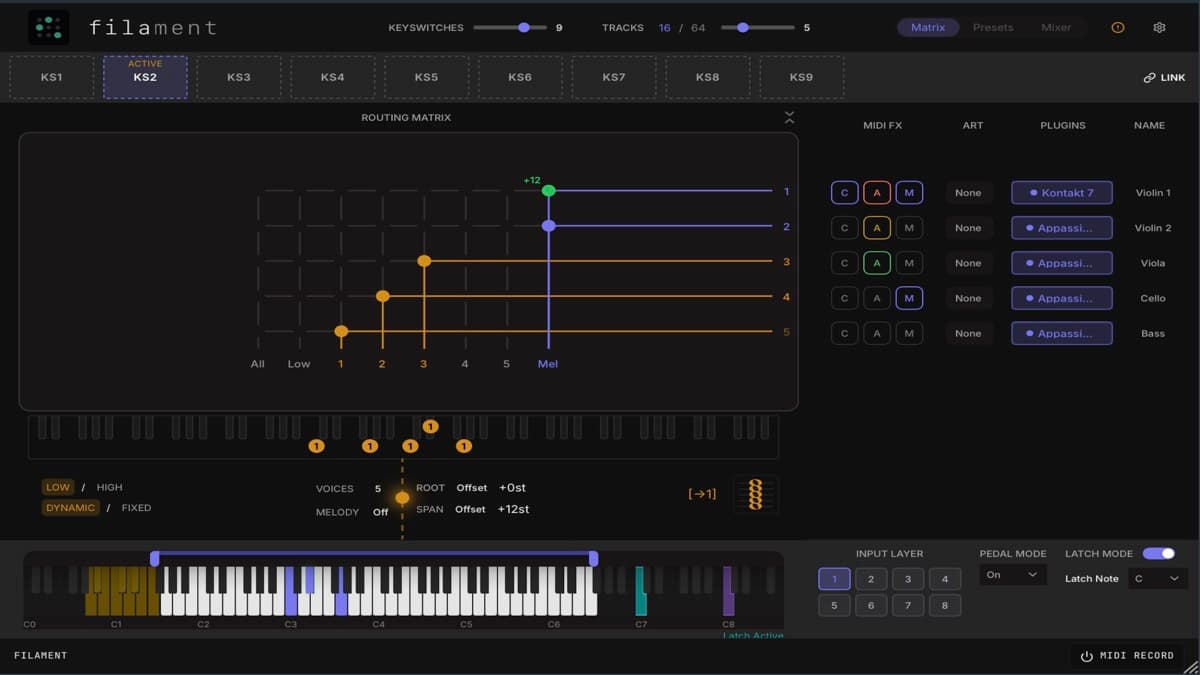
Forma Labs Audio shipped Filament on June 30, 2026, after a public beta. It is a real-time orchestration plugin that turns one keyboard performance into a fully voiced, multi-instrument arrangement as you play. Instead of programming each section by hand, you play chords and Filament distributes, transposes, and sequences those notes across every instrument it hosts.
That single idea reshapes how a composer sketches an ensemble. Here is how it works, what it costs, and who it actually suits.
At a glance
- What it is: A real-time MIDI orchestration engine and plugin host.
- Core trick: Play chords once, hear a full section or orchestra respond live.
- Hosting: Up to 64 VST3 or AU instruments inside one plugin instance.
- Formats: VST3, AU, and standalone for macOS and Windows.
- Price: £99 launch offer (regular £149), with the intro price running until July 14, 2026.
- Trial safety net: 14-day refund policy and up to three machine activations.
- Best for: Composers who build orchestral, cinematic, or layered electronic parts and want to play them live.
How Filament works
Filament sits on a single DAW track and loads your instruments inside it. You point it at up to 64 VST3 or AU plugins, then play as if you were performing one patch. Behind the scenes, Filament splits your input and routes each voice to the right instrument.
The result feels like conducting rather than sequencing. You hold a chord, and strings, brass, and woodwinds fill in their parts at once. Change the chord, and the whole ensemble revoices in real time. For anyone who normally maintains a giant template of keyswitched tracks, this collapses much of that setup into one playable instance.
Key features
Filament is built around live arrangement, not sound design. It ships without its own sample library, so you bring your own orchestral or synth instruments and let Filament handle the routing and voicing.
64-output routing matrix
The routing matrix is the heart of the plugin. Any incoming voice can travel to any hosted instrument, and each connection carries its own transpose value from −24 to +24 semitones. That per-connection transpose lets you stack octaves, double a line, or send a bass voice down two octaves without touching your DAW.
Intelligent revoicing
A Smart Filter mode distributes voices dynamically as you play. Rather than assigning fixed notes to fixed instruments, Filament spreads the chord to suit the instrumentation you have loaded. Voice-allocation options such as close, open, and drop voicings shape how those notes fan out across the ensemble.
Phrase arpeggiator
The built-in arpeggiator does more than run notes up and down. It builds moving parts with per-step articulations and Euclidean rhythms, so you can generate ostinatos and pulsing figures from held chords. A Link mode ties rhythmic motion across several hosted instruments at once, which is useful for cinematic pulses that need to feel connected.
MIDI clip launcher
Filament includes a per-instrument MIDI clip launcher. You drop in MIDI files, edit them in a piano roll, then trigger and reharmonize them live. It turns pre-written phrases into performable building blocks that follow your chords instead of staying locked to their original key.
Keyswitches and voice management
Filament handles articulation switching through keyswitches, a Smart Modifier, and an Articulation Trigger. You can map how each instrument responds to your playing and manage voice layers so a single performance drives legato, staccato, and sustained articulations across the ensemble.
Preset system and mixer
A deep preset system stores your orchestration setups, library configurations, keyswitch structures, and mixer choices. You can keep up to 64 presets per instance, which makes it practical to recall entire ensembles or switch instrumentation mid-project. A built-in mixer balances the hosted instruments so you can shape the blend without leaving the plugin.
Filament specs at a glance
| Specification | Detail |
|---|---|
| Type | Real-time MIDI orchestration plugin and host |
| Hosted instruments | Up to 64 VST3 or AU plugins per instance |
| Formats | VST3, AU, standalone |
| Platforms | macOS and Windows |
| Per-connection transpose | −24 to +24 semitones |
| Presets | Up to 64 per instance, plus a factory library |
| Machine activations | Up to 3 |
| Refund policy | 14-day refund |
| Launch price | £99 (regular £149) |
System requirements are not fully listed on the official product page, so confirm compatibility on the Forma Labs Audio site before buying.
Filament vs Divisimate
Divisimate is the closest well-known tool in this space, so it makes a useful reference point. Both take one performance and spread it across an ensemble, but they take different architectural routes.
| Forma Labs Filament | Divisimate | |
|---|---|---|
| Approach | Hosts instruments and routes internally | Routes MIDI out to your DAW tracks |
| Instrument hosting | Up to 64 VST3/AU inside the plugin | None; you host instruments elsewhere |
| Formats | VST3, AU, standalone | Standalone router feeding your DAW |
| Live divisi/revoicing | Yes | Yes |
| Arpeggiator and clip launcher | Yes | Not the core focus |
| Best for | One-instance, self-contained ensembles | Large existing multi-track templates |
The practical difference is where your instruments live. Filament keeps them inside one instance, which simplifies recall and standalone performance. Divisimate leaves instruments on separate DAW tracks and sends MIDI to them, which some composers prefer for granular mixing and per-track processing. Neither approach is strictly better; they suit different template habits.
Who Filament is for
Filament targets a specific workflow. If you write orchestral, cinematic, or layered electronic music and want to play full arrangements in real time, it removes a lot of routing and voicing busywork. Composers who currently manage sprawling keyswitch templates will feel the time savings first.
It is less essential if you work with one instrument at a time or program parts step by step. Because Filament is a layer on top of your instruments rather than a sound source, it only pays off if you already own libraries worth orchestrating. For sketching and live performance, though, the intelligent revoicing and arpeggiator can surface ideas you would not write out by hand.
How much does Filament cost?
Filament launched at a £99 introductory price, down from the regular £149. That launch offer runs until July 14, 2026, after which the price returns to £149. The purchase includes VST3, AU, and standalone formats, up to three machine activations, and a 14-day refund policy.
Filament does not include instruments, so budget for the libraries you plan to orchestrate. You can pair it with cinematic and orchestral content from Loopmasters or build a rotating pool of sounds through Loopcloud.
Frequently asked questions
Does Filament come with sounds?
No. Filament is an orchestration engine and host, not a sample library. You load your own VST3 or AU instruments, and Filament handles the routing, voicing, and performance layer on top of them.
Can I use Filament without a DAW?
Yes. Alongside the VST3 and AU plugin versions, Filament runs as a standalone application on macOS and Windows. That makes it practical for live performance and quick sketching away from a full session.
How many instruments can it host?
Up to 64 VST3 or AU instruments inside a single plugin instance. Each connection in the routing matrix carries its own transpose value, so you can layer, double, and octave-shift parts freely.
Is there a trial or refund?
Forma Labs Audio lists a 14-day refund policy rather than a time-limited demo. A public beta ran before the v1.0 release, but the shipping version is a paid product with the refund window as its safety net.
How does Filament compare to keyswitch templates?
It replaces much of that manual setup. Instead of maintaining dozens of keyswitched tracks and routing rules, you configure one Filament instance and play. The trade-off is that everything lives inside a single track, which suits some mixing workflows better than others.