AudioThing The Orb 2 Adds Custom Vowels and an iOS App
AudioThing The Orb 2 is a free update to the vowel formant filter, adding custom vowels, stereo controls, a new interface and a first iOS version, on sale at $19.
Black Friday 2026AudioThing Black Friday 2026: dates and deals →
AudioThing has released The Orb 2, a major update to its vowel formant filter that adds custom vowels, new stereo controls, a redesigned interface and, for the first time, an iOS version. It landed on 28 September 2026, it is a free update for existing owners, and it is on sale at $19 during the launch. This is a first look based on the official product page, not a hands-on review.
At a glance: The Orb 2 is a formant filter that shapes any sound into vowel-like tones using three band-pass filters. Version 2 is free for current owners and adds Stereo Width, Spread and Size controls, a new procedural interface, a preset browser and a custom-vowel system, plus macOS Tahoe support. It runs as VST2, VST3, AU, AAX and CLAP on desktop, and now as an AUv3 plugin and standalone app on iPhone and iPad. It is $19 during the sale, down from $49.
What is The Orb?
The Orb models a defining trick of the human voice: formants. When we speak, the shape of the throat and mouth emphasizes certain frequency bands, and those bands are what your ear reads as different vowels. The Orb recreates that with three band-pass filters, each tuned to a formant, so it can take a pad, a bass or a drum loop and make it say ah, ee or oh. It is the plugin producers reach for when they want a talking synth, a wah-like vocal filter or that classic vowel-morph movement.
The original was already a well-liked, focused effect. Version 2 keeps that focus but rebuilds the tool around it, widening what the filter can do, opening up its vowel content and finally putting it on mobile. It counts as a feature update rather than a new plugin, and it packs in plenty.
What's new in The Orb 2
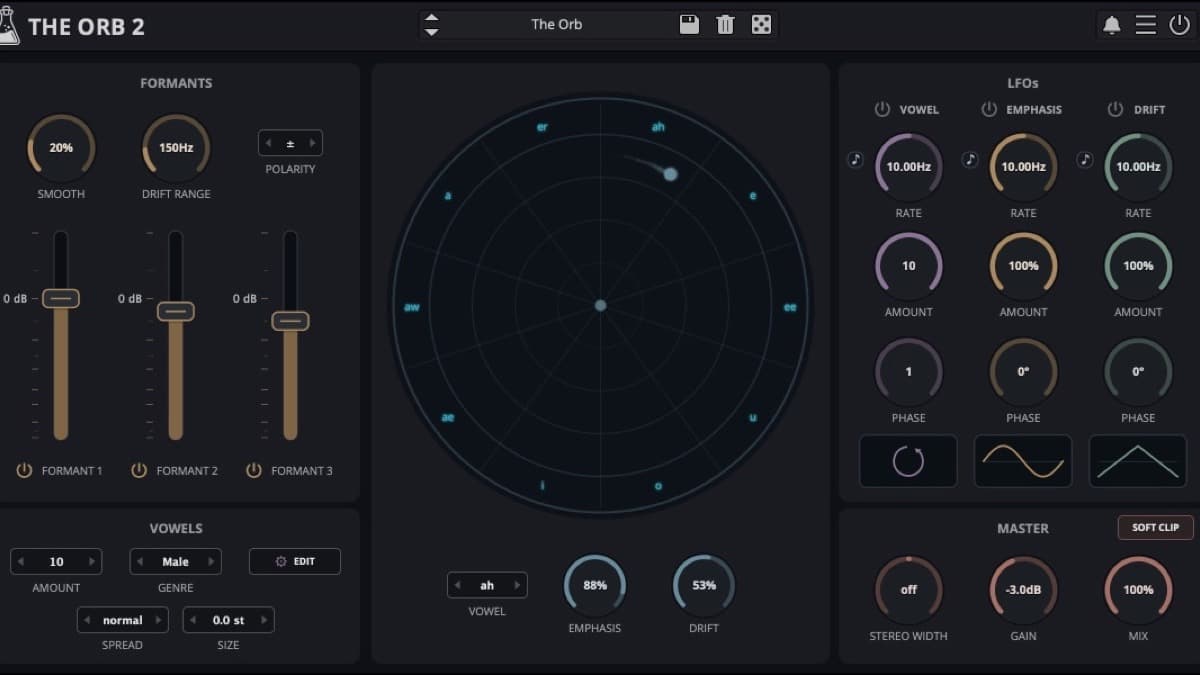
Custom vowels you can build yourself. The Orb ships with Male, Female and Child vowel sets, and version 2 lets you create your own. You can name a vowel and set the frequency of each of its three formants, which means the effect is no longer limited to imitating a human voice. You can invent vowels that do not exist, tune them to a track, and morph between them. This is the change that most expands the instrument, turning a fixed vowel bank into an open design space.
Stereo Width, Spread and Size. Three new stereo parameters give the effect room to breathe. Width and Spread place the formant movement across the stereo field rather than locking it to the center, and Size adds a sense of space. For a pad or a lead, that difference is the gap between a mono novelty and a wide, produced sound.
A new procedural interface. The Orb 2 opens with a redesigned, cleaner GUI that AudioThing describes as procedural. It is more modern and less cluttered than before, and the window is resizable, which matters on both large displays and small laptop screens. A new preset browser sits alongside it, making it faster to audition and recall sounds.
Three LFOs for automatic movement. Movement is central to what makes a formant filter interesting, and The Orb 2 drives it with three LFOs. One modulates the Vowel itself, sweeping between mouth shapes. One modulates the Emphasis, the resonance of the formants, for a sharper or softer vocal character. The third is Drift, which shifts the formant frequencies up or down. Version 2 also adds dotted note values to the tempo-synced LFOs, which is a small but genuinely useful timing option.
A first iOS version. The headline for mobile producers is that The Orb now runs on iPhone and iPad as an AUv3 plugin and a standalone app with IAA support. The same formant filter that lives in your desktop DAW is now available in AUM, GarageBand and other iOS hosts, which is a meaningful expansion for a plugin that used to be desktop only.
Workflow polish. Rounding it out are quality-of-life additions: a preset randomizer for fast inspiration, Brightness and Contrast controls, Parameter Lock to hold settings while you browse, a smoothed bypass to avoid clicks, and support for macOS 26 Tahoe. None of these is a headline on its own, but together they make the plugin nicer to live with.
The Orb 2 specifications
| Spec | Detail |
|---|---|
| Type | Vowel formant filter |
| Developer | AudioThing |
| Engine | Three band-pass filters, one per formant |
| Vowel sets | Male, Female, Child, plus unlimited custom vowels |
| Modulation | Three LFOs (Vowel, Emphasis, Drift), tempo sync with dotted values |
| Stereo | Width, Spread and Size controls |
| Extras | Preset browser and randomizer, Brightness, Contrast, Parameter Lock |
| Desktop formats | VST2, VST3, AU, AAX, CLAP (64-bit) |
| iOS formats | AUv3 and standalone (IAA) |
| System | macOS 10.13 to 26 (Universal 2), Windows 7 to 11, Ubuntu 20.04 LTS |
| Price | $19 launch sale, from $49 |
The Orb 2 vs iZotope VocalSynth 2
The Orb 2 is a focused, affordable formant filter. The nearest well-known reference is iZotope VocalSynth 2, a full vocal effects suite with vocoder, talkbox and polyvox engines. They overlap at the formant, but they are very different in scope and price.
| AudioThing The Orb 2 | iZotope VocalSynth 2 | |
|---|---|---|
| Type | Dedicated vowel formant filter | Multi-engine vocal effects suite |
| Vowels | Built-in and custom vowel sets | Vocoder, talkbox, polyvox and more |
| Interface | Single focused panel | Modular chain of modules |
| iOS | Yes, AUv3 and standalone | Desktop only |
| Price | $19 sale, from $49 | $199 |
| Best for | Fast, creative vowel filtering | Full vocal-processing production |
Which to pick. If you want a big, do-everything vocal toolbox, VocalSynth 2 is the more powerful choice and its vocoder and talkbox go well beyond formants. If you specifically want expressive, tunable vowel filtering on vocals, synths or drums, and you like the idea of using it on iOS, The Orb 2 does that one job cleanly at a fraction of the price. A pitch-and-formant tool like Little AlterBoy covers a different corner of vocal design again.
Who The Orb 2 is for
Buy it if you like creative filtering: talking synths, vowel-morphing pads, vocal robots and rhythmic wah effects. The custom-vowel system and stereo controls make it far more than a one-trick effect, and at $19 it is an easy addition.
It suits you if you produce on iOS and want a real formant filter in AUM or GarageBand, or if you already own The Orb and simply want the free upgrade to the new features.
Skip it if you need a complete vocal-production suite with pitch correction, vocoding and harmony. That is a job for a larger tool like VocalSynth 2, not a dedicated formant filter.
How much does The Orb 2 cost?
The Orb 2 is on sale at $19, or €19, during the launch, down from its regular $49 or €49 price, with the offer running through 31 October 2026. It is a free update for existing owners. You can check the price on Plugin Boutique or buy it directly from the official product page, and the iOS version is on the App Store.
For related vocal and creative-effect tools, our plugin database covers iZotope VocalSynth 2 and Little AlterBoy, and our best free VST plugins of 2026 roundup points to more effects worth trying.
FAQ
Is The Orb 2 a free update?
Yes. Version 2 is a free update for existing owners of The Orb. New buyers can pick it up during the launch sale for $19, down from $49, through 31 October 2026.
What does The Orb do?
It is a vowel formant filter. Three band-pass filters mimic the formants of the human voice, so the plugin can make any sound take on vowel-like character, from talking synths to wah-style vocal filtering, with LFOs to animate the movement.
Does The Orb 2 work on iPhone and iPad?
Yes. Version 2 adds an iOS release, available as an AUv3 plugin and a standalone app with IAA, so it runs in hosts like AUM and GarageBand alongside the desktop versions.
What formats and systems does The Orb 2 support?
On desktop it runs as VST2, VST3, AU, AAX and CLAP, on macOS 10.13 to 26 (Universal 2), Windows 7 to 11 and Ubuntu 20.04 LTS. On mobile it is an AUv3 plugin and standalone app for iOS.