Some links on this page are affiliate links. If you buy through them, Dubspot may earn a commission at no extra cost to you. It never affects our scores or what we recommend — read our policy.
Intrect de-artifact Cleans AI Mixes on the 2-Bus
Intrect de-artifact strips RVQ ghosting, codec residue, and HF aliasing from AI mixes on the 2-bus. Intro is $149, with a 14-day full trial and no AAX.
T
Theo Nakamura
September 23, 2026 · 12 min read
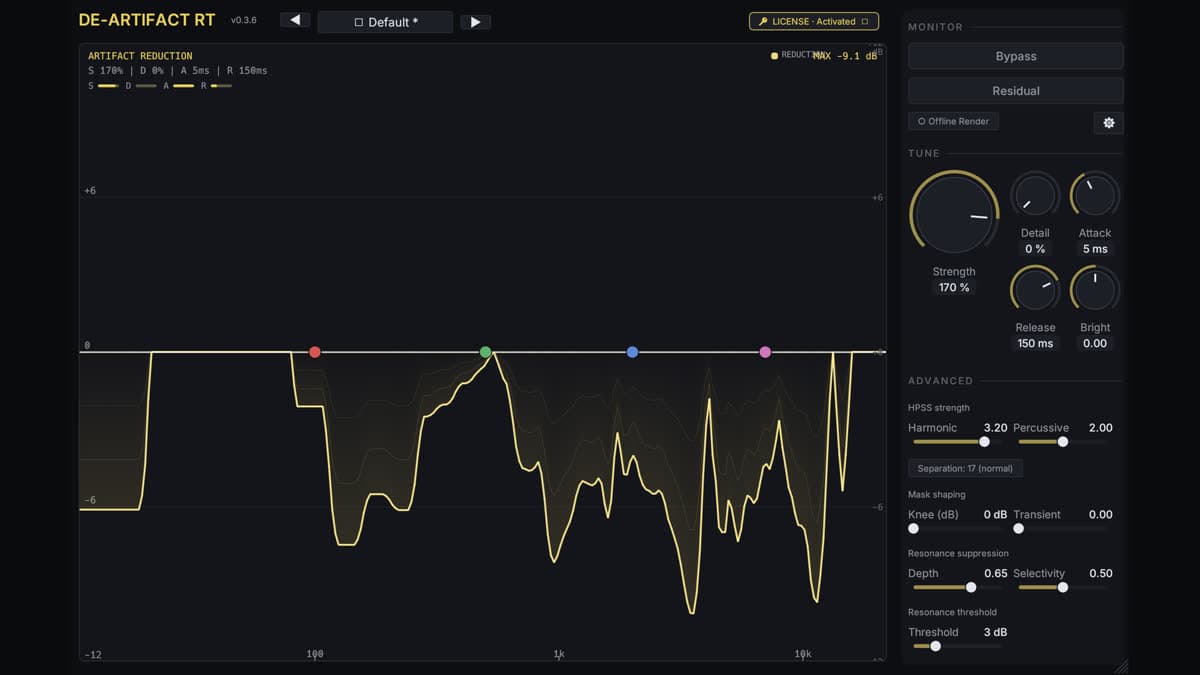
Intrect has shipped de-artifact, a real-time restoration plugin for the damage generative models and lossy codecs leave in a mix. The page prices it at $149, down from $179, as a one-time licence, with a 14-day full trial. It is built to sit on the 2-bus or on a separated stem, and to subtract RVQ ghosting, codec residue, and high-frequency aliasing. This is a first look from Intrect's product page and the official demo. We have not used it in a session.
At a glance: $149 intro / $179 list. 14 days of full quality, then a short silent gap every 60 seconds until you activate. VST3, AU, and CLAP on macOS 11 or later, Universal. VST3 and CLAP on Windows 10 2004 or later, 64-bit, AVX2. No AAX. No Linux build yet. Latency is 305 ms on macOS and 435 ms on Windows at 44.1 kHz, reported to the host.
What de-artifact is for
de-artifact is a restoration tool, not a tone shaper. Intrect describes three stages in series. A short-time Fourier transform feeds a harmonic-percussive split. Each side goes through ArtifactUNet, a 3.6-million-parameter network, which writes a mask. Adaptive spectral subtraction then removes energy below the noise floor and keeps music above it. The cleaned harmonic and percussive layers sum, and an inverse transform returns audio.
The page is specific about the damage it is looking for. Full mixes from Suno, Udio, Stable Audio, MusicGen, or Riffusion. Stems pulled with a separator such as htdemucs or Spleeter, vocals in particular. A low-bitrate MP3, AAC, or Opus file when that is the only copy. A last polish pass on a master that already contains any of those.
It is equally specific about the jobs it will not take. Bleed, a vocal still audible in a drum stem, is a different Intrect plugin, de-leak. One ringing resonance is ENZYME. Deliberately rebalancing harmonic against percussive content is Intrect HPSS, which is free and macOS-only. Pro Tools is out, because there is no AAX build. Arrangement, performance, and mix decisions stay put. A cleaned generation still sounds like the generation it came from.
Artifacts, on Intrect's account, concentrate above roughly 3 kHz, where acoustic music has less energy. The model is conservative on genuine acoustic sources by design. On a bass stem the page puts the peak reduction at about 0.8 dB even at Strength 100%. A near-flat curve there is the result they expect. Cranking Strength because the meter looks idle is the failure mode they warn about.
What you actually control
The plugin exposes 32 parameters. Eight factory presets set all of them at once. Nudge a control after that and the preset is marked modified instead of snapping back. Save As stores your own.
| Preset | Intrect's use |
|---|---|
| Conservative | Subtle MP3, AAC, or Opus residue. Maximum transparency |
| Balanced | General polish with a light hand |
| Default | General AI-generated or AI-separated material. Strength at 60% |
| Aggressive | Heavily artefact-laden AI tracks, plus resonance suppression |
| Vocal | AI-separated vocal stems. Harmonic-weighted, transient- and sibilance-aware |
| Gentle Reduction | A soft mask floor when colouration has to stay minimal |
| More Harmonics | Watery sustains and vocal smear. Maximum harmonic-channel reduction |
| Soft Master Bus | Light control on a finished mix. Soft knee, slow release, strong resonance suppression |
Strength is the global amount, and 60% is the default starting point. Harmonic and percussive reduction are separate, because the HPSS split gives vocals, synths, and sustains one mask and drums and transients another. Separation switches the median kernel between Normal (17) and Strong (31). Strong costs more CPU and is the one Intrect points at for dense mixes.
Emphasis EQ is four bands you drag on the spectrum to tell the model where to look. The boost is fed to the model only. Listener audio is inverse-EQ'd, so the tone you hear is not the curve you drew for the detector. Brightness adds to, or subtracts from, the high-frequency energy the plugin already measures and restores. If the result goes dull, Intrect's order is Brightness up, then Strength down from 60%, or the Gentle Reduction preset.
Resonance suppression ducks narrow peaks that stand above the local spectral baseline. Depth, Selectivity, and Threshold decide how tight a peak must be and how far it has to rise. That is a stage inside this plugin. It is not a substitute for a dedicated resonance suppressor when the only problem is one ring.
Bypass keeps the reported latency so the A/B stays sample-aligned. Residual plays only what is being subtracted. If you hear music in the residual, the preset is too strong. The same rule is on the web demo: Diff should not sound like the song.
Latency, hosts, and the trial
Host delay compensation is part of the design. At 44.1 kHz the macOS build reports 305 ms (13,440 samples) and the Windows build reports 435 ms (19,200 samples). Intrect says the Mac build primes one chunk less. Any sample rate from 8 kHz to 384 kHz is accepted. A resampler brings audio to the model's 44.1 kHz rate and back.
That latency is a 2-bus and print decision, not a tracking insert. On a freeze or bounce, the first moment can go silent: the host signals offline mid-stream and the worker re-primes one chunk. Intrect says the output is correct from the first audible frame after that. Residual phase can rotate between plays if the chunk grid does not line up. Spectrum and RMS stay stable. Same sample rate and the same transport start give bit-identical phase.
The 14-day trial is the full plugin: every preset, every parameter, no intentional quality cut. The same installer becomes the licensed build when you add a key. After 14 days it inserts a brief silent gap every 60 seconds until activation. A browser preview on the product page will clean 30 seconds of a file up to 50 MB, with no account. de-artifact Cloud runs full-length files on Intrect's GPUs with one tuned preset rather than the full control surface.
There is a direct answer on detector scores, because people will ask. de-artifact is built to change the sound, not to push an AI-detection probability down. A score can move up or down after processing. Intrect says a higher score does not mean the track became "more AI," and the score is not a measure of how many audible artifacts came out.
de-artifact specifications
| Spec | Detail |
|---|---|
| Price | $149 intro / $179 list, one-time. Direct from Intrect |
| Trial | 14 days full quality. Then a silent gap every 60 seconds |
| Type | Real-time spectral subtraction for generative and codec artifacts |
| Engine | HPSS split, then ArtifactUNet (3.6M parameters) per layer |
| Presets | 8 factory, plus Save As |
| Emphasis | 4-band detector EQ, inverse-EQ'd on the listener path |
| Latency | 305 ms macOS, 435 ms Windows, at 44.1 kHz. Reported for PDC |
| Sample rate | 8 kHz to 384 kHz in. Model runs at 44.1 kHz |
| macOS | 11 or later, Universal (Apple Silicon and Intel). VST3, AU, CLAP |
| Windows | 10 version 2004 or later, 64-bit, AVX2 and FMA. VST3 and CLAP. VC++ 2015–2022 x64 runtime |
| Not included | AAX, standalone, Linux |
| CPU / RAM | Apple M1, Intel Core i5, or Ryzen 5 minimum. 8 GB RAM. About 150 MB on disk |
| Buffer | 256 samples minimum. Intrect suggests 1024 for comfort on a low-power machine |
| Hosts, macOS | VST3: Live, Reaper, Bitwig, Studio One. AU: Logic, GarageBand, MainStage. CLAP: Reaper, Bitwig |
| Hosts, Windows | VST3: Live, Reaper, Bitwig, Studio One, FL Studio. CLAP: Reaper, Bitwig |
| Buy | de-artifact at Intrect |
From version 0.3.4 the macOS build runs the network on the Apple Neural Engine. Intrect's own figure is headroom moving from about 2.7× to about 31× on an M1 Max. On an 8 GB M1, their dropout order is Strength down, buffer up, Separation back to Normal, then freeze other heavy plugins.
de-artifact vs SpectraLayers vs RX
SpectraLayers 13 and iZotope RX 11 are editors. de-artifact is an insert. The jobs meet on the word "cleanup" and then leave.
| Intrect de-artifact | SpectraLayers 13 | iZotope RX 11 | |
|---|---|---|---|
| Price | $149 intro / $179 list | €89.99 Elements / €359 Pro on the SpectraLayers card | RX 11 is superseded on iZotope's site by RX 12. The RX 11 card is the suite, not a 2-bus insert |
| Where it runs | Real time on the 2-bus or a stem | Standalone plus ARA. You edit a spectrogram | Standalone and ARA. You edit a spectrogram |
| Aimed at | RVQ ghosting, codec residue, HF aliasing on generated or separated audio | Unmix, reconstruct, and heal in post | Noise, clicks, clipping, and spectral repair across dialogue and music |
| Latency | 305 ms macOS / 435 ms Windows at 44.1 kHz | Offline or ARA, not a live 2-bus number | Offline or ARA |
| Formats | VST3, AU, CLAP. No AAX. No Linux | Standalone, VST3 ARA, AU ARA, AAX AudioSuite | Standalone and plugin modules, including AAX in the suite |
| Reach for it when | A generated mix or a separated vocal needs a repeatable pass | You need to see and repaint the spectrum | The damage is noise, a click, or a hole you will edit by hand |
Which to pick. Choose de-artifact when the file is a generative mix, a separated stem, or a low-bitrate encode, and you want one insert you can print with delay compensation. Choose SpectraLayers when the repair is visual and selective. The SpectraLayers 13 first look covers unmix and reconstruct. Choose RX when the problem is a recording, not a model: hum, clicks, clipped peaks, a noise print. ReStem 2 is the other direction. It separates drums. de-artifact does not split a mix into parts. It cleans whatever you already routed to it.
Who de-artifact is for
Consider it if you finish tracks that start in a generative model, or you mix stems that came out of a separator and the top end still has a watery hash.
Consider it if the master already contains those files and you want the Soft Master Bus preset as a light last pass, with Strength left near the default until the residual sounds like noise rather than music.
Consider it if you work in Logic, Live, Bitwig, Reaper, Studio One, or FL Studio and you can spare a third of a second of plugin delay on the bus.
Skip it if you track in Pro Tools. There is no AAX version.
Skip it if you need Linux, or a standalone app you can open outside the DAW.
Skip it if the source is a clean acoustic recording and you are hoping for a loudness or tone change. The model is built to do very little there. A bass stem that barely moves is the plugin working.
How much does de-artifact cost?
$149 during the intro, $179 list, one time, from Intrect. There is no Plugin Boutique, Thomann, or Best Service listing. The 14-day trial is the full control surface. Cloud minutes are a separate product for full-length browser jobs, and they are not the plugin licence.
The plugin card is the short finder entry. Read the product page before you buy if your CPU is older than AVX2, or if you need the plugin on a live vocal chain. 305 ms is a late vocal. It is a reasonable print delay.
FAQ
What does de-artifact remove?
RVQ ghosting, codec residue, and high-frequency aliasing from generative mixes, separated stems, and low-bitrate MP3, AAC, or Opus files. It subtracts that residue. It does not rewrite the arrangement or separate stems.
de-artifact vs a spectral editor?
SpectraLayers and RX are places you edit a picture of the spectrum. de-artifact is a 2-bus insert with eight presets, separate harmonic and percussive amounts, and a residual monitor. Use the editors when you need to paint. Use de-artifact when you need a repeatable pass with host delay compensation.
Why is the latency so high?
The network runs per chunk. Intrect reports 305 ms on macOS and 435 ms on Windows at 44.1 kHz, and the plugin tells the host so the session lines up. Bypass keeps that delay so an A/B does not jump. It is the wrong insert for tracking.
Does it run in Pro Tools or on Linux?
No AAX build, so Pro Tools will not load it. Linux is listed as a roadmap item, not a download. macOS 11 or later gets VST3, AU, and CLAP. Windows 10 2004 or later, with AVX2, gets VST3 and CLAP.
Will it make an AI detector score drop?
Intrect says no. The plugin is designed to improve the sound, not to minimize a detector score. The reported probability can move either way, and a higher score after processing is not a verdict on how many artifacts you removed.