Some links on this page are affiliate links. If you buy through them, Dubspot may earn a commission at no extra cost to you. It never affects our scores or what we recommend (read our policy).
AutoTune Advanced Tunes Hard and Keeps Vibrato
AutoTune Advanced is Antares' flagship automatic tuner, with a DVA vibrato engine and Live mode under 1 ms. The perpetual license from Antares is $450.
P
Priya Raman
September 25, 2026 · 11 min read
Dubspot's best Black Friday dealDrum Programming and Groove Production Course: $19, was $99 ↗
Black Friday 2026Antares Black Friday 2026: dates and deals →
Antares released AutoTune Advanced on 24 September 2026, and it now sits at the top of the company's automatic pitch correction range. The algorithm is a ground-up rebuild. The headline addition is DVA, a vibrato engine designed to leave a singer's natural vibrato in place while the notes lock to pitch. A perpetual license costs $450, and there's a 3-day trial if you want to hear it on your own vocals first.
At a glance: $450 perpetual, or $35 a month for Advanced on its own. AutoTune Unlimited, which includes Advanced, is $35 a month or $210 a year. Formats are VST3, AU, and AAX, running on macOS 14 or later and Windows 10 and 11. Live mode stays under 1 ms from 44.1 kHz through 192 kHz. Graph Mode stays on Pro 11.
Where Advanced sits in the lineup
The AutoTune name now covers three plugins with three different jobs. AutoTune Advanced is the automatic flagship, built around real-time correction, the new vibrato tools, and a live-latency mode. AutoTune Pro 11 keeps Graph Mode and the harmony player for note-by-note editing. AutoTune is the streamlined edition for everyday correction. At the budget end, Karanyi Sounds' new Voicemax vocal tuner and harmonizer costs €59 and adds four live harmony voices.
Advanced sits beside Pro 11 rather than replacing it. What it changes is the old trade-off where the hardest real-time tune flattened the vibrato along with the pitch.
If most of your tuning happens in Graph Mode, this probably isn't your upgrade. Auto-Tune Pro is still the plugin with the piano-roll style editor. Advanced is a tracking tool: the singer performs, the plugin corrects, and DVA works out which part of the wobble was musical.
DVA and what it does to a take
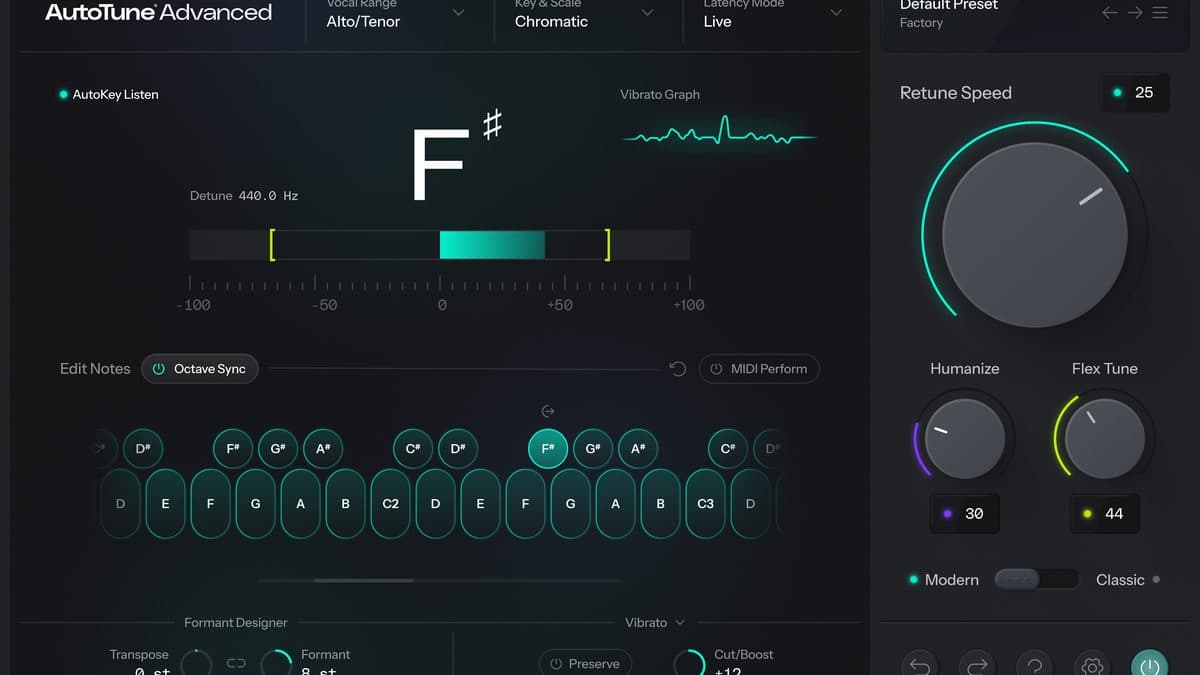
DVA is a vibrato detector. Antares says it recognizes the singer's own vibrato and leaves that movement alone, both at transparent settings and at the fastest retune speed. A real-time visualizer draws what the engine is hearing, so you can see which vibrato it's keeping.
From there, you decide how much of it you want. Preserve keeps the performance as sung, Cut pulls the wobble down, and Boost pushes it further. If a take has no vibrato at all, Vibrato FX can write one using sine, square, saw, or triangle shapes, with rate and cut/boost controls. The expanded panel adds detection threshold, a vibrato meter, delay, attack, variation, and separate depth for pitch, amplitude, and timbre.
Correction itself still comes from Retune Speed, Humanize, and Flex-Tune, the controls AutoTune users already know. DVA is a new layer on top of them. In practice, a zero retune speed no longer has to turn a melisma into a staircase.
You also get two tonal characters in one plugin. Classic Mode delivers the hard, familiar AutoTune color. Modern Mode is the transparent path, with Flex-Tune and higher-quality processing. You pick per song instead of owning two plugins.
Live mode, formant, and scale tools
Three latency modes share a single menu. Live is for tracking, and Antares rates it at 0.84 ms at 44.1 kHz, staying under 1 ms from 44.1 kHz through 192 kHz. Low Latency is the general studio setting. Switch to High Quality when you bounce, so the instance a singer tracked through can print at its best.
Transpose and Formant each cover ±12 semitones. Link them and the voice shifts pitch and size together. Unlink them for a pitched-down verse, or print one singer four times at four different sizes to build a stack. These two knobs are the creative pair, separate from the correction.
Key and scale share one panel, with all twelve keys and the available modes, so you're not hunting through menus mid-comp. A 78-key visual keyboard lets you bypass a note or retune it by hand. That's how you keep a vocal fry, a bend, or a blue note out of the correction. With AutoKey 2 compatibility, a detected key, scale, and tempo can be sent to every Advanced instance in the session, including when the key changes.
MIDI Perform maps the main tuning controls and Vibrato FX to a controller. You can ride them while recording or write the moves as automation.
The scale panel and keyboard are still automatic-mode tools, though, and they don't add up to Graph Mode. Drawing notes by hand remains Pro 11's job.
System requirements and activation
Advanced runs as VST3, AU, and AAX on macOS and Windows. You'll need macOS 14 or higher on a Mac, or Windows 10 or 11 on a PC. The user guide includes insert steps for Pro Tools, Logic Pro, Ableton Live, Cubase, Studio One, and FL Studio.
Activation runs through Auto-Tune Central. Log in with your Antares account, then install from the Plug-Ins tab if you bought direct, or redeem a code if your license came from a reseller. Each license activates on up to two locations at once, and a location can be a computer or an iLok dongle.
A new preset library, including presets from working producers, makes a useful starting point, though you'll still set Retune Speed and DVA per singer.
AutoTune Advanced specifications
| Spec | Detail |
|---|---|
| Price | $450 perpetual from Antares. $35/month for the Advanced subscription |
| Unlimited | $35/month, or $210/year. Current subscribers get Advanced included |
| Trial | 3-day free trial from the Advanced page. Unlimited has a free trial too |
| Released | 24 September 2026 |
| Type | Automatic pitch correction. DVA vibrato engine. Not Graph Mode |
| Correction | Retune Speed, Humanize, Flex-Tune. Classic and Modern modes |
| Vibrato | Preserve, cut, or boost. Vibrato FX: sine, square, saw, triangle |
| Latency | Live, Low Latency, High Quality. Live: 0.84 ms at 44.1 kHz, under 1 ms through 192 kHz |
| Formant | Transpose and Formant, ±12 semitones, linkable |
| Scale | Key and scale on one panel. 78-key visual keyboard. AutoKey 2 |
| MIDI | MIDI Perform for the main controls and Vibrato FX |
| Formats | VST3, AU, AAX |
| macOS | 14 or later |
| Windows | 10 and 11 |
| Activation | Auto-Tune Central. Up to two locations, computer or iLok |
| Buy | AutoTune Advanced |
AutoTune Advanced vs Pro 11 vs Melodyne
Melodyne 5 is the dedicated note editor, starting at $99 for the entry edition, with DNA polyphonic editing in the higher tiers. Topline Vocal Tune is Universal Audio's real-time tuner at $99. AutoTune Pro 11 costs $550 for a perpetual license from Antares.
| AutoTune Advanced | AutoTune Pro 11 | Melodyne 5 | |
|---|---|---|---|
| Price | $450 perpetual, or $35/month | $550 perpetual from Antares | From $99 on the Melodyne card |
| Main job | Real-time correction that keeps vibrato | Automatic correction plus Graph Mode and harmonies | Note-by-note pitch, timing, and formant edits |
| Live tracking | Live mode under 1 ms, 44.1 to 192 kHz | Auto Mode for tracking. Graph Mode for the edit | ARA and offline editing, not a sub-millisecond tracker |
| Vibrato | DVA preserve, cut, boost, or written Vibrato FX | Vibrato tools inside the older AutoTune feature set | Vibrato edited on the note blobs |
| Manual notes | Bypass or retune on a 78-key keyboard | Graph Mode | Built around it |
| Formats | VST3, AU, AAX. macOS 14+, Windows 10/11 | VST3, AU, AAX | VST3, AU, AAX, ARA, standalone |
| Reach for it when | The singer is in the room and the tune has to feel human | You'll draw pitches after the take, or stack harmonies | The vocal needs timing, sibilant, and polyphonic edits |
Which one to pick
Advanced makes the most sense when the session happens in real time. Think of a singer on headphones, a hard tune that should still wobble, or a formant move you ride while tracking. The $450 perpetual license is a one-time cost, and if you already pay for Unlimited, you won't need to buy it again.
Pro 11 is the choice when the work happens in the graph. Comping a lead, drawing pitches, printing a four-part harmony, and correcting timing all live there. At $550, it costs $100 more than Advanced and covers a different half of the job. Plenty of studios will own both, using Advanced on the way in and Pro 11 for the edit.
Melodyne fits when the problem is a note you can see: timing, drift, a polyphonic stack, or the formant on one syllable. The entry edition at $99 is an affordable way into that editor, though it won't give you DVA or a 0.84 ms live mode. Topline, also $99, is the other real-time option if you'd like UA's tuner and don't need Antares' vibrato engine. For a budget tuner with built-in harmonies, Klevgrand's Altitude Harmony vocal tuner is $29.99 at its intro price.
Who AutoTune Advanced is for
Consider it if
- You track vocals and the singer needs to hear the tune with almost no delay. Live mode is built for that.
- Hard tuning keeps eating vibrato, and you want a control that preserves it or puts it back without leaving Auto mode.
- You already subscribe to AutoTune Unlimited, which includes Advanced.
- You work in Pro Tools, Logic, Live, Cubase, Studio One, or FL Studio, since AAX, AU, and VST3 are all supported.
Skip it if
- Your workflow revolves around Graph Mode. Pro 11 is the manual editor, and Advanced doesn't have a graph.
- You only need light, natural correction a few times a month and $450 is hard to justify. Melodyne's entry edition or Topline at $99 is the smaller spend, and Unlimited at $35 a month includes Advanced plus the rest of the catalog.
- Your Mac is on macOS 13 or earlier. Advanced requires macOS 14 or higher.
- You want a harmony engine in the same plugin. That player lives in Pro 11.
How much does AutoTune Advanced cost?
A perpetual license is $450 on the Antares purchase page. The same checkout offers an Advanced-only subscription at $35 a month.
AutoTune Unlimited costs $35 a month or $210 a year ($17.50/month), and both plans include Advanced. Since monthly Unlimited costs the same as the Advanced-only subscription, it's the better $35 if you'll use anything else in the Antares catalog. Current Unlimited subscribers get Advanced at no extra charge.
The product page offers a 3-day free trial, and new subscribers can also try Unlimited free. For a quick summary, see the AutoTune Advanced card in our plugin finder.
FAQ
How much is AutoTune Advanced?
The perpetual license is $450 from Antares. A monthly Advanced subscription is $35. AutoTune Unlimited, which includes Advanced, is $35 a month or $210 a year.
Does AutoTune Advanced have Graph Mode?
No. Graph Mode and the harmony player stay on AutoTune Pro 11. Advanced focuses on automatic correction, with retune, humanize, flex-tune, DVA, formant, and a 78-key keyboard for notes you want left alone.
What is DVA?
DVA is the vibrato engine in Advanced. It detects the singer's vibrato and can preserve, cut, or boost it while the pitch corrects. When a take has none, Vibrato FX can add one.
Will it work for live tracking?
Yes. Live mode is the low-latency setting, and Antares reports 0.84 ms at 44.1 kHz, with Live mode staying under 1 ms from 44.1 kHz through 192 kHz. Low Latency and High Quality are the other two modes.
What are the system requirements?
Advanced runs as VST3, AU, and AAX on macOS 14 or later and Windows 10 and 11. Activation goes through Auto-Tune Central, on up to two locations, computer or iLok.


