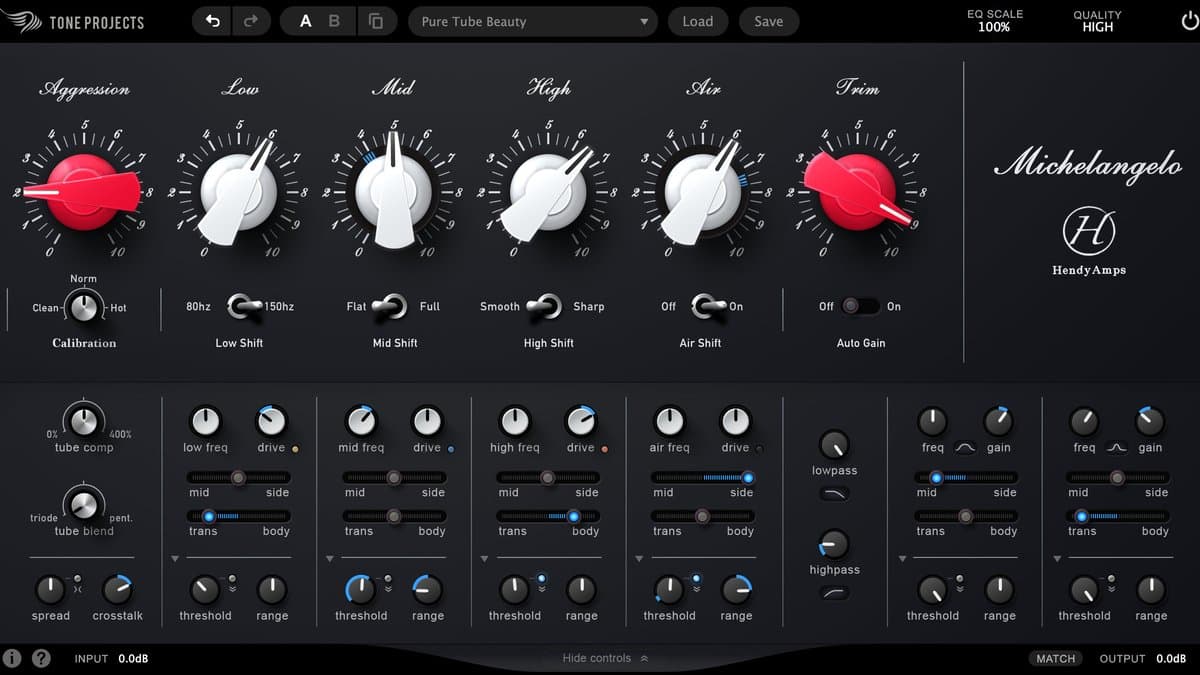
Tone Projects Michelangelo is the officially endorsed plugin version of the Hendyamps Michelangelo—an all-tube stereo EQ and harmonic generator admired for raw musical beauty more than clinical curves. Built with hardware designer Chris Henderson, the plugin aims to keep that “right-brained” tone-sculpting feel while adding digital-only tools: dynamic EQ, Mid/Side, transient/body separation, and deeper tube calibration.
If Pro-Q is a scalpel, Michelangelo is a brush. You paint broad, interacting bands, then decide how hard the tube path works via Aggression.
What makes it special
Interactive broad bands
The four main bands are designed to interact musically—hardware users often say the EQ “feels good” even before they understand the graph. That interaction is the point: boosts and cuts that glue rather than draw mechanical smiley faces. The current first look is Scaler EQ Pro.
Aggression / calibration
Aggression (input mojo) and trim/calibration controls set how hard you drive the tube modeling. Mastering usually lives at subtle settings. Mixing and tracking can push further into obvious harmonic color. Overcooking is easy—matched-loudness A/B is mandatory.
Extra precision bands
Two additional bands (narrow/wide bell, low/high shelf options) cover tasks the broad bands should not force—small fixes without abandoning the tube path.
Modern mastering tools
- Dynamic EQ — movement and energy without static over-EQ
- Mid/Side — tone the center vs width differently
- Transient/Body — EQ attack vs sustain layers independently
- Per-band saturation emphasis — color where you want it
- EQ scale — exaggerate, reduce, or invert a curve for bus experimentation
How to use Michelangelo
Mastering: gentle polish
- Insert after major balance decisions (or as the “character EQ” stage).
- Keep Aggression low.
- Use broad bands for tone: low weight, mid clarity, high air—tiny moves.
- Use extra bands only for stubborn issues.
- Try light dynamic EQ on harshness instead of static cuts.
- Match loudness; if bypass wins, you over-colored.
Mastering: Mid/Side tone
- Soften harsh sides while keeping mid vocal presence
- Add weight to mid without widening boom
- Always mono-check
Mix bus color
Slight Aggression + broad lifts can make a print feel “expensive.” If the mix already has saturation everywhere, skip or go cleaner.
Transient/Body tricks
- Acoustic guitar: cut body boom, keep pick
- Drums: lift transient crack without harshizing wash
- Vocals: careful—body cuts can thin a singer fast
Tracking / sound design
Push Aggression for obvious tube EQ character on synths, guitars, and parallel buses. This is where “hi-fi distortion” descriptions make sense—treat it as harmonic design, not invisible EQ.
Michelangelo vs alternatives
| Tool | Role |
|---|---|
| FabFilter Pro-Q 4 | Surgical / dynamic digital EQ |
| Mäag EQ4 | Simple musical air-band clarity |
| bx_digital V3 | M/S mastering EQ workhorse |
| Unisum | Mastering compression partner |
Who should buy it
Buy Michelangelo if you want tube EQ character as a creative instrument and you already own a surgical EQ. Ideal for mastering polishers and mixers who miss hardware vibe in the box.
Skip if you only need clean balancing, or if budget forces one EQ and that one must be Pro-Q-class utility.
Honest limitations
It will not fix bad arrangements. Aggression can mask problems until translation fails. Interactive bands can confuse graph-first engineers. And no tube EQ replaces monitoring and references.
Verdict
Tone Projects Michelangelo is a top-tier character mastering EQ: Hendyamps soul, interactive musical bands, and digital tools that extend the hardware idea without sterilizing it. Score 8.9.
Confirm price, trial, and formats on the official Michelangelo page. Trial with Aggression near zero first—earn the drive after the curve is musical.