Effect / plugin file

Carbonated Audio On Tap

Carbonated Audio / $20

On Tap by Carbonated Audio is a $20 sidechain ducking plugin with 16 curves, three trigger modes and a band-split crossover, on macOS and Windows, with zero latency.

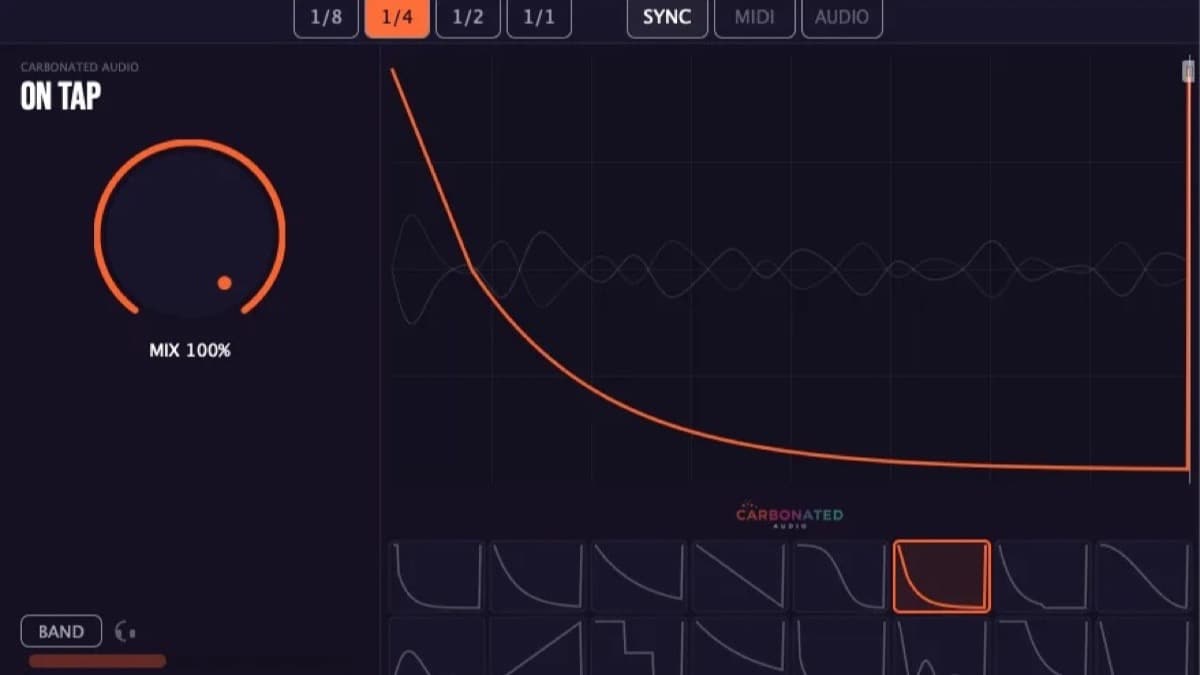
Carbonated Audio On Tap sidechain ducking plugin showing a hand-drawn ducking curve and trigger controls
El veredicto de Dubspot

El veredicto de Dubspot

Ideal para Producers who duck the same way on most tracks and want the pump without the routing, with a band split for ducking only the sub.

Pros

  • 16 hand-crafted curves cover the common ducking jobs in one click
  • Three trigger modes: Sync, MIDI and Audio
  • Band-split crossover ducks only the lows or only the highs
  • $20 one time, zero latency, full-feature demo

Cons

  • Narrower scope than a drawable shaper like VolumeShaper or ShaperBox
  • No AAX on Windows, so no Pro Tools on a PC
  • Sold direct only, not through the major affiliate retailers

Field notes

Resumen

On Tap is Carbonated Audio's sidechain ducking plugin. It gives you a classic pump without routing a kick to a compressor: you insert it on a track and pick a shape. The core is a library of 16 hand-crafted ducking curves, including a standard sidechain pump, a dedicated sub-bass duck and a reverse chain, with a slope offset, a shift amount and a draggable end marker to tune the result. Three trigger modes drive it, Sync to DAW tempo, MIDI from any note, and Audio from an incoming signal.

The band-split crossover, from 20 Hz to 5.12 kHz, lets you duck only above or below a frequency, so you can pump the sub out of a kick's way while leaving the top untouched. Anti-click smoothing cleans the gain transitions, and the developer reports zero latency with no lookahead. It is $20, one time, for three machines, with formats VST3, AU and AAX on macOS and VST3 on Windows. The nearest rivals are Kickstart 2, Cableguys VolumeShaper 6 and the ShaperBox 3 bundle, and On Tap undercuts them all. For the same studio's ducking reverb, see FOAM. Full walkthrough in the On Tap first look.

Technical matrix

Especificaciones

Type
Sidechain ducking and volume-shaping plugin
Curves
16 hand-crafted shapes, including sidechain pump, sub-bass duck and reverse chain
Trigger modes
Sync (DAW tempo), MIDI (any note), Audio (incoming signal)
Band split
Crossover from 20 Hz to 5.12 kHz, duck above or below
Controls
Mix, slope offset, shift amount, draggable end marker
Latency
Zero, no lookahead
Formats
VST3, AU, AAX on macOS (Intel and Apple Silicon native); VST3 on Windows
System
macOS 10.13 or later, Windows 10 or later (64-bit)
License
$20 one time, 3 activations, free updates

Última verificación 2026-10-17

Quick reference

Preguntas frecuentes

How much does Carbonated Audio On Tap cost?

On Tap is $20, a one-time purchase sold direct by Carbonated Audio, with three machine activations and free updates. The nine-plugin Carbonated Audio bundle, which includes On Tap, is $99. A free demo plays 60 seconds then mutes for 10 on a loop.

On Tap vs Kickstart 2?

Both are curve-based duckers with no compressor. On Tap adds a band-split crossover and a reverse-chain curve and is cheaper. Kickstart 2 is the more established name and keeps the workflow as simple as possible.

What formats and systems does On Tap support?

VST3, AU and AAX on macOS 10.13 or later, native on Intel and Apple Silicon, and VST3 on Windows 10 or later, 64-bit. There is no AAX on Windows, so Pro Tools on a PC is not supported.

Comparison matrix

Competidores directos

Carbonated Audio On Tap vs — head-to-head specs, price, and Dubspot Score.

Kickstart 28.2
Carbonated Audio On Tap vs Kickstart 2
Comparar →
Cableguys VolumeShaper 68.4
Carbonated Audio On Tap vs Cableguys VolumeShaper 6
Comparar →
ShaperBox 38.7
Carbonated Audio On Tap vs ShaperBox 3
Comparar →
Carbonated Audio FOAM
Carbonated Audio On Tap vs Carbonated Audio FOAM
Comparar →

Adjacent signals

Plugins relacionados

Further routing

Ver también