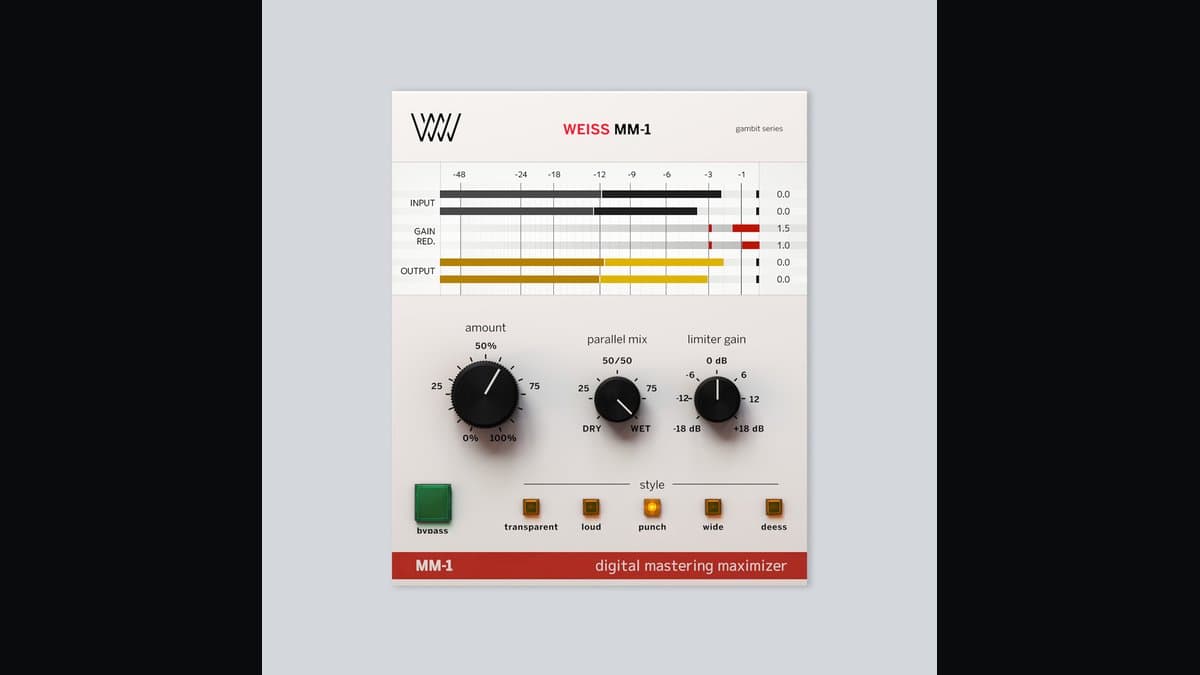
Softube Weiss MM-1 Mastering Maximizer is the streamlined loudness tool in the Softube/Weiss ecosystem. Under the hood it uses 1:1 code-ported DS1-MK3 algorithms—the same digital dynamics DNA that made Weiss a mastering staple—wrapped in a UI built around Style, Amount, and Mix. The pitch is not “one more generic limiter.” It is “Weiss maximizer behavior without requiring a full DS1 education on day one.”
That is why MM-1 shows up in two very different conversations: as a final mastering maximizer, and as a mix-bus polish that somehow makes a print feel finished. Used carefully, it earns that reputation. Used as a loudness cheat code with no monitoring discipline, it will flatten a mix just like any other maximizer.
What MM-1 is doing under the hood
Think of MM-1 as a two-stage mastering path:
- A style-defined compressor / dynamics path that prepares the program (density, punch, width, or de-ess-oriented control)
- A brick-wall limiter / maximizer that sets the ceiling and pursues competitive loudness
The Style selector is not a cosmetic skin. Softube documents each style as a different mastering scenario with internal ratio/attack/release/knee (and stereo strategy) choices already biased for that goal. Turning Amount does not merely raise a single threshold—it scales the intelligent parameter set for that style. That is the “black magic” people hear when a few dB of movement suddenly sounds like a finished master.
Parallel Mix is the safety and musicality control. Push processing deeper, then blend dry energy back so transients and microdynamics survive. If a master only sounds good at 100% wet, you are usually over-processing.
The five styles (how to choose)
| Style | Intent | When it helps | Watch-outs |
|---|---|---|---|
| Transparent | Least invasive; keep transients and dynamics while still lifting RMS | Acoustic, dynamic pop, anything that must not sound “squashed” | May feel underwhelmed if you chase streaming loudness wars |
| Loud | Higher RMS / headroom strategy for competitive level | Dense modern masters that need level without obvious pump | Easy to overcook crest factor; check true peaks and streaming normalization |
| Punch | Weight + transient emphasis for energetic feel | Rock, hip-hop, electronic with drums that should hit | Can exaggerate already-hot transients into harshness |
| Wide | More 3D image; widen drums/backings/whole mix | Masters that feel mono-small or center-heavy | Width tricks can fail mono checks—always verify mono |
| Deess | Smooth harsh highs while maximizing | Vocal-forward masters, bright electronic tops | Overuse dulls air and cymbals |
Wide and Deess are often described as more mid/side-aware in practice, while Transparent/Loud/Punch behave more like conventional stereo maximizer paths. That is a practical mental model for A/Bing styles quickly.
How to use Weiss MM-1
Mastering maximizer (primary use)
- Finish tonal balance and any broad dynamics first.
- Insert MM-1 late in the chain.
- Set output ceiling with delivery in mind (many engineers leave a little true-peak safety before lossy encode—confirm your delivery specs).
- Pick a Style that matches the problem, not the marketing word:
- Too small/narrow → try Wide carefully
- Flat/soft drums → Punch
- Needs level but not vibe change → Transparent or Loud
- Harsh esses/cymbals → Deess
- Raise Amount until the chorus feels competitive, then stop.
- Back off with Mix if the punch dies.
- Loudness-match bypass vs engage. If bypass wins at equal loudness, you overdid it.
Mix-bus finishing
Light Amount on Transparent or Punch can add “print polish” before a client bounce. Keep GR conservative. MM-1 is not a substitute for fixing the kick/vocal relationship in the mix.
De-ess while maximizing
Deess style is useful when a master is almost done but top-end spikes prevent clean limiting. Still, if sibilance is a vocal problem, fix the vocal first; master de-ess is a safety net, not a mix fix.
Parallel maximizer technique
- Choose Punch or Loud.
- Push Amount further than you would 100% wet.
- Set Mix so only part of the maximized signal returns.
- Result: density and level without full-time brick-wall feel.
Settings cheat sheet
| Goal | Style | Amount | Mix | Notes |
|---|---|---|---|---|
| Invisible polish | Transparent | Low–medium | 70–100% | First choice for dynamic material |
| Competitive streaming loudness | Loud | Medium | 80–100% | Check LUFS and true peak |
| Drum-forward impact | Punch | Medium | 60–90% | Watch cymbal harshness |
| Small-sounding master | Wide | Low–medium | 50–80% | Mono-check religiously |
| Harsh bright master | Deess | Low–medium | 70–100% | Don’t kill air |
These are starting points. Genre, arrangement density, and prior compression change everything.
MM-1 vs alternatives
Weiss DS1-MK3 — Full instrument: band-selective compression, deep release design, hardware-faithful control. Buy DS1 when you need surgery; use MM-1 when you need speed. DS1 packages often include MM-1.
FabFilter Pro-L 2 — Best-in-class metering, algorithm switching, true-peak confidence. Choose Pro-L when you want visual precision and flexible limiting characters. Choose MM-1 when Style-driven Weiss density is the sound you already trust.
iZotope Ozone Maximizer / Ozone 12 — Suite convenience and Assistants. Ozone wins if you want EQ+dynamics+imaging in one mothership. MM-1 wins as a dedicated maximizer with Weiss lineage.
sonible smart:limit — AI-assisted limiting with loudness targets and quality checks. Different philosophy: guidance vs Weiss style maximizer. Some engineers use smart:limit for compliant loudness, MM-1 for musical density.
Who should buy it
Buy MM-1 if you want Weiss maximizer quality with a short ramp-up, you finish a lot of mixes yourself, or you want a dedicated final stage that does not require DS1 mastery. It is especially strong if you already like Softube/iLok workflow and may later expand into DS1-MK3 / Complete Collection.
Skip if you already love Pro-L 2 and never want another maximizer, or if your budget only allows one dynamics plugin and you need a full compressor more than a maximizer (consider Pro-C 2 or The Glue first for mix work).
Honest limitations
MM-1 will not repair a bad balance. Styles can become crutches. Wide can fail translation. Loud can win level wars and lose emotion. And because the control count is low, people assume it is “set and forget”—it is not. You still need calibrated monitoring, references, and gain-matched decisions.
Verdict
Softube Weiss MM-1 is one of the highest-value entries into true Weiss mastering dynamics: DS1 algorithms, five practical styles, Amount intelligence, and Mix for musical parallel control, at a list price far below the full DS1 flagship. Score 8.9.
Confirm current price, trial, and system requirements on the official Softube MM-1 page. Trial it on a finished mix bus first—if it only “wins” by being louder, turn Amount down and try again.