Some links on this page are affiliate links. If you buy through them, Dubspot may earn a commission at no extra cost to you. It never affects our scores or what we recommend — read our policy.
Softube Flow Studio: Compact Hardware Controller for Faster Mixing
Softube's new Flow Studio is a $399 desktop control surface with 25 included plugins and 100+ macro signal chains designed to speed up mix decisions.
E
Elena Marsh
April 27, 2026 · 7 min read
Black Friday 2026Softube Black Friday 2026: dates and deals →
Softube has released Flow Studio, a compact desktop control surface aimed at producers who want to mix faster and spend less time clicking through plugin windows. The unit launched on April 15, 2026, at $399 / £349, and ships with a 25-plugin software bundle plus a library of over 100 ready-to-use signal chains.
Flow Studio is not a traditional channel-strip controller. It is built around a different idea: instead of mapping one knob to one parameter, you twist a knob and it nudges a whole chain of processing at once. The hardware, the plugins, and the signal chains are all sold together as one system.
What's in the box
The unit itself is small. It measures 144mm wide and 217mm deep, weighs 660 grams, and connects to your computer via a single USB-C cable. The housing is anodized aluminum, and there are VESA mounting threads on the back for stand or rack setups.
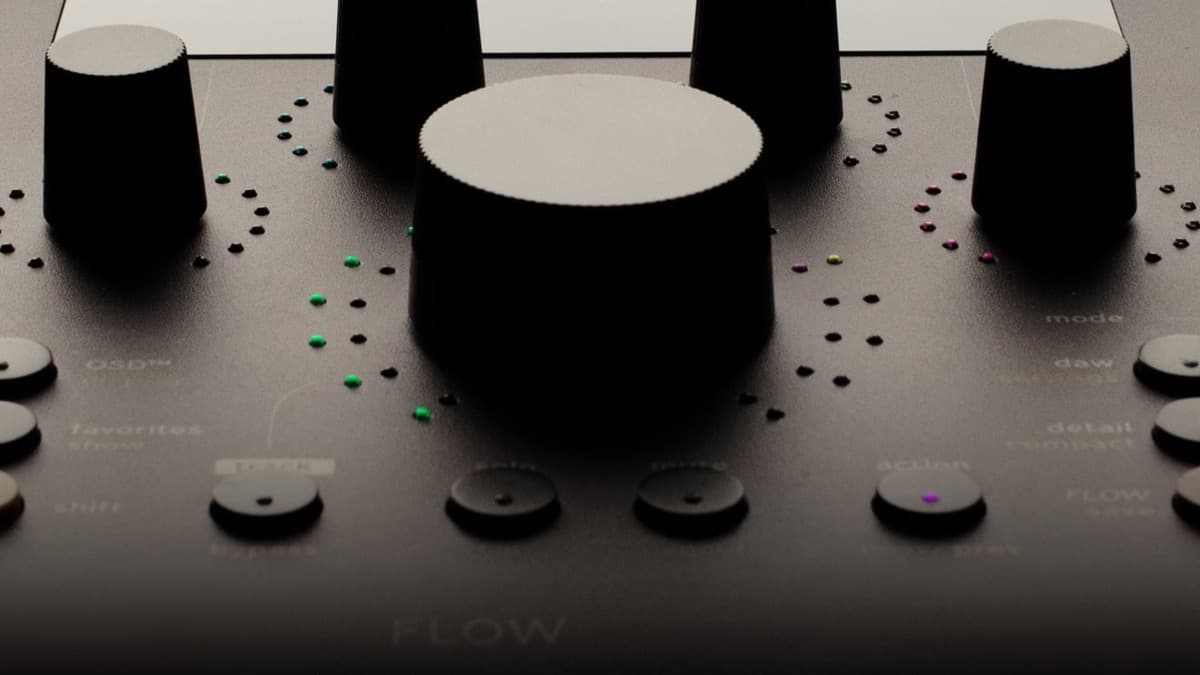
On the front you get five touch-sensitive Analog Feel potentiometers with RGB LED rings, a separate Omni Knob for navigation and scrolling, nine RGB function buttons, a Shift button, and a 4.3-inch high-resolution IPS display that shows visualizations and parameter values as you work. A 2-meter braided USB-C cable and four M4 mounting screws are included.
The five knobs are a key part of the pitch. Softube calls them "analog feel" because they are real potentiometers, not endless encoders, so each turn has weight and resolution rather than the spin-forever vagueness of cheaper controllers.
Three modes of operation
Flow Studio runs in one of three modes, switched by dedicated buttons on the right side of the unit.
DAW Mode handles the boring but essential stuff. Volume, pan, solo, mute, six sends per track, and track select. There is no MIDI mapping setup. Native DAW integration covers Pro Tools, Logic Pro, Ableton Live, Cubase, Studio One, Nuendo, Bitwig Studio, Reaper, FL Studio, LUNA, Digital Performer, Cakewalk, and Samplitude.
Flow Mode is the interesting one. You load one of the 100+ included signal chains onto a track and the five knobs become macro controls that steer multiple plugins at once. Twist the "weight" macro on a drum chain and it might tilt the EQ, push a compressor harder, and add saturation in the same gesture. The point is to make a sound move in a musical direction without having to think about which plugin is doing what.
Detail Mode opens up the chain. Use it when you want to dive into a single Softube plugin and tweak individual parameters by hand, with the five knobs mapped to the controls of that specific processor.
Softube's official walkthrough video demonstrates how the three modes work together in a real session:
The 25 included plugins
Flow Studio ships with perpetual licenses for 25 Softube effects. There is no subscription required to use them, which is worth saying out loud because the rental model has crept into more and more software bundles in the past few years.
The included list covers the major mixing categories:
- Compression: FET Compressor Mk II, OPTO Compressor
- EQ: British Class A Equalizer, Equalizers
- Saturation and distortion: British Class A Drive, Tube, Kraft, Dirty Tape, Bad Speaker
- Reverb and delay: Core Dimensions (five algorithms, newly developed for this release), Stereo Delay
- Modulation and stereo: Layers, Widener, Model 84 Chorus, Lion Head, Tinnerö, Model 72 Envelope Filter
- Guitar and bass amps: 30W Top Boost, American Mainstayer 100W, Bass Standard Line V8, Pacific Dual Tremolo (Black and Silver versions)
- Utilities: Clipper, Deesser, Vocal Tuner
The Vocal Tuner is built for low-latency tracking, so you can monitor through pitch correction in real time while recording.
How the 100+ signal chains work
The Flows that ship with the system are organized around common production tasks rather than effect categories. There are chains for vocal enhancement, drum bus glue, guitar amp tone shaping with mic placement, bus-level processing, and creative sound design. Softube also lets you build your own Flows from any of the supported plugins, save them as templates, and share them with other users.
If you outgrow the included library, the platform supports more than 80 Softube plugins and over 300 additional Flows through the optional Flow Suites subscription, starting at €15 per month. You can buy individual plugins outright as well.
Each Flow can expose up to eight macro controls, which means you can build chains that go beyond what the five physical knobs show at once and page between them with Shift.
For a closer look at how the Flow Mixing Suite plugin handles the signal chains under the hood, Softube's official Flow Mixing Suite walkthrough breaks down the system in detail:
System requirements and DAW integration
Flow Studio runs on macOS Sonoma 14, Sequoia 15, or Tahoe 26, and on Windows 10 (64-bit) or Windows 11. The plugins are available in AU, VST3, and AAX formats. Softube recommends VST3 in any DAW that supports it, except for Logic Pro (use AU) and Pro Tools (use AAX). VST2 is not supported when running with the hardware.
You will also need a Softube account and an iLok account for license management, plus an internet connection during installation.
Where it fits in the workflow
The honest take on Flow Studio is that it is built for a specific moment in a session: the early shaping pass, where you are establishing the rough balance, picking a tonal direction, and building energy across a track. It is fast at that job. You can move from a flat dry mix to something with shape and movement in minutes without opening a single plugin window.
The trade-off is visibility. When you are turning one knob that controls four parameters across three plugins, you are working on the result rather than the cause. That is great for momentum and bad for diagnosis. If something sounds off, you may need to drop into Detail Mode or open the plugin GUI to figure out which stage is misbehaving.
It is also worth flagging that the included plugins, while solid, are not the most exotic in the Softube catalog. The system is biased toward bread-and-butter mix tools that do their job well, not toward the heritage emulations that Softube is sometimes known for. Those live in the optional subscription tier.
Hardware compatibility with the Console 1 system
If you already own a Console 1 Channel Mk III or Fader Mk III, Flow Studio sits next to them on the desk and complements rather than replaces them. Console 1 is the precision tool, with full channel-strip metering and parameter-level control. Flow Studio is the speed tool, with macro-driven decisions and signal-chain thinking. The two are designed to work together in the same session.
For producers who want similar plugin discovery and bundles at lower cost, Plugin Boutique regularly stocks Softube plugins and offers competitive pricing on individual processors that integrate with the Flow Mixing Suite. Sample-based producers can also pair the workflow with content from Loopcloud or Loopmasters for fast track-building from loops through Flow chains.
Final thoughts
Flow Studio is a clear-eyed product. Softube has not tried to build a do-everything control surface. They have built a fast, focused unit for one part of the mixing process, paired it with a curated plugin set, and priced it to compete with mid-tier MIDI controllers that ship with nothing.
If your sessions stall when you are clicking through twenty plugin windows trying to balance a rough mix, this is the kind of tool that gets you to the music sooner. If you mix slowly and surgically and want hands-on control of every parameter, Console 1 is still the better fit, and Flow Studio probably is not for you.
Flow Studio is available now from Softube and authorized dealers worldwide.