Some links on this page are affiliate links. If you buy through them, Dubspot may earn a commission at no extra cost to you. It never affects our scores or what we recommend — read our policy.
Kiive Audio VX-Q Review: British EQ Meets Creative Saturation
Kiive Audio's VX-Q combines rare British EQ character with five saturation modes for creative tone-shaping. Here's our hands-on review.
M
Marcus Feld
Updated July 10, 2026 · 7 min read
See full specs, price, and alternatives in the plugin database →
Kiive Audio has built a reputation for modeling hardware that others overlook. While the plugin market is saturated with Neve clones and SSL emulations, Kiive consistently digs deeper into audio history. Their latest release, the VX-Q, continues this trend by capturing the character of a "rare British EQ" that most producers have never heard of.
The result is something more interesting than another console channel strip. The VX-Q sits somewhere between a musical equalizer and a full-blown saturation processor, with enough flexibility to handle everything from transparent correction to outright distortion.
What Makes the VX-Q Different
Most EQ plugins fall into two camps: surgical tools for problem-solving, or colored processors for vibe. The VX-Q attempts to cover both territories through a combination of four sweepable EQ bands and five distinct saturation modes.
The hardware inspiration appears to trace back to Vortexion, a British manufacturer from the 1960s and 70s. These weren't pristine hi-fi units. Vortexion gear was robust, characterful, and famously used by Joe Meek on recordings like "Telstar." That historical context explains the VX-Q's personality: it's designed to add texture and density, not just adjust frequency balance.
The EQ Section
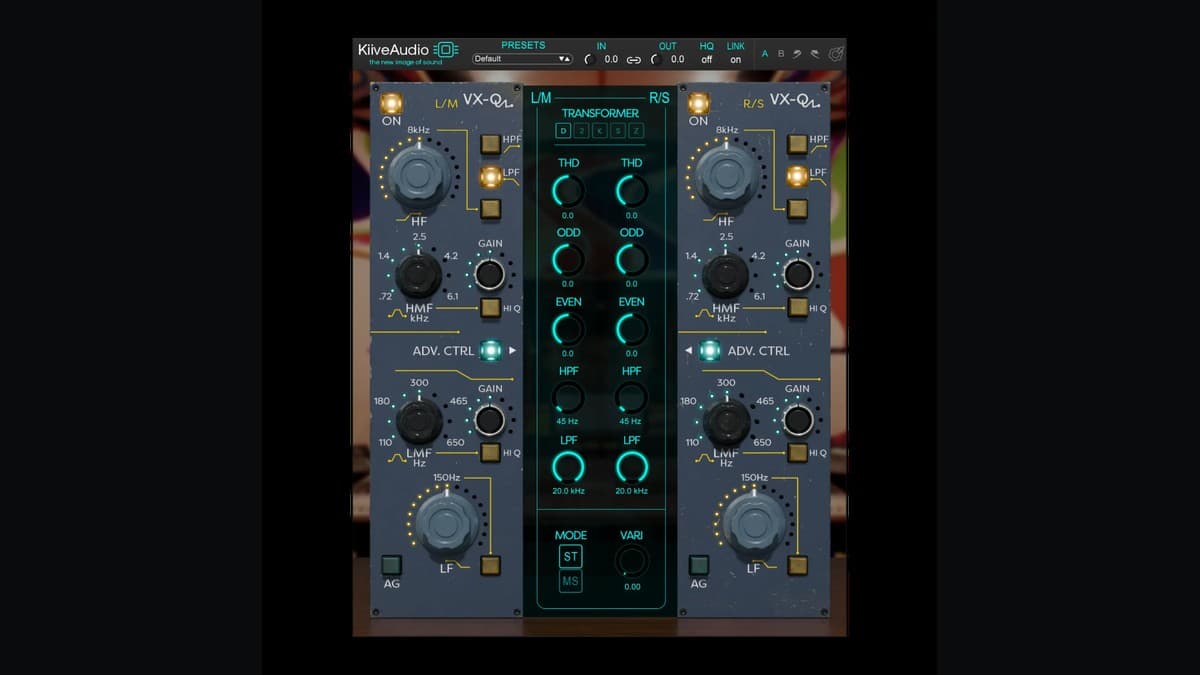
The four-band equalizer covers the expected territory:
- Low band: Switchable between 60Hz and 150Hz, with shelf or bell options
- Low-mid and high-mid bands: Fully sweepable for surgical work
- High band: Switchable between 8kHz and 10kHz
What sets it apart is the Q-factor switch. In the default position, the bands have a broad, musical character that affects surrounding frequencies naturally. Engage the high-Q mode, and the curves tighten up for more focused adjustments. This duality means you can use the VX-Q for both broad tonal shaping and targeted corrections.
The high-frequency shelf deserves special mention. Users have noted that it can be pushed aggressively without introducing harshness. A 10dB boost at 10kHz that would sound brittle on many digital EQs translates to smooth presence here.
The Saturation Engine
The real depth of the VX-Q lives in the Advanced panel, which houses five transformer/saturation modes:
| Mode | Character | Best Use |
|---|---|---|
| D (Default) | Balanced odd/even harmonics | General-purpose glue and subtle weight |
| 2 (Vivid) | Enhanced 2nd-order harmonics | Guitars, synths, adding presence |
| K (Kai) | Rich low-mids, smooth highs | Thickening vocals, warming thin sources |
| S (Send) | Clean, transient-focused | Mix bus work, preserving snap |
| Z (Zener) | Hard odd-order distortion | Aggressive drums, creative destruction |
The "K" mode is particularly interesting. It appears to emulate a high-nickel transformer, producing a creamy saturation that works exceptionally well on vocals and bass. This is the "vintage British" character that gives the plugin its identity.
At the opposite extreme, "Z" mode delivers something closer to fuzz pedal territory. It's deliberately aggressive and generates the kind of odd-order harmonics you'd expect from clipped waveforms. Not subtle, but exactly what you want for crushing a drum bus or adding edge to aggressive vocals. If you're weighing dedicated saturation boxes against a hybrid like this, our Decapitator vs Saturn 2 comparison breaks down where each approach shines.
Harmonic Control
Beyond the transformer modes, the Advanced panel offers direct control over harmonic content. Separate Even and Odd knobs let you bias the saturation toward warmth (even harmonics) or edge (odd harmonics). This effectively lets you revoice any of the transformer modes to taste.
A THD (Total Harmonic Distortion) control sets the overall saturation intensity, while a Focus section lets you concentrate the distortion on specific frequency ranges. Want saturation only in the mids? You can do that.
Stereo Image Tools
The VX-Q includes three channel processing modes:
- Stereo: Linked processing across both channels
- Dual Mono: Independent left/right processing
- Mid-Side: Separate control over center and side information
The Mid-Side mode opens up some powerful mixing techniques. Processing the mid channel differently from the sides lets you, for example, clean up low-frequency mud in the center while adding air to the stereo field.
The Variance Feature
Perhaps the most clever inclusion is the Variance knob. This introduces subtle randomized differences between the left and right channels, mimicking the component tolerances of analog hardware. Real analog EQs don't process both channels identically. Capacitors have tolerances, transformers have subtle variations.
The psychoacoustic effect is a gentle widening and depth enhancement. It's the kind of subtle improvement that makes a mix feel less "in the box" without resorting to heavy-handed stereo wideners.
CPU Efficiency
For a plugin with this much saturation modeling, the VX-Q is remarkably efficient. The oversampling options go up to 16x, but even at 2x (enough to eliminate audible aliasing in most cases), CPU usage remains low. Reports suggest around 1% per instance, which is significantly lighter than convolution-based alternatives.
The plugin offers zero-latency operation when oversampling is disabled, making it suitable for tracking situations where monitoring delay is a concern.
Practical Applications
Drum Bus Processing
Set to Mode Z with a modest boost at 60Hz. The EQ drives the saturation harder in the low frequencies, adding weight and "explosion" to kicks while the Zener-style clipping adds grit to the overall kit. Dial in 5% Variance to widen room mics.
Vocal Chain
Mode K is the natural choice here. The smooth high-nickel saturation thickens thin vocals without harshness. Boost at 10kHz for presence, cut around 300Hz to reduce boxiness, and increase Even harmonics for additional warmth. For encode-stage air instead of a shelf, Bogren A-Class Vocal is the Type-A option.
Mix Bus Glue
Switch to M/S mode with Mode S for transparency. Process the Mid channel conservatively to preserve transients, then add a subtle high shelf to the Side channel for width. The S mode's transient-focused character keeps the mix punchy while adding cohesion.
Strengths and Considerations
What works well:
- Five distinct saturation characters in one plugin
- Musical EQ curves that can be pushed without harshness
- Efficient CPU usage even with oversampling
- Variance feature adds subtle analog depth
- M/S processing expands creative options
- No iLok required (simple serial number activation)
Worth noting:
- The "Advanced" panel is hidden by default; new users may miss the saturation features
- The "rare British EQ" marketing leaves the hardware inspiration somewhat ambiguous
- Some users may prefer knowing exactly what circuit is being modeled
Pricing and Availability
The VX-Q is available directly from Kiive Audio at an introductory price of $39 (regular price $69). Loyalty discounts are available for existing Kiive customers.
Check Kiive VX-Q price at Kiive AudioA 14-day trial is available, which is worth taking advantage of. The saturation modes respond differently to various source material, so testing on your own sessions will give you the best sense of where the VX-Q fits in your workflow.
Final Thoughts
The VX-Q succeeds by not trying to be everything. It's not a surgical EQ, though it can handle precision work when needed. It's not purely a saturation plugin, though it can deliver serious harmonic destruction. The sweet spot is using both sections together: shaping frequencies and then pushing those shaped frequencies through the saturation engine.
For producers looking to add character to their mixes without stacking multiple processors, the VX-Q offers genuine value. The five saturation modes alone justify the price, and the musical EQ curves make it easy to dial in results quickly. It also earns a spot among our best effect plugins for character-driven mixing.
At the current introductory price, it's an easy recommendation for anyone interested in British-flavored tone shaping with modern flexibility.